

Many sellers hit a wall trying to list their products. Pages show blocked listings or say “brand restricted.” You search forums and contact support, and still don’t know how to get brand approval on Amazon the right way.
The good news is that Amazon allows brand approval for gated products through a clear application process inside Seller Central. You just need the right documents, valid invoices, and to follow a few simple steps correctly.
In this blog, you’ll learn the exact steps to get brand approval, who will get brand approval, and what mistakes to avoid. We’ll cover common reasons for rejection, how to fix them, and how to speed up your approval.
What is Brand Approval on Amazon?

Brand Approval on Amazon is permission sellers need to list products under a specific brand, helping verify authenticity, protect trademarks, and prevent unauthorized or counterfeit listings.
Brand approval is Amazon’s way of limiting who can sell certain high-profile brands on its platform. It’s part of a system called brand gating, which helps protect customers from fake products and unreliable sellers.
If you try to list a restricted brand like Nike or Apple, Amazon may block you from selling. To unlock the listing, you need to apply for approval through your Seller Central account. This shows Amazon that you’re a trusted seller with real, authorized products.
Brand approval is not the same as Brand Registry. The registry is for brand owners who want to protect their trademarks. Brand approval is for sellers who want permission to resell someone else’s brand.
This system helps Amazon avoid counterfeits, protect buyer trust, and reduce problems tied to brand misuse. Every gated brand has its own rules. Some only need invoices. Others require letters directly from the brand owner.
We worked on an Amazon Brand Approval project with the BrandsBro team, where the client was struggling with weak storefront structure, poor product presentation, and low customer engagement.
Our team improved the storefront layout, upgraded the visual presentation, and made the brand look more professional and trustworthy. After these changes, the client achieved a stronger brand presence and a better-performing Amazon storefront. If you are facing similar issues with Amazon Brand Approval, you can book a free meeting with us to discuss your problem.
Why Amazon Requires Brand Approval?

Some sellers used to list branded items without permission. That caused fake products and unhappy customers on Amazon. To stop this, Amazon created a system called brand gating. It keeps certain brands locked until sellers complete an approval process.
Only verified sellers can access those listings. This protects brands and helps Amazon avoid counterfeits in the marketplace. Buyers trust Amazon because they expect real products. Brand gating helps Amazon protect that trust every single day.
When fake items slip through, it hurts real brands and causes major losses in sales and reputation.
Amazon’s brand protection rules also make sellers follow strict compliance policies. It keeps the platform safe and fair. Each gated brand sets its own rules. Some ask for purchase invoices. Others need approval letters from the brand.
If you try to list without meeting those rules, Amazon won’t let the product go live. This approval system supports Amazon’s anti-counterfeit policy and keeps quality high across the platform.
Who Needs Brand Approval?

Brand approval is needed by sellers, agencies, or businesses that want to legally sell branded products, protect listings, avoid account issues, and build buyer trust.
Not every Amazon seller needs brand approval. It depends on your business model, how you source products, and the brands you plan to sell. Amazon places restrictions on many branded items to prevent fakes.
That’s why some sellers face blocks, while others can list without extra steps.
- Resellers: Need brand approval if selling branded products. Amazon checks whether goods come from verified, authorized distributors.
- Wholesalers: Also require approval for gated brands. Buying in large quantities doesn’t bypass Amazon’s brand protection system.
- Retail Arbitrage Sellers: Often get blocked from listing branded items bought from retail stores like Walmart or Target locations.
- Private Label Sellers: Usually don’t need approval. They sell products under their own brand name, not someone else’s brand.
Before listing, always check if the brand or category is restricted. Amazon’s approval policies change more often than expected.
Amazon Brand Approval Requirements for Resellers vs Brand Owners
| Requirement | Resellers | Brand Owners |
|---|---|---|
| Main Goal | Get permission to sell another company’s branded product | Get approval to sell and manage your own brand on Amazon |
| Best For | Wholesale sellers, distributors, retail arbitrage sellers, third-party resellers | Private-label sellers, manufacturers, trademark owners |
| Brand Ownership | Not required | Required or strongly expected |
| Trademark Needed? | Usually not required for basic brand approval | Required for Brand Registry; Amazon says the brand must have an active registered trademark or pending trademark application from an accepted trademark office. (Sell on Amazon) |
| Key Documents Needed | Supplier invoice, brand authorization letter, distributor proof, product authenticity documents | Trademark details, brand name, logo/product images, packaging images, business details |
| Authorization Letter | Often useful, especially when selling restricted or gated brands | Needed only if someone other than the brand owner is managing the brand account |
| Invoice Requirement | Very important; Amazon may request invoices to prove product authenticity and supply chain legitimacy | Less important for Brand Registry, but may still be needed for product/listing verification |
| Product Images | May need clear product and packaging images to prove authenticity | Usually needed to prove the brand name appears on the product or packaging |
| Approval Difficulty | Medium to high, depending on the brand’s restriction level | Medium, but can become difficult if trademark, brand name, or packaging proof does not match |
| Main Risk | Rejection due to weak invoice, retail receipt, mismatched supplier info, or no authorization | Rejection due to trademark mismatch, missing brand proof, or brand name not shown clearly |
| Main Benefit | Allows you to list and sell restricted branded products | Gives access to brand protection tools, A+ Content, Brand Stores, and stronger listing control |
| Who Controls the Brand? | The original brand owner controls the brand | The brand owner controls the brand through Brand Registry |
What You Need Before You Apply?
Before you apply for brand approval, Amazon expects everything to be in perfect order. You must have a Professional Seller Account, not an Individual one.
Amazon checks every detail closely, and even a small mismatch can delay or deny your application.
Here’s exactly what you need to prepare before submitting your application:
- Professional Seller Account
- Invoice from an Authorized Distributor
- Letter of Authorization (if required)
- Product Photos Showing Branding
- Exact Match with Account Info
- Supplier Contact Details
You must have a Professional Seller Account to apply. Amazon doesn’t allow brand approval for individual sellers. Your invoice needs to be recent and include the product name, brand, quantity, and full supplier contact information.
If the brand requires it, you’ll also need a letter showing you have permission to sell their products. Take real photos of the product packaging that clearly shows the brand name printed on it.
Make sure your name and address on every document match your Amazon account exactly. Also, include the supplier’s phone number and business address. Amazon might contact them to confirm the invoice is real.
Check every detail before submitting your application. A small error can cause delays or even a rejection.
How to Get Brand Approval on Amazon (Step by Step)

Brand approval isn’t automatic. You have to request it through your Amazon Seller Central account. This process allows Amazon to check if you meet their selling requirements for restricted brands.
Everything happens inside your seller dashboard, and it only takes a few minutes to complete. You’ll need to choose a brand, request approval, and upload your documents. If everything matches, you might even get approved instantly.
Follow these steps to complete the brand approval process the right way.
Step 1: Register Your Trademark
Brand approval starts with a registered trademark. You can file with the USPTO or your country’s IP office. If you want to speed up the process, Amazon offers IP Accelerator to connect with trusted trademark attorneys. Most trademarks take months to process, but IP Accelerator can provide faster Brand Registry access.
Step 2: Create an Amazon Seller Account
Go to Amazon Seller Central and create a Professional Seller Account. Individual plans do not qualify for Brand Registry. Use the same name, email, and business address that matches your trademark registration. Amazon verifies this information during the approval process, so keep everything consistent.
Step 3: Enroll in Amazon Brand Registry
Once your trademark is active or pre-approved through IP Accelerator, visit brandservices.amazon.com. Fill out the Brand Registry application. You’ll need to submit your trademark number, brand name, and images of your logo and product packaging. Amazon uses this to confirm ownership and brand identity.
Step 4: Submit Product Listings for Approval
Now you can create listings for your branded products. Make sure your title, images, and description meet Amazon’s listing guidelines. Product photos must clearly show your brand name and logo. Avoid restricted categories unless you have separate approval for them.
Step 5: Wait for Amazon’s Approval
Amazon brands usually reviews submissions within 2 to 5 business days. Monitor your Seller Central notifications and email inbox. If your application is rejected, Amazon will explain what to fix so you can resubmit your documents correctly.
Step 6: Start Selling Your Branded Products
Once approved, you’ll gain access to A+ Content, Sponsored Brands, and brand analytics. These tools help you tell your brand story, run display ads, and track performance. Use them to stand out and grow faster in the Amazon marketplace.
How Long Does Brand Approval Take?
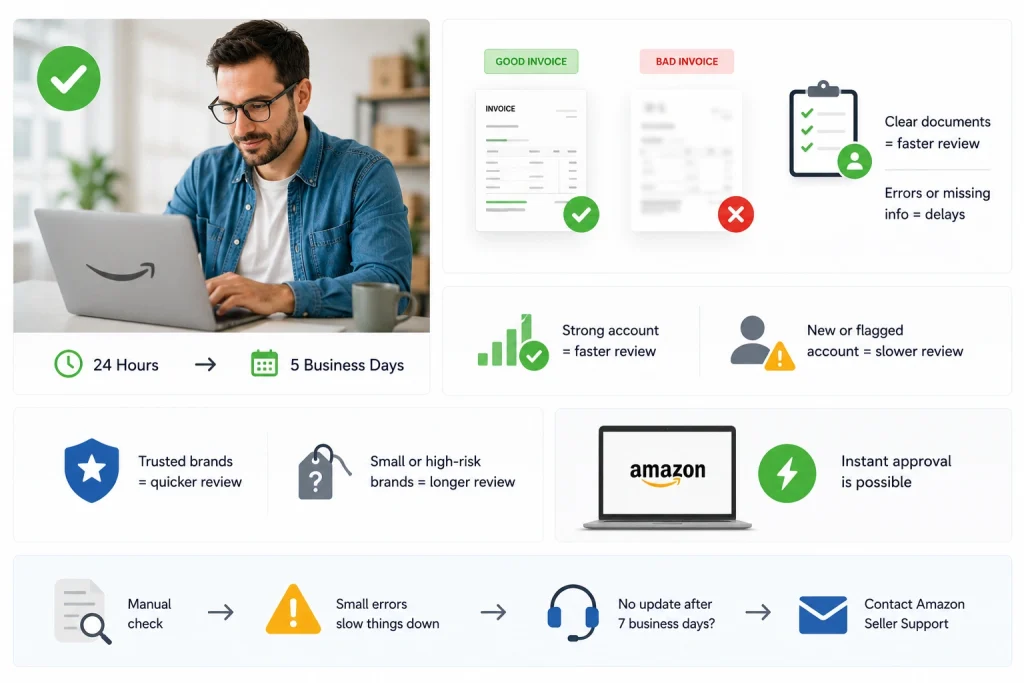
Brand approval usually takes a few days to several weeks, depending on platform rules, document accuracy, trademark status, and how quickly your application is reviewed.
Brand approval on Amazon usually takes between 24 hours and five business days, depending on your account and documents.
The review time depends on how accurate and clear your documents are when you submit your request. If your invoice is blurry, missing details, or doesn’t match your account info, Amazon may delay the process.
Your account health also affects timing. Sellers with strong performance records often get reviewed faster than new or flagged accounts. Products linked to large, trusted brands tend to get reviewed quicker than smaller or high-risk brands.
Sometimes, you may even get instant approval if everything is correct and your seller account looks reliable. Every application goes through manual checks. Small errors can slow things down without any updates from Amazon.
If you don’t receive any update after seven business days, it’s best to contact Amazon Seller Support directly.
What If You’re Denied Brand Approval?
A rejection might feel discouraging, but most brand approval issues are easy to correct and resubmit. Most denials happen because of small mistakes that can be corrected and resubmitted.
Here are the most common reasons for rejection:
- The invoice is in the wrong format or missing key information.
- Product photos are blurry or don’t clearly show the branded packaging.
- The business name or address doesn’t match what’s in your Amazon Seller Central account.
- The supplier you used is not recognized or verified by Amazon.
What to Do If You’re Rejected
If you get denied, don’t panic. Go back and review every part of your submission. Make sure your invoice is clear, correct, and shows accurate contact details. Retake your product photos if needed, and be sure the branding is clearly visible.
Fix anything that’s mismatched or unclear, then resubmit the application with your updated documents.
If the problem continues, you can open a support case through Amazon Seller Support and request a manual review.
Proven Methods to Get Brand Approval Fast
Amazon moves quicker when your paperwork is clean, clear, and matches your seller account exactly. Most delays come from missing details or mismatched information.
Follow these steps to reduce the chances of rejection and speed up the approval process.
- Buy from Amazon-verified distributors to avoid getting flagged for using unknown or unapproved suppliers.
- Never edit your invoice or its layout since Amazon can reject altered documents without any warning.
- Use real product photos that clearly show the brand name printed on the item’s actual packaging.
- Match your business name and address exactly between your invoice and your Seller Central account.
- Upload files as PDFs or JPGs only, and avoid blurry images or unsupported document formats.
These steps help avoid the most common issues that cause delays in the approval process. Amazon checks thousands of submissions, so incomplete or unclear documents often get overlooked. If everything is accurate and easy to verify, your application is more likely to move forward without problems.
Brand Approval vs Brand Registry: What’s the Difference?
Brand Approval and Brand Registry are not the same thing on Amazon. Amazon Brand Approval means Amazon gives a seller permission to list products under a specific brand name. This is usually required when a brand, category, or product type is restricted. Sellers may need to provide invoices, product photos, or a letter of authorization to prove they are allowed to sell that brand. Brand approval is mainly about getting permission to list and sell branded products.
Amazon Brand Registry, on the other hand, is a program for brand owners who want to protect and manage their own brand on Amazon. To enroll in Brand Registry, a seller usually needs an active registered trademark or a pending trademark accepted through Amazon’s IP Accelerator program. Brand Registry gives access to tools like A+ Content, Brand Stores, Sponsored Brands ads, brand analytics, and stronger control over product detail pages. It is more about brand ownership and protection than simple selling permission.
The easiest way to understand the difference is this: Brand Approval helps you sell a brand, while Brand Registry helps you own, protect, and grow a brand on Amazon. A reseller may need brand approval to sell Nike, Samsung, or another restricted brand, but they cannot enroll those brands in Brand Registry because they do not own them. A private label seller may need Brand Registry to protect their own brand and improve visibility. Confusing these two can lead sellers to prepare the wrong documents and delay their Amazon approval process.
Documents Needed for Amazon Brand Approval
The documents needed for Amazon Brand Approval usually depend on the brand, product category, and seller account history. In most cases, Amazon asks sellers to submit a valid wholesale invoice, product photos, or a letter of authorization from the brand owner or authorized distributor. These documents help Amazon verify that the seller has legitimate inventory and permission to sell the branded product. A retail receipt, screenshot, edited invoice, or informal purchase proof is usually not enough for approval.
A proper invoice should clearly show the supplier’s business name, address, phone number or email, invoice date, product name, quantity, and buyer information. The buyer details should match the business information in the Amazon Seller Central account. Amazon may also check whether the supplier is a real wholesaler, manufacturer, or authorized distributor. If the invoice looks incomplete, edited, outdated, or unverifiable, the application may be rejected. Sellers should avoid cropping, highlighting, or changing invoices before uploading them.
Product photos are also important for brand approval. Amazon may ask for real photos of the product, packaging, barcode, and visible brand name or logo. The brand name should appear permanently on the product or packaging, not added with a sticker, mockup, or digital edit. For stricter brands, Amazon may request a letter of authorization that confirms the seller is allowed to sell the brand on Amazon. Before submitting, sellers should check that every document is clear, accurate, and consistent with their Seller Central business details.
Frequently Asked Questions(FAQs)
If you’re unsure about the process, these FAQs will help clear things up.
Yes, some brands do not require a letter of authorization. In those cases, a valid invoice from an authorized supplier showing your business name, address, and product details is enough. However, high-risk brands often still ask for this extra document to verify resale rights.
Submitting fake or altered documents can lead to immediate rejection and even account suspension. Amazon checks documents manually and may contact your supplier. Always submit original, unedited files that match your account information to avoid permanent damage to your seller status.
Yes, brand approval is required for each gated brand you plan to sell. Being approved for one brand does not give you access to others. You must complete the process and submit the correct documents every time you want to list a new restricted brand.
Yes, new sellers can apply, but approval may take longer if your account has no sales history. Amazon trusts sellers with stronger performance records. To increase your chances, submit clean documents and use verified suppliers right from the start.
Search for products on Amazon Seller Central. If you see “Listing limitations apply,” that brand is gated. You can’t list the product until you request and receive approval. Always check brand status before ordering inventory to avoid being stuck with unsellable stock.
Brand approval is free, but you need a registered trademark, which costs $250–$350 through the USPTO. Amazon’s IP Accelerator is faster, but it usually comes with higher legal fees. You’ll also need a Professional Seller Account, which costs $39.99 per month.
From Approval to Growth with Brand's Bro
Approval is important, but it’s what comes next that drives real results. Once you’re approved, the next challenge is building a store that performs. That means managing your listings, launching ads, tracking results, and keeping your account in good standing.
If you’ve just learned how to get brand approval on Amazon, your next step is making that approval count. This is where many sellers start to feel stuck. It is also where our team steps in.
Brand’s Bro helps you handle everything beyond brand approval. We manage Amazon ads, design A+ content, support account health, and build full PPC strategies. Our team also offers Google Ads audits and creative work that helps your products stand out.
You don’t have to figure it all out alone. If you’re ready to grow with expert support, we are here to help you move forward with clarity, strategy, and the right tools in place.
