

You build a strong Amazon listing with real reviews and on-time orders. Then complaints start rolling in. Customers say the items feel fake. But you shipped the real thing. Confused and losing sales, many sellers start looking for answers. One question arises fast: how does Amazon Transparency work?
Amazon created the Transparency program to fix this exact issue. It adds a unique code to every unit before it ships. Buyers scan that code to confirm the product is real. Sellers use it to block fakes and protect their brand at the item level.
In this blog, you’ll learn how the program works, who qualifies, how to join, and what it costs. You’ll also see how Amazon sellers gain long-term benefits and use these tools to grow with confidence.
What Is Amazon Transparency?

The Amazon Transparency program was built to stop fakes before they ever reach your customer. It works by adding a unique, trackable code to each unit that proves the item is real. This helps sellers protect their listings, even when other sellers offer the same product.
Every code comes from a serialization system that gives each unit its own identity. That identity cannot be copied, shared, or reused. Amazon scans the label before shipping the product. Buyers can scan the same code through the Transparency mobile app before opening the box.
Here’s what the program includes:
- A unique product code for tracking and counterfeit protection.
- QR code label that links to verified product data.
- Amazon verification at the warehouse before shipment.
- Mobile scan option to prove product authenticity.
- Extra protection from fake returns or complaints.
Why Amazon Launched the Transparency Program?
The counterfeit problem on Amazon did not start with obvious fake listings everywhere. It started quietly. One seller noticed unusual return requests. Another saw negative reviews for products they never shipped. Refund rates increased, listings were hijacked, and customers began receiving products that looked authentic but were actually counterfeit. Sellers lost customer trust and struggled to prove their items were genuine.
As the issue grew, it spread across multiple categories. Electronics, supplements, toys, beauty products, and household goods all became targets for counterfeit activity. Industry reports estimate that the global counterfeit market now reaches hundreds of billions of dollars every year. Honest sellers were blamed for problems they did not create, and buyers slowly started questioning whether products on Amazon could truly be trusted.
To address this growing problem, Amazon introduced the Transparency program in 2017 after testing it with its own products. Many sellers today still ask, what is Transparency app Amazon, because the system works differently from standard product protection tools. Amazon Transparency gives every product unit a unique code that verifies authenticity before the order ships to the customer.
The process is simple but powerful. Brands generate unique Transparency codes through Amazon Seller Central and place them directly on product packaging. Many new sellers also want to know how to print Amazon Transparency on products correctly. Amazon requires the codes to be printed clearly with approved label sizes and placed where warehouse scanners can easily detect them before fulfillment.
The program also created questions for smaller businesses entering the marketplace. One common concern is, can you be in Amazon Transparency without a trademark. While Amazon strongly connects Transparency with brand protection and Brand Registry benefits, eligibility requirements can vary depending on the seller’s situation and marketplace region.
The real purpose of Transparency goes beyond stopping fake products. It helps protect legitimate brands, reduce counterfeit complaints, improve customer confidence, and rebuild trust across the Amazon marketplace.
BrandsBro helps brands set up and manage Amazon Transparency work to protect products from counterfeits, improve trust, and support a cleaner buying experience.
If you need help with Amazon Transparency setup or product protection, book a free meeting with us and we’ll discuss your problem.
How Does Amazon Transparency Work? [Step-by-Step Breakdown]

Some Amazon sellers get fake product complaints, even when they ship real and approved items. This happens when counterfeiters list their fake inventory under a real seller’s ASIN.
As a result, sellers lose reviews, revenue, and brand trust with no easy way to prove authenticity. The Transparency program gives sellers a clear process to stop fake listings and protect every item they send out.
Here’s how the Transparency program flow works from start to finish:
Step 1: Enroll Your Brand
To join the Transparency program, your brand must first be enrolled in Amazon’s Brand Registry. This confirms your brand ownership and gives you access to Transparency tools inside Seller Central.
Step 2: Generate Transparency Codes
After approval, use the Transparency dashboard to generate unique Transparency codes. Each code is part of Amazon’s serialization system and connects to one specific product unit.
Step 3: Apply Codes to Every Product
Print Transparency labels with QR codes for each approved product. Apply the correct label to every unit’s packaging before sending inventory to Amazon or directly to your customers. These codes link each item to your brand and help prevent mix-ups or unauthorized listings later.
Step 4: Amazon Verifies at Fulfillment
Amazon scans the Transparency code during the FBA or FBM fulfillment process. If the code is missing or doesn’t match your data, the product will not ship. This step ensures only real, approved items reach the buyer and adds another layer of brand protection.
Step 5: Customers Scan to Verify
Once the product arrives, customers can use the Transparency mobile app to scan the QR code. This lets them verify product authenticity before opening the box or leaving feedback.
Who Is Eligible for Amazon Transparency?
Not every seller can join the Amazon Transparency program. To qualify, a brand must meet specific requirements that prove authenticity and control.
Here’s the full eligibility checklist based on Transparency program requirements:
- The brand must be enrolled in Amazon Brand Registry with a valid trademark in the country of sale.
- Each product must use a GS1-verified GTIN, such as a UPC or EAN, for traceability.
- Every unit should follow a serialization system with one unique Transparency code per item.
- Packaging must allow space for a scannable Transparency code label placed before fulfillment.
- Listings must be private label or brand-owned with full control over product content and pricing.
FBM vs FBA: How Transparency Works for Both Models
Amazon Transparency works for both FBA and FBM sellers, but the responsibilities are different at each step.
Here’s a clear breakdown of how code handling and scanning work for both fulfillment types:
| Step | FBA Sellers | FBM Sellers |
|---|---|---|
|
Code Application |
Seller adds Transparency code to packaging before sending inventory to Amazon |
Seller applies the code to the packaging before shipping the item to the customer |
|
Code Scanning |
Amazon scans and verifies codes at its warehouse before shipping to the buyer |
Seller must scan and verify codes manually before shipment leaves their location |
|
Responsibility Level |
Low, Amazon handles scanning, validation, and logistics in its fulfillment system |
High, Seller must control verification and ensure each unit meets Transparency rules |
|
Risk of Errors |
Low, Amazon controls most steps with automation and tracking |
Higher, Manual steps increase the risk of skipped scans or invalid codes |
|
Effort Required |
Less effort. Scanning and verification handled inside Amazon’s fulfillment workflow |
More effort. FBM sellers must manage scanning and verification on their own |
How Much Does Amazon Transparency Cost?
Imagine you’re preparing to launch a product and want to keep every unit protected from fake copies. One of the first questions sellers ask is about the Transparency cost per label. Amazon charges brands a small fee for each unit, and that price depends on quantity.
If you’re labeling up to 5,000 units, expect to pay about 5 cents for each Transparency code. For orders between 5,001 and 25,000 units, the cost per unit label usually drops to 3 cents. Large brands that label more than 25,000 units often qualify for the lowest pricing, just 1 cent per code.
This pricing structure gives sellers a chance to control costs through volume. Some variation may happen based on label production or region, but these ranges apply to most sellers.
The real value comes from preventing fakes. Even one avoided issue can protect reviews, revenue, and trust. That makes the cost worth it for long-term brand safety.
Top Benefits of Amazon Transparency for Brands

When brands add Amazon Transparency, they gain more than protection. They unlock new ways to grow. Each verified unit builds customer confidence, protects listings, and helps increase repeat sales with fewer risks.
Transparency doesn’t just stop fakes. It strengthens your brand’s trust and performance across every listing.
Here are the top benefits brands gain through Amazon Transparency:
- Protects your brand: Transparency verifies each item before it ships, so fakes never reach your customer’s doorstep. This protects your brand identity at every touchpoint.
- Builds customer trust: When buyers scan a Transparency code and see it’s real, trust increases. That trust brings more repeat sales.
- Removes fake listings: Amazon can block unverified offers trying to list under your ASIN. This reduces counterfeit listings and protects product pages.
- Improves long-term sales: Fewer returns, better reviews, and safer listings often lead to steady sales growth. Some brands report 10–30% increases.
What Are Transparency Codes and How to Use Them
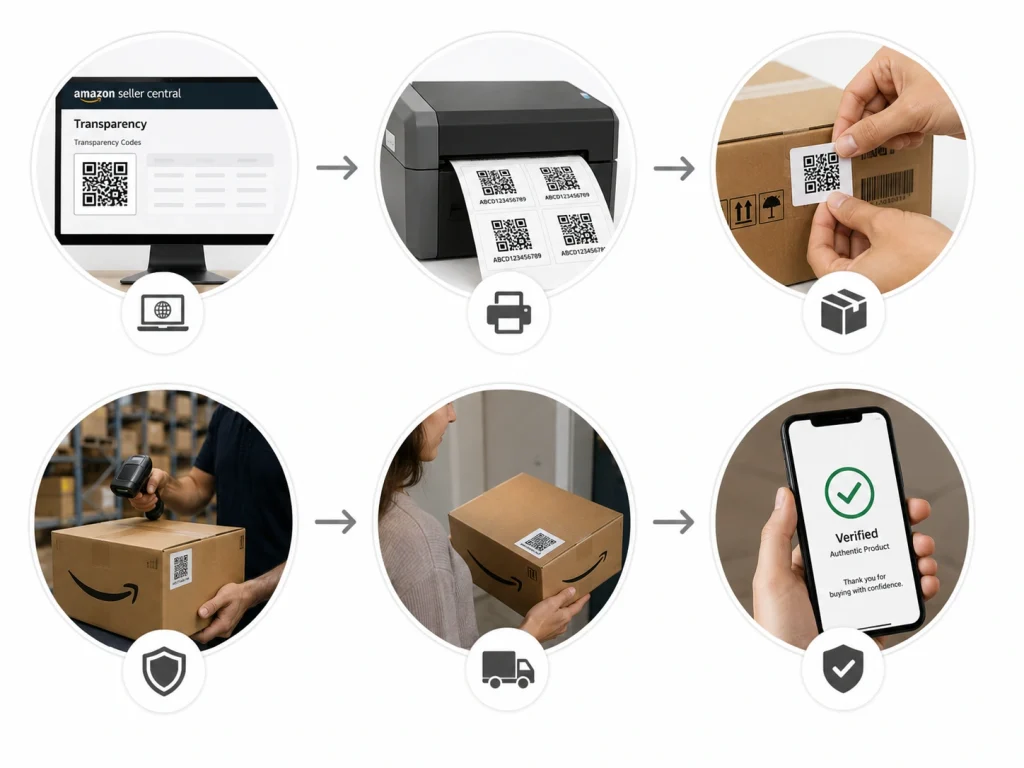
You’ve packed your product, sealed the box, and now it’s ready to ship. But you want one last layer of protection. You need something that proves your item is real before it ever reaches a buyer. That’s where the Transparency code comes in.
Each Transparency code is a special QR label created for one product unit. It includes a barcode, a serial ID, and information linked to your Seller Central account. Amazon uses this code to confirm the product is authentic before it leaves the warehouse.
Amazon asks sellers to place the code label on the outer packaging where it’s visible and easy to scan. Most brands put it next to the main barcode or product title. Labels must meet Amazon’s size rules and be printed clearly with the right label printer.
Once the customer receives the item, they can scan the QR label using the Transparency mobile app. A verified message confirms the product is real and safe to open.
This small code does more than stop fakes. It gives your customers confidence from the moment they pick up the package.
Common Issues with Transparency and How to Fix Them
You set up Transparency, apply your codes, and think everything is working. But then problems show up fast. Amazon can’t scan your labels. Your shipment gets flagged. Sales drop, and you can’t figure out why.
These real seller examples reveal what went wrong and how each one fixed it the right way. The examples below are real mistakes made by sellers like you, along with the exact steps they used to fix them.
Case 1: Beauty brand mislabeled products
Priya runs a private label skincare brand. She applied Transparency codes to the wrong items by mistake. When Amazon scanned them, they didn’t match the listings. To fix it, she removed all mislabeled units, reassigned the correct codes in Seller Central, then printed fresh labels for each product.
Case 2: Candle seller used low-quality printing
Mark makes handmade candles and printed labels on low-ink settings. The QR codes looked faded and unreadable. Amazon flagged every box. He switched to Amazon-approved thermal labels, increased the print resolution, and tested a few before sending a new shipment.
Case 3: Toy business placed labels poorly
Lena sells wooden toys. She placed labels near the package folds, where some peeled off in transit. To fix it, she moved all labels to flat packaging areas and rolled them with a press to stay in place.
Case 4: Clothing seller skipped activation
Jacob owns a small t-shirt brand. He created Transparency codes but forgot to activate them. Amazon couldn’t verify the items. He logged into the Transparency dashboard, activated each code, and applied them only after confirming they were live.
Transparency vs Other Amazon Brand Protection Tools
Some sellers focus on blocking hijackers. Others want to stop fakes before they ever leave the warehouse. Picking the right Amazon protection tool depends on what risk your brand faces and where it starts. If fake listings hurt your sales, you’ll need one path.
If you want full control at the product level, another tool works better. Every tool solves a different piece of the problem, but not all work the same. Now let’s break down how Transparency, Project Zero, and IP Accelerator compare side by side.
| Tool | What It Does | Best For |
|---|---|---|
|
Transparency |
Uses unique codes on each unit to stop counterfeits early |
Protecting each product before it ships |
|
Project Zero |
Lets you remove fake listings instantly using self-service tools |
Fighting hijackers on live listings |
|
IP Accelerator |
Helps new brands get trademarks quickly with approved lawyers |
Starting brand protection with legal support |
Transparency works best when sellers need control at the product level. It prevents counterfeits before they reach the buyer. If you’re already brand-registered and face fake listings often, Project Zero may offer faster takedowns. For newer brands, IP Accelerator helps you qualify for protection faster by securing a trademark early.
Amazon Transparency Enrollment Requirements Checklist
Amazon Transparency enrollment requires a registered brand, eligible products, and a clear plan to apply unique Transparency codes to every enrolled unit. The brand must usually be connected through Amazon Brand Registry, and each enrolled ASIN needs accurate product information before codes are requested.
Sellers should prepare packaging files, barcode placement areas, supplier instructions, and inventory workflow before applying. Amazon-issued Transparency codes are unique, non-sequential codes used to verify product authenticity, and brands only pay when ordering codes, not just for enrollment.
The basic checklist includes: confirm Brand Registry access, select eligible ASINs, request codes, apply codes to every unit, test scan quality, train the warehouse team, and prepare for the Operational Performance Review.
How to Pass Amazon Transparency Operational Performance Review
To pass the Amazon Transparency Operational Performance Review, every enrolled unit must be labeled accurately and consistently. Amazon says Transparency protections are not active until the product passes this review.
For FBA orders, sellers start the review through the Transparency portal, and Amazon scans codes when units arrive at the fulfillment center. For self-fulfilled orders, sellers provide Transparency codes during order confirmation in Seller Central so Amazon can monitor enrolled units.
The practical way to pass is simple: do not mix coded and uncoded units, do not reuse codes, do not place codes where they can be damaged, and make sure the correct code is applied to the correct ASIN. Amazon’s UK and Germany pages state that Transparency protections become active after passing OPR with 98% accuracy.
Where Should You Place Transparency Codes on Product Packaging?
Transparency codes should be placed on the product packaging where Amazon, warehouse teams, and customers can scan them easily. The code should be flat, visible, undamaged, and not hidden under tape, shrink wrap, folds, seams, or curved surfaces.
The best placement is usually near the product barcode area, but not so close that it interferes with the UPC, FNSKU, or other required labels. Keep enough white space around the Transparency code so scanners can read it cleanly.
For small products, place the code on the outer retail box instead of an inner insert. For bundles, kits, or multipacks, apply the code to the sellable unit packaging, not to loose internal components unless Amazon or your packaging workflow specifically requires it.
What Happens If a Seller Ships Products Without Transparency Codes?
If a seller ships enrolled products without valid Transparency codes, those units can fail Amazon’s Transparency check. Amazon says all enrolled units must have a valid Amazon Transparency code or approved existing serial code, or they will not pass the Transparency check.
For FBA, uncoded or incorrectly coded units may be set aside, investigated, delayed, or blocked from reaching customers. For seller-fulfilled orders, Amazon may monitor order confirmations and require valid codes before the enrolled product is fully protected.
The blunt truth: once an ASIN is enrolled and protections are active, shipping without codes is not a small mistake. It can create fulfillment delays, inventory problems, listing risk, and customer trust issues. Treat Transparency labeling like a mandatory packaging requirement, not an optional anti-counterfeit sticker.
Frequently Asked Questions(FAQs)
If you’re still unsure about how Transparency works or what to expect, these common seller questions will help you avoid mistakes and understand the program more clearly.
No, it’s not required. Transparency is an optional tool. But sellers facing hijackers or counterfeit problems often use it to add strong protection at the product level before anything ships out.
Yes. You can enroll one ASIN at a time. Many brands start with their best-selling item before expanding the program to other products in their catalog, especially if those are targeted by counterfeiters.
If a code fails at fulfillment, Amazon may reject the shipment. Sellers should double-check print quality and code activation. Scanners need a clean, readable label to verify product authenticity correctly.
Yes. If Transparency is active and codes are missing or unreadable, Amazon can mark your units unfulfillable. This delays shipment or sends the inventory back until it is relabeled properly according to their guidelines.
While rare, some sellers reported code reuse by hijackers. If this happens, report it through Seller Central immediately. Amazon may investigate and take action depending on scan results and account history.
Protect Your Listings with Brand’s Bro
Sellers often lose trust, reviews, and revenue when counterfeit products slip into their listings. Transparency helps fix that. But setting it up the right way can be confusing if you’re doing it alone.
Brand’s Bro supports Amazon sellers with expert help across amazon listing optimization, A+ content, and SEO. We guide you through every step. That includes applying codes, avoiding mistakes, and protecting your products before they ever leave your warehouse.
Our team makes sure your product pages follow Amazon’s rules. We help your listings build trust and keep your brand secure. Buyers should feel confident the moment they land on your page.
If you’re adding Transparency to a best-selling item or starting fresh with a new ASIN, we’re ready to help.
