

Amazon Brand Story is a special space on your product page where you get to share the heart of your brand. It shows shoppers who you are, what you believe in, and why your brand exists. It appears right above your A+ Content and gives customers a warm, personal peek into your world before they even scroll further.
Brand stories help build trust quickly. People see your mission. They learn your values. They understand what makes your brand stand out. That simple emotional connection can make buyers choose you instead of another seller.
Only brands enrolled in Amazon Brand Registry can use this feature. If you want stronger trust, clearer identity, and better conversions, adding a Brand Story is one of the most powerful moves you can make.
What Is an Amazon Brand Story?
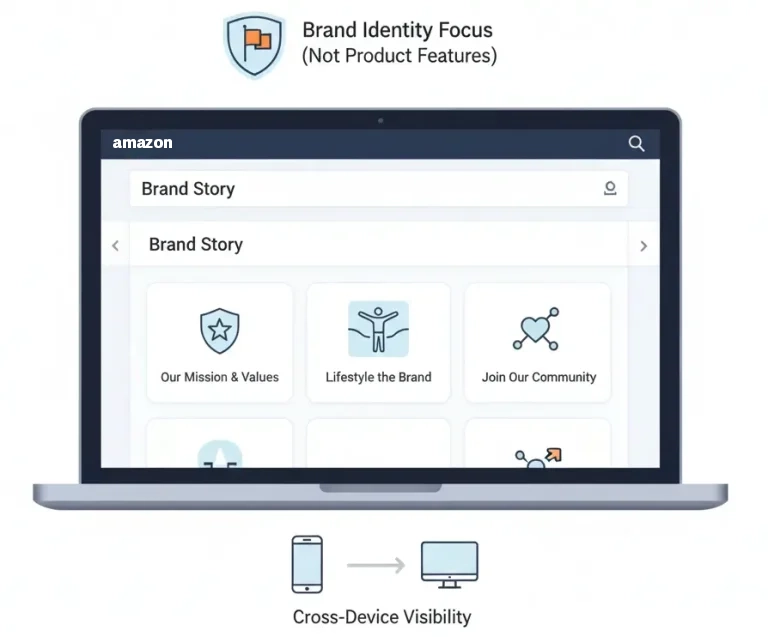
Amazon Brand Story is a special area on your product page that introduces your brand in a fun, visual way. It appears as a scrollable carousel right above the normal A+ Content section. Customers can swipe through pictures, text, and short messages that explain who you are and what your brand stands for.
Only sellers enrolled in Amazon Brand Registry can use this feature. It gives real brand owners a place to share their mission, values, and personality. This helps customers feel a connection, not just see a product.
Brand Story is different from A+ Content and your product description. Those sections talk about the product. Brand Story talks about your brand. It shows your world, your purpose, and your vibe.
Shoppers can view it easily on both mobile and desktop, making it a smooth part of the buying experience.
Eligibility Requirements & Access
To use Amazon Brand Story, you must be part of Amazon Brand Registry. This program proves you are the real owner of your brand. It protects your products, your name, and your creative work.
To join Brand Registry, you need a trademark. It can be fully registered or still pending. Amazon accepts trademarks from supported government offices. This step helps Amazon confirm that your brand is genuine and not copied.
You can find the Brand Story feature inside the A+ Content Manager. It appears as a special option when your brand is approved.
Once you create your Brand Story, Amazon reviews it before it goes live. They check for quality, rules, and proper formatting.
Sellers without Brand Registry cannot use this feature. This keeps Brand Story exclusive to real, verified brand owners.
How to Check If You’re Eligible?
To check if you’re eligible use these simple steps:
- Log in to Seller Central.
- Go to Brands → Brand Registry.
- Confirm your trademark information.
- Make sure your brand name matches your listings.
- Open A+ Content Manager to see if “Brand Story” is available.
If you can select the Brand Story option, you’re eligible.
Keep Your Account and Documents Ready
Amazon checks your account health. They also look at your trademark documents. Make sure your:
- The brand name matches your packaging.
- Logo is consistent everywhere.
- Listing titles use the correct brand name.
- Trademark files are clear and readable.
A clean, organized setup makes approval faster and easier.
We create Amazon Brand Story Guidelines that help high-traffic listings build trust, explain brand value, and guide shoppers with a clear message.
Our service makes your Brand Story section structured, compliant, and conversion-focused for stronger Amazon presence.
Understanding Amazon Brand Story Structure

Amazon Brand Story is built like a smooth, scrollable carousel. Each part feels like a small chapter in your brand’s world. On the desktop, shoppers move through the story by sliding left and right. On mobile, the slides stack neatly, so customers simply swipe downward. Everything feels natural, simple, and easy to explore.
You can use up to 19 modules in one Brand Story. Each module has a job. One introduces your brand. Another shows your images.
Another highlights your products. Another leads customers to your Brand Store. Together, they create a clear, connected path from curiosity to trust.
Brand Story always appears above your normal A+ Content. That means customers see your brand identity before they see product details. This makes your story a powerful first impression.
It pulls attention, sets the tone, and helps shoppers feel close to your brand before they read anything else.
A good Brand Story follows a clean visual order. Think of it like a guided tour:
- The hero image grabs attention.
- The brand logo shows who you are.
- Identity text explains your mission.
- Lifestyle images show your vibe.
- Product links guide shoppers to more items.
- CTA invites them to explore your Brand Store.
Each slide should support the next, just like turning pages in a storybook. When the flow is smooth, customers understand your brand quickly. They feel more connected. They trust you more.
Amazon Brand Story Modules (Full Breakdown)
Amazon Brand Story is built from special modules. Each module has a clear purpose. Each one helps tell your brand’s story in a simple, visual way. When you choose the right modules, your Brand Story feels smooth, clear, and exciting for shoppers.
Below is a full breakdown of each module and how to use it correctly.
Brand Carousel Background (Hero Image)
This is your big, full-width background image. It is the first thing shoppers see. It sets the entire mood of your Brand Story. Think of it as the “cover” of your brand book.
You should use a high-resolution image. It must look clean and professional. Popular choices include lifestyle photography, a brand environment scene, or a moment from your founder’s journey. These types of images feel genuine and powerful.
Instructions:
- Avoid clutter or too much text.
- Use colors that match your brand identity.
- Keep the style consistent with your packaging and store design.
- Make sure the image loads clearly on mobile and desktop.
A strong hero image makes shoppers stop, look, and explore.
Brand Logo & Description Module
This module shows your logo and a short brand introduction. It tells shoppers who you are in just a few words. Think of it as your friendly “hello.”
You can include your mission, tagline, or brand purpose. These simple statements help customers understand what makes your brand unique.
Instructions:
- Keep the text short and easy to read.
- Use warm, emotional language.
- Avoid sales claims like “best,” “#1,” or “top-rated.” Amazon rejects them.
- Make sure your logo is clear and high-quality.
This module works best when it feels honest and welcoming.
Brand Focus Image Module
This module brings your story to life. It uses visuals to show what your brand cares about. You can highlight lifestyle moments, your team, your workshop, your crafting process, or your values.
This is the perfect place to show what makes your brand human.
Instructions:
- Use images that “show, not tell.”
- Keep visuals consistent-no random stock photos.
- Make sure colors and lighting match your hero image.
- Check that image quality meets Amazon standards.
Great visuals help customers feel closer to your brand instantly.
ASIN Showcase / Brand Store Link
This module lets you highlight other products. It also gives shoppers a quick link to your Amazon Brand Store. It is one of the most powerful modules because it turns curiosity into browsing.
It also supports cross-selling, which can increase order size.
Instructions:
- Only add related or complementary products.
- Make sure product images are clean and professional.
- Avoid showing sold-out or unavailable items.
- Use clear product titles and simple layouts.
This module helps customers explore your full product family.
Brand Q&A or Information Module
This module answers common customer questions. It helps shoppers understand your values, quality, and process. It is perfect for telling your mission, your eco practices, or what makes your brand trustworthy.
Short answers work best. Clean formatting makes it easy to scan.
Instructions:
- Keep each answer short and simple.
- Focus on customer concerns and expectations.
- Avoid promising things you can’t prove.
- Use helpful, positive, clear statements.
This module is all about building trust and transparency.
Visual Guidelines & Image Requirements
Great visuals make your Amazon Brand Story unforgettable. They shape your brand’s personality, mood, and trust. The right images pull shoppers in. The wrong ones push them away. That’s why using strong, clean, high-quality visuals is essential.
Let’s break down exactly what Amazon expects and how to get every image right.
Use High-Resolution Images
Your images must be sharp and clear. Blurry photos look unprofessional. They hurt trust immediately. Amazon prefers high-resolution images because they look good on every screen size.
Use images that stay crisp on large desktop monitors and small phone screens. Clear images help shoppers feel confident in your brand.
Follow Smart Aspect Ratios
Amazon’s modules work best with the right shapes. Wide images fit well in hero backgrounds. Square or vertical images work well in focus or product modules.
Keeping the correct aspect ratios prevents stretching, cropping, or awkward layouts.
A clean fit keeps the story smooth.
Keep Colors Consistent Across All Slides
Your brand should look the same everywhere. Use colors that match your logo, packaging, website, and Brand Store.
Consistent colors help customers recognize your brand immediately. They also make your Brand Story feel professional and intentional.
Avoid mixing random color tones. Avoid sudden style changes. Keep everything in the same visual family.
Avoid Pixelation and Heavy Compression
Never upload images that look grainy or blocky. These issues happen when pictures are compressed too much.
Pixelation makes your brand look low-quality. It also distracts shoppers from your message.
Always export your visuals at a high quality. Keep file sizes reasonable, but never sacrifice clarity for speed.
Keep Brand Identity Strong
Your brand identity should show in every image. Use the same fonts, colors, photography style, and tone.
- If your brand is minimal, keep images clean and simple.
- If your brand is warm and friendly, use bright colors and lifestyle shots.
- If your brand is luxury, use elegant lighting and refined layouts.
Your visuals should speak your brand’s “language.”
Good vs. Bad Image Examples
Here are some of the good and bad image examples of
Good Images:
- Clear, bright, high-resolution
- Consistent colors and style
- Clean backgrounds
- Real lifestyle photos
- Proper composition
- No clutter or distractions
Bad Images:
- Pixelated or blurry
- Over-edited or artificial
- Random stock photos
- Crowded with text
- Mismatched colors
- Irrelevant visuals
Good images build trust. Bad images break trust instantly.
Amazon Rejection Triggers
Amazon reviews every Brand Story image before approval. These issues often cause rejection:
- Too much text on the image
- Fake claims (e.g., “best,” “#1,” “guaranteed”)
- Misleading visuals
- Inappropriate content
- Off-brand color schemes
- Pixelation or low-quality photos
- Copyrighted images you don’t own
Avoid these and your Brand Story will pass review without delays.
Why Visual Quality Makes a Difference
Images are the heart of your Brand Story. They guide shoppers through your message. They create emotional connection. They show who you are before any word is read.
Strong visuals make your Brand Story powerful. Weak visuals make it forgettable.
Choose carefully. Match your brand. Keep quality high. And always think about what shoppers will feel the moment they see your images.
Copywriting Guidelines for Amazon Brand Story
Your words matter just as much as your images. They shape how shoppers feel about your brand. They build trust, emotion, and personality in just a few short lines. Amazon Brand Story is not a long section, so every word counts. Clear, simple, warm language works best.
Your tone should feel friendly and human. It should sound like your brand speaking directly to your customer. Don’t focus on product features here. Focus on your mission, your heart, and the values behind your brand. Let shoppers understand who you are, not just what you sell.
Short sentences work best. Emotional words connect faster. Honest statements feel more trustworthy. When your writing is clean and sincere, customers feel closer to your brand instantly.
Use a Tone That Matches Your Brand
Your tone is your brand’s voice. Keep it consistent everywhere.
- If your brand is fun, use playful words.
- If your brand is calm, use soft language.
- If your brand is bold, use strong, confident statements.
Shoppers should feel the same vibe in your Brand Story, your packaging, and your storefront.
Keep It Brand-Rich, Not Product-Heavy
Brand Story is about you, not your products.
Use it to share your:
- Mission
- Beliefs
- Values
- Purpose
- Culture
- Inspiration
- Vision
Save product details for A+ Content and product description areas. Brand Story is your space for identity, not specs.
Use Simple, Emotional Language
Simple language is powerful. It feels honest and real. Emotional words create warmth. Together, they build fast trust.
Examples of emotional tone:
- “We believe in simple, honest materials.”
- “Our team designs every product with care.”
- “Your comfort and happiness matter to us.”
These small lines create a big connection.
Keep It Short and Clear
Amazon Brand Story is a short section.
- Write small.
- Write clean.
- Write only what matters.
Aim for 1-2 sentences per module.
- Avoid long paragraphs.
- Say your message simply.
Templates You Can Use
Here are ready-to-use templates to help you write instantly:
Brand Mission Template
We believe in ____, and we work every day to ____. Our goal is to bring ____ to every customer.
Example:
We believe in quality you can feel, and we work every day to make life easier. Our goal is to bring comfort and joy to every home.
Brand Origin Template
Our story began when _____. We wanted to create ____ that helped people ____.
Example:
Our story began when our founder needed safer baby products. We wanted to create gentle essentials that helped families every day.
Brand Promise Template
We promise to deliver ____, built with ____, designed for ____.
Example:
We promise to deliver long-lasting products, built with care, designed for everyday use.”
Do’s and Don’ts
Here are some of the dos and don’ts when you write copy for amazon brand story guidelines
Do’s
- Do keep your sentences short.
- Do use warm, emotional language.
- Do share your values and beliefs.
- Do stay honest and authentic.
- Do match your tone to your brand identity.
- Do speak directly to your customer.
- Do stay consistent with your packaging and storefront style.
Don’ts
- Don’t add product features here.
- Don’t use exaggerated claims like “best” or “#1.”
- Don’t overload with text.
- Don’t use complicated or technical language.
- Don’t change the tone mid-story.
- Don’t make promises you can’t prove.
How Copy Builds Your Brand
Your copy is your brand’s voice. It guides how shoppers see you. It shapes the connection they feel.
A great copy makes your brand unforgettable. Weak copy makes your story disappear.
- Write with heart.
- Write with purpose.
- Write like your customer is right in front of you.
Compliance Rules & Content Restrictions
Amazon wants every Brand Story to be safe, honest, and trustworthy. That means your content must follow strict rules. These rules protect shoppers from false claims and protect brands from unfair competition. When you understand the rules, your Brand Story gets approved faster and looks more professional.
Let’s break down exactly what you can and cannot do, step by step.
No Pricing or Promotions
You cannot mention prices, discounts, coupons, or deals.
- No “50% off.”
- No “limited-time sale.”
- No “best price today.”
Brand Story is for your identity, not your offers.
No External Links
You cannot link to websites, social media, or apps.
- No “Visit us at…”
- No QR codes.
- No off-Amazon URLs.
All links must stay inside Amazon.
No Competitor Comparisons
Never mention other brands.
- No “better than Brand X.”
- No “cheaper than others.”
- No comparison charts.
Amazon wants a positive, competition-free space.
No Medical, Exaggerated, or Unverified Claims
Avoid claims that promise results you cannot prove.
- No “guaranteed healing.”
- No “instantly cures pain.”
- No “works better than all others.”
Stick to safe, honest statements only.
No Political or Offensive Content
- Your Brand Story must stay neutral.
- No political messages.
- No sensitive topics.
- No offensive jokes or images.
Keep the tone friendly and welcoming.
No Third-Party Brand Misuse
- Do not use trademarks or brand names that aren’t yours.
- No claiming partnership you don’t have.
- Not using another company’s logo.
- No referencing famous brands without permission.
Brand Story should highlight your brand only.
Quick Compliance Checklist
Use this simple checklist before submitting:
- No pricing or promotions
- No off-Amazon links
- No competitor mentions
- No medical or exaggerated claims
- No political or sensitive content
- No third-party trademarks
- All images are clean and professional
- All text is honest, short, and brand-focused
- Tone is friendly, warm, and safe
- Everything matches your brand identity
This checklist keeps your Brand Story safe and ready for approval.
Common Reasons for Amazon Rejection
Amazon often rejects Brand Stories for these reasons:
- Too much text in images
- Claims that can’t be proven
- Mentions of “best,” “#1,” or “top rated”
- Promotional language
- Linking to outside websites
- Using copyrighted images
- Using low-quality or pixelated images
- Showing unavailable products
- Using medical promises
Avoid these and your approval time becomes much faster.
Why Strong Compliance Matters
Following Amazon’s rules protects your brand.
- It builds trust with shoppers.
- It keeps your listing safe from takedowns.
A compliant Brand Story gets approved quickly, looks professional, and helps customers feel confident choosing you. When your images and words follow the rules, your brand earns respect and long-term loyalty.
Best Practices for High-Converting Brand Stories
A high-converting Brand Story feels real, warm, and meaningful. It draws shoppers into your world and makes them feel like your brand understands them.
With the right techniques, your Brand Story becomes more than words and pictures-it becomes an experience customers remember.
Here are the best practices that make Brand Stories powerful and effective.
Use Real Storytelling Elements
- Great storytelling starts with heart.
- Share your origin.
- Share your mission.
- Share your values.
- Tell customers why your brand exists.
When people understand your journey, they trust you more. Simple stories create strong emotional impact.
Example:
Our journey began in a small kitchen, where we dreamed of healthier snacks for families everywhere.
Focus on Customer Benefit, Not Self-Praise
Customers want to know how your brand helps them. Not how “great” you think you are.
Skip sentences like:
- We are the best.
- We are unbeatable.
- We are number one.
Instead, focus on what customers gain.
Example:
We create simple formulas that keep your skin calm, happy, and hydrated. Customer-focused writing builds connection instantly.
Make Your Visuals Memorable
Your images should speak louder than your text. They should show your world clearly. They should make shoppers pause and feel something.
Use lifestyle photos, behind-the-scenes shots, real people, and real moments. These bring your brand to life. They also keep your Brand Story fun to scroll through.
Memorable visuals = stronger trust + higher conversions.
Stay Consistent Across All Amazon Areas
Your Brand Story must look and feel like your A+ Content and your Brand Store.
- Same colors.
- Same tone.
- Same style.
- Same message.
Consistency helps shoppers recognize you instantly. It also makes your whole Amazon presence feel professional and well-organized. A consistent brand is a trusted brand.
Cross-Sell Products the Smart Way
Use the ASIN Showcase to guide shoppers to related items. Show products that make sense together.
- Don’t overload them.
- Don’t show random items.
Smart cross-selling increases order value without feeling pushy.
Example:
If your Brand Story is about fitness, link protein bars, shakers, and gym towels-items that work together naturally.
Use Warm, Human Language
Write like you’re talking to a friend. Use short, kind, and human sentences.
- Avoid robot-like words.
- Avoid complicated vocabulary.
Warm language feels real. Real language builds trust. Trust leads to sales.
Example:
We’re here to make everyday moments feel easier, brighter, and more enjoyable.
Real Example Structure for a High-Converting Brand Story
You can follow this simple flow:
- Hero Image: Show the heart of your brand.
- Logo + Intro: Tell your mission in one short sentence.
- Lifestyle Image: Show your brand in real life.
- Value Statement: Share what you believe in.
- ASIN Showcase: Introduce your product family.
- CTA: Invite shoppers to explore your Brand Store.
This structure is clean, simple, and highly effective.
Pre-Tested Brand Story Template
Use this template to write your story instantly:
- Module 1 – Hero Image Text: We started with one simple idea: make everyday life better.
- Module 2 – Logo + Brand Intro: Our brand creates products that are honest, thoughtful, and made with care.
- Module 3 – Focus Image Line: We believe great design should feel natural, helpful, and comfortable for everyone.
- Module 4 – Value Statement: Every item we make comes from passion, purpose, and real-life needs.
- Module 5 – Product Showcase Text: Discover our full collection designed to support your daily routine.
- Module 6 – CTA: Visit our Brand Store to explore more. This template works for almost any brand and is built through proven testing.
Common Mistakes to Avoid
Even great brands make simple mistakes in their Amazon Brand Story. These mistakes can confuse shoppers, weaken trust, and hurt conversions.
The good news? Each mistake has an easy fix. Let’s walk through the most common issues and how to avoid them.
Mistake 1: Overloading Modules
- Too many modules overwhelm shoppers.
- A cluttered story makes people scroll away fast.
Fix:
- Use fewer, stronger modules.
- Keep each one focused on a single message.
Mistake 2: Using Generic Stock Images
- Stock photos look fake and disconnected.
- Shoppers can sense when the visuals aren’t real.
Fix:
- Use real lifestyle photos.
- Show your team, your workspace, or your actual products.
Mistake 3: Too Much Text
- Long paragraphs are hard to read.
- Brand Story is not meant for heavy writing.
Fix:
- Use short lines.
- One or two sentences per module is enough.
Mistake 4: No Emotional Connection
- Some stories feel cold or robotic.
- Shoppers want to feel something.
Fix:
- Share your mission, your values, your purpose.
- Use warm, friendly language.
Mistake 5: Inconsistent Branding
- Mixed colors or random styles confuse customers.
- It makes your brand look unprofessional.
Fix:
- Stick to one color theme.
- Match your Brand Story with your Brand Store and A+ Content.
Mistake 6: Irrelevant Images or Confusing Layout
- Images that don’t match your brand feel odd.
- Layout problems break the flow of the story.
Fix:
- Choose visuals that match your brand identity.
- Keep each module connected to the next.
Mistake 7: Forgetting to Link Complementary Products
- Missing links means missing cross-sell chances.
- Customers never see your other items.
Fix:
- Add related or complementary ASINs.
- Make sure they are in stock and well-presented.
Mistake 8: Poor Mobile Formatting
- Some Brand Stories look great on desktop but messy on phones.
- Most shoppers use mobile, so this matters a lot.
Fix:
- Always preview your layout on mobile.
- Check spacing, text size, and image clarity.
Quick Audit Checklist
Use this list before publishing your Brand Story:
- Clean, simple module flow
- No clutter or overload
- Real, authentic images
- Short, emotional text
- Consistent branding
- Logical slide order
- Complementary product links included
- Mobile formatting checked
- Clear visuals with no pixelation
- Honest claims with no exaggeration
This checklist keeps your Brand Story strong, clear, and ready to convert.
How to Create a Brand Story in Seller Central: Step-by-Step
Creating your Amazon Brand Story is simple when you follow a clear path. Think of it like building a mini homepage for your brand. Each step helps you shape your identity, your message, and your visuals until everything comes together beautifully.
Let’s walk through it in the easiest way possible.
Step 1: Go to the Right Place
Follow this path inside Seller Central:
Seller Central → Advertising → A+ Content Manager → Create → Brand Story
This opens the space where you’ll build your story. It’s your brand’s “creative zone.”
Step 2: Choose Your Brand & ASIN
Select the brand you want to create the story for. Then pick the ASIN(s) that the Brand Story will appear on.
Most brands reuse the same Brand Story across many products. This saves time and keeps your branding consistent.
Step 3: Upload Your Modules
Start adding modules one by one:
- Hero background
- Logo + intro
- Focus image
- Value statement
- Product showcase
- CTA
Each module will have its own upload button. Keep file names clean and simple, like “brand-hero.jpg” or “logo-main.png.” Short names help you stay organized.
Step 4: Add Your Text
Each module has a small text field. Use short, warm, emotional sentences.
Stay brand-focused, not product-focused.
Keep copy length tight so everything looks clean on mobile.
Step 5: Link Your ASINs Correctly
Use the ASIN Showcase module to add related or complementary products. Choose items that make sense together. Avoid out-of-stock products.
Check that images and titles look neat. This step boosts cross-selling and improves customer browsing.
Step 6: Preview on Mobile First
Most Amazon shoppers use their phones. Always preview the mobile version before anything else.
Check:
- Image clarity
- Text spacing
- Slide order
- Scroll behavior
- Alignment
If it looks great on mobile, it will look great everywhere.
Step 7: Preview on Desktop Next
Desktop previews show the full width of your Brand Story. Look for:
- Clear hero image
- Balanced colors
- Proper cropping
- Smooth slide transitions
Make sure the experience feels professional.
Step 8: Submit for Review
Click the Submit for Approval button. Amazon will check your:
- Images
- Text
- Claims
- Formatting
- Compliance
This usually takes 1-7 days. Sometimes faster.
Step 9: Monitor Approval Status
Return to A+ Content Manager. Check your Brand Story’s status:
- Draft
- In Review
- Needs Edits
- Approved
If Amazon requests changes, adjust your text or images and resubmit. This is normal.
Amazon Brand Story vs Basic A+ Content vs Premium A+ Content
Amazon Brand Story introduces the company behind the product. It typically highlights brand values, history, product collections, lifestyle imagery, and links to related products within the brand catalogue.
Basic A+ Content focuses on product education. Sellers can use enhanced images, formatted text, feature sections, and comparison charts to explain benefits, specifications, use cases, and differences between products.
Premium A+ Content offers more interactive modules, including video, larger images, clickable hotspots, advanced comparison tables, and FAQ sections. It is best suited to brands that need richer demonstrations or stronger visual storytelling.
Amazon Brand Story Examples by Product Category: What Works and What Fails
For beauty products, effective Brand Stories show ingredients, routines, brand values, and related skincare products. Generic lifestyle images without proof, differentiation, or product relevance usually fail.
For electronics, strong examples explain innovation, compatibility, warranties, and the wider product ecosystem. Overly emotional stories that ignore specifications and practical benefits can frustrate comparison-focused shoppers.
For home, kitchen, and fitness products, use real-life applications, product collections, and clear brand positioning. Avoid crowded designs, unreadable text, unsupported claims, and repeating information already shown in Basic A+ Content.
How to Measure Amazon Brand Story Performance and Conversion Impact
Amazon does not always isolate Brand Story performance as a separate conversion metric. Measure its impact by comparing unit-session percentage, sales, sessions, average order value, and related-product sales before and after publication.
Use Amazon’s Manage Your Experiments tool when eligible to test different A+ layouts, images, headlines, and messaging. Run tests long enough to collect meaningful traffic rather than judging results after several days.
Also monitor customer questions, reviews, return reasons, and advertising conversion rates. A successful Brand Story should reduce uncertainty, encourage catalogue exploration, strengthen brand recognition, and support higher conversion across related ASINs.
Frequently Asked Questions (FAQs)
Customers often have questions about how Amazon Brand Story works and what to expect when using it. These quick answers will help you avoid confusion and build your Brand Story with confidence.
No, Amazon Brand Story is not required. It’s an optional feature for brand-registered sellers. However, using it can make your listings feel more professional and trustworthy. Many brands see higher engagement when they add a Brand Story.
Brand Story does not directly affect Amazon search rankings. But it can indirectly help by improving customer trust, lowering bounce rates, and encouraging more page exploration. These behaviors can improve overall listing performance.
Yes, you can reuse the same Brand Story for many ASINs. Most brands do this to keep a consistent identity across different products. It also saves time, since you only need to build it once.
Approval usually takes 1-7 days. Some Brand Stories get approved faster, depending on Amazon’s review queue. If there are issues, Amazon may request changes before final approval.
Yes, you can edit your Brand Story anytime. Just update the content in A+ Content Manager and resubmit it. The changes will go live once Amazon approves them again.
Rejections usually happen because of low-quality images, too much text, risky claims, or policy violations. You may also be using promotional language or linking outside Amazon, which is not allowed. Fix the issues Amazon flags and resubmit for approval.
Conclusion
A strong Amazon Brand Story helps customers understand who you are and why your brand matters. With clear messaging, emotional language, and high-quality visuals, your story becomes a powerful way to build trust and stand out in a crowded marketplace.
When your modules flow smoothly and your identity stays consistent, shoppers connect with your brand faster and feel more confident choosing your products.
Ready to build your Amazon Brand Story? Start with a simple outline today.
Need help creating something truly powerful?


