

Many businesses treat Google Shopping ads like a vending machine. They put money in, but get very little back in sales. This is a frustrating cycle. The solution begins with learning how to optimize Google Shopping ads effectively.
The direct solution is strategic campaign optimization. This process unlocks higher visibility for your products in search results. It also immediately improves your return on investment (ROI) by making every dollar of your ad spend more effective.
We promise to show you the way forward in this guide. You will discover our proven methods to build and scale your campaigns. Get ready to transform your approach and achieve lasting eCommerce success.
What Are Google Shopping Ads and How Do They Work?
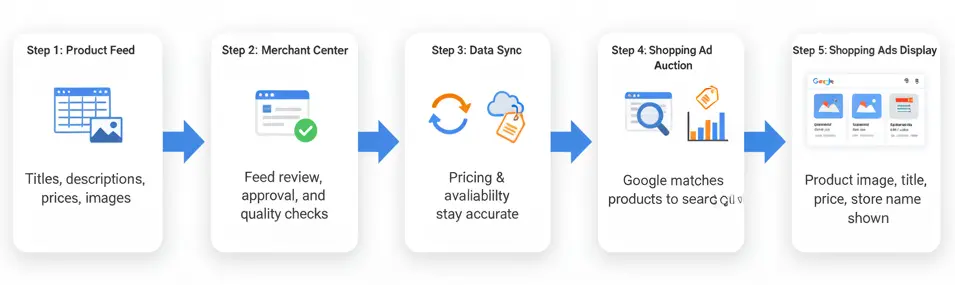
Google Shopping ads are the picture-based results you see at the top of Google searches. They act like a digital storefront directly on the search results page. Each ad displays a clear product image, its title, and its price. Your store name also appears, helping build brand recognition with shoppers.
The system uses your product data as its foundation. It begins with a product feed, which is like a detailed spreadsheet. This feed lists all essential product information: titles, descriptions, prices, and image links. You then upload this product feed to a free tool called Google Merchant Center.
The Merchant Center serves as your central dashboard for all product data. Its primary role is to check your feed for accuracy and quality. Google must approve your feed before any Shopping ads can run. This ensures accurate information is presented to potential customers.
Once approved, Google synchronizes your product data automatically. This ensures your ad’s pricing and availability remain current. This data synchronization is crucial for connecting buyers with precise product details. This method differs significantly from typical text-based advertising.
Your product information then enters an automatic ad auction. Google matches the details in your product feed to shopper search queries. This data-driven approach ensures the most relevant items appear in ads.
The best-matched product listing wins the top spot on the search results page. This system connects your products to interested buyers at the perfect moment.
Why Optimizing Google Shopping Ads Matters for eCommerce Growth
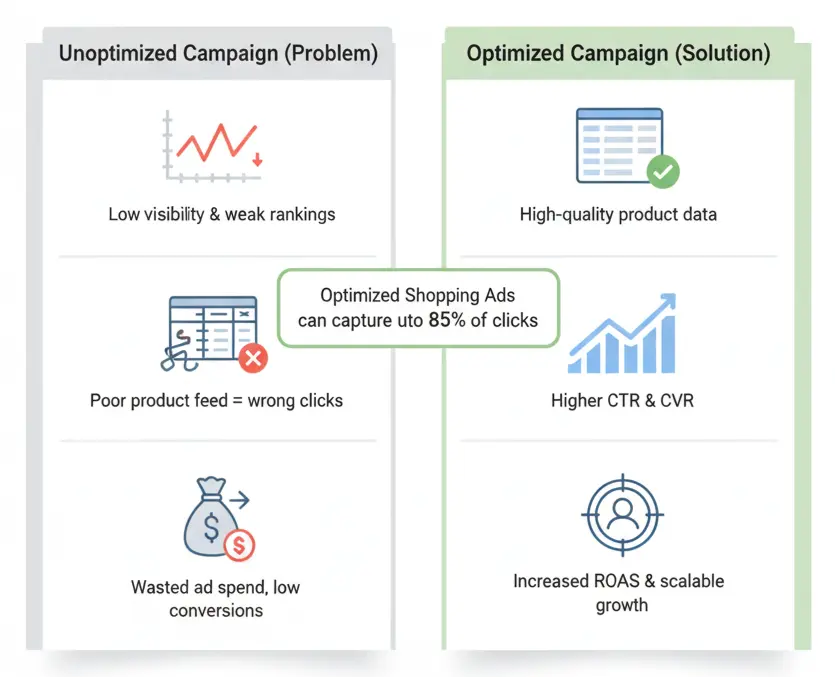
An unoptimized campaign will consistently waste your ad spend. Your ads get low visibility and weak rankings on search pages. This means your products never appear in front of shoppers who are ready to buy. It is a major problem that hurts your budget and limits your sales potential.
This issue almost always begins with poor product data. If Google’s system cannot understand your feed, it shows your ads to the wrong people. This mismatch leads to pointless clicks that do not convert. Your ad spend becomes a major expense instead of a tool for growth.
Strategic optimization is the clear solution. A clean, high-quality product feed helps Google understand and rank your products. In fact, optimized Shopping Ads can capture up to 85% of all clicks for retailers. Your visibility soars, and your ads finally reach the right audience.
This process boosts your Click-Through Rate (CTR) and Conversion Rate (CVR). The direct result of these improvements is a much higher Return On Ad Spend (ROAS). For example, we recently optimized titles for a client in the home goods industry. That single project boosted their ROAS by 35% in under sixty days.
A strong ROAS is the engine for real eCommerce growth. It turns your ad spend into a reliable source of new revenue. You can then confidently reinvest in your campaigns to scale your business. This creates a predictable path to hitting your long-term sales goals.
How to Optimize Google Shopping Ads(Step by Step)
You now understand why optimization is critical for growth. It is time to move from the “why” to the “how.” This section provides the actionable steps you need.
Each step is a crucial part of building a successful campaign. So, let’s begin with the absolute foundation of your campaign.
Step 1: Optimize Your Product Feed
Your product feed is the key to success and the data source for all your Shopping ads. Google needs this clean, healthy data to approve your products and rank them well in search results. The following checklist will help you set up your feed correctly.
- Complete All Required Attributes. Make sure every product has a valid GTIN, brand, title, description, price, and link.
- Use High-Quality Images. Your main image link should go to a clear, professional photo with a plain background.
- Select Accurate Google Product Categories. Choose the most specific category possible. This improves ad relevance.
- Ensure Data Freshness. Update your feed at least once daily. This keeps pricing and stock levels accurate.
- Monitor for Feed Disapproval Issues. Check your Merchant Center diagnostics tab regularly. You can fix any errors here quickly.
Step 2: Write Product Titles and Descriptions That Rank
Your product titles are the most important factor for ad ranking. They are your primary keywords. Google reads them to match your product to a user’s search. A strong structure improves visibility and your Click-Through Rate. Vague titles get ignored by everyone.
Let’s look at a practical example of a poorly structured title versus an optimized one. The difference in performance can be huge.
Before: Unoptimized Title
- Title: “Nike Shoes”
- Problem: This is too generic. It lacks the key details a customer needs to make a decision. It will not rank well for specific searches.
After: SEO-driven Title
- Title: “Nike Air Zoom Pegasus 38 Men’s Running Shoes – Size 11 – Blue”
- Why it works: This title follows a proven formula. It uses Brand + Model + Product Type + Gender + Key Attributes. It answers a searcher’s questions directly.
Your product descriptions also matter for ranking. Use this space to include secondary keywords and features. Describe the product’s benefits and materials. Write in a natural, persuasive tone to help shoppers make their final decision. A well-written description can improve your ad’s relevance score and conversion rate.
Step 3: Use High-Quality Images to Improve Clicks
Shoppers are visual, making your image their first impression. A great photo builds trust and encourages clicks. A poor image looks unprofessional and will be ignored, no matter how good your title is. The right visual is essential for a higher Click-Through Rate (CTR).
Many ads suffer from common image problems. A blurry photo, a cluttered background, or poor lighting will hurt your performance. These mistakes make a product look untrustworthy. They fail to show their true quality and detail to potential buyers.
Your main photo must always look professional. Use a sharp, high-resolution image on a pure white background. This simple setting makes your product stand out. Bright, even lighting shows the true colors and builds instant customer confidence.
Consider adding lifestyle images as secondary photos in your feed. These show your product in a real-world context. This helps customers visualize themselves using the item, which can improve clicks.
Step 4: Structure Campaigns for Better Segmentation
A single campaign for all your products is a common mistake. This approach treats every item the same, which wastes your ad spend. Proper campaign structure gives you much better control. It lets you manage your budget and bidding with precision.
This is an advanced but powerful optimization strategy. A segmented structure allows you to allocate your budget based on business goals. The method provides superior control over your budget and delivers much stronger results.
Group by Profit Margin
This is a highly effective strategy for most businesses. You create different campaigns for your high-margin and low-margin items. This ensures your ad spend goes to your most profitable products first. You invest your budget where it delivers the best possible return.
Segment by Product Category
You can also organize your campaigns by product category. For example, create separate campaigns for “running shoes” and “winter boots.” This structure gives you tighter control over your bidding. It also helps you add category-specific negative keywords for better targeting.
Use Custom Labels for Automation
Custom labels in your product feed are very powerful. You can create labels like “bestseller” or “seasonal” for any group of items. These labels work perfectly with automated campaigns like Performance Max. They help you build smarter, more organized campaigns that enhance your results.
Step 5: Master Bidding Strategies That Drive ROI
Your bidding strategy is the set of instructions for your ad budget. It tells Google exactly how much to pay for a potential customer’s click. The right choice is essential for maximizing your campaign’s return on investment (ROI).
Google Ads provides several powerful options to choose from. These range from complete manual control to fully automated, AI-driven systems. Each strategy has a direct impact on your campaign’s overall performance and efficiency.
The table below compares the most common bidding strategies. It provides examples of their best use cases and potential outcomes.
| Bidding Strategy | How It Works | Best For | Potential Outcome |
|---|---|---|---|
|
Manual CPC |
You set the maximum bid for each ad group or product. |
Gaining full control and starting new campaigns. |
Highly controlled spending but requires constant monitoring. |
|
Enhanced CPC |
Automatically adjusts your manual bids up or down for likely sales. |
Campaigns with some conversion data. |
Better efficiency than manual, with moderate control. |
|
Target ROAS |
AI bidding that aims for a specific Return On Ad Spend goal. |
Campaigns with a consistent history of conversions. |
Maximum efficiency and hands-off bid management. |
For most e-commerce stores with sufficient data, Target ROAS is the best option. This Smart Bidding strategy uses machine learning to optimize performance. It analyzes thousands of signals to predict which clicks will lead to sales. This helps you achieve your profitability goals with much less manual effort.
Step 6: Add Negative Keywords to Eliminate Wasted Spend
Negative keywords are a crucial tool for budget protection. They prevent your ads from showing up for irrelevant search terms. Without them, you will waste a lot of money on clicks from non-converting traffic. You are telling Google which searches you do not want your products to appear for.
Regularly check your Search Term Report in Google Ads. This report shows the exact queries that triggered your ads. You will find many irrelevant searches that are wasting your ad spend.
Examples of Irrelevant Searches and Actions:
Your Product: “leather dress shoes”
- Irrelevant Search: “shoe repair”
Action: Add “repair” as a negative keyword. - Irrelevant Search: “free shoes”
Action: Add “free” as a negative keyword. - Irrelevant Search: “what are dress shoes”
Action: Add “what are” as a negative keyword.
Step 7: Use Automation Tools and AI Feed Managers
Managing a large product feed can be a very time-consuming task. Manually updating thousands of products is inefficient and prone to errors. This is where automation tools and AI feed managers become essential. These platforms simplify feed updates and help you scale your campaigns effectively.
Several excellent tools are available in the market. Each offers features that save time and improve data quality.
- Feedonomics: A powerful, full-service solution for large, complex catalogs. It handles everything from optimization to synchronization across many channels.
- Channable: Excellent for creating custom rules and automating feed updates. It has a user-friendly interface for managing bulk edits.
- DataFeedWatch: A great all-around tool that helps you optimize and troubleshoot your feed. It provides templates to simplify setup.
Step 8: Seasonal, Regional, and Device Optimization
Your customers shop in many different ways. Their location, the current season, and the device they use all matter. A smart campaign adapts to these real-world customer behaviors. This is done using a simple tool called bid modifiers.
Let’s imagine your eCommerce brand sells winter jackets. Your peak sales season is just around the corner. You want to maximize your visibility during this busy time. This is the perfect opportunity to adjust your strategy for better results.
Holiday shoppers are now searching online for gifts. You can increase your bids in colder geographic regions. This simple adjustment shows your ads to the most relevant audience. Your jackets will appear to people who actually need them right now.
Many of these shoppers use their phones to browse products. You can apply a positive bid modifier for mobile devices. This ensures your ads are more visible where your customers are looking. It is a simple way to meet customers where they are.
This adaptive strategy is a powerful tool for growth. It helps you capture peak seasonal demand effectively. You can boost sales by being more relevant to your customers. This leads to a higher return on your ad spend.
Step 9: Track, Measure, and Improve Continuously
Your optimized campaign is now live and working for you. The final, ongoing step is to manage its performance. This ensures you maintain momentum and achieve sustainable, long-term success. You must listen to what your campaign data is telling you every week.
Your primary tools for this are Google Ads and Google Analytics. Think of them as the control panel for your advertising engine. They provide all the results you need. With this information, you can make smart, data-driven adjustments to improve your performance.
A weekly KPI chart is the easiest way to see your progress. This simple report acts as a quick health check for your campaign. It helps you track the most important metrics at a glance. You can spot trends and measure the impact of your changes.
| Metric | Last Week | This Week | Change |
|---|---|---|---|
|
Clicks |
1,200 |
1,350 |
+12.5% |
|
CTR |
2.5% |
2.8% |
+0.3% |
|
Conversions |
60 |
75 |
+25% |
|
ROAS |
3.5x |
4.2x |
+20% |
This chart tells a clear story about your campaign. The rising Clicks and CTR show that your new titles and images are effective. They are successfully grabbing the attention of more shoppers. This is a great sign of improved ad quality and relevance.
More importantly, the increase in Conversions and ROAS is crucial. This proves that your optimizations are driving real business results. It shows your ad spend is becoming more profitable. This is the ultimate goal of any advertising effort.
Also, look at metrics like Impression Share in your reports. This number tells you how much of the available ad space you are capturing. If it is low, you have room to grow your visibility. Consistent monitoring is the key to lasting campaign success.
Common Google Shopping Ads Optimization Mistakes to Avoid
You can avoid many common pitfalls with a simple checklist. These small ad errors often cause the biggest problems. They can lead to disapproved feeds, wasted ad spend, and significant CTR loss. A few quick fixes will help you prevent these issues and keep your campaigns healthy.
Here are some of the most frequent optimization mistakes and how to solve them.
- Ignoring Merchant Center Feed Errors
Quick Fix: Check the “Diagnostics” tab in your Google Merchant Center account at least once a week. - Writing Vague, Low-Quality Product Titles
Quick Fix: A winning title follows a simple pattern. Structure it like this: Brand + Model + Product Type + Key Attributes. - Forgetting to Add Negative Keywords
Quick Fix: Review your Search Term Report every week. Add all irrelevant search queries to your negative keyword list. - Using a Single Campaign for All Products
Quick Fix: Segment your products into different campaigns. You can group them by profit margin, brand, or category. - Choosing the Wrong Bidding Strategy
Quick Fix: Start new campaigns with Enhanced CPC. You can switch to Target ROAS after you have at least 30 conversions in a month. - Using Poor-Quality Product Images
Quick Fix: Help your product look its best. Your main image should be a high-resolution photo. It looks best on a simple and clean white background.
This playbook gives you everything needed for Google Shopping mastery. The methods inside are powerful tools for your business. They help you grow much faster and earn a real return on your ad spend.
Frequently Asked Questions(FAQs)
Putting these strategies into action often brings up a few final questions. We have compiled the most common inquiries below, with the clear answers you need to succeed.
You will notice initial results like a higher CTR within the first week. However, significant ROAS improvements often take 30 to 60 days. This period gives Google’s algorithm enough time to learn from your changes.
Standard Shopping campaigns offer you complete manual control over bidding and targeting. Performance Max is a fully automated campaign type. It uses AI to serve your product ads across all of Google’s networks.
Your product feed requires an update at least once per day. Your store’s prices or stock levels might change often. For this reason, you should update the feed multiple times each day. This practice ensures your ads are always accurate for customers.
No, you do not bid on a specific keyword list. Instead, Google uses the information directly from your product feed. It matches those details to what a person searches for online. Your optimized product titles and descriptions act as your keywords.
The average CPC varies greatly by industry and product. Most eCommerce stores see an average cost between $0.60 and $1.40 per click. Your product feed quality and optimization level directly impact this cost.
Build Smarter Shopping Ads with Brands Bro
Google Shopping is more than an ad platform. It is a direct path to your ideal customers. The difference between it being a costly expense and a profitable investment lies in strategic optimization. That is where our team of experts makes a powerful difference.
Brands Bro helps sellers master the entire Google Shopping pipeline. From deep feed optimization and campaign management to advanced bidding strategies, we build the exact systems that drive predictable sales and powerful ROI.
We’ve helped brands eliminate wasted spend and achieve scalable success with clean, data-backed execution. Let’s build the winning campaigns your products truly deserve.


