
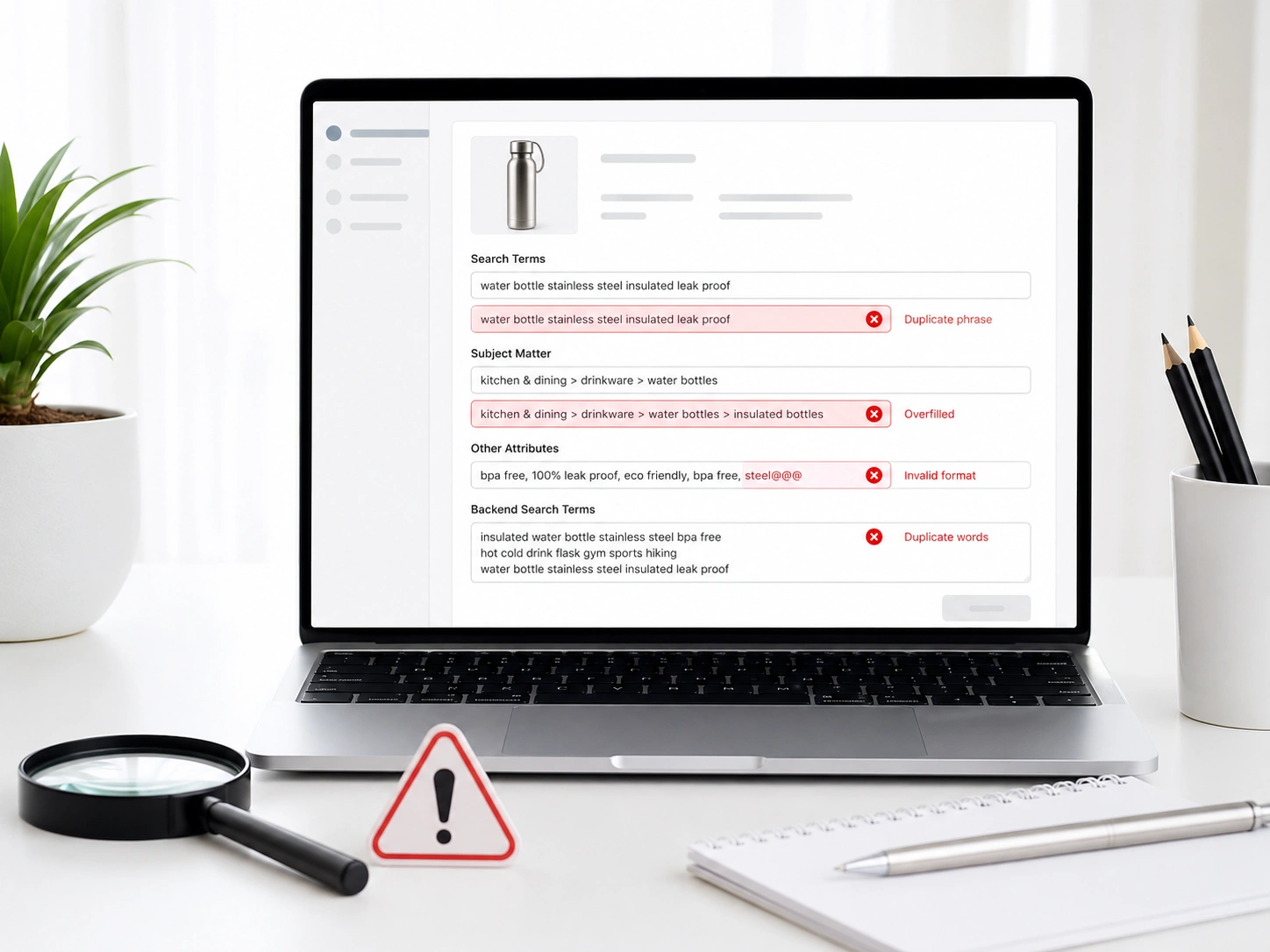
You open Seller Central and see sales and impressions dropping, even though you did not change anything. Your title, images, and ads still look fine, but traffic keeps going down.
This often happens because of backend keyword issues in Amazon catalog optimization. Over our 11 years working with clients, we have seen this countless times.
These problems are not visible on the front end, but they quietly reduce your product visibility in search results.
In cases like this, it helps to understand how to fix Amazon backend keyword errors. Duplicate keywords waste indexing space. Restricted words can block your listing. Irrelevant keywords reduce search relevance.
Fix it by reviewing backend search terms, removing duplicates, deleting restricted words, and replacing weak keywords with stronger ones. Once cleaned, indexing improves, and traffic gradually returns.
Why Does Backend Keywords Matter For Amazon
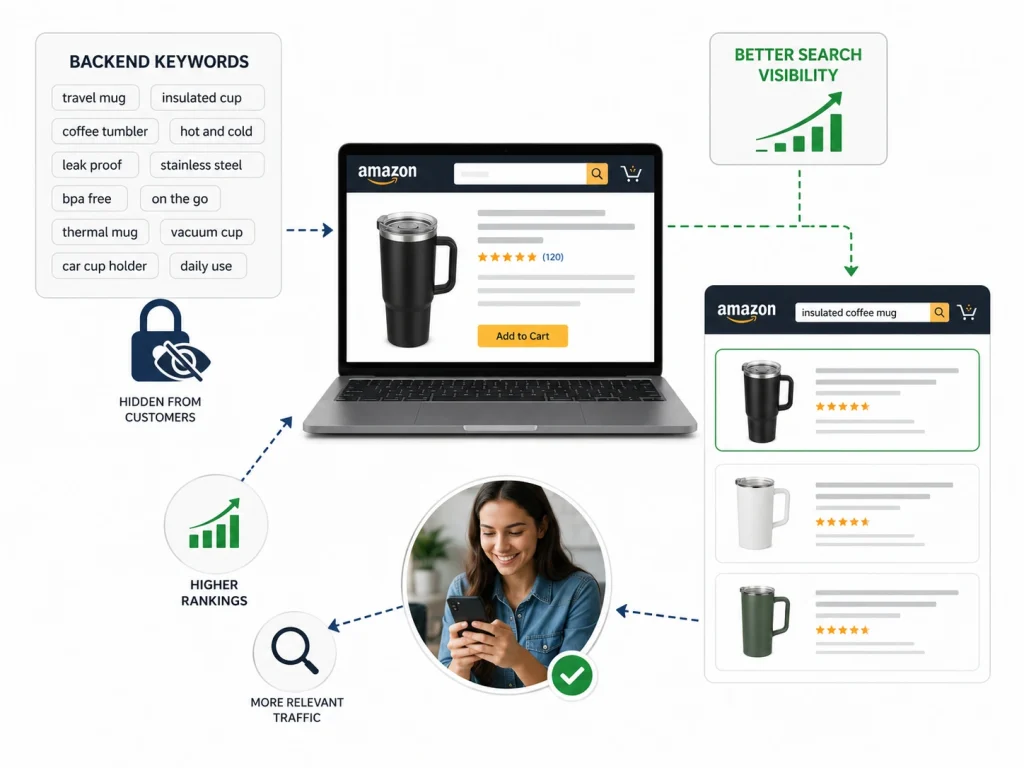
Backend keywords are the invisible backbone of successful Amazon search algorithm logic. While customers never see these hidden search terms, they remain essential for improving product search rankings.
These metadata fields allow sellers to include high-volume phrases that do not fit naturally into the frontend title or bullet points. By implementing a precise backend keyword optimization strategy, you ensure that your listing stays relevant for a wider variety of customer search queries.
Effective backend search terms act as a direct signal to the system, helping it understand the specific context of your product. Without them, you risk missing out on valuable long tail traffic that competitors might be capturing.
Proper product indexing through these fields ensures your items appear in the most relevant Amazon search results. Ultimately, mastering these hidden attributes is the most efficient way to boost product visibility and maintain a competitive edge in a crowded marketplace where every single byte counts.
Different Types of Amazon Keywords
Navigating Amazon requires understanding how different keyword types work together. Keywords are split into frontend and backend. Frontend keywords appear in your title and bullet points. They’re visible to shoppers and help drive clicks and conversions.
Backend keywords sit behind the scenes. These include hidden search terms, Subject Matter, and Intended Use fields. Shoppers don’t see them, but they help Amazon understand and index your product.
Using both creates a balanced listing that’s easy to read and optimized for search. This helps you rank for broad terms and capture more specific, high-intent searches.
- Frontend Keywords: Title, bullet points, and description; built for readability and conversion
- Backend Keywords: Hidden search terms and attributes; built for indexing
- Subject Matter Fields: Define your product’s niche
- Intended Use / Target Audience: Connect your product to the right shopper
Amazon Backend Keywords vs. Frontend Keywords: What Matters More?
Understanding the hidden side of your listing is the first step to better performance. Your title and bullet points are what customers see first. These are your front-end keywords, and they explain what you sell.
Behind that is another layer made up of backend search terms. Customers never see them, but Amazon uses them to decide when your product shows up in search results.
Feature | Frontend Keywords | Backend Keywords |
Visibility | Seen by customers | Hidden from humans |
Limit | 200 characters (Title) | 249 bytes (Search Terms) |
Purpose | Persuasion and click-through | Indexing and relevance |
Indexing Power | High visibility factor | Essential for long-tail discovery |
The metadata hierarchy is clear. Frontend keywords help you convert, but backend keywords ensure you get found in the first place. If your backend is broken, your beautiful title won’t even get a chance to be read.
Case Studies: Real-World Results
Data tells a story, charts alone can’t finish. These fixes have changed real business outcomes, no matter the product type. Clean the data, and sales follow. Below are results from cleaning seller central search terms and utilizing data-driven ads for Amazon to fix Amazon indexing issues across four niches.
Power & Battery and Personal Care Niche Results
Look at these shifts. They show what happens when you stop guessing. We cleared out duplicate search terms that were eating up space and deleted irrelevant search terms that confused the algorithm. Every click started to count. The outcome was a total transformation of account health.
Metric | Power Niche (Before) | Power Niche (After) | Personal Care (Before) | Personal Care (After) |
ACoS | 19% | 12% | 106.91% | 29.11% |
ROAS | 5.26 | 8.33 | 0.94 | 3.43 |
CVR | 3.54% | 8.74% | 11.94% | 18.72% |
Impressions | 994,821 | 1,199,980 | 454,557 | 1,340,186 |
But here is the exciting part. For the Personal Care niche, the ACoS was a nightmare. It was over 100%. By helping them fix keyword errors, we saved the account from total failure. Their reach tripled because the machine finally understood what they were selling. Precision wins every time.
Wireless Tech and Kitchen Gadget Niche Results
Wonderful things happen when you use amazon backend keywords correctly. In our next two categories, the visibility explosion was even more massive. We conducted deep amazon seo troubleshooting to find the gaps. We removed the blocked backend keywords that were holding these listings back. The rankings soared.
Metric | Wireless Tech (Before) | Wireless Tech (After) | Kitchen Gadgets (Before) | Kitchen Gadgets (After) |
ACoS | 161.61% | 46.95% | 96.18% | 47.36% |
CVR / CTR | 2.47% (CVR) | 5.6% (CVR) | 0.16% (CTR) | 0.72% (CTR) |
Rating / ROAS | 3.2 (Rating) | 4.0 (Rating) | 1.04 (ROAS) | 2.11 (ROAS) |
Impressions | 150,888 | 353,420 | 185,653 | 933,052 |
In the Kitchen Gadget niche, visibility improved sharply. CTR rose by 350% after removing irrelevant search terms that confused shoppers. ROAS also doubled through cleaner backend keyword structure. Simple fixes, but strong impact. Metadata matters more than it looks. Clean it, and performance follows.
How Amazon A10 and Rufus AI Algorithms Utilize Backend Metadata
Amazon has changed how it “thinks” about your product data in the last few years. The old days of simple keyword matching are gone. Now, Amazon algorithm logic is far more advanced. It uses something called semantic intent.
This means the system doesn’t just look for words; it looks for the relationship between those words. When you fill out your search terms, you are providing the context for this AI.
A10 search terms act as a roadmap for the new Rufus AI shopping assistant. If your backend keywords are clean, Rufus can recommend your product to shoppers using conversational searches.
This algorithm indexing power is what determines if you show up for “best gift for hikers” versus just “hiking boots.” Using AI semantic search principles allows your listing to bridge the gap between what a customer types and what they actually need.
Why Amazon Backend Keywords Stop Working: Diagnosing Indexing Drops
When backend keywords suddenly stop performing, it rarely happens without a reason. Sales drop, visibility disappears, and everything still looks “active” in Seller Central.
This is usually a sign of silent suppression caused by indexing or metadata issues. The best way forward is to diagnose what broke in your Amazon account and then fix it at the source with expert account support.
- Silent suppression: Listings stay active, but stop appearing in search results due to backend or indexing errors
- Ranking drops: Keywords that once drove sales suddenly lose visibility without obvious changes
- Indexing failures: Amazon may ignore parts of your keyword string if metadata issues are detected
- Category shifts: Automatic or accidental category changes can disrupt keyword indexing
- Policy flags: Restricted or risky terms can quietly reduce or block keyword visibility
- Wider impact: When multiple keywords stop indexing, it signals a deeper backend health problem
- Core fix: Identifying why backend keywords fail is key to restoring organic reach and stability
BrandsBro helps fix Amazon backend keyword errors by cleaning duplicate terms, removing restricted words, and improving keyword placement for better indexing.
Our team optimizes backend search terms professionally so your listings stay compliant, searchable, and ready for stronger Amazon visibility.
Amazon Search Term Field Best Practices for 100% Indexing
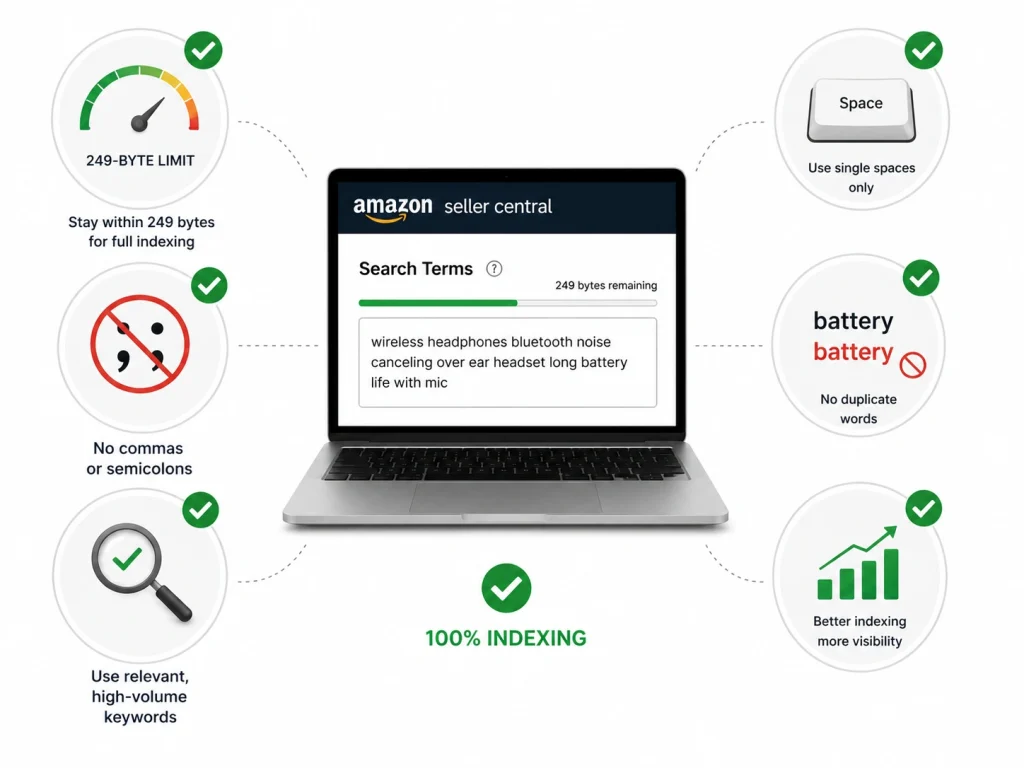
Success on Amazon requires following a very specific set of rules. If you break these rules, the algorithm won’t just penalize you; it will ignore you. The first rule is the 249-byte limit. This is not the same as a character limit.
Some characters, like special symbols or emojis, take up more than one byte. If you go to 250 bytes, Amazon might drop the entire field from its index.
Mastering indexing optimization means keeping things clean. Do not use commas. Do not use semicolons. Just use single spaces between your words. Search term best practices suggest that you should never repeat a word. If “battery” is in your title, you do not need it in your backend. When you optimize backend field data correctly, every single byte is used to capture a new search lead.
3 Amazon Backend Keyword Errors (Duplicate, Blocked, Irrelevant)
You do everything right. You pick a great product. You spend money on ads. But the sales just don’t come. Usually, the problem is invisible. It hides in your backend data. These errors act like a brake on your store.
They stop you from growing. But here is the good news. Once you see the mistakes, you can fix them. And for most sellers, cleaning up these three errors is like turning on a faucet of new sales.
Error Type 1: Duplicate Backend Keywords on Amazon
Repeating keywords feels harmless. Even logical at first. But it quietly wastes valuable backend space that could be used to reach new shoppers.
Amazon already understands your product from your title and bullets. Repeating the same terms in the backend doesn’t help. It just adds clutter.
In the Power & Battery niche, removing duplicates improved ACoS from 19% to 12% and boosted ROAS from 5.26x to 8.33x. CTR also doubled from 0.56% to 1.12%. Same product, just cleaner structure.
This pattern shows up often. Keywords get repeated across multiple sections without adding anything new. Once they’re removed, performance usually lifts.
In Personal Care, ACoS dropped from 106.91% to 29.11%, and CVR increased from 11.94% to 18.72%. That shift came from simply cutting repeated terms and freeing up space for better ones.
Wireless Tech saw impressions grow from 150,888 to 353,420 after cleanup. Nothing complicated. Just less repetition and better use of space.
Error Type 2: Blocked and Prohibited Backend Keywords
Some keywords don’t just underperform. They can limit visibility completely. Amazon filters backend terms strictly. One restricted word can reduce indexing or block reach without warning.
Competitor names, brand references, and ASINs should never be used. In the Power & Battery niche, removing risky terms helped maintain strong results, with ROAS at 8.33x and CTR at 1.12%. Clean data keeps performance stable.
Promotional words are another issue. Terms like “best,” “top,” or “new” don’t belong in backend fields. In Personal Care, removing them helped improve ROAS from 0.94x to 3.43x.
Wireless Tech showed a clear impact from cleanup. ACoS dropped from 161.61% to 46.95%, while impressions increased from 150,888 to 353,420. Better compliance led to better visibility.
Error Type 3: Irrelevant Backend Keywords
Not all traffic is useful traffic. Irrelevant keywords bring clicks without buyers. That’s where performance starts to slip. Amazon notices when people click but don’t convert.
In Kitchen Gadgets, removing irrelevant terms improved CTR from 0.16% to 0.72% and ROAS from 1.04x to 2.11x. Fewer wasted clicks. Better intent. Broad keywords are usually the problem. They attract too many unrelated searches. Once removed, results tend to improve quickly.
In Audio and consumer electronics, ACoS dropped from 96.18% to 47.36%, and CVR rose from 5.40% to 8.56%. Less noise, better conversions. Wireless Tech also improved after refining relevance.
CTR increased from 0.20% to 0.42%, and ratings moved from 3.2 to 4.0. The product didn’t change. The audience did. Relevance is what drives real performance. Not traffic volume, but the right traffic.
Common Amazon Backend Keyword Mistakes That Hurt Sales
Even experienced sellers fall into these traps. One of the biggest SEO errors sellers make is using filler words. You do not need words like “for,” “and,” “with,” or “by.” Amazon ignores these.
Including them just eats up your byte count. Another issue is sales-killing mistakes like using outdated seasonal terms. If you still have “Christmas gift” in your backend in July, you are wasting space.
Many keyword mistakes amazon sellers commit involve neglecting secondary fields. While the “Search Terms” field is the most important, you also have “Subject Matter,” “Target Audience,” and “Intended Use” fields. Each of these offers more space to index. Ignoring these backend attribute errors is like leaving free money on the table.
How to Fix Amazon Backend Keyword Errors (Duplicate, Blocked, Irrelevant) in Three Phases
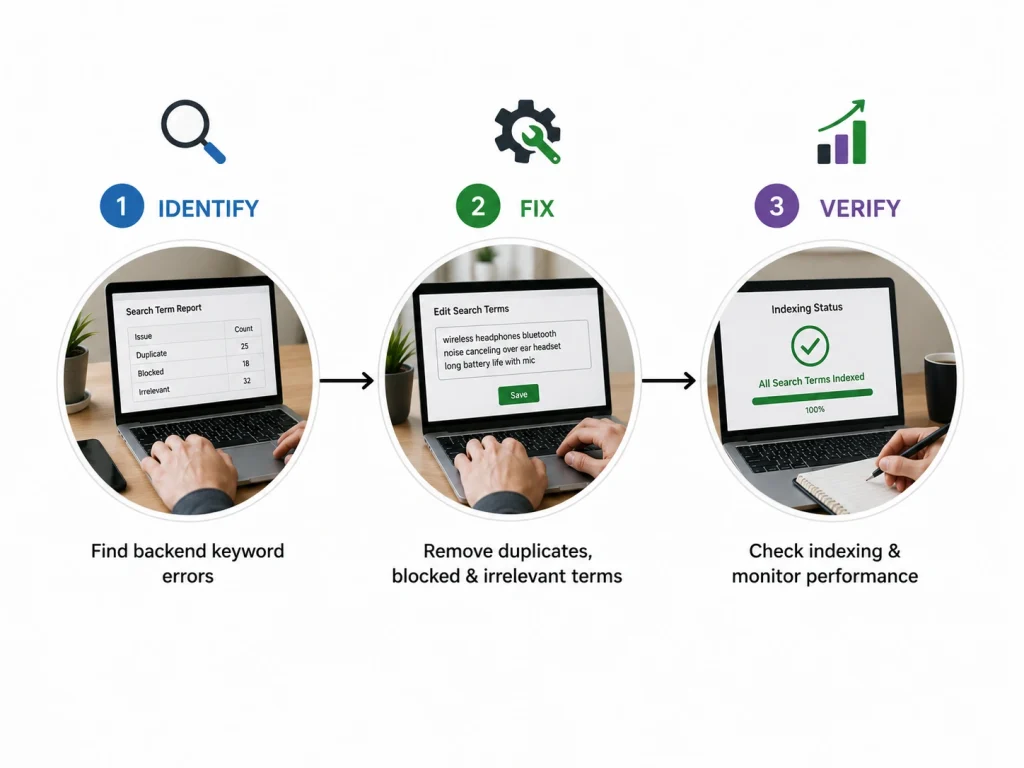
To truly master your listing, you need a repeatable process. First, you must identify the errors. Second, you must apply the technical fixes. Third, you must verify the results. This isn’t a one-and-done task. It is a cycle of improvement.
Phase 1: The Indexing Verification Test
You cannot fix what you haven’t measured. Start by doing a manual index check. Take your ASIN and a specific keyword from your backend. Type “ASIN + Keyword” into the Amazon search bar. If your product doesn’t show up, you are not indexed for that term. This is the most reliable indexing verification test available.
If you have hundreds of products, use a backend check tool. Professional tools can scan your entire catalog and tell you exactly which terms are failing. Once you verify amazon keywords, you can begin to see patterns. Are all your “blocked” terms competitor names? Is your byte count too high across the board?
Phase 2: Applying the Bulk Update Method
Efficiency is the key to scaling your Amazon business.
For a single product, you can use the seller’s central manual fix. Just go to the “Edit Product” page and navigate to the “Keywords” tab. But for larger brands, this takes too much time. You need to master the partial update file. This is an Excel sheet that allows you to change just your search terms without affecting the rest of your listing data.
Using the bulk update method prevents errors. It allows you to use formulas to check your byte count before you upload. If you have stuck metadata resolution issues where the dashboard won’t update, a flat file upload is often the only way to force the system to accept your new data.
Phase 3: Monitoring Recovery with A Battery Niche Data
Let’s look at what happens when you get everything right. The battery store had a decent setup, but their ACoS was 19%, and their CVR was 3.54%. They were a “solid” brand, but they weren’t “top tier.”
We implemented a full audit and fixed their backend keyword errors. Their ACoS dropped to 12%, and their CVR more than doubled to 8.74%. Their impressions grew from 994,821 to 1,199,980. This shows that even “good” listings have massive room for growth. When your backend is perfect, your ads become more efficient and your organic traffic explodes.
The Ultimate Amazon Backend Keyword Audit Checklist
Use this as your final quality control before hitting “Save.”
- Check Byte Count: Is it under 249 bytes? (Remember: bytes, not characters).
- Remove Duplicates: Are there any words already in the Title or Bullets?
- Verify Compliance: Did you remove all competitor brand names and ASINs?
- Kill the Commas: Is the string separated only by single spaces?
- Analyze Relevance: Does every word directly describe the product?
- Scan for Prohibited Claims: Did you remove words like “best” or “sale”?
- Fill Secondary Fields: Did you utilize Subject Matter and Intended Use?
- Check for Plurals: Are you wasting space on “shoe” and “shoes”? (Amazon stems these automatically).
- Remove Filler Words: Are “a,” “the,” and “with” gone?
- Test Indexing: Did you run an “ASIN + Keyword” search for your top 5 terms?
Following this audit protocol ensures that you don’t just fix current errors, but you also prevent future ones. A professional backend SEO audit should be conducted quarterly to keep up with algorithm changes.
Technical Implementation: Updating Your Keywords in Seller Central
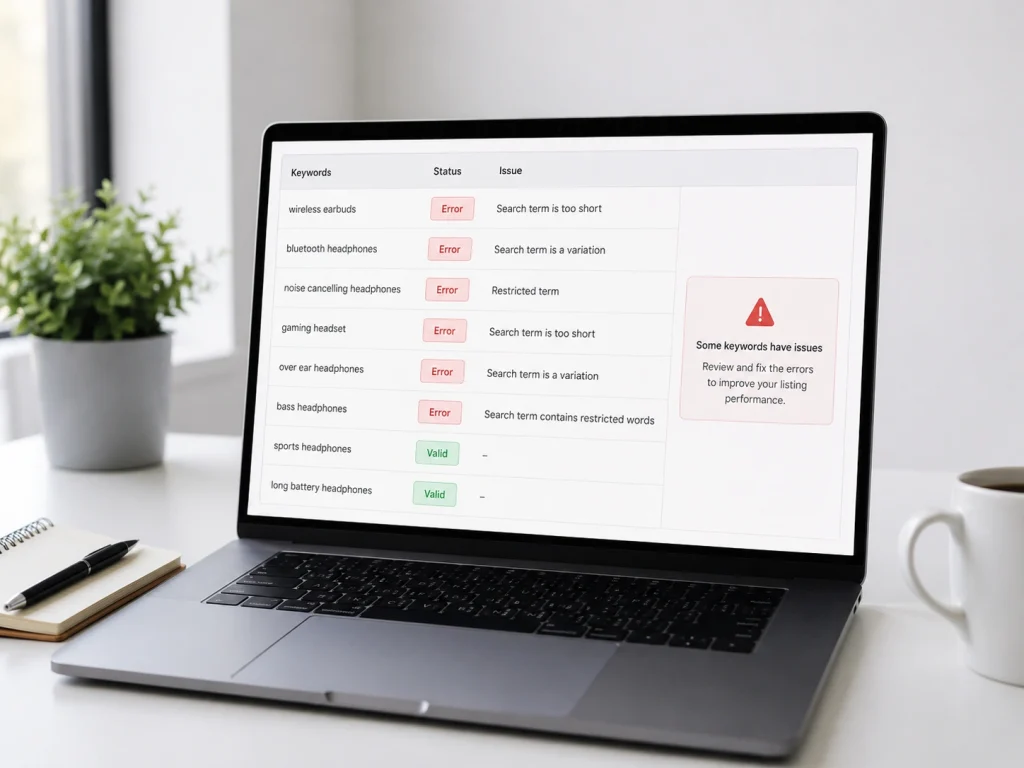
Getting the data into the system is the final hurdle.
Sometimes you make the changes, but they don’t “stick.” This is usually due to a contribution conflict. If you are a brand owner, you should have the highest “winning” contribution. If your changes don’t show up after 24 hours, you may need to perform a “Full Update” instead of a “Partial Update.”
If the system gives you an error message during upload, check your formatting. Common seller central manual fix errors include hidden HTML tags or illegal characters in the Excel cells.
Once the upload is successful, wait for the stuck metadata resolution period to pass before testing your indexing again. Usually, the index updates within an hour, but it can take up to 24 hours for the full rank to settle.
How to Fix Brand Name, UPC, or GTIN Backend Conflicts
Brand name, UPC, and GTIN backend conflicts happen when Amazon’s catalog data does not match the information you are trying to submit. This usually appears when the brand name is locked, the UPC belongs to another product, the GTIN does not match the manufacturer record, or another seller has already contributed conflicting catalog data.
To fix this, first check whether your brand name matches your Brand Registry account, product packaging, invoice, and GS1 certificate. Do not use shortened brand names, extra symbols, or different spacing. Amazon often rejects backend updates when the submitted brand name does not exactly match the trusted source.
For UPC or GTIN conflicts, use only valid GS1-issued codes whenever possible. If the product is private label, make sure the UPC is assigned to your company and not recycled from another listing. Then open a Seller Support or Brand Registry case with product images, packaging photos, invoice, GS1 certificate, and the correct SKU/ASIN details. The goal is to prove that your submitted data is the most accurate catalog contribution.
When to Use Manual Edit vs Flat File vs Amazon Support Case
Use manual edit when the backend error is simple and limited to one listing. For example, backend search terms, bullet points, title updates, image changes, or minor attribute edits can usually be fixed inside Manage Inventory. Manual editing is faster, but it is not always strong enough for locked catalog fields.
Use a flat file when you need to update multiple SKUs, fix required attributes, correct category fields, repair variation data, or push structured backend changes. Flat files are better for bulk fixes because Amazon gives a processing report that shows exact errors. If a field fails, the report helps you identify which column, value, or SKU caused the issue.
Use an Amazon Support or Brand Registry case when the backend field is locked, overwritten, rejected, or controlled by another catalog contribution. This is common with brand name, manufacturer, UPC, GTIN, product type, variation theme, and compliance fields. Do not waste time repeatedly editing the same field manually if Amazon keeps reverting it. That means you need support intervention with proof.
Amazon Backend Error Checklist Before Updating a Listing
Before updating a listing, check the product title, brand name, product ID, UPC/GTIN, manufacturer, model number, category, product type, and variation structure. These fields affect how Amazon reads and stores your listing data. If one of them is wrong, your backend update may fail or create new indexing problems.
Next, review backend search terms, subject matter fields, intended use, target audience, material, size, color, compatibility, and compliance attributes. Remove duplicate keywords, prohibited terms, competitor brand names, medical claims, exaggerated claims, and irrelevant search terms. Backend data should support the listing, not confuse Amazon’s algorithm.
Finally, save a backup before making changes. Download your current listing data or flat file, then update one section at a time. After submission, check the processing report, listing status, suppressed listing alerts, and keyword indexing within 24–48 hours. If the same error remains after repeated updates, stop editing manually and open a support case with screenshots and proof.
Frequently Asked Questions (FAQs)
You work too hard to let a tiny mistake hide your product from the world. Here is the good news, you can fix it right now. These answers will help you get your store back on track:
No. Commas just waste space. Use a single space between words instead. Amazon reads these spaces perfectly. Every extra byte counts toward your limit. Save those bytes for keywords that actually drive sales. Keep it clean and simple.
Never do this. It is against Amazon policy. Using rival brand names can get your listing suppressed or blocked. Stick to terms that describe your item. Focus on what makes your product unique instead of riding someone else’s coattails.
Usually, it is fast. You might see changes in sixty minutes. Sometimes it takes a full day for the system to update. Check your rank after twenty-four hours to see the true impact. Patience is key during this technical refresh.
No. Repeating words is a waste. Amazon already knows those terms. Use the backend for new words that did not fit in your title. This expands your reach. You want to cover as much ground as possible with unique phrases.
Not really. Amazon’s search engine is smart. It combines the words regardless of their order. Focus on including the best terms rather than worrying about the sequence. Just make sure the words relate to your product and what shoppers actually type.
Amazon will ignore the entire field. It does not just cut off the extra bits. The whole list of keywords fails to index. This makes your product invisible. Always use a byte counter to stay within the safe zone.
Fix Your Backend Keywords Before You Lose More Visibility
Every minute you wait, your rankings can slip further. At first, it feels small, then your product becomes harder to find. Losing visibility like this can hurt sales quickly.
The good news is, it can be fixed.
Learning how to fix Amazon backend keyword errors helps you recover performance. We often see duplicate, blocked, and irrelevant keywords quietly holding listings back.
Cleaning these up improves indexing and search relevance. That means better visibility and more consistent traffic.
Start with a quick audit, remove errors, and update weak keywords. Or let Brands Bro handle it for you and get your listings back on track faster.
