
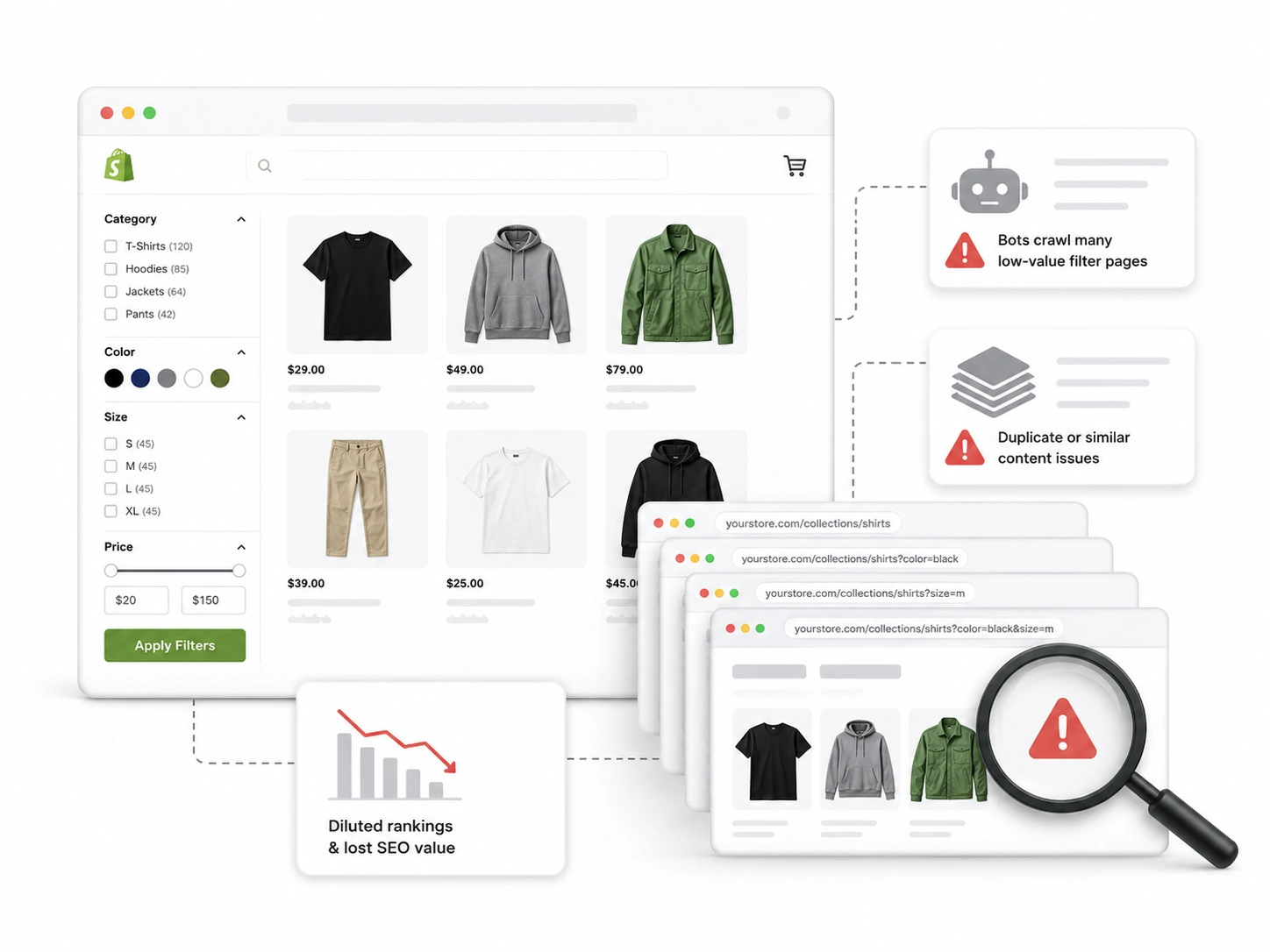
Shopify’s faceted navigation sabotages SEO by creating a heap of low-grade links, pages with duplicate content, and gaps in the authority juice funnel. About 50% Google crawl issues faced by online businesses today stem from navigable filters.
At the same time, a faceted search system is a valuable part of a site’s UX. Static searches make users work hard and often don’t lead to the desired product. Picture typing black, sports shoes, size M in the search bar on Nike’s website.
Shopify filtering and faceted navigation SEO problems are a growing concern. Here in this blog, we will get into the depths of it and find solutions.
What is Faceted Navigation and the Concept behind Shopify Filtering?
In simple words, a faceted navigation is a filtering system. It helps site visitors find products by features like brand name, size, color, and price.
On most big e-commerce websites, you will find a faceted navigation system in product listing pages. More common as sidebars and at the top of the inventory section. You must have used one to get to that full-sleeve, red, and checked shirt from your favorite brand on a site with a big shirt collection.
A faceted navigation has complicated technologies running under its hood. If not designed and managed well, it can destroy your site’s SEO and overall experience before you even notice.
How does Faceted Navigation Work?
“When you struggle with a problem, that’s when you understand it.” – Elon Musk
You can’t just ignore how something functions and expect to solve the problems it creates. That’s why it’s necessary to understand what happens when you click on a faceted filter.
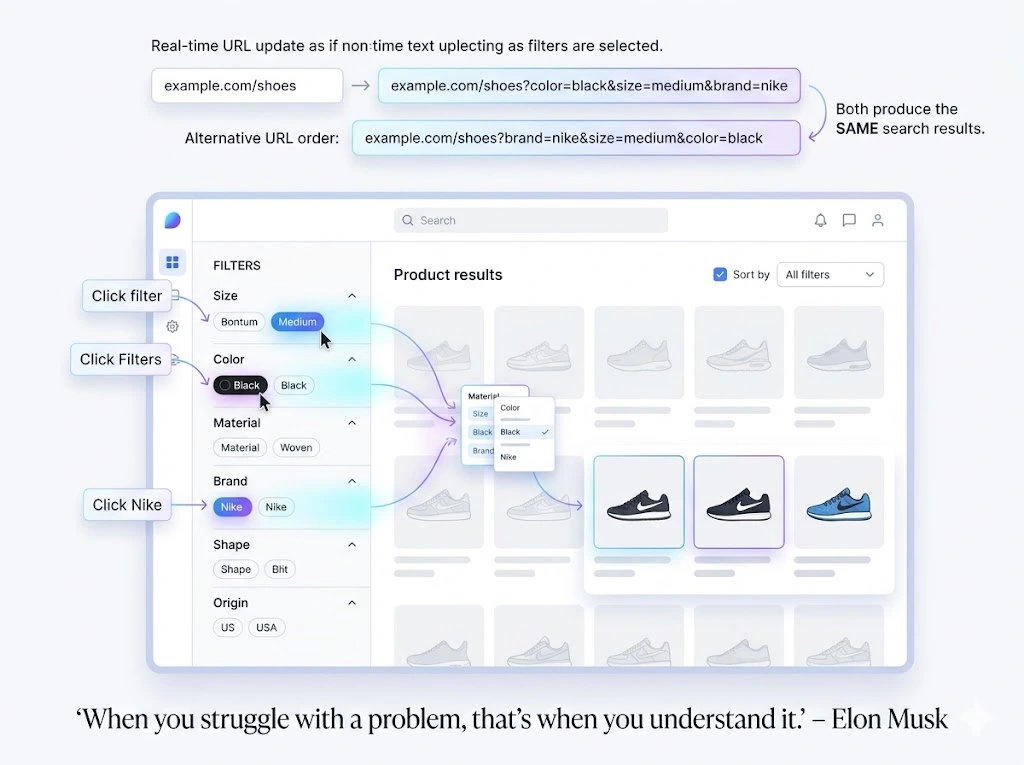
- On the interface, you see specific attributes of an item. Like size, shape, color, material, and origin. Each attribute is called a “facet”. They divide a large category of products by their unique qualities and features.
- As you type or click on a facet, the page reorganizes and shows only the content tagged with that facet. It also adds the facet name to the URL parameters.
- You can select multiple facets during a search. The added facets stack up at the end of the URL.
- You can follow any order when selecting facets to narrow down your options. Choose the size before the brand name, or pick the material last. But the order you follow is reflected in the new URL parameter.
For example, the following is an alternative search that brings the same result as the one in the previous point.
How Collection Page SEO Breaks Because of Filters?
The golden question. Where are things going wrong? Why, after all your hard SEO work, are visitors complaining about speed and being directed to the wrong pages? What’s pulling down the traffic? Let’s see:
Queries Exhausting the Database: Every selected facet creates a new query request. The system validates the query, goes through the inventory, matches and collects items, and makes a new link for the result. Meanwhile
- For each facet, the backend triggers the same set of actions
- Shopify simultaneously counts the number of items and updates the UI
- Some themes are prone to duplicate API calls
- Together, all these suffocate the site speed
Crawlers Collecting Dynamic Pages: Google doesn’t take the dynamic links from faceted search for temporary pages. It crawls all of them and indexes them as main pages, resulting:
- Duplicate URLs from filters in Shopify
- Faceted navigation duplicate content
- Shopify crawl budget issues
- Collection page SEO filter problems
- Crawl path issues by Shopify filters
Indexes Scaling Lightening Fast: Popular sites receive too many filter requests every day. At an incredible pace, they populate the index listing. The same set of queries appears with shuffled facets. That means a hundred possible URLs for a single search. Consequenting:
- Indexed volume outburst
- Weak faceted navigation internal linkings
- Wrong page promotion
- Redirection issues
Here, we will look closely at the major reasons for bad user experience (UX), Core Web Vitals failures, and SEO dilemmas.
Why Shopify Filters Create Duplicate Content Problems?
According to RavenTool, about 29% of websites in 2025 had duplicate content of some types. Duplicate content is chunks of similar text that show up on several pages of the same or different websites.
They don’t necessarily have to be texts scraped from somewhere else. Pages with the same category descriptions, product listings, and parameter versions are also examples.
You might also have heard the term Duplicate URL. It’s when multiple links refer to the same products and content. Whether making a full copy of a primary category page or a partial reference.
Shopify filters’ duplicate content puzzles search engine algorithms. They can’t figure out which page to rank, as all of them seem relevant to a user’s query.
Why Is Cannibalization a Common Faceted Navigation Problem?
Cannibalization is often misunderstood as duplicate content. But they are fundamentally different. If two or more pages of a website are ranking for one keyword, it’s cannibalization. Beyond texts and URLs, it’s about keyword targeting.
When millions of filtered pages containing the same keywords get indexed, they cloud Google’s brain. Affected pages compete for authority and end up diminishing each other’s value. The result is irrelevant rankings, which is the worst nightmare of an SEO manager.
How Faceted Navigation Hurts Shopify Crawl Budgets?
Google deals with over 1.3 billion registered websites every day. So it divides its crawl time among websites based on their popularity, hosts’ capacity, and update frequency. For a particular site, the crawl time allocated to it is its crawl budget.
With faceted navigation, crawl budget is spent rapidly and on the wrong assets. How? When a hundred visitors on an e-commerce site juggle through filters, Google treats the generated links as crawlable updates.
Every iteration attracts crawlers to recognize and sort them. Such crawl waste from filter pages prevents important pages from getting the attention they deserve.
How Can Faceted Filtering Trigger Index Bloating?
Index bloating happens when Google enlists too many unnecessary pages of a site as rankworthy resources. Many think that the bloat jams Google’s database and ranking system. When the actual problem is how it pollutes the index quality.
Most faceted filter links are short-lived. But they are collected and archived as permanent routes. When searchers click on them, they hit a dead wall.
Even those unlikely to be cited ever still live in Google’s memory. They play against prominent pages by downgrading their authority, relevance, and keyword strength.
What are Internal Linking Problems Caused by Faceted Navigation?

Faceted navigation can sabotage your internal linking strategy. It creates a subway network of unregulated content with no value. They point at you and challenge your authenticity. Eventually, your acceptance to Google plummets.
It’s an issue more severe than you think. What if all those autonomous resources have mentions of your homepage? Usually, you link your homepage to give Google more context about it. But done wrong, and it fires back.
How Can the Dynamic Filter be a Disaster for the Sitemap?
Shopify updates sitemaps on the go. You enter a new product, and the sitemap can reform automatically. Faceted search combinations can ruin a sitemap’s otherwise organized structure within seconds.
When a sitemap re-renders, the system paddles in a loop. It checks records of existing pages, reads the query type, and refreshes the XML list. If not backed by a caching system, the process iterates for every new product, blog, and dynamic page entry.
Categories, product names, and their attributes pile up into a tower of URL variants via faceted filters. They extend a dynamic sitemap vertically. Soon, it grows into a skyscraper with its head in the clouds. Google and your integrated API struggle to trace it from the bottom up.
Why is Faceted Navigation Not Just Another SEO Issue?
Faceted navigation hurting category pages is not a new idea. What’s new is the awareness of its catastrophic nature. It’s only in December 2024 that Google officially documented this and suggested better approaches to resolve consequences.
Whether you have just switched to Shopify ecommerce development through Shopify Migration, want to create a Shopify store, or already have one up and running, you must optimize its filter system.
Dynamic filters are part of the interface, with interactive functionality and technical sides. Optimizing them involves at least three departments: SEO for Shopify, design, and development.
Planning, wireframing, and executing phases become easier after you finalize decisions over a few common ambiguous matters. Let’s delve into them:
Planning Site Architecture: Sealing Gaps Beforehand
A foolproof blueprint is built by anticipating and solving future drawbacks. Before shapes, colors, and structure come technologies you are to use for a project.
Professionals not only focus on benefits. They brainstorm possible pitfalls early on and devise strategies to mitigate them.
For example: Crafting page templates that follow internal linking and category tree best practices. Ideating on tag varieties to achieve the most with the least filter options. Building a 301 redirect policy.
Placing facets in their most relatable sequence, so visitors don’t have to break the hierarchy, requires a creative effort. Designers can use toggles, icons, and other elements to promote a single line of choices.
Shopify Tags vs Filters SEO: Which Is Better?
Product tags vs filters? Shopify users often shift between these arguments. Which is the best filtering method for Shopify SEO? Modern Shopify answers them eloquently by prioritizing filters over tags.
Once trendy, tags were essential for categorizing items. Google used them as SEO signals. Over time, tags lost popularity due to the lack of an effective model to manage them. Shopify introduces Metafield to revolutionize filtering and as an effective alternative to tags.
Should Shopify Filter Pages Be Indexed or Blocked?
Should filter pages be indexed? Or should you block faceted navigation for SEO? Index them all, and your site will crumble under the weight of poor links. Block them, and potential high-value pages will never come into the light.
Shopify filter page indexing requires Shopify development experts to be thoughtful. With a well-planned site, you can assume the indexworthy parameter combinations. Keep them traceable and ready for full exposure. Use the noindex tag for the rest.
Robots.txt and Noindex for Shopify Filter URLs
Both can be used as Shopify filter URL blocking tools. But they command two different entities of the search engine. Robots.txt for Shopify filters includes the list of pages you want to stop crawlers from crawling.
While noindex is an indexing blocker. Custom tags with the capacity to set conditions for indexing. Crawlers enter a page, and shelve it in its directory if it meets those conditions.
Noindex for faceted navigation offers flexibility. Instead of blocking all dynamic pages, you can keep the promising ones open for crawling and indexing. Nothing is a better solution.
Canonical Tags for Shopify Filters: What Actually Works
Shopify filter canonical setup is perhaps the most implemented faceted navigation canonical strategy. Canonical tags are how you deal with duplicate content by guiding crawlers on which URLs to prioritize. All subordinate URLs without the tag get ignored.
Go to the “theme.liquid” file to update the default tag if necessary.
A default canonical tag looks like this.
Custom code snippets give you customization abilities to control certain pages’ visibility. Metafields even feature further advanced properties to override the default canonical instructions for selected page types.
How to Audit Shopify Filters Like an SEO Expert

E-commerce SEO services take multi-fold actions to diagnose site filtering issues. Beyond symptoms, they analyze crawl behaviors.
Tools like Screaming Frog, Google Search Console (GSC), and SEMRush don’t have targeted features for Shopify filter SEO audit. Familiarity with SEO metrics, index lists, and crawling principles comes as a prerequisite for auditing Shopify faceted navigation.
We suggest:
- Crawling: Crawler tools follow Search Engine algorithm rules and map actual crawlers’ footprints into your site. You get a visual guide to all paths and dead ends.
- Index: Focus on indexed links. If their number is way higher than the actual pages, your site is teeming with duplicate content. Watch out for URL parameters like these:
- Link Sources: Googlebots can read pages, whether loaded via AJAX scripts or HTML links. In the index hierarchy, HTML tags rank over JS nodes. Note the sources of most indexed pages. Even breadcrumb, sidebar, and footer navigations are not the same in the risk spectrum.
Tags and TXT files: GSC lets you dig into categorical, descriptive, and directive HTML tags: canonical and noindex tags and robot.txt instructions. Canon calls made by users are harder to take care of, as they ignore the default canonical remarks.
Real Client Case Study: Turning Faceted Filters Profitable
Last year, we worked with a business in the kitchen niche. Its traffic and revenue were falling steeply like a plane crash. The site had started losing its rank just after the month it saw a massive sales boost.
Brand Bro’s Shopify experts cracked the mystery just by listening to the story. They restored the growth momentum within a couple of months after signing the contract. Click here to read the full case study.
Which Shopify Filter URLs Should Be Indexed, Noindexed, Canonicalized, or Blocked?
Shopify filter URLs should not all be treated the same. Some filter pages can target real search demand, while others only create duplicate, thin, or low-value pages. The right decision depends on search intent, keyword value, product availability, and how unique the page is.
Index filter URLs when the combination has clear search demand and supports a useful shopping intent. For example, “black leather handbags,” “waterproof hiking boots,” or “organic cotton baby clothes” may deserve indexable pages if the product selection is strong.
Noindex low-value filter pages that create too many variations, such as sort order, price range, size-only filters, availability filters, or combinations with very few products. These pages usually do not deserve to appear in Google because they do not add unique value.
Canonicalize filter URLs to the main collection page when the filtered version is too similar to the parent category. Block URLs in robots.txt only when crawl waste is a serious issue, but be careful: blocking can stop Google from seeing canonical or noindex signals.
How to Find Faceted Navigation Problems in Google Search Console
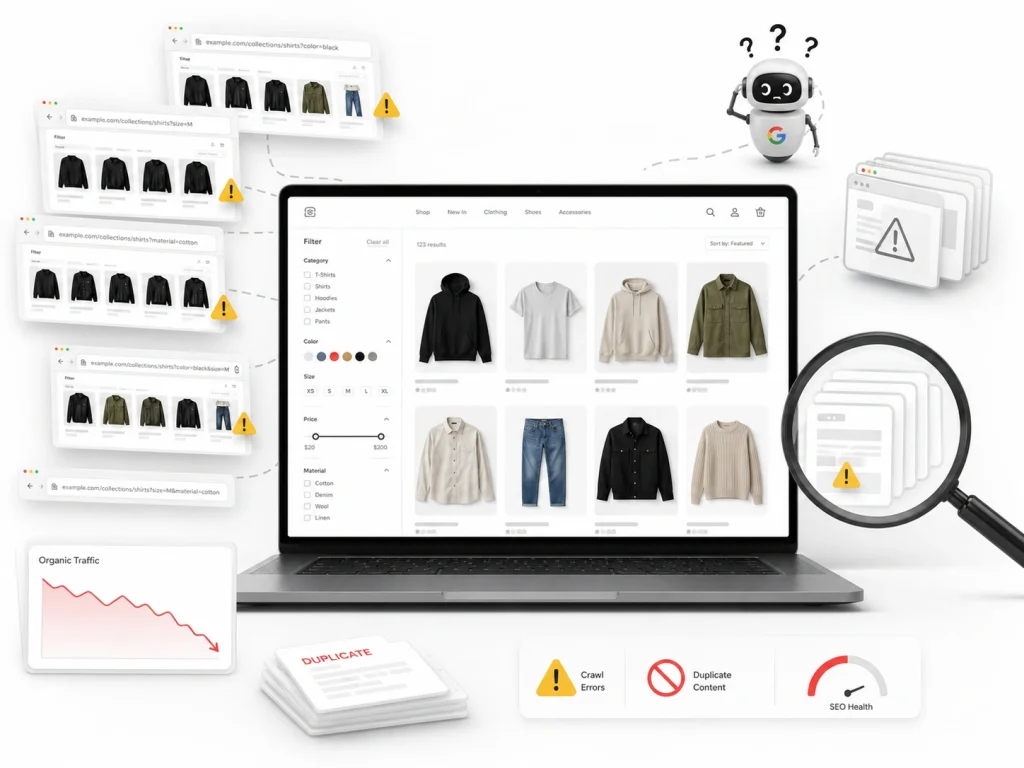
Google Search Console is one of the best tools for finding Shopify faceted navigation issues. Start by checking the Pages report under indexing. Look for unusual URL patterns containing filters, parameters, tags, sort options, or collection variations.
If many filter URLs are listed as “Crawled – currently not indexed” or “Duplicate without user-selected canonical,” it usually means Google is discovering too many low-value pages. This is a strong sign that your faceted navigation needs better control.
Next, check the Performance report. Filter pages that get impressions but no clicks may be weak, irrelevant, or poorly optimized. However, filter URLs with impressions, clicks, and strong commercial intent may be worth turning into dedicated landing pages.
Also review internal links. If your Shopify theme heavily links to every filter combination, Google may waste crawl budget on pages that should not matter. Clean navigation, noindex rules, and selective internal linking help Google focus on your most valuable pages.
When to Create Dedicated Landing Pages for Valuable Filter Combinations
Create dedicated landing pages when a filter combination matches a keyword people actually search for. A good landing page should target a specific intent, such as product type, material, color, size, use case, or audience.
For example, instead of relying on a messy filtered URL like /collections/shoes?color=black&type=running, create a clean landing page for “black running shoes.” This gives you more control over the URL, title tag, meta description, heading, copy, and internal links.
Dedicated pages work best when they have enough products, unique content, and stable demand. Do not create pages for every possible filter combination. That creates index bloat and weak pages that can damage overall SEO quality.
The best rule is simple: index pages that help shoppers and match search demand. Noindex or canonicalize pages that only rearrange existing products. Build dedicated landing pages only when the filter combination has real SEO value.
Frequently Asked Questions (FAQs)
The right question answered is half the problem solved. Topics like faceted navigation involve intricate technicalities. It’s only normal for you to have questions about it. Here we respond to the most common ones:
Faceted filters spark undesired links, bloat the index, duplicate content, and damage sitemaps. Issues solvable through custom noindex tags, canonical tags, and facet organization.
Filters can rapidly generate millions of pages. To crawlers, they are site updates that need urgent attention. They invest all the allotted time for that day in probing and indexing these rather unnecessary additions.
Many online sources recommend Shopify Search & Discovery and Sitemap NoIndex Pro. They may come in handy if your site is small and has a limited audience. To manage the growing traffic and resulting filter page issues, you need professional help.
In Google Search Console, you’ll see a long list of links with meaningless URL parameters, too many missing URLs and canonical data warnings, and crawl stats highlighting dubious links.
Boost Commerce Search & Discovery are two praised names. They use AJAX scripts to improve your filter experience. However, the satisfaction level varies from user to user.
Shopify has a unique framework running underneath. One that differs from any other popular CMS or libraries. Only rely on agencies specialized in e-commerce services, especially those with hands-on Shopify experience.
Make Faceted Navigation Your Strength, Instead of Losing to It
Today, an e-commerce site is impossible to imagine without a dynamic filtering system. Faceted navigation is not your enemy. Rather, it’s a weapon you need to master before stepping onto the battlefield.
At Brand’s Bro, we have a team of expert SEO masterminds. All of them have seasons of experience and have ripened their hands by solving real business problems. Get them to have a look at your site. After a short audit session, they will tell you what’s missing.
From planning and designing to promoting, we have every aspect of your site covered.
