
When your brand uses Amazon A+ content modules effectively, you transform a standard listing into a high-impact storytelling platform. These tools can help you connect with customers and show them what makes your products special.
Think of A+ Content as a way to upgrade your product descriptions. Instead of just plain text, you can add beautiful images, detailed charts, and even videos. The “modules” are like building blocks that you can mix and match to create a unique page for each product.
Using these modules is important for a few big reasons. They can help increase your sales, make your brand look more professional, and even help more shoppers find your products on Amazon. Let’s explore how you can use these tools to grow your brand.
Understanding Amazon A+ Content
Amazon A+ Content is a special feature for sellers who have registered their brand with Amazon. You can find it in your Seller Central account, and it lets you create enhanced product detail pages.
The main purpose of A+ Content is to give customers a better look at your products. Each piece of A+ content is connected to a specific product, known as an ASIN. You can use different types of media, like images and text, to show off your product’s best features.
Using amazon A+ content has great benefits. It can lead to more sales, fewer returns, and a stronger brand image. To use it, you’ll need to be part of Amazon’s Brand Registry program. This connects your brand to the A+ modules you’ll use.
The Anatomy of Amazon A+ Content
To truly master Amazon A+ Content, it helps to think of it as a complete system. Understanding its main purpose will make your strategy much stronger than just focusing on keywords.
Let’s break down the core concept of A+ Content by looking at its key characteristics.
Here are the essential qualities that define this powerful tool:
- Purpose: The main goal of A+ Content is to enhance your product pages. It aims to create better engagement with shoppers, which leads to more sales.
- Eligibility: A key requirement is that this feature is an exclusive perk. It is only available to sellers who have enrolled their brand in the Amazon Brand Registry program.
- Platform: You can find this tool in a specific location. It is located within your Amazon Seller Central account, inside the A+ Content Manager.
- Media Types: One of its best features is the variety of media you can use. You can build your pages with text, images, scrolling carousels, and even videos (for the Premium tier).
- Associated ID: Every A+ page is tied to a unique identifier. This is the ASIN (Amazon Standard Identification Number), which is the code for a specific product.
- Benefits: The advantages are clear. Using A+ Content can lead to a sales lift of anywhere from 8% to 20% and significantly improve how customers see your brand.
- Optimization Context: Its role in your business is vital. A+ Content is a crucial part of your Amazon SEO and conversion rate optimization efforts, helping you get seen and get sales.
Think of A+ Content as the main system. The modules themselves are the individual building blocks within that system. These are the tools you’ll use to tell your brand’s story.
What Are Amazon A+ Content Modules?
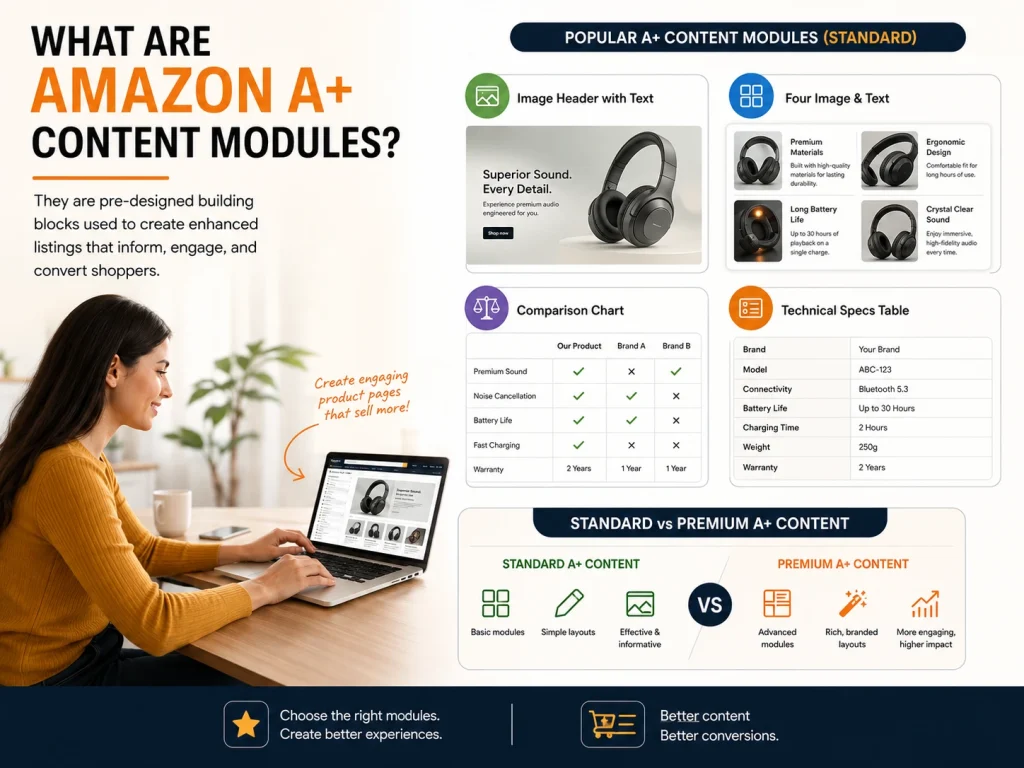
Amazon A+ content modules are the building blocks you use to create your enhanced listings. Think of them as pre-designed templates that you can fill with your own pictures and words. These are often called “A+ modules” or “content modules.”
These modules make it easy to design a beautiful and informative page. You simply choose the layouts you like and apply them to your product listings. This creates an engaging experience for your customers, much like a mini-website for your product.
There are many types of modules to choose from in the Standard A+ Content tier. Some popular options include:
- Image Header with Text: A large banner image with a text description.
- Four Image & Text: A grid of four images, each with its own text box.
- Comparison Chart: A table that compares your product with other similar items.
- Technical Specs Table: A chart that lists all the important technical details of your product.
Next, we distinguish between the two main tiers of A+ content, Standard vs Premium, and how their module sets differ.
Amazon A+ Content Module Types
Choosing the right Amazon A+ content modules is like picking the right tools for a job. Each layout serves a distinct purpose, from sharing your brand story to highlighting key product features.
In this guide, we’ll explore every Standard and Premium module available, showing you how to mix and match them to create a compelling narrative that drives sales.
You’ll see how interactive Premium features can boost engagement and get quick optimization tips to ensure your content converts.
Standard A+ Content Modules
Amazon currently offers around 17 modules in the Standard tier. You can mix and match up to 7 per ASIN.
- Standard Company Logo: Reinforces brand identity with a dedicated image slot at the top of the page.
- Standard Image Header with Text: A hero area that introduces the main product benefit with a concise text overlay.
- Standard Image & Text Overlay: A single image with a text caption overlay, great for feature storytelling.
- Four Image & Text Module: A balanced grid of four benefits with headlines and short copy, designed for mobile viewing.
- Standard Text Module: A text-only block used for extended detail or legal and ingredient information.
- Comparison Chart Module: Shows multiple ASINs side-by-side with a clickable “Add to Cart” button to boost cross-selling.
- Technical Specifications Table: A two-column data layout ideal for technical products like electronics.
- Standard Image Left / Right with Text: Uses an alternating image and text orientation for visual flow, perfect for process or tutorial sections.
- Single Image & Sidebar Text: A large photo next to a text sidebar, great for sustainability or guarantee messages.
- Standard Multiple Image Module: A simple, non-interactive carousel-style photo gallery.
- Standard Image Header with Dark Text Overlay: A variant of the hero module that uses stronger contrast for campaign headlines.
- Standard Four Image & Text Quadrant (Variant): Features larger image tiles to showcase flagship products.
- Standard Two Image & Text Module: Allows you to compare two features side-by-side (e.g., “Old vs New”).
- Standard Image & Text Overlay, Variant 2: A portrait-orientation version of the popular overlay module.
- Standard Brand Story Module: A banner layout for sharing your mission, heritage, and values, with space for trust badges or certifications.
- Standard Image with Text Carousel: A sliding gallery with captions that adds motion without needing Premium access.
- Standard FAQ (Text-Only): An expandable Q&A for common questions, which helps reduce returns and customer service requests.
Standard modules cover essentials for most brands, but Premium A+ Content adds motion and interaction for maximum impact.
Premium A+ (A++) Content Modules
Premium A+ lets you use interactive elements and videos for an immersive brand story. You can use up to 7 modules per listing.
- Premium Full-Width Hero Banner: An edge-to-edge image or looping background video with a headline overlay that instantly grabs attention.
- Premium Video with Text Overlay: An embedded product video (up to 60 seconds) with a headline or callout, best for demonstrations.
- Premium Image Carousel: A swipe-through gallery for showing multiple product angles or color variants.
- Premium Hotspot Image Module: Interactive click points on an image that reveal features with icons and micro-copy.
- Premium Split Layout (Image + Text Panels): Alternating sections ideal for “process,” “story,” or “how it works” content.
- Premium Q&A Accordion: An interactive accordion for pre-purchase questions that enhances the mobile user experience.
- Premium Comparison Table: A visually richer version of the standard chart, featuring hover states and clickable CTAs.
- Premium Brand Story Carousel: A scrolling panel series used to convey your mission, values, and craftsmanship through images and copy.
- Premium Lifestyle Background Module: A large contextual photo with floating text boxes, great for fashion or home brands.
- Premium Interactive Feature Module: Advanced hotspots combined with zoom areas for complex items like gadgets or tools.
Whether you use Standard or Premium, choose modules that support the buyer’s decision path and reinforce your brand story.
Optimization Tips for Both Tiers
- Keep the first two modules visually strong; they capture > 60 % of user attention.
- Add alt-text with natural keywords for search visibility.
- Use consistent image lighting and color tone for brand unity.
- Reorder modules to test conversion changes.
- Always preview on mobile before submitting.
How to Choose and Structure Your A+ Content Modules
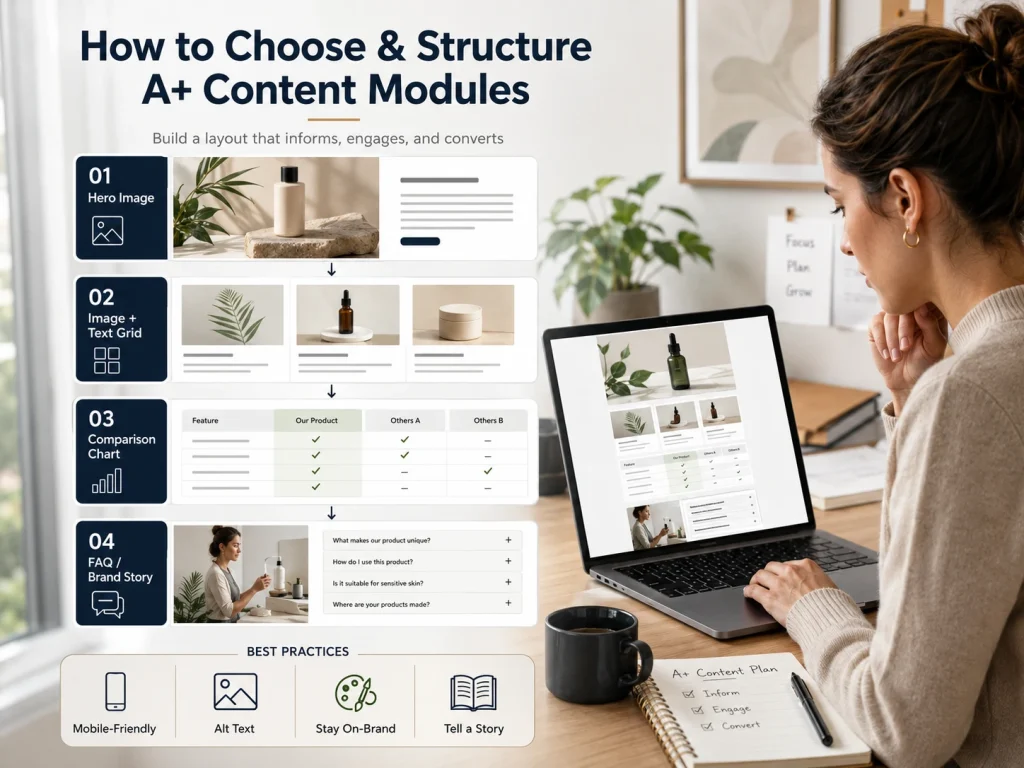
Choosing the right modules is all about your goals. Do you want to show off the benefits of your product? Use modules with images and text. Need to explain technical details? A specs table is perfect for that. Want to encourage customers to buy more? A comparison chart can help you cross-sell other products.
A great way to structure your modules is to think of your A+ Content like a landing page. You can start with a big, bold hero image to grab attention. Then, use a grid of images and text to highlight the main features. After that, a comparison chart can help customers make a decision. You can end with your brand story and an FAQ section to answer common questions.
When you build your layout, remember to use the keyword “Amazon A+ content modules” naturally. Also, keep these best practices in mind:
- Make it mobile-friendly: Many people shop on their phones, so make sure your content looks good on a small screen.
- Use alt-text: Add descriptions to your images. This helps with accessibility and can improve your product’s visibility in search results.
- Stay on-brand: Use your brand’s colors and fonts to create a consistent look.
- Tell a story: Use your modules to tell a compelling story about your product and brand.
It’s also helpful to have a checklist for your modules. This should include image size requirements and character limits for text to make sure everything fits perfectly.
With your module layout planned, the next step is execution and linking into your broader product-listing and brand ecosystem.
We worked on an Amazon A+ Content Modules project where the client had weak product presentation and low engagement, so the BrandsBro team improved the module structure, visual layout, and content flow to make the brand look more professional, trustworthy, and better optimized for performance.
If you’re struggling with your Amazon A+ Content Modules, you can schedule a free meeting with us, and we’ll review your issue and suggest the right solution.
Implementation: From Setup to Submission
Putting your A+ Content into action is a straightforward process. First, make sure your brand is enrolled in the Brand Registry. Once that’s done, you can go to the A+ Content Manager in Seller Central.
From there, you’ll select the modules you want to use and start uploading your assets. This includes high-resolution images, videos (if you’re using Premium), and well-written text that focuses on the benefits of your product. Don’t forget to fill in the alt-text for all your images.
After you’ve built your page, you’ll apply it to the specific ASINs you want to enhance. Then, you submit it for review. Amazon will check to make sure your content follows their guidelines, and once it’s approved, it will go live on your product page.
It’s also a good idea to track how your new A+ Content performs. You can use Amazon’s experiments to A/B test different layouts and see what works best for your audience. This will help you understand what resonates with your customers and improve your content over time.
Finally, let’s examine how to measure impact and maintain the content for long-term performance.
Measuring Impact & Maintaining Performance
Once your A+ Content is live, it’s important to see how it’s doing. You can look at several metrics to measure its success. These include the conversion rate lift, which tells you if more people are buying your product. You can also track sales, return rates, and how much time shoppers spend on your page.
Amazon’s own data shows that A+ Content can have a big impact. Standard A+ can increase sales by around 8%, while Premium A+ can boost them by up to 20%.
Well-made A+ Content can also help with your Amazon SEO. While the content itself isn’t directly indexed by Amazon’s search, it can lead to higher conversion rates, which is a positive signal to the algorithm. The images and text can also be indexed by Google, bringing more traffic to your page.
To keep your A+ Content performing well, you should refresh it from time to time. Update your images, A/B test different modules, and make sure your brand story is consistent across all your products.
Best Amazon A+ Content Module Layouts by Product Type
The best Amazon A+ Content layout depends on the product type, price point, and customer objections. Visual products need lifestyle images, comparison charts, and benefit-led image blocks. Technical products need specification tables, feature callouts, and use-case modules.
For electronics, tools, appliances, and mobility products, use a clear problem-solution layout: hero image, key benefits, technical specs, comparison chart, and FAQ-style answers. Amazon recommends balancing images and text, adding specifications, and using comparison charts to reduce buyer hesitation.
For beauty, fashion, kitchen, and home products, focus on lifestyle storytelling. Use before-and-after visuals, ingredient or material highlights, size guides, and brand story modules to build trust and make the product feel easy to understand.
Amazon A+ Content Approval Rules and Rejection Checklist
Amazon A+ Content can be rejected if it includes unsupported claims, poor image quality, spelling errors, pricing, promotional language, external links, guarantees, or competitor mentions. Do not use words like “best,” “#1,” “free,” or “money-back” unless Amazon clearly allows and verifies the claim.
Before submission, check every image, headline, and paragraph for compliance. Remove medical claims, exaggerated performance promises, warranty-heavy language, and customer review quotes. Keep claims factual, product-specific, and easy to prove.
Also preview the content before submitting. Amazon’s A+ Content tool allows sellers to check desktop and mobile versions before review, which helps catch layout and readability issues early.
Mobile Optimization for Amazon A+ Content Modules
Most Amazon shoppers browse on mobile, so A+ Content must be readable on small screens. Use short headlines, large product images, minimal text overlays, and simple benefit statements.
Avoid stuffing text into images. Amazon warns that embedded image text can become blurry or unreadable on mobile, so key product details should stay clear, short, and scannable.
For mobile-first A+ Content, place the strongest benefit in the first module, use vertical-friendly visuals, and keep each section focused on one message.
Frequently Asked Questions(FAQs)
If you’re just starting with Amazon A+ Content or looking to upgrade to Premium A+, it’s normal to have a few questions. Below are some of the most common queries sellers ask about using Amazon A+ content modules effectively.
You must be enrolled in Amazon Brand Registry to access A+ Content. It’s available to brand owners and professional sellers. Standard A+ is free, while Premium A+ is invitation-only and may include extra costs.
Standard A+ Content offers basic layouts with images and text. Premium A+ adds videos, interactive features, and larger visuals. Standard is free for all registered brands; Premium requires eligibility and offers more design flexibility.
Choose modules that match your goal. Use image headers for branding, feature grids for benefits, comparison charts for product differences, and FAQs for buyer questions. Keep your design clean and consistent with your brand.
Yes, indirectly. A+ Content boosts conversion rates, which can improve Amazon rankings. It also helps Google index your product pages through images and text, increasing visibility both inside and outside Amazon.
Common mistakes include using blurry images, making false claims, adding external links, or repeating product titles. Always follow Amazon’s content guidelines, use original visuals, and check spelling to avoid rejection or delays.
It's Time to Master Your A+ Content
To sum up, Amazon A+ content modules are powerful tools that let you tell a richer story about your brand and products. They can help you build trust with customers, increase sales, and create a stronger brand identity on the platform.
We’ve seen how Amazon A+ Content is divided into Standard and Premium tiers, each with its own set of module types. By choosing the right modules and arranging them thoughtfully, you can turn a simple product page into a compelling sales tool.
Now is the time to take a look at your own listings. See where you can use A+ Content to improve the customer experience. By mastering Amazon A+ content modules, you position your brand for stronger performance and marketplace authority.
