

Setting up an Amazon Storefront can be challenging. Many sellers have their applications denied because they fail to meet Amazon’s requirements. You must follow the Amazon Storefront requirements to get approved.
These requirements include: getting a Professional Seller account, enrolling your brand in Amazon Brand Registry with a registered trademark, and having active product listings. Once approved, you can design your Storefront using Amazon’s Store Builder and submit it for review.
In this guide, you will learn what the requirements are for an Amazon Storefront and how to follow them step by step. From creating your seller account to submitting your Storefront, we’ll guide you through each step.
Understanding Amazon Storefront

An Amazon Storefront is just like your own little shop inside the Amazon website. It’s a place where you can show all the products you sell in a clean and organized way. You can add pictures, videos, and even share a story of your brand so that the customers can connect.
Amazon Storefronts are different from regular product pages. You can share all about your business in one clean link (like amazon.com/yourbrand) with the customers. When someone clicks on your link, they’ll only see your products, not products from any other sellers.
It’s like decorating your own store in a mall. So, the people walking into your store only see your product. Creating an Amazon Storefront makes your brand look more professional and allows you to sell more on Amazon.
Benefits of creating an Amazon storefront

There are several reasons why creating an Amazon Storefront is better than depending on standard product listings. A Storefront gives you more control, more visibility, and a stronger connection with your customers.
Here’s why having a storefront makes a big difference:
- A storefront makes your brand easier to find.
- Your brand looks real and trustworthy.
- You control how your products look.
- Amazon provides performance data, so you know what’s working.
- A better shopping experience means people come back more often.
Amazon Storefront Requirements: What You Need to Qualify
Before you can build a branded Storefront on Amazon, you need to meet the basic requirements for Amazon Storefront approval. These Amazon Storefront requirements help ensure your brand is eligible for better visibility, stronger brand control, and access to advertising opportunities.
Here’s everything you need to know to get approved and start building your Storefront.
Step 1: Get a Professional Seller Account on Amazon
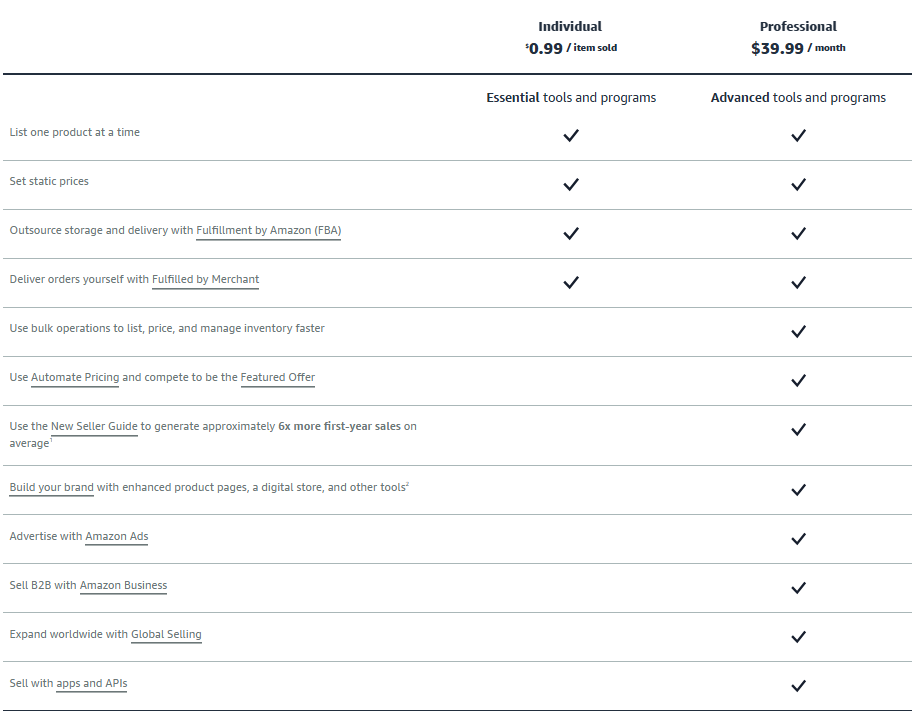
First things first, you need to have a professional account on Amazon to get started. This is the paid seller plan (about $39.99/month) that gives you full access to Amazon’s selling tools, including the ability to create a storefront.
If you’re currently on an individual plan, then you won’t be able to set up a storefront. To upgrade, simply log into your Seller Central account, then go to your account settings, and switch to the professional plan.
After completing this step, you’re now one step closer to building your brand on Amazon.
Step 2: Register Your Brand with Amazon
After getting your Professional Seller account, the next step is to register your brand using Amazon’s Brand Registry.
It gives your brand official access to build a Storefront and use premium features like A+ Content, brand protection tools, and enhanced advertising options.
To register your brand with Amazon, you’ll need a registered trademark for your brand name. It must be active (not pending unless you use Amazon’s IP Accelerator) and printed on your product packaging. Word marks are the easiest to register, but image marks can also be effective.
The process is simple: first, visit https://brandregistry.amazon.com, then sign in with your seller’s account and submit the required information.
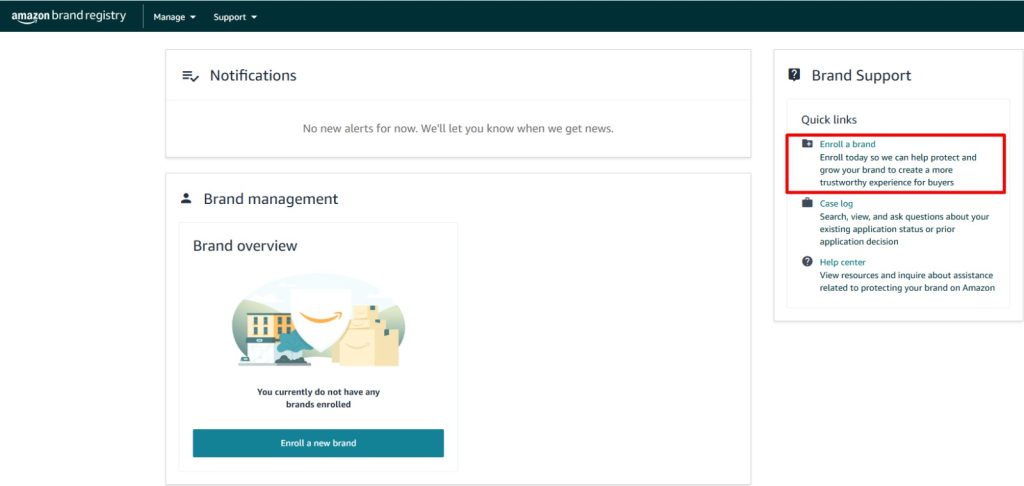
Amazon typically verifies ownership by contacting the trademark owner (or their attorney) listed with the trademark office.
They will send a verification code via email. Once received, enter it into your Amazon account to complete the process.
After you submit your Brand Registry application, you have to wait for Amazon to approve it.
Step 3: Wait for Brand Registry Approval
This part is pretty straightforward. You just need to wait for Amazon to approve your Brand Registry application. It can take anywhere from a few days to two weeks to approve.
It depends on how quickly you respond to Amazon’s emails and whether your trademark details are precise.
You can speed things up by:
- Checking your emails daily (including spam folders) for Amazon’s verification message.
- If you used a lawyer or registered agent for your trademark, let them know to expect the email.
- Double-check that your trademark info exactly matches what you submitted.
Once Amazon’s Brand Registry team approves you, you’ll be eligible to access Store Builder and start creating your Amazon Storefront.
Step 4: Access the Store Builder
After registering your brand, it’s time to build your storefront. Amazon makes creating a store easy with its store builder. It’s a drag-and-drop tool that can be found inside Seller Central. It helps you build and design your Storefront without needing any coding skills.
To access the store builder, first log in to your Amazon Seller Central account. Then hover over the “Stores” tab, and click “Manage Stores.”
Choose your brand, then hit “Create Store.” That’s your starting point.
You’ll be taken to a page where you can start customizing your Storefront. You can add your logo, header image, and brand colors to match your style. This is your chance to bring your brand to life on Amazon.
Amazon also gives you several templates to choose from, like a grid layout, product showcase, or featured deals. Pick the one that fits your catalog best.
You can create multiple pages, such as ‘Best Sellers’ or ‘New Arrivals’, to organize your catalog like a professional brand site. Each page uses “tiles,” which are blocks that you can drag and drop, similar to images, videos, product collections, or text.
How your storefront looks, how the products are grouped, what story you tell your customers, you control everything.
If you want a complete step-by-step guide, you can check out our guide to creating an Amazon Storefront for beginners.
Step 5: Get Final Approval From Amazon
Once your storefront is built, it’s time to submit it for approval to Amazon.
The Amazon team checks your storefront to make sure it follows their content guidelines. That means:
- No misleading claims
- No comparisons to competitors
- No pricing promises
- Do not include links that direct customers outside of Amazon
Most stores are reviewed within 24 to 72 hours, but it can take longer if there’s any issue with your content or design. If there’s an issue, Amazon will tell you exactly what needs fixing before approval.
Once your storefront goes live, you can now share your custom store link with customers, run Sponsored Brand Ads, and track performance using Store Insights.
Don’t Make These New Seller Mistakes
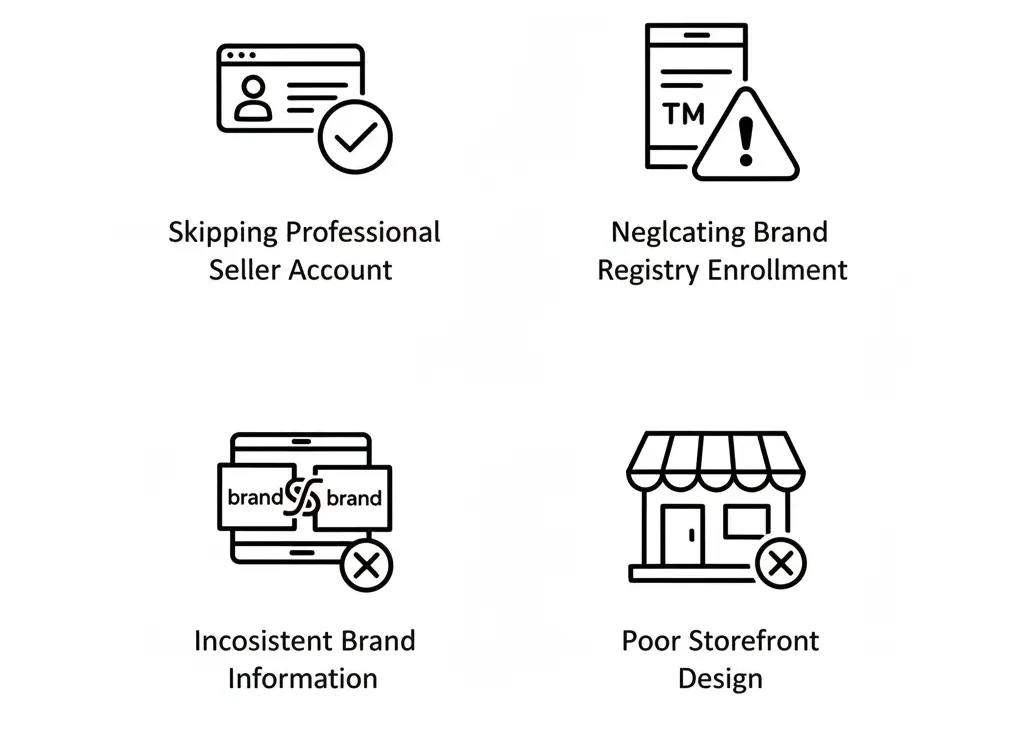
The Amazon Storefront is a powerful tool for growing your brand, but there are some common mistakes that most new sellers make. It often leads to rejection of your Amazon Storefront approval.
Here are the most common mistakes you should avoid while setting up an Amazon Storefront:
Skipping the professional seller account
Some sellers try to build a storefront without switching to the professional seller plan and wonder why nothing’s showing up.
Amazon only gives storefronts access to professional sellers’ accounts, so there’s no skipping.
Neglecting Brand Registry Enrollment
Some sellers create a storefront without enrolling in the brand registry. They assume that the listed products are enough.
However, Amazon requires proof that you are a legitimate brand with a registered trademark. Without the registered trademark, you’ll be stuck at the approval stage, unable to move forward.
Inconsistent Brand Information
Amazon can flag your brand if the brand name on your product doesn’t exactly match the name in your Brand Registry or Seller Central. So, keep everything consistent and identical from your trademark to your product packaging and logo.
Poor Storefront Design
A messy or unclear Storefront can hurt your brand image. Your storefront will look unprofessional with sloppy layouts, low-res images, or missing info that makes shoppers bounce right off your page.
You can check out our professional Amazon Storefront design service to get a clean, high-converting store.
Do You Need an Amazon Storefront?

Not every seller on Amazon needs a storefront, but if you’re serious about building a brand, then it’s a smart move.
A brand owner or private label seller can create a storefront to tell their brand story. This storefront can show the entire product line and help them stand out from other sellers. It also drives traffic directly to your brand. So, they get a complete branded experience from the moment they land.
The sellers can run Amazon ads by setting up an Amazon Storefront. It helps them test different promotions and improve campaign results with better tracking.
Amazon Storefront also gives a personal hub for influencers or content creators. It’s like your own Amazon shop that’s built just for your audience. Followers can shop all your recommended products in one place. It’s easy to share and helps you monetize your recommendations with affiliate earnings.
So, if you’re looking to grow visibility, conversions, and customer loyalty, then Amazon Storefront is worth it.
Amazon Storefront Eligibility Checklist Before You Apply
Before you apply for an Amazon Storefront, make sure your seller or vendor account is actually eligible. The core requirement is simple: sellers need a Professional seller account, enrollment in Amazon Brand Registry, and an active account in good standing. Amazon also requires the brand to be properly registered with the right selling roles assigned before you can create a Store.
The biggest mistake sellers make is trying to build a Store before their brand setup is clean. Your brand name, trademark details, catalog connection, and ASIN ownership should match inside Amazon’s system. If your brand name appears differently across your trademark, Seller Central, product listings, and packaging, Amazon may delay or block access. This is not a design problem; it is an account-structure problem.
You should also check that your listings are active, compliant, and attached to the correct brand. A Storefront is meant to organize your branded product catalog, not fix broken listings. If your ASINs have suppressed images, incomplete detail pages, pricing problems, or policy warnings, clean those up before applying.
A strong pre-application checklist should include Brand Registry approval, Professional selling status, account health in good standing, active branded ASINs, correct brand ownership, high-quality product images, and clear category organization. If any of these are missing, do not rush the Store build. Fix the foundation first.
Amazon Storefront Image, Video, and Creative Asset Requirements

Amazon Storefront creative assets must be clear, high-resolution, properly sized, and built for both desktop and mobile shoppers. Amazon says every Store page includes a header and must have at least one additional content tile. Each page can have up to 20 sections, with limits on specific tile types such as background videos, product grids, galleries, featured deals, and recommended products.
For the header, Amazon lists a minimum hero image size of 3,000 × 600 pixels and a brand logo size of 400 × 400 pixels, with a maximum file size of 5 MB for each. The hero image is one of the first things shoppers see, so keep the main product, lifestyle scene, or brand message inside the safe zone. Amazon notes that some hero images may be cropped by up to 30%, so placing important text or product details near the edges is a bad idea.
Image tiles should also follow Amazon’s size rules. For example, large image tiles require 1,500 × 1,500 pixels, medium tiles require 1,500 × 750 pixels, and small tiles require 750 × 750 pixels. Amazon recommends 3,000-pixel-wide images for high-resolution display across devices. Do not upload blurry, stretched, pixelated, or over-compressed images because these create a poor shopping experience and can hurt approval.
For video, keep the content relevant to the product and Store. Amazon’s Store policies state that videos must stream correctly, match the product or Store, and not exceed five minutes. Background video tiles have tighter specs: they need MP4 format, H.264 codec, at least 1,280 × 640 resolution, and a video length between 2 and 20 seconds.
Do not rely heavily on text embedded inside images. Amazon specifically discourages embedded text because search engines cannot read it well and screen readers may not access it. For better SEO, accessibility, and AI Overview visibility, use Amazon’s text tiles or “image with text” tiles instead of putting all your messaging directly into the image.
Amazon Storefront Content Rules That Can Get Your Store Rejected
Amazon can reject a Store if the content does not provide a consistent, high-quality customer experience. Store content must be suitable for general audiences, written in the primary language of the Amazon marketplace, and use correct grammar and punctuation. Sloppy text, random capitalization, spelling mistakes, and incomplete sentences make your Store look unprofessional and can trigger moderation issues.
Avoid anything that pulls shoppers away from Amazon. Store content must not include phone numbers, email addresses, physical addresses, QR codes, or links to websites outside Amazon. Social media follow buttons may be allowed, and brand website details may appear in videos only when they are not paired with a direct call to action such as “Shop now at our website.”
Claims are another major rejection risk. Amazon requires advertising claims to be truthful, accurate, and supported with evidence. If you claim “best,” “number one,” “clinically proven,” “reduces 99%,” or compare your product against competitors, you need proper substantiation. Direct competitor denigration is not allowed, and comparative claims generally need independent, recent evidence.
Do not include disease, treatment, cure, prevention, or medical-style claims unless your product and evidence fully comply with Amazon’s rules and applicable laws. Amazon’s Store policy specifically says Store content must not claim to diagnose, cure, mitigate, treat, or prevent a disease or addiction. This is especially important for health, wellness, supplement, beauty, baby, and medical-adjacent products.
Promotion copy must also be handled carefully. Amazon does not allow shipping or delivery claims, time-sensitive promotions, pressure-based CTAs like “Last Chance,” or vague calls to action such as “Click here.” If you use deals, use Amazon’s Featured Deals widget correctly and avoid unsupported discount language. The safest Storefront copy is clear, factual, product-focused, and directly connected to the page or ASIN it links to.
Frequently Asked Questions (FAQs)
After going through the Amazon Storefront requirements, it’s common to have a few questions. Here are some answers to common questions around setup, approvals, and account limitations.
Creating a Storefront is free, but you need a $39.99/month Professional Seller account. That’s the only required fee to access the Storefront builder and features.
One Storefront per brand per seller account is allowed. If you manage multiple brands, each one needs its own registered trademark and brand registry approval to create a separate Storefront.
No, but you must have a Professional Seller account and brand registry approval. Individual seller accounts are not eligible for Storefront access.
It usually takes 24 to 72 hours after submission. However, delays can happen if your content does not meet Amazon’s guidelines. The Brand Registry approval can take up to 2 weeks.
You might not have a Professional Seller account or matching brand info. Also, your brand name in Seller Central must match exactly with your trademark. If those don’t align, the Storefront option may not appear.
Brand’s Bro Makes Amazon Storefront Setup Simple
Starting your Amazon Storefront is exciting, but even one mistake can delay your approval. That’s where Brand’s Bro comes in.
We help sellers meet every requirement – from upgrading to a Professional Seller plan to completing Brand Registry. With over a decade of experience and millions in storefront sales for our clients, we know what works and what doesn’t.
Follow the steps in this guide to set up your storefront the right way. And if you need help, just reach out. Brand’s Bro is here to make your Amazon Storefront launch simple, clear, and successful.
