
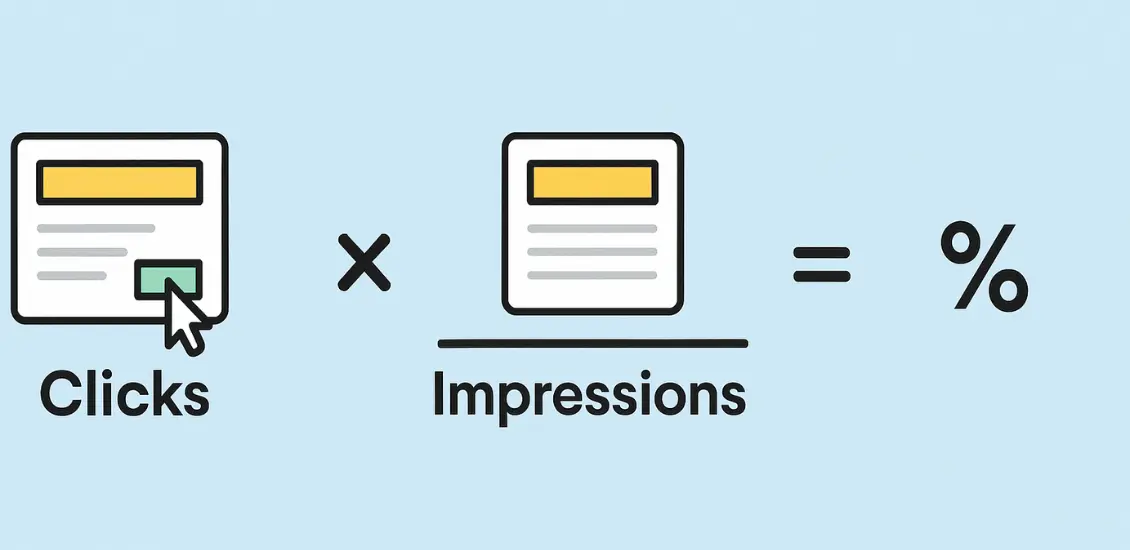
Suppose you set up an e-commerce ad that looks polished, but clicks barely come through. Sales slip, and frustration grows as budgets drain. To avoid this, it is important to know how to calculate CTR. This metric shows if campaigns truly connect or simply miss their mark.
CTR, or click-through rate, shows how many people clicked compared to those who viewed. This number reveals engagement and helps measure marketing success across ads, SEO, and even email campaigns. Higher CTR usually signals stronger conversions and healthier business performance overall.
This guide explains CTR in detail, from its basic formula to real-world examples. You will learn benchmarks that define good performance. It also covers strategies that raise engagement and proven methods to maximize return from every e-commerce campaign.
What Is CTR?

CTR stands for click-through rate. It shows how many people clicked after seeing your ad. A low CTR means weak targeting or poor messaging. A high CTR means strong engagement. This metric helps improve results and avoid wasted budget.
You can calculate CTR using this formula:
CTR = (Total Clicks ÷ Total Impressions) × 100
For example, if your ad appeared 500 times and got 25 clicks, your CTR would be 5%. That number is always a percentage and helps measure the success of a campaign.
To understand CTR, you need to know the difference between impressions, views, and clicks. Impressions are how many times your ad shows up on someone’s screen.
Views usually apply to videos and mean someone watched for a few seconds. Clicks are what count most. They show someone acted after seeing your message.
Think of a busy street. Impressions are everyone who walks by and sees a bakery sign in the window. Clicks are the people who walk in and ask for a cookie sample. The CTR tells how often someone goes from seeing to taking action.
How to Calculate CTR (step by step)

You’ve seen how CTR shows what works. Now let’s break it down and calculate it the right way. The formula stays the same, but small details change across ads, emails, and display banners. Each step below will help you track CTR with confidence.
Step 1: Get Your Click and Impression Data
Every CTR calculation starts with two numbers: total clicks and total impressions. Clicks are the number of times someone took action on your ad. Impressions are how many times the ad appeared on screens.
Most platforms like Google Ads, Meta, or Mailchimp provide this data in your reports. Choose the right campaign and correct date range. That way, your results reflect the same window of time. Accurate input leads to more useful output when analyzing performance later.
Step 2: Apply the CTR Formula
Once you have your data, use the basic formula:
CTR = (Clicks ÷ Impressions) × 100
For example, if you get 25 clicks from 1,000 impressions, your CTR is 2.5%. This percentage tells you how often people responded to what they saw. Most platforms calculate CTR automatically.
Still, understanding the formula helps when results seem off or you’re comparing across tools. When CTR feels too low or unusually high, you’ll know how to break it down and check it yourself.
Step 3: Fix Email CTR (Remove Bounces)
If you’re calculating CTR for email, always remove bounced emails from your impressions total. Bounces mean the email never reached the person’s inbox. That means they never had a chance to see or click.
If 200 out of 1,000 emails bounce, only 800 count as real impressions. Use those 800 in the CTR formula to get an honest result. This adjustment shows who actually had the chance to click—not just who was on the list.
Step 4: Fix Display CTR (Use Viewable Only)
Display ads sometimes “count” impressions even if no one saw the ad. These are called non-viewable impressions. For example, an ad that loads too low on the page might never appear on screen. That’s why some platforms track viewable impressions separately.
Use only viewable impressions in your CTR formula. This keeps your results honest and closer to what people actually experienced. A clean, viewable CTR shows how your ad performed when it had a fair chance to be seen.
Step 5: Read What the CTR Tells You
Now that you’ve calculated CTR, ask what it reveals about your campaign’s quality. A high CTR often means your message matches the audience’s needs. A low CTR usually means something missed the mark.
It could be the image, the words, or even the offer itself. CTR gives a clear sign of how people react. Use it as your first clue when fixing problems or planning better campaigns. Good decisions always begin with numbers you trust.
CTR Examples in Action

Real examples help make CTR easier to understand. Each platform tracks clicks and impressions in slightly different ways. The formula stays the same, but how people respond can vary. These examples show how to read results and spot what works.
Google Ads Example
A small business runs a search ad campaign for winter jackets. The ad shows 4,000 times and gets 160 clicks. That gives a CTR of 4%. This is considered a strong result for search campaigns, where anything above 2% is usually great. It shows people were interested, and the headline matched what they were searching for.
SEO Example (Organic Search)
A blog post ranks on page one for a popular keyword. It appears in 10,000 search results and gets 120 clicks. That gives a CTR of 1.2%. This might look low, but for SEO, anything above 1% is often solid. It shows the title tag and meta description are doing their job, attracting clicks.
Email Campaign Example
An email campaign reaches 5,000 people. Out of those, 500 open the email and 50 click the main link. That results in 10% CTR from those who opened the email. This tells the sender the message was clear and the offer worked well.
Social Media Ad Example
A sponsored Facebook post appears 8,000 times and gets 96 clicks. The CTR is 1.2%. That’s a decent performance for social ads. It shows the creative caught the audience’s attention, and the call-to-action connected with the audience.
YouTube Video Example
A brand uploads a video ad that appears 20,000 times before users can skip it. It gets 600 clicks. That’s a 3% CTR, which is very good for YouTube. It means the thumbnail and headline worked together to make people curious.
BrandsBro helps you calculate CTR like experts by analyzing clicks, impressions, ad performance, and weak engagement points. We turn confusing numbers into clear marketing insights.
Need better CTR tracking? Book a free meeting and let’s improve your campaign performance.
Where to Find CTR in Popular Platforms
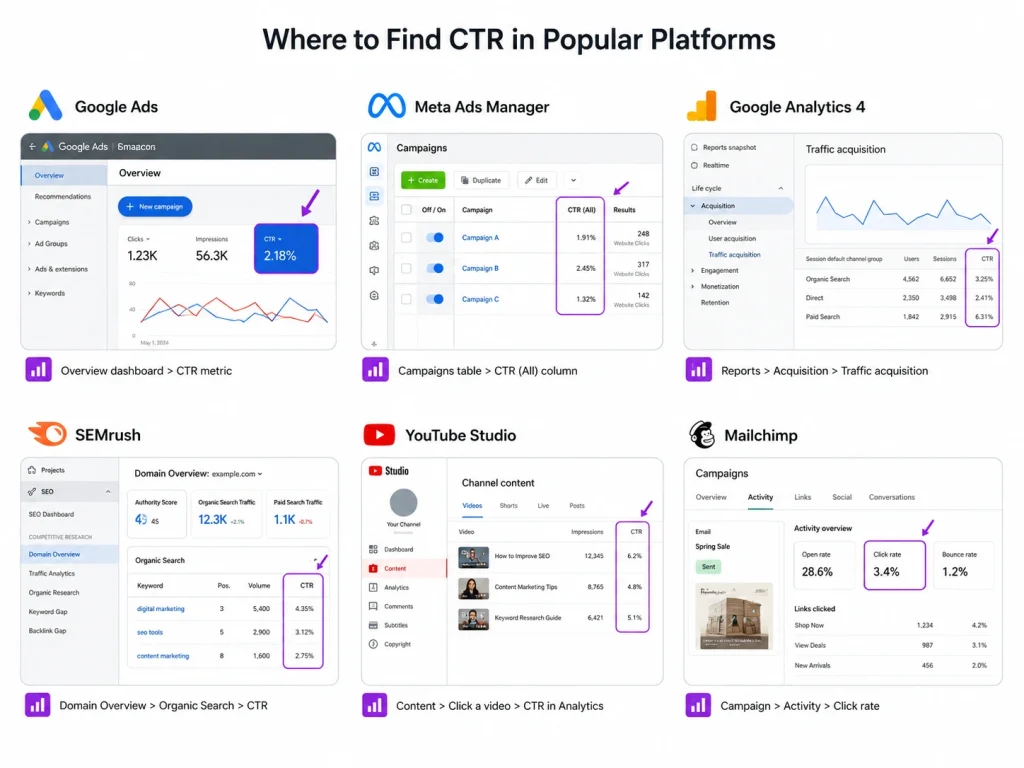
Now that you’ve seen CTR in action, let’s find out where to check it on your favorite platforms. Each tool tracks CTR differently, but the number is always easy to find if you know where to look. Below are step-by-step tips for locating CTR in six major platforms most marketers use every day.
Platform: Google Ads
Where to Click: Open your campaign, ad group, or keyword tab from the left-side navigation.
What You’ll See: CTR appears in its own column by default. If not, click “Columns” and add “CTR.”
Why This Is Useful: Google Ads CTR shows how well your keywords or ad copy connect with search intent.
Platform: Google Search Console
Where to Click: Go to “Performance” on the left menu, then select “Search results.”
What You’ll See: CTR appears next to Total Clicks and Total Impressions in a clean report layout.
Why This Is Useful: This is your organic CTR—how many searchers clicked on your site from Google results.
Platform: Google Analytics 4 (GA4)
Where to Click: Go to “Explore,” choose “Blank,” and build a free-form report using clicks and impressions.
What You’ll See: Add “Link Clicks” and “Impressions” as metrics, then create a formula for CTR.
Why This Is Useful: GA4 doesn’t show CTR by default, but a custom exploration gives full control over reporting.
Platform: Meta Ads Manager (Facebook & Instagram)
Where to Click: Head into “Ads Manager,” select your campaign, and scroll right in the performance table.
What You’ll See: Look for the “CTR (All)” or “CTR (Link)” column. Adjust columns if you don’t see it.
Why This Is Useful: Meta gives multiple CTR types, so always focus on link CTR for real engagement tracking.
Platform: YouTube Studio
Where to Click: Click “Content” in the left menu, then choose any video and scroll to the “Analytics” tab.
What You’ll See: CTR is shown as “Impressions click-through rate” under the Reach section.
Why This Is Useful: This shows how often users clicked your video after seeing the thumbnail in their feed.
What Is a Good CTR?

Search ads often bring the highest CTR, usually between 2% and 5%. Display ads typically fall lower, often below 1% since people rarely click banners without strong intent. Social ads average between 1% and 2%, while email campaigns often range from 2% to 5%.
Benchmarks differ because every platform reflects a different stage in the customer journey. Google searches show intent, so CTR rises naturally. Display ads interrupt browsing, so fewer people click. Social platforms fight distractions, emails depend on targeting, and organic CTR relies heavily on search ranking positions.
The best CTR is measured against both industry standards and your personal history. If your numbers meet or exceed benchmarks, results are usually healthy. When CTR falls short, review targeting, messaging, and placement. Improvement over time always shows real success beyond chasing a single percentage.
CTR vs Other Metrics
You’ve seen how CTR helps measure attention, but it’s not the only metric that defines campaign success. Marketers often compare CTR with CPC, conversion rate, and CPM to see the full picture.
Each metric measures something different, and together they explain if a campaign is efficient, affordable, and profitable.
Let’s break them down side by side so you can see how CTR fits into the larger story.
| Metric | What It Measures | Relation to CTR |
|---|---|---|
|
CPC (Cost per Click) |
The average cost paid for each click on an ad. |
High CTR can lower CPC, since better engagement often improves Quality Score and reduces cost. |
|
Conversion Rate
|
The percentage of clicks that lead to a purchase, signup, or goal.
|
CTR shows interest, but conversions prove real success. High CTR without conversions signals wasted traffic.
|
|
CPM (Cost per Thousand Impressions) |
The price paid for every thousand times an ad is shown.
|
CPM tracks visibility, not actions. CTR shows how many impressions turned into real engagement.
|
|
ROI (Return on Investment) |
The profit earned compared to total campaign costs.
|
CTR feeds ROI but cannot replace it. Profitability matters more than click percentages alone. |
CTR gives valuable insight into attention, but it should never stand alone. A high CTR might lower your CPC, but it means little without conversions. CPM helps measure visibility, yet without clicks or conversions, visibility has no value.
ROI ultimately ties everything together by showing if clicks, costs, and conversions led to profit. The smartest marketers use CTR as the first signal and then confirm success by checking costs, conversions, and returns.
Why CTR Drops (Common Mistakes)
If your CTR looks lower than expected, the next step is figuring out what might be going wrong. Click-through rate drops when something breaks the link between attention and action.
Let’s explore the most common mistakes and how they quietly bring numbers down.
- Weak Headlines or Ad Copy: A headline that sounds confusing or generic often fails to grab attention. For example, a search ad that says “Solutions That Work” doesn’t tell what the product does or why it matters. Strong copy speaks directly to what people want or need.
- Bad Audience Targeting: Reaching the wrong group means your message won’t connect. Imagine running a high-end tech ad to a general news audience. Even if people see it, they’re not the right fit. Good CTR starts with the right viewers.
- Outdated or Cluttered Visual Design: A messy design often scares away clicks. An email with too many fonts, colors, or images loses focus fast. Clean, focused visuals help guide attention toward the call-to-action and increase the chance of getting clicks.
- Ad Fatigue from Repetition: If people see the same ad too often, they start ignoring it. One brand showed the same image daily for weeks and saw CTR fall hard. Rotating creatives keeps the message fresh and engagement alive.
- Mobile Layout Problems: Sometimes an ad looks fine on desktop but breaks on mobile. Text may shrink or buttons vanish. If mobile users can’t read or click easily, CTR will naturally drop without warning.
How to Improve CTR?

Once you know what causes CTR to drop, the next move is to bring it back up. Small, focused changes in your ad copy, design, or targeting can make a big difference without a full campaign overhaul.
- Use clear, benefit-driven headlines that include keywords and match exactly what people are searching for.
- Add site link and callout extensions to increase space, visibility, and clickable opportunities in your ads.
- Write strong title tags with emotional keywords or numbers to grab attention fast in search results.
- Pair meta descriptions with clear benefits and finish with a subtle call to action for higher engagement.
- Use clean visuals that focus on one key message, not multiple elements fighting for attention.
- Target your audience based on real interests or behavior to avoid wasting reach and paid clicks.
- Write subject lines that feel personal, short, and curious without making them look like spam.
- Break your email list into smaller groups so messages feel tailored instead of broad or random.
- Design thumbnails that highlight faces, contrast, or motion to pull attention quickly on video platforms.
- Start your videos with a bold question or visual moment to hook viewers within the first few seconds.
CTR Formula: Clicks, Impressions, and Percentage Explained
CTR stands for click-through rate. It measures how many people clicked your link, ad, email, or search result after seeing it. The basic CTR formula is simple: CTR = (Clicks ÷ Impressions) × 100.
Clicks mean the number of times users clicked on your result. Impressions mean the number of times your ad, page, or listing appeared in front of users. For example, if your ad gets 100 clicks from 5,000 impressions, the CTR is 2%.
CTR helps you understand whether your title, ad copy, image, call-to-action, or offer is strong enough to attract attention. A higher CTR usually means your message is relevant to the audience. A low CTR often means the headline, targeting, keyword, or creative needs improvement.
However, CTR should not be judged alone. A high CTR is useful only when it brings the right traffic. If people click but do not buy, sign up, or take action, then the problem may be your landing page, offer, pricing, or audience quality.
Click CTR vs Link CTR: Which One Should You Track?
Click CTR and link CTR are not always the same. This is especially important in platforms like Meta Ads, where users can click different parts of an ad. They may click the image, page name, reaction button, comment section, or the actual website link.
Click CTR usually counts all clicks on the ad. Link CTR focuses only on clicks that take users to your website, landing page, product page, or selected destination. That means link CTR is more useful when your goal is traffic, leads, or sales.
For example, an ad may have a high click CTR because people are reacting, expanding the image, or checking comments. But if the link CTR is low, it means fewer people are actually visiting your website. This can make the campaign look better than it really is.
You should track link CTR when measuring website traffic performance. For awareness or engagement campaigns, click CTR can still be useful. But for SEO, Google Ads, Meta Ads, and eCommerce campaigns, link CTR usually gives a clearer picture of real user interest.
How to A/B Test Headlines, CTAs, and Creatives for Better CTR
A/B testing helps you improve CTR by comparing two or more versions of the same element. You can test headlines, ad copy, call-to-action buttons, images, videos, product angles, or landing page titles. The goal is to find which version gets more relevant clicks.
Start by testing one element at a time. For example, test two headlines with the same image and same audience. If you change the headline, image, CTA, and targeting all at once, you will not know what actually improved the CTR.
Headlines should be clear, specific, and matched with search intent. A vague headline usually gets ignored. A better headline tells users exactly what they will get, such as a solution, comparison, guide, checklist, discount, or benefit.
CTAs should also be direct. Instead of weak phrases like “Click Here,” use action-focused CTAs like “Get the Free Guide,” “Compare Prices,” “Shop the Deal,” or “Book a Free Audit.” The CTA should match the user’s next step.
Creatives also affect CTR heavily. For ads, test lifestyle images, product-focused images, short videos, before-and-after visuals, and problem-solution creatives. For SEO, test title tags and meta descriptions. For email, test subject lines and preview text.
The winning version should not only have a higher CTR but also better conversions. A/B testing is not about getting random clicks. It is about getting qualified clicks that lead to real business results.
Frequently Asked Questions(FAQs)
Even with everything covered above, many marketers still face questions while running live campaigns. These quick FAQs answer common doubts people ask when trying to understand or improve CTR across different platforms and strategies.
Yes, a 10% CTR is excellent on most platforms. For search ads, anything above 5% performs well. Always compare your CTR with industry averages to understand if your results are truly strong.
Not always. A high CTR shows people clicked, but that doesn’t guarantee sales or conversions. If your landing page or offer doesn’t match user intent, clicks may not lead to actual results.
A good CTR for Meta ads is between 0.9% and 1.6%. This depends on your industry, ad quality, and targeting. Link CTR is more reliable than total CTR when measuring true engagement.
Google has not confirmed CTR as a direct ranking factor. However, higher CTR often means stronger engagement, which can boost page relevance and visibility over time through user behavior signals.
CTR helps measure how well your content or ad grabs attention. A higher CTR often lowers costs and improves campaign performance. It’s one of the easiest ways to spot what’s working in your strategy.
CTR (Google Ads) =

👉 Found directly in the Google Ads dashboard under each campaign/ad group/keyword.
In Google Analytics 4 (GA4), CTR isn’t directly shown but can be derived:
CTR =

For organic search CTR, use Google Search Console (Performance Report).
CTR (Facebook) =

👉 Facebook Ads Manager provides CTR (All) and CTR (Link Click-Through) — use the second one for measuring actual traffic.
CTR =

This formula works across ads, search results, emails, or social media campaigns.
CTR (Email) =

Example: If 200 clicks / 5,000 delivered emails → CTR = 4%.
Not Getting Clicks? Brand’s Bro Fixes What Slows You Down
Low CTR usually means something is broken. It could be weak headlines, poor targeting, or visuals that don’t convert. Whatever the cause, we help brands figure it out and fix what’s dragging performance down.
Our team optimizes Google Ads with better ad copy, improved targeting, and higher engagement across search. We also boost visibility on Amazon by improving product listings, PPC campaigns, and on-page SEO for long-term growth.
If your email campaigns aren’t getting clicks, we can improve subject lines, segments, and flows using Klaviyo. We also redesign creatives, including Amazon photos and thumbnails, to turn impressions into results.
You don’t need more traffic. You need more clicks that lead to revenue. That’s where we come in. We bring the strategy, creative, and targeting needed to help you win attention and grow faster.


