

How to change Shopify URL structure? You can’t change Shopify’s core folders, but you can change handles, domains, internal links, and set up 301 redirects so SEO stays safe.
Shopify keeps /products/, /collections/, /pages/, and /blogs/ locked in. That’s normal. The part you really control is the last bit of the URL (the handle). And you control where old URLs send people.
In a minute, I’ll show you the exact places in Shopify to edit handles, the redirect rules that trip people up, and the clean way to keep URLs consistent during a rename or migration.
How to Change Shopify URL Structure?
First we need to agree on words. Because most people say “URL structure” but they mean three different things:
- Structure = the fixed folders Shopify won’t let you remove (like /products/).
- Handle = the last part you can rename (the “slug”).
- Domain = your main address (like yourbrand.com or yourstore.myshopify.com).
Once you see it like that, everything gets way less confusing.
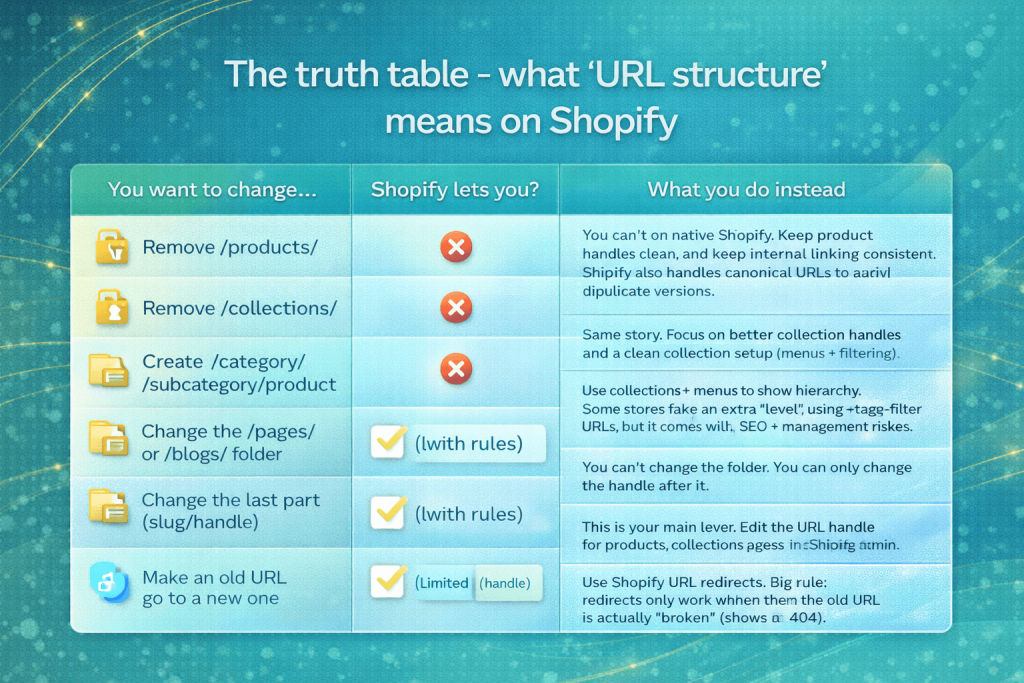
| You want to change… | Shopify lets you? | What you do instead |
|---|---|---|
|
Remove /products/ |
❌ |
You can’t on native Shopify. Keep product handles clean, and keep internal linking consistent. Shopify also handles canonical URLs to avoid duplicate versions. |
|
Remove /collections/ |
❌ |
Same story. Focus on better collection handles and a clean collection setup (menus + filtering). |
|
Create /category/subcategory/product |
❌ (native) |
Use collections + menus to show hierarchy. Some stores fake an extra “level” using tag-filter URLs, but it comes with SEO + management risks. |
|
Change the /pages/ or /blogs/ folder |
❌ |
You can’t change the folder. You can only change the handle after it. |
|
Change the last part (slug/handle) |
✅ |
This is your main lever. Edit the URL handle for products, collections, pages, and blog posts inside Shopify admin. |
|
Make an old URL go to a new one |
✅ (with rules) |
Use Shopify URL redirects. Big rule: redirects only work when the old URL is actually “broken” (shows a 404). |
|
Change your *.myshopify.com address |
✅ (limited) |
Shopify allows this, but it’s limited-treat it like a “do it carefully” decision, not something you change often. |
|
Use a branded domain (yourbrand.com) |
✅ |
Connect a custom domain and set it as primary. This is the cleanest “URL upgrade” most stores should do. |
Shopify URL anatomy (products, collections, pages, blogs)
Alright bestie, now let’s make Shopify URLs feel simple. Think of every Shopify URL like a fixed folder + a name you control.
The folder part is mostly locked. The name part (the handle) is what you can edit.
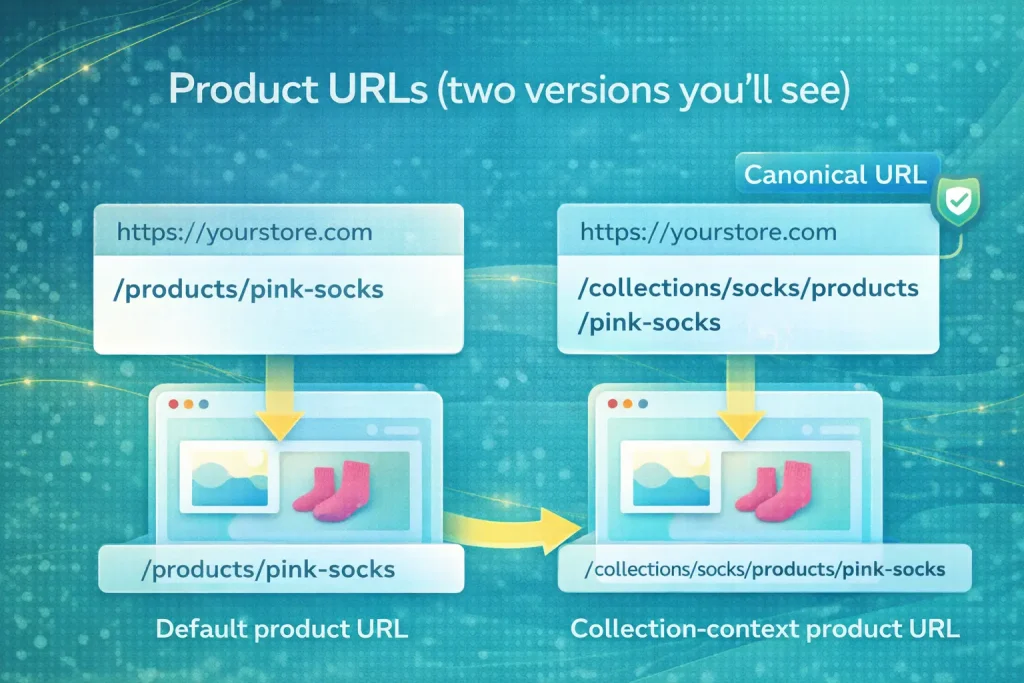
Product URLs (two versions you’ll see)
On Shopify, a product can show up with two “valid-looking” URLs:
- Default product URL:
/products/handle - Collection-context product URL:
/collections/collection-handle/products/handle
Both can open the same product page. So don’t freak out when you see both.
Here’s the important part: Shopify usually treats the /products/ version as the canonical URL. That’s Shopify’s way of telling Google, “This is the main one. Ignore the duplicates.”
Why Shopify does this:
A product can belong to many collections. If Shopify picked a “main collection” automatically, it could get messy fast.
Collection URLs
Collections live here:
- Collection URL:
/collections/handle
That /collections/ folder is fixed. You can’t remove it.
Also, Shopify doesn’t natively do “real” nested folders like this:
- ❌ /collections/shoes/running
If you try to force that kind of structure, you’ll end up using workarounds. And those usually come with trade-offs (SEO confusion, harder management, weird edge cases).
Pages + blogs
These are also “fixed folder + editable handle”:
- Pages:
/pages/handle
(You can change the handle. You can’t remove /pages/.) - Blog posts:
/blogs/blog-handle/post-handle
(You can change the blog handle and post handle. You can’t remove /blogs/.)
Quick tip: if your blog is called “blog”, you’ll get URLs like /blogs/blog/… which looks silly.
Most stores rename the blog handle to something like news, guides, or journal to keep it cleaner.
How to change handles safely (the only “true” native URL edit)
Okay bestie, this is the one “real” URL change Shopify actually allows: the handle (the last part of the URL). Everything else is basically fixed folders + rules.
The golden rule: if you change a handle, always keep the redirect on. That protects old links, old Google results, and people’s bookmarks.
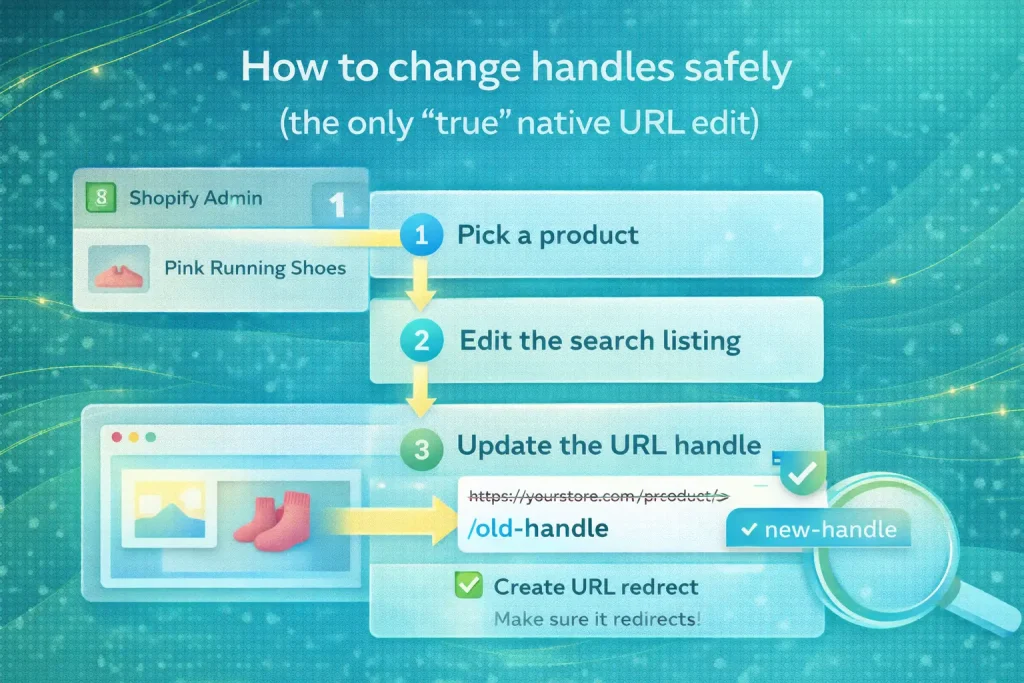
Products
- Go to Shopify Admin > Products > pick a product.
- Scroll to Search engine listing.
- Click Edit.
- Change the URL handle (the last part).
- Make sure “Create a URL redirect” is checked.
- Hit Save.
After saving, open the old URL in an incognito window.
It should jump to the new URL right away.
Collections
- Go to Products > Collections > pick a collection.
- Scroll to Search engine listing > Edit.
- Update the URL handle.
- Keep “Create a URL redirect” checked.
- Save, then test the old URL.
Collections get linked in menus a lot, so also click through your main menu and make sure nothing feels broken.
Pages + blog posts
Pages:
- Go to Online Store > Pages > pick a page.
- Search engine listing > Edit > URL handle.
- Turn on redirect.
- Save.
Blog posts:
- Go to Online Store > Blog posts > pick a post.
- Search engine listing > Edit > URL handle.
- Turn on redirect.
- Save.
If you ever move a post to a different blog (like from News to Guides), double-check the old URL too – sometimes you’ll need to add a redirect manually depending on what changed.
Mini-handle checklist (keep it clean and safe)
- Keep it short and easy to read
- Use lowercase
- Use hyphens between words (running-shoes, not Running_Shoes)
- Avoid random numbers unless they matter (like a model number)
- Don’t change handles “for fun” – change only when it improves clarity, fixes a mistake, matches a new name, or helps with clean consolidation
If you tell me which one you’re changing first (product, collection, page, or blog post), I’ll give you a quick “before/after” checklist for that exact case so nothing slips.
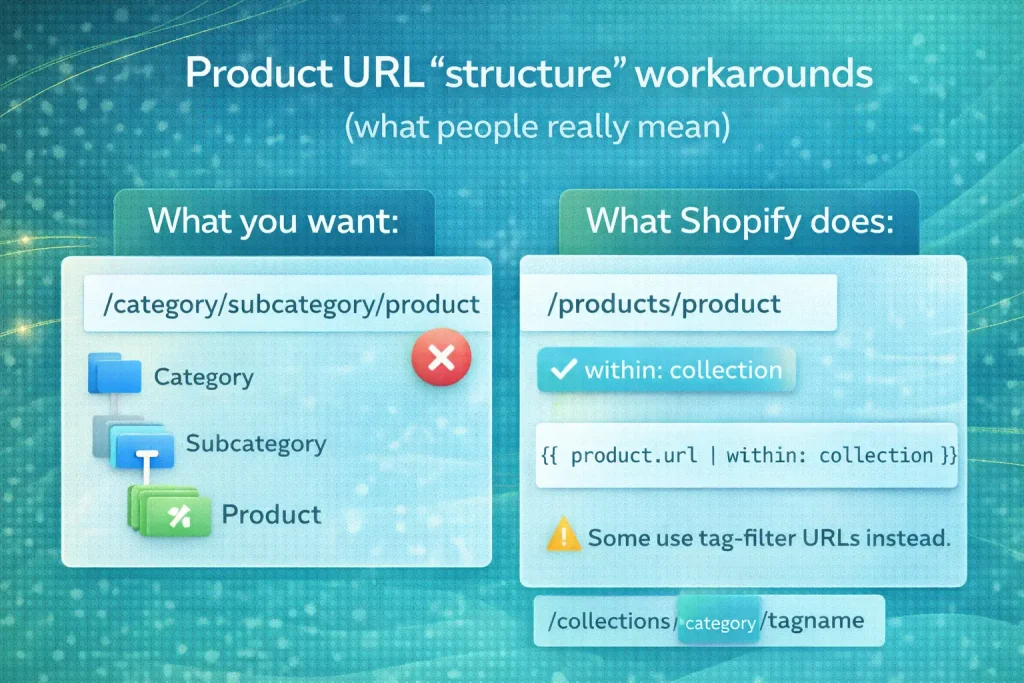
Product URL “structure” workarounds (what people really mean)
Okay bestie, when people say “change Shopify product URL structure,” they usually mean one thing:
“I want every product URL to include the collection path.”
Like: /collections/socks/products/pink-socks
instead of: /products/pink-socks
Shopify doesn’t let you force that as the only URL everywhere. But there are workarounds.
Why Shopify won’t make one “main collection” automatically
Here’s the core problem: one product can live in many collections.
So which collection should Shopify choose?
- Socks?
- Best sellers?
- New arrivals?
- Sale?
If Shopify picked one “main” collection randomly, your URLs could flip around depending on where the product shows up. That’s messy for users, messy for SEO, and messy for tracking.
So Shopify keeps a stable default: /products/.
The built-in option: collection-context links using within
Shopify has a built-in way to link to a product inside a collection context.
So when someone is browsing a collection page, the product links can become:
/collections/socks/products/pink-socks
That’s totally normal on Shopify. It’s basically saying, “You came from this collection, so I’ll keep that context in the URL.”
But the default product URL still exists:
/products/pink-socks
So you’ll still see both versions out in the wild.
Tiny implementation note (only when a collection exists):
{{ product.url | within: collection }}
If the collection object isn’t available on that page, this won’t behave the way you expect. So it’s not something you paste everywhere blindly.
SEO trade-off you must say out loud
This is the part most people skip, and it matters.
When you create more URL versions, you create more chances for duplication.
Shopify usually handles this with canonical rules (so Google knows the “main” product URL). But you still want to help Shopify by being consistent:
- Pick one style for your internal links as much as you can.
- Don’t mix 5 different URL patterns across menus, featured sections, blog links, and apps.
- After any change, spot-check your pages in Google Search Console (if you use it) to make sure indexing stays clean.
If you want, tell me your goal in one line:
- “I want collection URLs everywhere for breadcrumbs”
- “I want shorter /products/ URLs everywhere”
- “I’m migrating from WooCommerce and want similar paths”
…and I’ll tell you the safest route for that exact goal.
URL redirects on Shopify (rules most guides forget)
Redirects are where people accidentally break SEO. So let’s make this super clear and super safe.
A Shopify redirect is basically: “If someone visits old link, send them to new link.” But Shopify has strict rules. If you ignore them, the redirect just… won’t work.
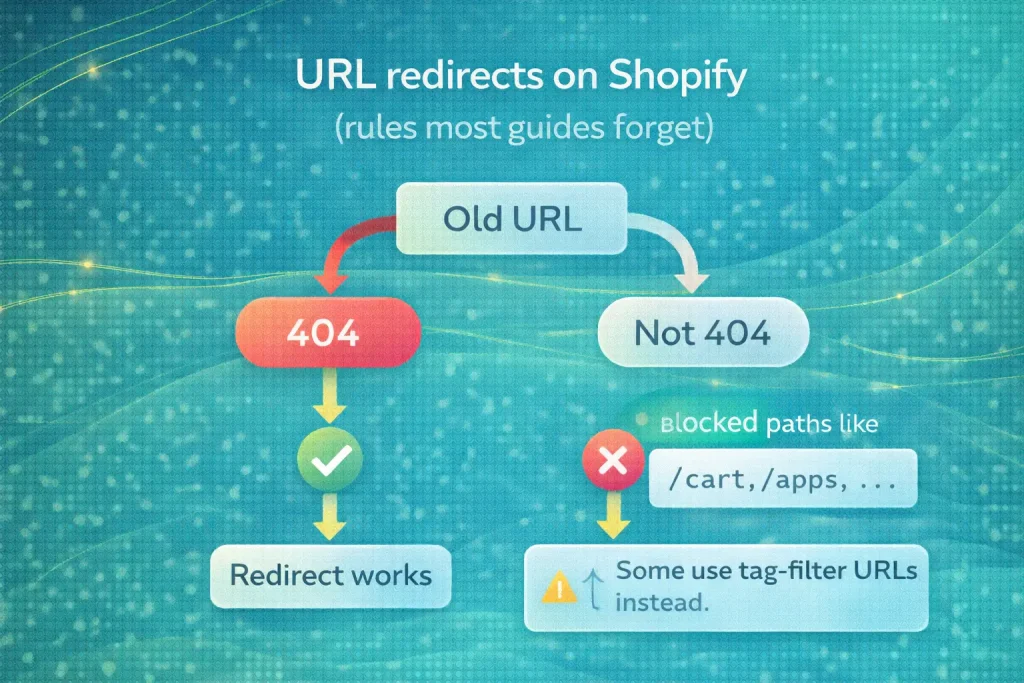
Redirects only work from broken (404) URLs
This is the #1 rule people miss.
If the old URL still loads a real page, Shopify won’t redirect it. It must be a true 404 / Page not found first.
That’s why a common workflow is:
- change a handle (Shopify makes the old URL broken), then
- the redirect works.
And if you’re trying to redirect a page that still exists, you may need to delete it or hide it first (so it becomes a 404).
Paths you can’t redirect
Some URL paths are “reserved” on Shopify. You can’t redirect them.
You can’t redirect URLs starting with prefixes like:
- /apps
- /application
- /cart or /carts
- /orders
- /services
- /shop
And you also can’t redirect “fixed Shopify paths” like:
- /products
- /collections
- /collections/all
So if your dream was “redirect /products to something else”… Shopify won’t allow it.
Big gotchas
These are the sneaky ones.
1) Collection tag filtering URLs can’t be redirected
Example style: /collections/collection-name/tag-name
Even if that tag shows zero products, Shopify still treats the URL as “valid,” so you can’t redirect it.
2) Redirect limits exist
On most stores, Shopify allows up to 100,000 redirects. (Plus stores have a much higher ceiling.)
3) Markets / language subfolders can get tricky
If you use subfolders for markets/languages (like /en-ca/), redirects don’t always behave the way people expect across locales.
Sometimes you’ll need locale-specific handling depending on what you’re doing.
4) 301 caching can make you think you’re going crazy
Browsers cache 301s. Search engines cache them too. So if you change or remove a redirect, your device might still “remember” the old behavior for a while.
Bonus gotchas that bite during migrations
- URLs with query strings can behave weirdly.
- URLs ending in .html have special behavior because Shopify already handles “clean URL” formatting.
Redirect QA checklist (do this every time)
Step 1: Open the old URL first. Confirm it’s truly 404.
Step 2: Test the redirect in incognito (no cache, no cookies).
Step 3: Test on another device (phone is perfect).
Step 4: If it “still doesn’t work,” clear cache and try again.
Step 5: Make sure you’re not trying to redirect a blocked prefix (like /cart) or a fixed path (like /products).
If you tell me what you’re redirecting (example: “old product handle > new handle” or “old platform URL > Shopify URL”), I’ll help you map it cleanly so nothing gets missed.
Troubleshooting (fast answers)
Alright bestie, here are the quick “why didn’t this work?” fixes. No fluff.
Redirect doesn’t work
Most common reason: the old URL is not actually a 404. Shopify redirects only work when the “Redirect from” URL is broken.
Second common reason: you tried a reserved path. Stuff like /cart, /apps, /orders, and other protected folders can’t be redirected.
Quick check: open the old URL first. If it loads anything real, it won’t redirect.
You wanted nested collections, but Shopify won’t do it
You tried something like:
/collections/shoes/running
Shopify doesn’t support real nested collection folders. And if you type a / into a handle, Shopify will usually convert it into hyphens instead.
So you’ll end up with something like:
/collections/shoes-running
Not what you wanted, but that’s the platform rule.
Collection-based product URLs look inconsistent
You see two product URLs and it feels random:
- /products/pink-socks
- /collections/socks/products/pink-socks
That’s expected.
If someone clicks a product from a collection page, Shopify can keep the collection context in the URL.
If they click from search, homepage, a blog post, or an app, there’s no collection context-so it uses the default /products/ URL.
So the fix here isn’t “force it everywhere.”
The fix is: decide how you want to link internally, and stay consistent where you can.
FAQs
Shopify URLs have a few hard rules, so most “URL structure” problems are really about handles, internal linking, and redirects. These FAQs cover the exact stuff that usually breaks (or saves) your SEO when you change URLs.
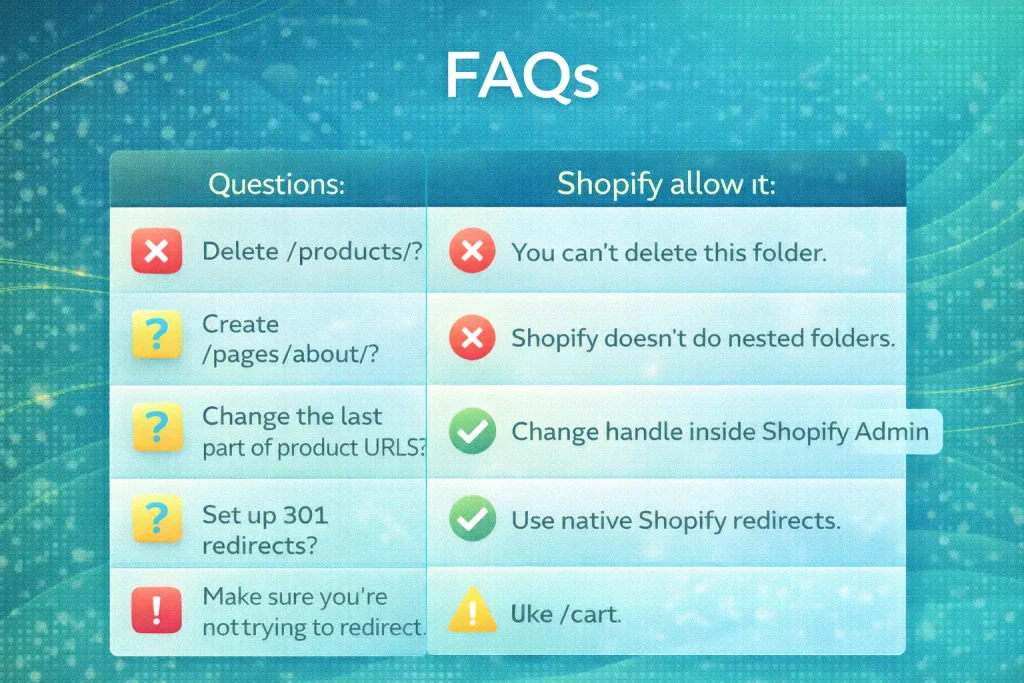
No. Shopify keeps core folders like /products/ locked. The best you can do is keep your product handle clean and be consistent with how you link internally.
Because Shopify can show a product in “collection context” when you clicked it from a collection page. The same product can live in many collections, so Shopify keeps /products/… as the stable main version and uses canonical signals to avoid duplication issues.
Not fully, not on native Shopify. You can make collection pages link with the collection context, but if someone comes from search, homepage, or a blog post, Shopify may still use /products/…. That’s normal.
A Shopify redirect only works when the “old URL” is a real 404 (broken page). If the old URL still loads a real page, Shopify won’t redirect it. So always test the old link first.
Because tag-filter URLs (like /collections/shoes/running) are treated as “valid” by Shopify, even if they show nothing. Since they aren’t a true 404, Shopify won’t allow a redirect there. It’s annoying, but it’s a hard platform rule.
Shopify blocks redirects for certain reserved paths like /cart, /orders, and /apps. You also can’t redirect fixed Shopify folders like /products and /collections themselves. If you try, the redirect will just fail.
Not in a true folder way on native Shopify. Shopify doesn’t support real nested collection folders like /collections/shoes/running. Most stores build “subcategories” using collections + menus (and sometimes filters), but those come with trade-offs.
Change the handle in the “Search engine listing” area. Always keep “Create a URL redirect” turned on so the old link still works. Then test the old URL in incognito to make sure it jumps correctly.
Yes, but it’s limited, so treat it like a rare change. Even if you switch to a branded domain, you should still keep your original myshopify.com address saved because it’s often used for admin login and support.
Sometimes they do, but don’t assume it’s perfect for every setup. If you need different destinations per market, you may need separate redirects per locale. Also remember: 301s can “stick” because browsers cache them.
Conclusion
Alright bestie, here’s the clean takeaway.
You can’t change Shopify’s core URL folders like /products/, /collections/, /pages/, or /blogs/ – so don’t waste energy fighting that. What you can control is powerful: your domain, your handles, your internal linking style, and your redirects.
If you change anything, do it like this: pick one change type at a time, keep redirects on, and test the old URL in incognito to confirm it’s really working. Do that, and you’ll get cleaner URLs without losing traffic or confusing Google.


