
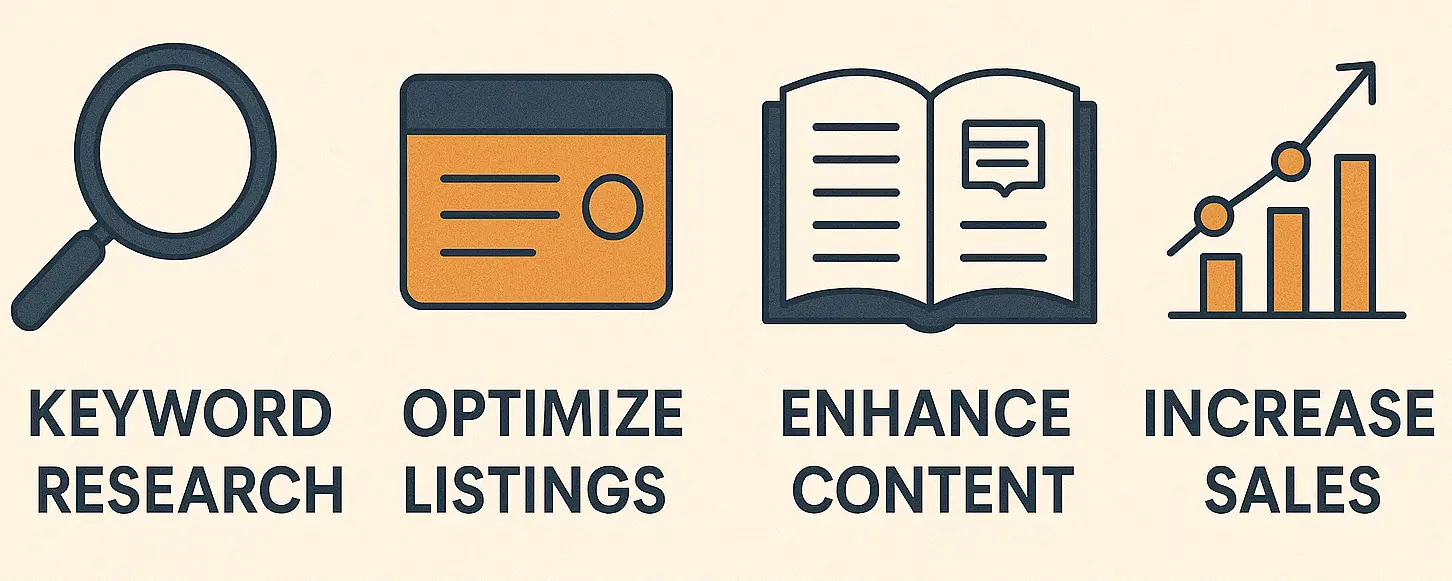
Have you ever felt like your product is not getting highlighted due to similar listings? With over 600 million products listed on Amazon, it’s hard to stand out. But not impossible.
This is where Amazon SEO comes in. If you have the algorithm right, your product’s visibility will increase drastically. In the current situation, if your products are not properly optimized for the A10 algorithm, you are losing sales.
Above 56% of total shoppers search directly on Amazon and not Google. So, if your product visibility is low, you’re in big trouble.
In this blog, we will talk about tips and tricks on how to improve SEO on Amazon through optimization and data-driven strategies. We will also talk about keyword-rich optimization and key Amazon listing strategies to help with your visibility and turn those clicks into sales.
Let’s get started.
What is Amazon SEO, and why is it important?
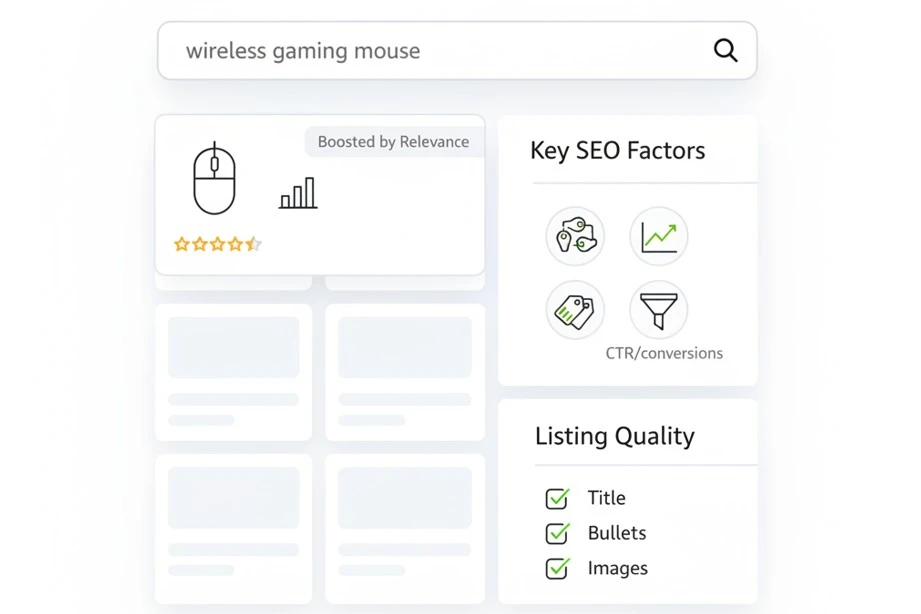
The main work of Amazon SEO is to optimize your product listing so that it shows up when you search on Amazon. Its main purpose is to help your listings appear higher on search results. The higher your products are, the more clicks it will get. This will significantly increase your chances of landing more sales.
Amazon uses the A10 algorithm to decide what shows up first. This algorithm looks at things like keyword relevance, sales history, reviews, and how often people click and buy.
For example, if you’re selling a “wireless gaming mouse,” and your title includes that keyword, and has good reviews, Amazon will push it up in search.
Without good Amazon SEO, even great products get buried. To stand out, you need the right keywords, clear images, and strong bullet points.
How does Amazon SEO strategy work?
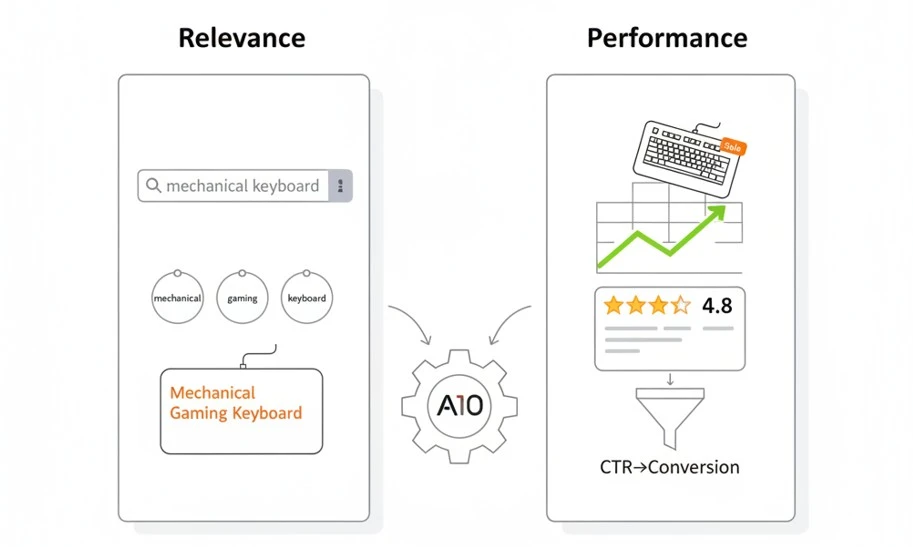
The core of Amazon’s strategy lies in the A10 algorithm. It is the secret weapon to increase your search engine visibility. It decides which product shows first when someone searches on Amazon. To convert your clicks into sales, you need to understand how the strategy works.
The A10 algorithm focuses on two key features: Relevance and Performance. Relevance basically means how your keyword matches with what people are searching. This is called Keyword relevancy.
When we are talking about performance, we mean how high the sales velocity of the product is. It also takes your reviews and high conversion rates into account to push your listing higher.
Let’s say you are selling a mechanical keyboard on Amazon during a sale. If your keywords are on point and the product is selling quickly, Amazon will keep showing your product even after the sale ends.
BrandsBro helps improve SEO on Amazon by optimizing product titles, bullet points, descriptions, keywords, and listing structure to increase visibility.
If your Amazon listings are not ranking well, book a free meeting and we’ll review your problem.
How to Improve SEO on Amazon? Step-by-Step
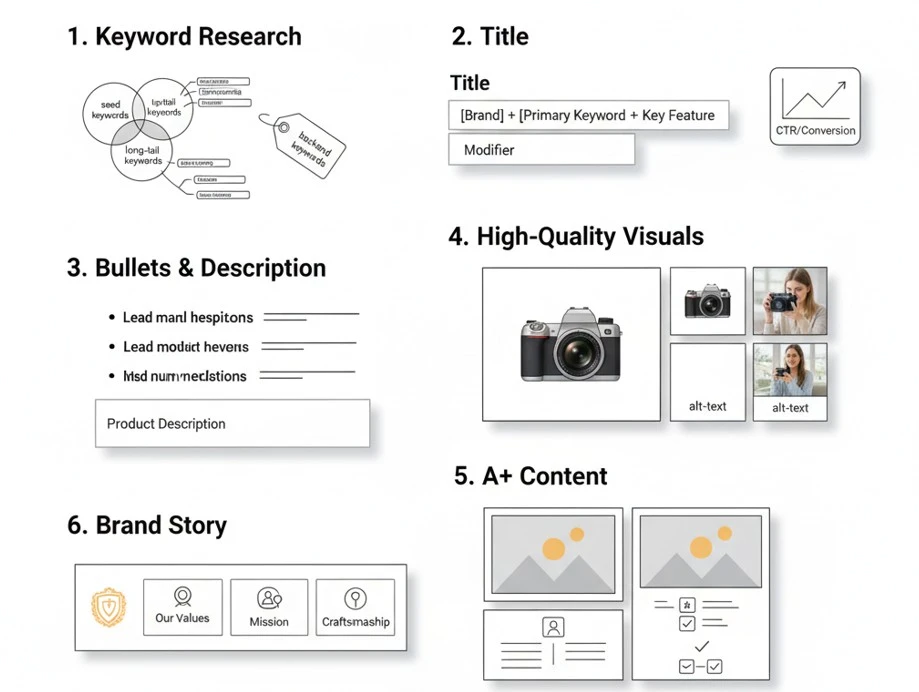
Improving your Amazon SEO means making your product easier to find for buyers. It also increases sales. It typically includes writing a strong title and having a clear visual.
You also need good reviews and to improve your listing based on performance data. When done right, this can significantly increase your brand visibility and drive more sales.
Conduct Killer Amazon Keyword Research
Proper Amazon keyword research helps you increase your product visibility. Start with seed keywords like “Mouse” or “Headphones”
Long Tail Keywords perform better. These are keywords like “Mechanical Keyboard With Cherry Blue Switches.” These keywords go into specifics and show what shoppers are actually looking for.
You can use SEO tools like Semrush or Amazon’s autocomplete to research these keywords. Another good way is to integrate what your competitors are using. A key point is to organize the keywords. For example, you can put together keywords about group, age, or size. This is called keyword clustering.
Another important thing to do is research Backend Keywords. Although these keywords are hidden, they help Amazon better understand your product.
Here’s a simple template:
- Main Title – Use one seed keyword
- Bullets – Add 2–3 long-tail keywords
- Backend – Add 5–10 support terms
Just remember. Better keywords mean more sales.
Optimize Title, Bullets & Description for SEO & UX
When you list a product on Amazon, your listing should be clear and easy to find. To improve your visibility, you need to optimize the product title, Bullet points, and descriptions.
Use a format like Brand + Primary Keyword + Key Feature + Modifier. For example: Acme Wireless Headphones, Noise Cancelling, Bluetooth 5.2, Black. Keep it simple yet effective.
Next, focus on bullet points.
- Keep the lines short and to the point.
- Key information should be first.
- Keep your keyword placement natural.
- Focus on features like “Lasts 10 Hours” or “Safe for kids.”
For the description and A+ Content:
- Start with a story about how your product solves a problem.
- Use semantic keywords (similar words your buyers might use)
- Add rich Images and icons.
Make bullet points easy to scan. Use bold phrases and space between lines. A cleaner description will gain the trust of Online buyers. This is the best way to improve SEO on Amazon.
Use High-Quality Visuals to Boost SEO Signals
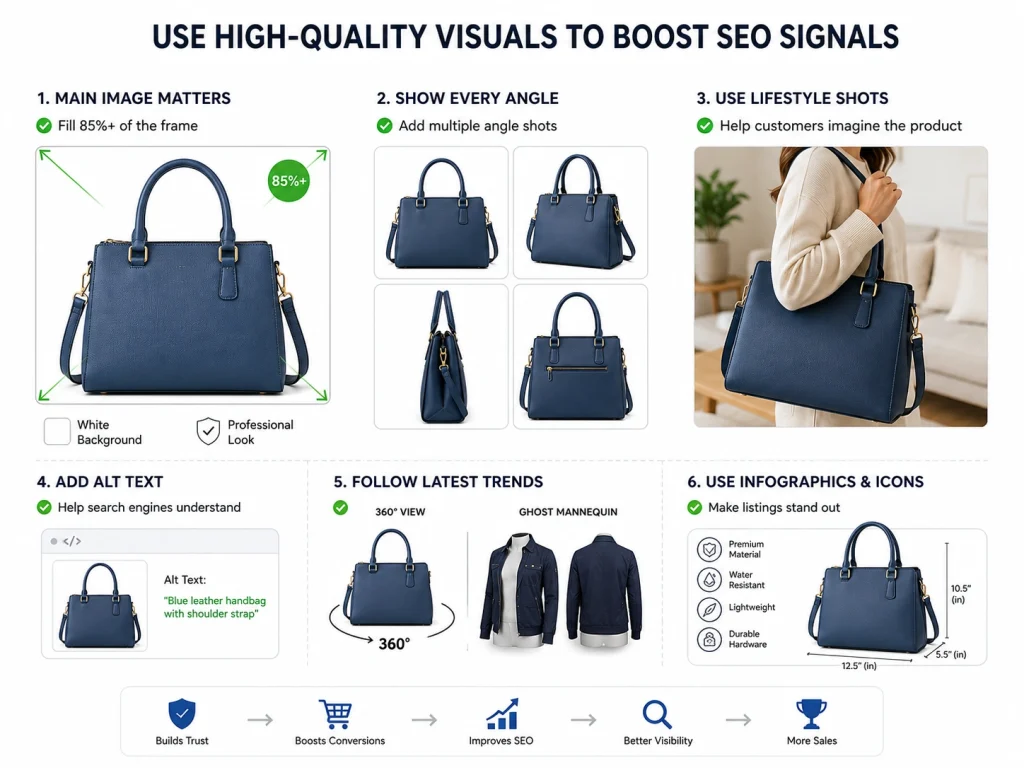
High-quality product images play a huge role in building trust with your customers. For e-commerce customers, the image is the only thing they see. The better and more realistic your image is, the more buyers will trust your product. They make your listing stand out and show up more.
Make sure your main image fills at least 85% of the frame. A white background makes your image look professional. Make sure to add photos from different angles so that the customers know exactly what to expect.
Try to add lifestyle shots of your products. This will help the customers know how a product might work for them.
Amazon can’t see your product photos. It can only read. So, make sure to use image alt-text. This will tell Amazon what the picture is about.
Also, follow the latest trends, such as 360° photos or the ghost mannequin effect, to enhance your visuals. Add charts, icons, or infographics to make your listings stand out from the rest.
Level Up with Amazon A+ Content
Amazon A+ Content is a powerful tool that can help you boost your sales. Although it’s a premium tool, it can be accessed if your brand is registered.
With the help of A+ content, you can replace your product description text with visuals, brand copies, and comparison charts.
Premium A+ Content
You can unlock Premium A+ Content if you meet certain benchmarks. The premium features let you use:
- Full-width modules
- Hover-advanced images
- Video loops
- Interactive comparison charts
These features will make your listing stand out and increase trust. And in this business, trust means converting clicks into sales.
Add Your Brand Story
The Amazon Brand Story Module can be found right above A+ content. With this, you can share:
- The values and mission of your brand
- Origin Story to increase brand trust
- Key product benefits across your catalog
This will help you build a strong and loyal customer base.
A+ Tips for Better Results
Here are a few tips and tricks to get you up and running.
- Use simple texts and clear visuals
- Avoid visuals with messy backgrounds.
- Keep your product line similar and organized so that your brand looks professional.
- Focus on benefits, not just features
- Cross-promote other products by adding comparison charts to your listings
- Tell your story with personality and professionalism.
A+ content and premium A+ content do more than just make your product look good. They help you stand out and make more sales.
Using these tools, brands can increase their conversion rate by up to 10% which is a lot when it comes to Amazon listings.
Accelerate Review Velocity & Conversions
An easy way to rank your products is to increase the number of product reviews. Amazon’s Algorithm tracks review velocity to put your listings higher. Most customers check the reviews before buying a product. Better reviews will lead to better sales and help you gain customer trust.
Amazon’s messaging system helps you set automated follow-up messages to thank your buyers. This increases the conversion rate and keeps the customer engaged with your brand.
A great way to get honest reviews on Amazon is to join the Amazon Vine Program. This program lets trusted reviewers try out your product and leave an honest review.
Clever tactics will help you increase your conversion rate:
- Offers and coupons go a long way
- Running a promotion will help drive traffic.
- Use smart content like A+ Content for better product storytelling.
A good way to track your clicks is to use backend metrics. This will give you the insights on how well your listing is performing, so that you can change your strategy accordingly.
Quick tip:
Use a 30‑60‑90-day review plan:
- 30 days: push coupons
- 60 days: launch Vine
- 90 days: optimize based on review feedback
Remember. More reviews mean customers will trust you more, and it will lead to an increase in sales.
Monitor Performance & Iterate with Data
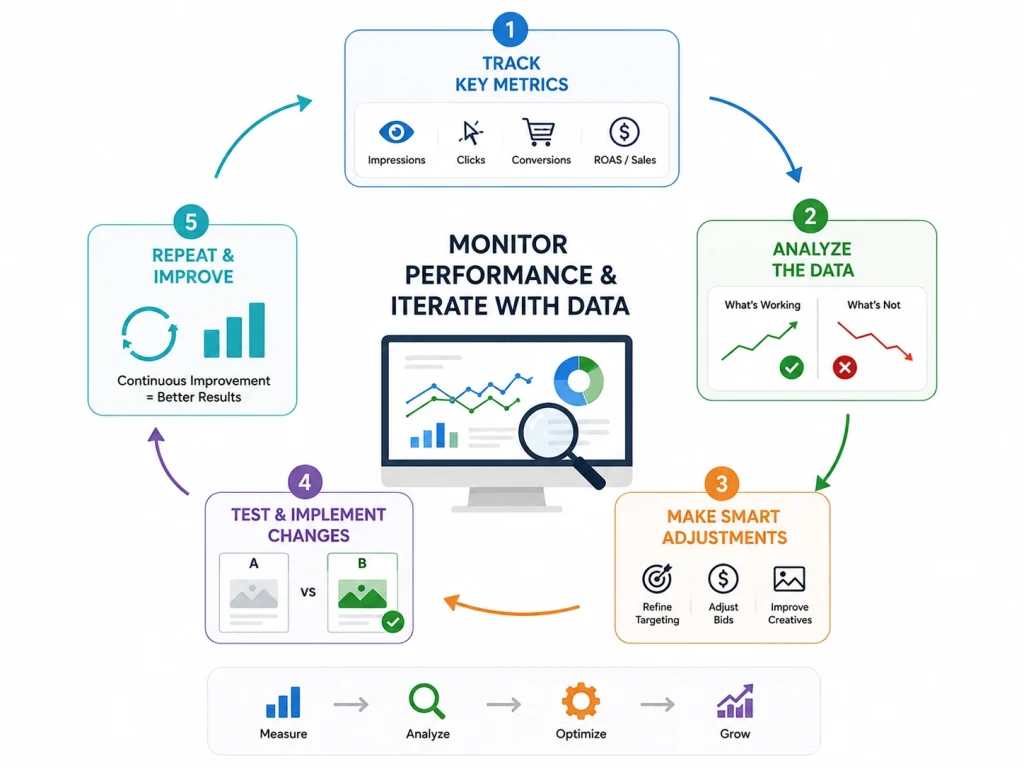
Trial and error is a part of the process of improving. And performance tracking will help you see what’s working and what’s not.
Use simple tools and smart changes to boost your results.
- Regularly track clicks, sales, and conversion rate
- Run A/B testing on titles, bullet points, and images
- Try Amazon Experiments to test what works best
- Stock-outs can affect the ranking of your product, so try to avoid them.
- Keep your pricing competitive
- Watch how changes affect your listing
- To log daily views and sales, create a simple KPI tracker
Use available data to test, learn, and improve. To rank better, you need to track your listings regularly to upgrade and improve.
Use your data to test, learn, and win. The more you track, the better you rank.
Amazon SEO Ranking Factors Sellers Need to Understand
Amazon SEO is the process of optimizing your product listing so it appears higher in Amazon search results. The main goal is simple: help Amazon understand your product and convince shoppers to buy it.
The most important Amazon SEO ranking factors include keyword relevance, product title, bullet points, backend search terms, images, price, reviews, ratings, conversion rate, and sales history. Amazon wants to show products that match the search query and are likely to sell.
Conversion rate is one of the biggest ranking signals. If shoppers click your product and buy it, Amazon sees your listing as relevant. That can help your product move higher for important keywords.
Availability also matters. If your product goes out of stock, your ranking can drop because Amazon cannot sell an unavailable item. Sellers should keep inventory stable, pricing competitive, and listings updated.
How to Use Backend Search Terms Correctly on Amazon
Backend search terms are hidden keywords added inside Seller Central. Shoppers do not see them, but Amazon uses them to understand what your product is related to.
Use backend keywords for relevant search terms that do not fit naturally in your title, bullet points, or product description. These may include alternate names, spelling variations, related use cases, and long-tail keywords.
Do not repeat the same keywords already used in your visible listing. Keyword stuffing wastes space and does not improve the shopper experience. Every backend term should add new relevance.
Avoid misleading keywords, competitor brand names, irrelevant terms, and promotional phrases like “best,” “cheap,” or “free shipping.” Amazon SEO works best when your backend terms are accurate and directly connected to the product.
How Amazon Product Images Affect SEO and Conversion Rate
Amazon product images do not rank keywords directly like titles or bullet points, but they strongly affect click-through rate and conversion rate. Better images can lead to more sales, and more sales can support stronger rankings.
Your main image should be clear, high-quality, and compliant with Amazon’s image rules. It should show the product clearly on a clean background so shoppers instantly understand what they are buying.
Secondary images should explain product benefits. Use lifestyle images, size comparison images, feature callouts, packaging photos, and use-case images to answer common buyer questions before they leave the page.
Good images reduce confusion and increase trust. If shoppers can see how the product works, what size it is, and why it is useful, they are more likely to buy.
How to Track Amazon SEO Performance in Seller Central
Tracking Amazon SEO performance helps sellers understand what is working and what needs improvement. Without tracking, you are guessing instead of optimizing.
Inside Seller Central, sellers should monitor sessions, page views, click-through rate, conversion rate, Buy Box percentage, sales, and advertising keyword performance. These metrics show whether shoppers are finding and buying the product.
If impressions are high but clicks are low, your main image, title, price, or reviews may need improvement. If clicks are strong but sales are weak, the issue may be product images, bullet points, pricing, or trust signals.
Brand-registered sellers can also use tools like Search Query Performance and Brand Analytics to find search terms, click share, and conversion opportunities. These reports help sellers improve listings based on real customer search behavior.
Frequently Asked Questions (FAQs)
Start with strong keyword research. Use those keywords in your title, bullet points, and backend. Upload high-quality images and enable A+ Content if possible. Offer a coupon or small discount to drive clicks. These quick changes can improve visibility and help you rank faster.
Ranking depends on relevance and performance. Use the right keywords, get consistent reviews, and keep your pricing competitive. Add lifestyle images and videos to increase conversions. Monitor performance, tweak listings regularly, and make sure you’re always in stock.
To find the best keywords, you can use tools like Semrush, AMZScout, and Amazon’s autocomplete. Focus on keywords with higher search volume and long-tail keywords for better optimization. Don’t forget to use backend keywords for hidden optimization.
Yes. A+ and Premium A+ Content improve product presentation, increase customer trust, and can boost your conversion rate by up to 10%.
You can use automated follow-up messages. This can be done from the Amazon app. You can also offer coupons and discounts to improve review velocity and increase your brand’s trust.
Struggling with Amazon SEO? Brand’s Bro to the Rescue!
Improving your SEO on Amazon is as simple as taking smart steps. All you need to do is create strong titles, introduce strong bullet points, and list them with a high-quality image.
A good way to improve your Amazon SEO is to incorporate A/B testing and increase your reviews. We mix SEO, PPC, and creative design services to make your product listing stronger.
Ready to boost your sales? Contact us now to grab our Account Support for Amazon and start winning on Amazon today.


