
Having a great online store that no one can find is like a beautiful shop in a desert. This guide shows you how to improve WooCommerce SEO so customers can easily find your products on Google. WooCommerce is the tool for selling on WordPress, and SEO is how you get your store to rank higher in search results.
More visibility means more traffic and more sales. We will give you a clear, step-by-step roadmap to make your store more visible, drive more traffic, and ultimately grow your sales. Let’s get started.
WooCommerce for SEO success
WooCommerce is a free and powerful tool that turns any WordPress website into a fully functional online store. It is not a standalone platform but a plugin, which is like an app you add to your WordPress site.
Once installed, WooCommerce lets you add products, set up payment options, and manage shipping with ease. It is incredibly popular because it is both flexible and easy to use.
Whether you are selling physical goods, digital downloads, or services, WooCommerce gives you all the tools you need to start selling online.
What is WooCommerce SEO?
WooCommerce SEO is simply the process of making your online store more visible on search engines like Google.
It involves tweaking your product pages, website settings, and overall structure. The goal is to help customers find your products easily when they search for them online.
Think of it as giving Google a clear map of your store. When your store is easy to understand, Google is more likely to show your products to people who want to buy them. This means more free traffic and more sales for you.
Is WooCommerce SEO-Friendly?
Yes, WooCommerce is very SEO-friendly right out of the box. It is built on WordPress, which is one of the best platforms for SEO. This gives you a huge advantage from the start.
WooCommerce lets you control important SEO elements like URLs, product titles, and descriptions. Plus, it works perfectly with powerful SEO plugins like Yoast or Rank Math. These tools make it easy to optimize your store, even if you are not an expert.
How to Improve Your WooCommerce SEO: 8 Proven Steps
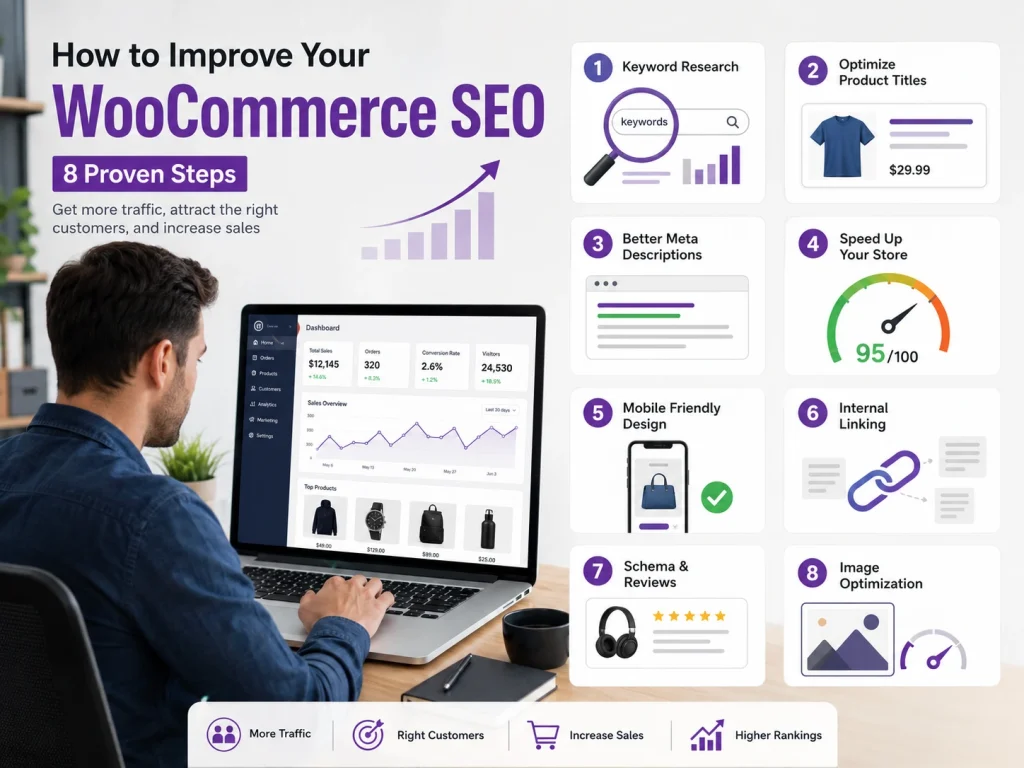
Improving your store’s SEO might seem like a huge task, but it’s much easier when you break it down into simple steps.
This guide provides a clear, step-by-step roadmap to help you boost your store’s visibility. Follow these nine steps to get more traffic, attract the right customers, and increase your sales.
1. Foundation: WordPress + WooCommerce SEO Setup
Before you start tweaking your products, it is important to have a solid foundation. Your WordPress settings play a big role in your store’s SEO. Simple things like your website’s URL structure and security can make a big difference.
Here is a checklist of things to look at:
- Permalink / URL structure best practices: Make sure your URLs are clean and easy to read. For example, a good URL would be yourstore.com/products/blue-shirt instead of yourstore.com/?product_id=123. You can change this in your WordPress settings under “Permalinks.”
- HTTPS / SSL, sitemap, robots.txt: An SSL certificate keeps your site secure and is a must for any online store. A sitemap helps Google find all the pages on your site. The robots.txt file tells search engines which pages to crawl and which to ignore.
- Theme compatibility: A lightweight and SEO-friendly theme can help your site load faster. A faster site is better for both users and search engines.
- Essential SEO plugin setup: Plugins like Rank Math, Yoast, or AIOSEO can help you with many of the SEO tasks we’ll discuss. They can help you write better titles and descriptions and set up your sitemap.
Once you have these foundational elements in place, you can start optimizing your product pages. This is where you can make a big impact on your rankings.
2. On-Page SEO for Products & Categories
On-page SEO is all about optimizing the content on your product and category pages. This helps search engines understand what you are selling and who you are selling it to.
Here are some things to focus on:
- Product title / SEO title: Your product title should be clear and include keywords that people are searching for.
- Meta description: This is the short description that shows up in search results. It should be compelling and encourage people to click.
- Slug / URL: Keep your URLs short and descriptive.
- Unique product description: Avoid using the same description for multiple products. Write unique descriptions that highlight the benefits of each product.
- Alt text/image optimization: Use descriptive alt text for your images. This helps search engines understand what the image is about. Also, make sure your images are not too large, as this can slow down your site.
- Reviews/star ratings: Customer reviews are a great way to build trust. They can also help your products stand out in search results.
For your category pages, make sure they have a clear title, description, and slug. Use categories and tags to organize your products and avoid creating duplicate content. Think of your category pages as landing pages for broader search terms.
Now that your on-page SEO is in good shape, let’s add some extra information for search engines using schema.
3. Schema & Structured Data for WooCommerce
Schema, or structured data, is a type of code that you can add to your website to help search engines understand your content better. This can lead to rich snippets in search results, such as star ratings and prices, which can improve your click-through rate.
Here are some types of schema you should implement:
- Product schema: This includes information like the price, availability, and reviews of your products.
- Breadcrumb schema: This helps search engines understand the structure of your site.
- Review/rating schema: This can help you get star ratings to show up in search results.
- Organization / Website schema: This provides search engines with information about your business.
You can use an SEO plugin to help you implement the schema, or you can add the code manually. You can test your schema using the Google Rich Results Test to make sure it is set up correctly. With your schema in place, it is time to look at your site’s architecture and internal linking.
4. Site Architecture, Navigation & Internal Linking
The way your site is structured can have a big impact on your SEO. A good site architecture makes it easy for both users and search engines to find their way around your site.
Here are some things to consider:
- Taxonomy hierarchy, breadcrumbs, silo structure, navigation depth: Organize your products in a logical way. Use breadcrumbs to show users where they are on your site. A silo structure means grouping related content together.
- Internal link flows: Link from your blog posts to your product pages. You can also link to related products and cross-sells.
- Anchor text, link equity flow, internal link strategy: Use descriptive anchor text for your internal links. This helps search engines understand what the linked page is about.
- Avoid “orphan” product pages: Make sure all of your product pages have at least one internal link pointing to them.
A solid site architecture will help you get the most out of your SEO efforts. Now, let’s make sure your site is fast and easy to use.
5. Technical SEO & Performance Optimization
Technical SEO is all about making sure your site is technically sound. This includes things like site speed, mobile-friendliness, and how your site handles JavaScript.
Here are some things to focus on:
- Speed & performance: A fast-loading site is important for both users and search engines. You can improve your site speed by using caching, minifying your CSS and JavaScript files, and compressing your images.
- Mobile / responsiveness: Your site should be easy to use on mobile devices. A mobile-friendly site is a must in today’s world.
- Handling JavaScript, AJAX, and script loading order: Make sure your JavaScript is not slowing down your site.
With your site’s performance optimized, it is time to address a common issue in e-commerce: duplicate content.
6. Duplicate Content, Canonicalization & Pagination / Filtering
Duplicate content can be a big problem for e-commerce sites. This is when you have the same or similar content on multiple pages of your site. This can happen with things like faceted navigation, filters, and product variants.
Here are some ways to deal with duplicate content:
- Use canonical tags: A canonical tag tells search engines which version of a page is the main one. This can help you avoid duplicate content issues.
- Use noindex, rel=prev/next: You can use the noindex tag to tell search engines not to index certain pages. The rel=prev/next tags can be used for paginated pages.
- Avoid duplicate product descriptions: As mentioned earlier, write unique descriptions for each of your products.
By properly managing duplicate content, you can ensure that your SEO efforts are not being wasted. Now, let’s look at how you can build authority for your site.
7. Off-Page SEO & Link Building for WooCommerce
Off-page SEO is all about building authority for your site. One of the best ways to do this is by getting links from other websites.
Here are some link-building strategies:
- Content marketing: Create helpful blog posts and guides that people will want to link to.
- Guest posting: Write articles for other websites in your industry.
- Product reviews: Reach out to bloggers and influencers and ask them to review your products.
- Partnerships: Partner with other businesses in your industry.
- Monitor competitor backlinks: See who is linking to your competitors and try to get links from those same sites.
Building high-quality backlinks can help you improve your rankings and get more traffic to your store. After you have put in all this work, you need to track your results.
8. Tracking, Analytics & Iteration
It is important to track your SEO efforts to see what is working and what is not. This will help you make informed decisions about your SEO strategy.
Here are some tools and metrics to track:
- Tools: Google Analytics, Google Search Console, and WooCommerce eCommerce tracking can help you track your traffic, rankings, and sales.
- Key metrics: Keep an eye on your impressions, clicks, click-through rate, rankings, conversion rate, and bounce rate.
- SEO audits: Regularly audit your site to find and fix any technical, content, or link-profile issues.
By tracking your results and making adjustments as needed, you can continue to improve your WooCommerce SEO over time. Now, let’s put it all together.
Actionable Checklist
Let’s say you have an online store that sells custom t-shirts. You have a great product, but you are not getting much traffic from search engines. By following the steps in this guide, you can improve your SEO and get more customers.
Here is a checklist of things you can do:
- Make sure your WordPress and WooCommerce settings are optimized for SEO.
- Write unique and compelling product titles and descriptions.
- Use high-quality images with descriptive alt text.
- Implement schema to help search engines understand your content.
- Build a logical site architecture with clear navigation.
- Optimize your site for speed and mobile-friendliness.
- Deal with any duplicate content issues.
- Build high-quality backlinks to your site.
- Track your results and make adjustments as needed.
By taking these steps, you can improve your WooCommerce SEO and get more traffic, sales, and visibility for your online store.
How to Optimize WooCommerce Category Pages for Higher Rankings
WooCommerce category pages rank better when they clearly match buyer intent. Add a short intro explaining the product type, use the main keyword naturally, and include related terms such as size, material, use case, brand, or price range.
Optimize titles, meta descriptions, H1 tags, breadcrumbs, and internal links. Keep URLs short and readable, and avoid thin category pages with only product grids and no helpful text.
For AI Overview visibility, answer the main question directly: what the category includes, who it is best for, and how buyers should choose. Add FAQs, comparison points, and schema where relevant.
Best WooCommerce SEO Plugins and Settings to Configure
The best WooCommerce SEO plugins include Yoast WooCommerce SEO, Rank Math, and AIOSEO. These plugins help manage meta titles, descriptions, schema, breadcrumbs, XML sitemaps, canonical URLs, and product SEO settings.
Configure product schema, category meta templates, breadcrumbs, image alt text, redirects, and sitemap settings first. Do not install multiple SEO plugins together, because duplicate schema and conflicting metadata can hurt performance.
For AI Overview optimization, use plugins to strengthen structured data, but do not rely on plugins alone. Your content still needs clear answers, unique product details, expert guidance, and useful category copy.
E-E-A-T and Trust Signals for WooCommerce Stores
E-E-A-T matters because shoppers and search engines need proof that your store is reliable. Add clear business information, return policy, shipping details, secure checkout, customer reviews, warranty details, and real contact information.
Product and category pages should show experience-based information, not generic copy. Include buying tips, comparison guidance, real use cases, sizing help, maintenance advice, and honest limitations.
For stronger trust, display author or reviewer credentials when publishing guides. Add review schema, product ratings, verified testimonials, trust badges, and transparent policies to improve both rankings and conversions.
Frequently Asked Questions (FAQs)
Yes, WooCommerce is very SEO-friendly. It is built on WordPress, which is already a great platform for SEO. With the right settings and plugins, you can make your online store rank high in search results and attract more customers.
To improve your product page SEO, use your target keyword in the product title, meta description, and URL. Write a unique and detailed product description. Also, use high-quality images with descriptive alt text to help search engines understand your product.
There are many great SEO plugins for WooCommerce. Some of the most popular and effective ones include Yoast SEO, Rank Math, and All in One SEO (AIOSEO). These plugins can help you with titles, descriptions, sitemaps, and more.
Customer reviews build trust with potential buyers. They also add fresh, user-generated content to your product pages. This can help improve your search engine rankings and make your products stand out with star ratings in search results.
Product schema is a special code that gives search engines detailed information about your products. This includes price, availability, and reviews. Using it can help you get rich snippets, like prices and ratings, in search results, which can increase clicks.
To speed up your site, use a lightweight theme and a good hosting service. You can also use a caching plugin, compress your images, and minimize your website’s code. A faster website provides a better user experience and can improve your SEO.
Yes, you should use both. Categories are for broad groupings of your products, while tags are for more specific details. Using them correctly helps organize your store for both customers and search engines, making your products easier to find.
Let's Turn These SEO Strategies Into Sales
We have covered a lot of ground in this guide. We have talked about everything from the basics of setting up your WordPress and WooCommerce for SEO to more advanced topics like schema and link building. We hope this guide has shown you how to improve WooCommerce SEO.
If you need help with any of this, our team is here for you. We can help you with SEO audits, technical fixes, schema implementation, internal linking, and content strategy. Contact us today to learn more about how we can help you grow your online store.
