

You launched your product, but it’s not selling. Days pass, and nothing changes. You have good reviews, clean photos, and fair pricing, yet the listing stays invisible. For many sellers, the problem isn’t the product. It’s that they don’t know how to rank higher on Amazon searches.
To rank higher on Amazon search, your listing must include relevant keywords, convert traffic into sales, and get clicks. Amazon’s algorithm ranks products based on performance signals like sales history, CTR, and keyword match. If those signals are weak, your product stays buried in results.
In this blog, you’ll learn how Amazon’s search algorithm works behind the scenes. We’ll explain the ranking strategies real sellers use to increase visibility and grow sales. You’ll also see common mistakes that lower rankings and how to fix them with proven techniques.
How Amazon’s Search Algorithm Works?
Amazon’s search algorithm is the system that decides which products show up when a customer types something into the search bar. It ranks listings based on how relevant they are to the search and how well they perform.
This includes things like keyword use, click-through rate, conversion rate, and overall sales history. The goal is to show shoppers the products they’re most likely to buy.
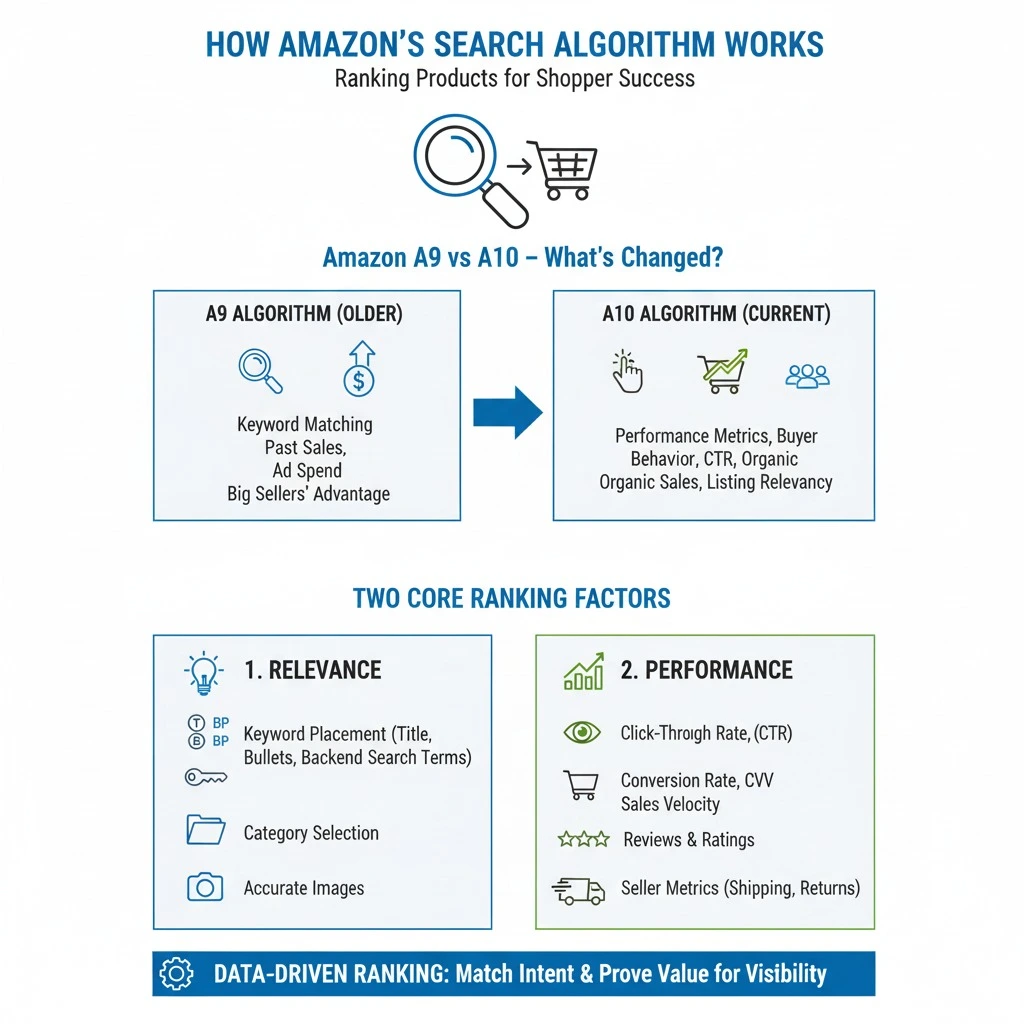
Before you can improve your ranking, you need to understand how Amazon’s search algorithm works today. Amazon uses a system called the A10 algorithm, which is an update to the older A9 version.
This new version focuses more on performance metrics and buyer behavior, not just keyword stuffing.
Amazon A9 vs A10 – What’s Changed?
The older A9 algorithm focused on matching keywords and boosting products with strong past sales. If your listing had the right words and decent ad spend, it could rank well. Even without strong engagement, big sellers had an advantage.
The newer A10 algorithm looks at more than just sales and keywords. It checks how useful your product is to real shoppers.
That means Amazon now values things like click-through rate, conversion rate, and how often your product sells without ads. It also considers how well your listing matches what buyers actually want.
Two Core Ranking Factors
Amazon uses two key signals to decide where your product appears in search:
- Relevance.
- Performance.
Both influence how Amazon’s algorithm understands your product and how it performs in front of shoppers. Relevance is all about how well your listing matches what the buyer is searching for. This includes:
- Keywords are placed naturally in the title, bullet points, and description.
- Backend search terms that support indexing by Amazon.
- Accurate category and subcategory selection.
- Images that clearly reflect the product and align with search intent.
On the other hand, performance focuses on how real buyers interact with your listing. Strong listings perform well in these areas:
- Higher click-through rate (CTR) from search results to your product page.
- Better conversion rate (CVR) from views into purchases.
- Faster sales velocity shows consistent demand.
- More reviews with strong average ratings.
- Positive seller metrics include fast shipping and low return rates.
How to Rank Higher on Amazon Search?
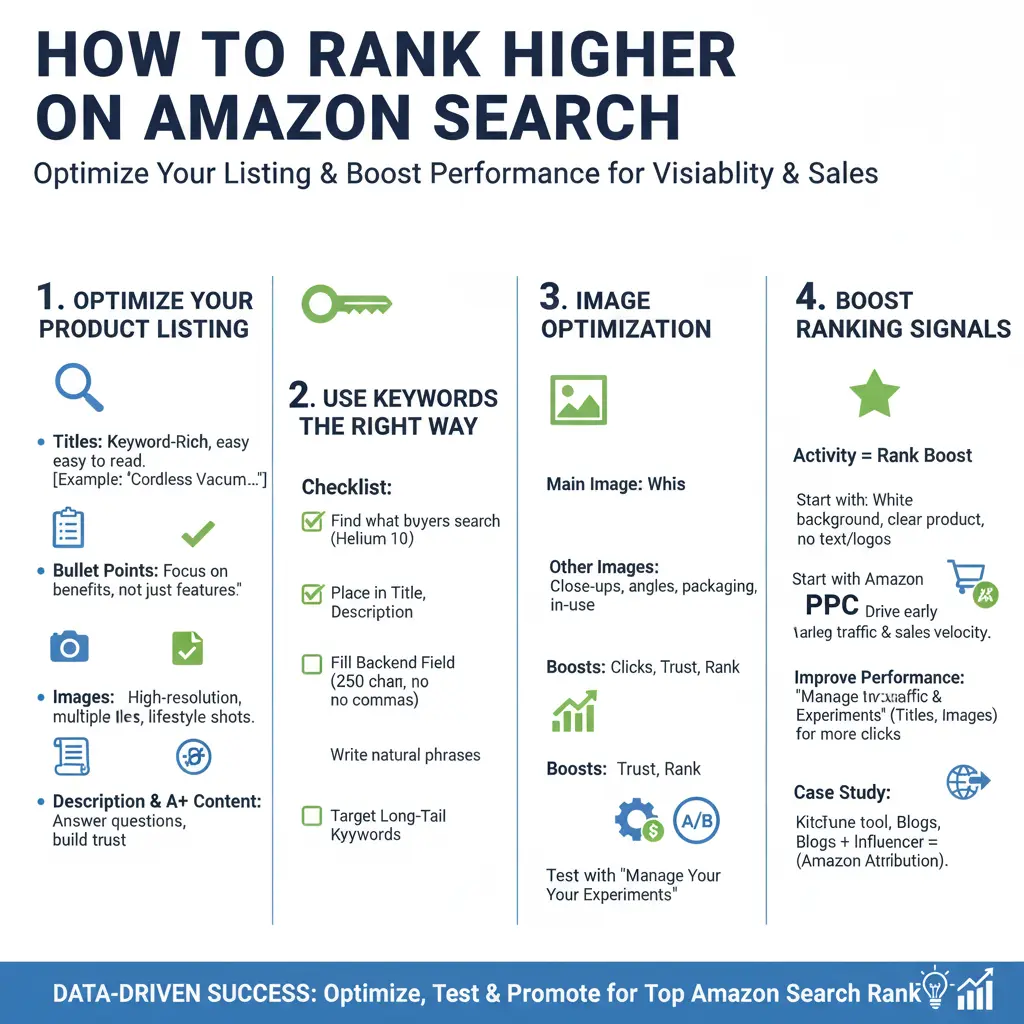
There are two things to rank higher on Amazon. Your listing must be easy to understand, and it must perform well when real buyers see it. That means using the right keywords, writing clear content, and building trust through activity.
Optimize Your Product Listing First
Your product title is one of the first things Amazon looks at. Start with the main keyword. Then include your brand, product type, and important details like color or size. For example, “Men’s Cotton T-Shirt, Large, Black, TrendWear” works better than “Cool Men’s Shirt.”
Bullet points should explain what buyers need to know. Focus on useful details like material, usage, or battery life. Explain why each point helps them. If you’re selling a rechargeable fan, say “Runs up to 6 hours per charge. Ideal for travel, camping, or office use.”
Images or photos must be clean and helpful. Show close-ups, angles, packaging, and someone using the product. If buyers cannot picture it, they will not click.
The product description should answer common questions and support your bullet points. A+ Content helps build trust with brand stories, diagrams, and added features.
Use Keywords the Right Way
Amazon needs to know what your product is before it can show it to the right people. That’s where keywords come in.
Use this checklist to make sure you’re doing it right:
- Find keywords that buyers actually search for. Use Helium 10, Amazon Search Terms, or Brand Analytics.
- Place your best keywords in the title. Include supporting ones in bullets and descriptions.
- Fill the backend keyword field properly. You get 250 characters where no commas, repeats, or brand names.
- Write natural phrases. Example: “wireless neck fan portable quiet cooling outdoor battery powered travel usb rechargeable.”
- Target long-tail keywords. These help with exact match searches and lower competition terms.
Image Optimization
Your main image plays a big role in search. If it looks unclear, buyers may skip your listing. That hurts your click-through rate, which can push your product lower in search results.
Use a clean white background and show the product clearly. Avoid adding text or logos to your main image. For the other images, include close-up shots, different angles, packaging, and the product in use. This helps shoppers understand what they’re buying without needing to read too much.
Good images make buyers trust the listing faster. That often leads to more clicks and stronger performance. When your images work, your rank improves.
You can also test new images using Amazon’s “Manage Your Experiments.” If one version gets more clicks, it may help your product move up in search.
Boost the Signals That Help You Rank
Even the best listing will not rank without activity. Amazon watches how your product performs after it appears in search. If shoppers click, buy, and leave positive reviews, your rank will improve.
Start with Amazon PPC. Paid ads bring in early traffic and help your listing build sales velocity. Focus on exact-match campaigns using keywords that match your title and backend terms.
To improve performance, use Amazon’s “Manage Your Experiments.” Test different titles or images to find what gets more clicks or conversions. Even small changes can lead to noticeable gains.
You can also send outside traffic. Bring visitors from YouTube, blogs, or Instagram using Amazon Attribution links. When that traffic converts well, Amazon sees your product as more reliable.
One real case involved a kitchen tool with zero rank. After two weeks of PPC and influencer traffic, it reached page one. The listing gained clicks, sales, and reviews. Those signals helped the product move up.
Common Mistakes That Lower Your Ranking
You’ve optimized your listing and added the right keywords, but something still feels off. If your product isn’t showing up in search or losing clicks, the problem may be hidden in simple errors. These mistakes affect how Amazon sees your listing and how buyers respond to it.
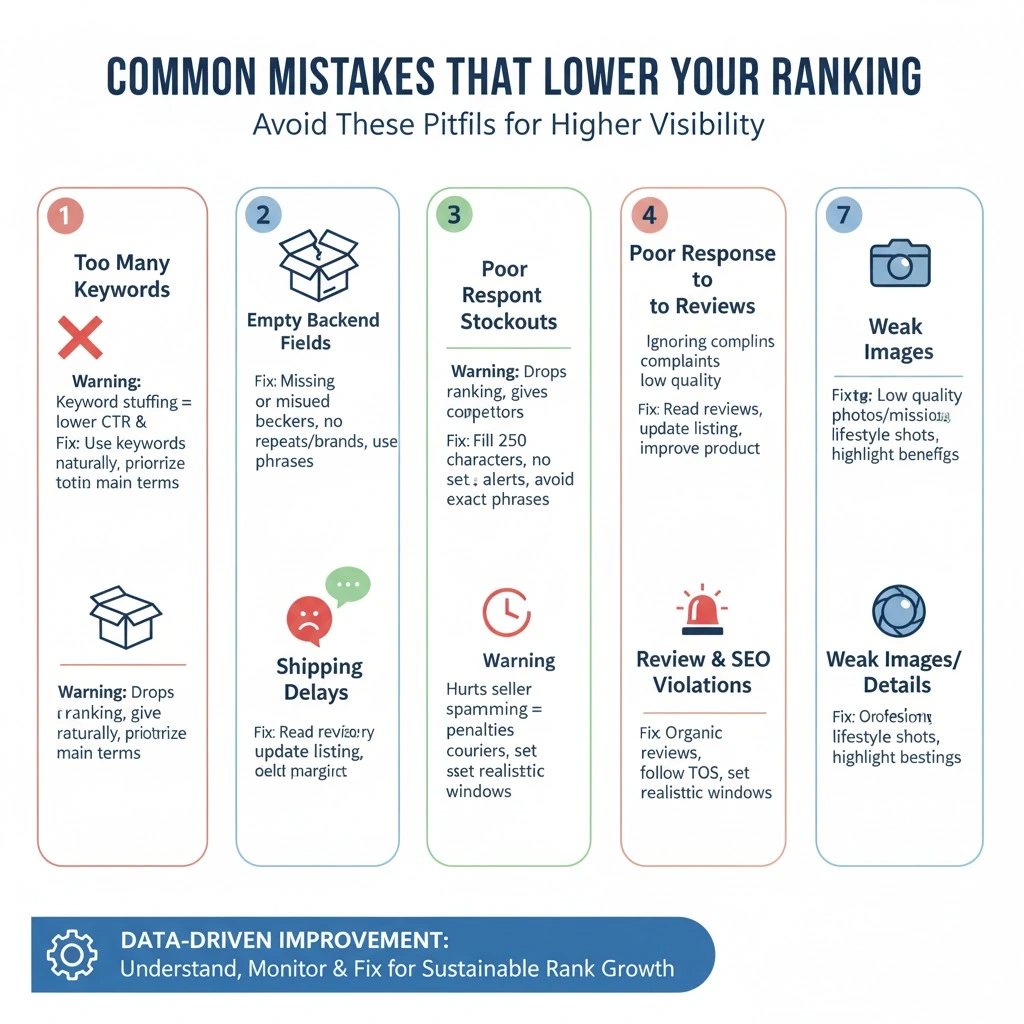
Let’s check out the common mistakes that cause your ranking to lower:
1. Too Many Keywords in One Listing
Many sellers think more keywords equal more traffic. But Amazon’s algorithm reads for clarity, not clutter. Stuffing keywords makes your content harder to read and lowers your click-through and conversion rates. It also signals to Amazon that your listing may not be trustworthy.
Warning: Never repeat keywords across the title, bullets, description, and backend fields just to fill space.
How to Fix It: Choose your main keyword and place it naturally in your title. Support it with related terms in bullets and the backend. Use each word once where it fits best and makes sense to the buyer.
2. Empty or Misused Backend Fields
Amazon gives every seller 250 characters in the backend to improve product indexing. Skipping this section or misusing it means missing out on important search visibility. Many sellers either leave it blank or fill it with repeats and brand names, which Amazon ignores.
Warning: Never leave backend fields empty or fill them with brand names, commas, or repeated front-end terms.
How to Fix It: Fill the backend with exact phrases buyers might search for that aren’t already in your listing. Use all 250 characters without duplicates, and avoid any terms already used in your title or bullets.
3. Frequent Stockouts That Disrupt Visibility
When your product goes out of stock, Amazon removes it from search and stops ranking it. Repeated stockouts hurt your history and momentum. Even when you restock, it takes time to recover your previous position.
Warning: Each stockout drops your ranking and gives your competitors space to move ahead.
How to Fix It: Use inventory tools or Amazon’s restock recommendations to track supply. Set alerts during peak seasons. Avoid tight margins that limit your ability to reorder in time.
4. Poor Response to Negative Reviews
Amazon’s algorithm watches how buyers interact with your product. If reviews consistently mention the same flaw, like sizing issues or missing parts, it signals a problem. Low ratings affect conversions, which directly lowers your performance rank.
Warning: Ignoring repeat complaints shows Amazon that your listing might not meet buyer expectations.
How to Fix It: Read reviews closely. Update your bullets or images to fix confusion. If needed, improve packaging, instructions, or your product itself. Show buyers you listened and made changes.
5. Shipping Delays That Hurt Performance Metrics
Amazon favors listings that ship fast and arrive on time. If your delivery is late, your metrics suffer. That means fewer clicks, fewer buys, and lower placement in search.
Warning: Slow or unreliable shipping lowers your seller performance score and search placement.
How to Fix It: Use Fulfilled by Amazon (FBA) if possible. If you ship yourself, work with trusted couriers, and set realistic delivery windows. Keep your promise every time.
6. Review and SEO Violations That Trigger Penalties
Some sellers offer discounts in exchange for reviews or use fake feedback to build stars quickly. Others try tricks like keyword spamming or hidden HTML. These moves might work short-term, but lead to long-term penalties.
Warning: Fake reviews, paid feedback, or keyword tricks can get your listing suppressed or your account banned.
How to Fix It: Stay updated with Amazon’s TOS and review policies. Focus on organic reviews through good service, follow-ups, and quality listings.
7. Weak Images or Incomplete Product Details
Low-quality photos or missing details create doubt. Buyers scroll past listings that don’t help them understand the product. Amazon tracks that behavior. If fewer people click, your listing drops in results.
Warning: Blurry images, lack of scale, or missing benefits lower buyer trust and reduce ranking potential.
How to Fix It: Use professional photos that show the product clearly and in use. Add lifestyle shots, dimensions, and packaging views. Improve bullet points to highlight key benefits and remove vague language.
How to Track and Maintain Your Rankings?
Your Amazon ranking can change even if you don’t touch your listing. New competitors enter the space. Buyer behavior shifts. Small updates to your title or photos can also affect how your product shows up in search. That’s why it’s important to track your rankings often, not just when sales dip.
There are a few tools that make this easy. Helium 10 shows where your keywords rank each day and lets you track movement over time.
DataHawk shows how your keywords are ranking and connects that data with traffic and product performance. SellerApp is also helpful for watching how your ASIN performs in different categories or countries.
Instead of watching everything at once, focus on a few important numbers. Track your main keyword positions weekly. This tells you if your visibility is holding steady.
Next, look at sessions to understand how many people visit your product page. If traffic drops, your rank may be slipping. Also, watch your conversion rate. A good rank with low sales means something on your page needs work.
You don’t need a complex system to manage all this. Start by checking your top keywords every Monday. Take five minutes to compare current positions to the week before. On Fridays, review your traffic and conversions. If something changes, look at your listing or ads to see why.
Frequently Asked Questions(FAQs)
Even with the right strategy in place, many sellers still have questions about how Amazon’s ranking system really works. Some of these questions don’t always fit inside the main content but matter just as much.
This section answers the most common doubts sellers have when trying to grow, protect, or improve their product’s visibility on Amazon.
Most new listings take 2 to 4 weeks to settle into search results. Early sales, keyword usage, and click-through rates all affect how quickly Amazon starts ranking your product for relevant terms.
Yes. Changing your main image can impact the click-through rate, which Amazon uses as a ranking signal. Better images often increase traffic, while unclear or low-quality images can reduce clicks and drop your listing in search results.
While reviews don’t affect ranking keywords, they strongly influence conversion rates. Amazon tracks buyer behavior. Listings with better ratings and more reviews often convert more, and higher conversion helps improve your overall search placement.
Yes. FBA offers fast shipping and better delivery rates, and often wins the Buy Box. These signals boost trust and performance, which Amazon’s algorithm rewards with improved visibility and higher rankings over time.
External traffic helps when it leads to conversions. Amazon rewards listings that bring in sales from sources like blogs, YouTube, or influencers. Strong off-site engagement shows demand and can move your product higher in search results.
The fastest way is a mix of:
Strong keywords (SEO).
Competitive pricing.
Good reviews.
Running PPC ads to drive initial sales.
It depends. New products may take weeks or months. With optimized listings, good reviews, and consistent sales, ranking usually improves steadily.
Yes. PPC ads (Sponsored Products) can boost visibility and generate sales. Those sales improve your organic ranking over time.
Ready to Rank Higher with Brand’s Bro?
Page one doesn’t last unless you keep optimizing, testing, and tracking what matters. You’ve seen what matters for ranking: keywords, conversions, and how buyers respond to your listing.
The hard part is keeping your momentum while everything around you keeps shifting. Competitors improve their listings, and buyer’s behavior changes. Even small drops in traffic or conversions can affect your visibility. That’s tough to manage alone.
At Brand’s Bro, we handle the parts of Amazon SEO that directly impact your rank. That includes keyword strategy, listing optimization, backend search term setup, and content that drives clicks and conversions.
We can also manage A+ Content, Amazon Storefront design, ad performance, and full PPC and DSP campaign management. Our team supports everything from SEO to photo editing and Amazon Ads to help you stay competitive.
If you want real support that actually moves your rankings and sales, we’re here.


