
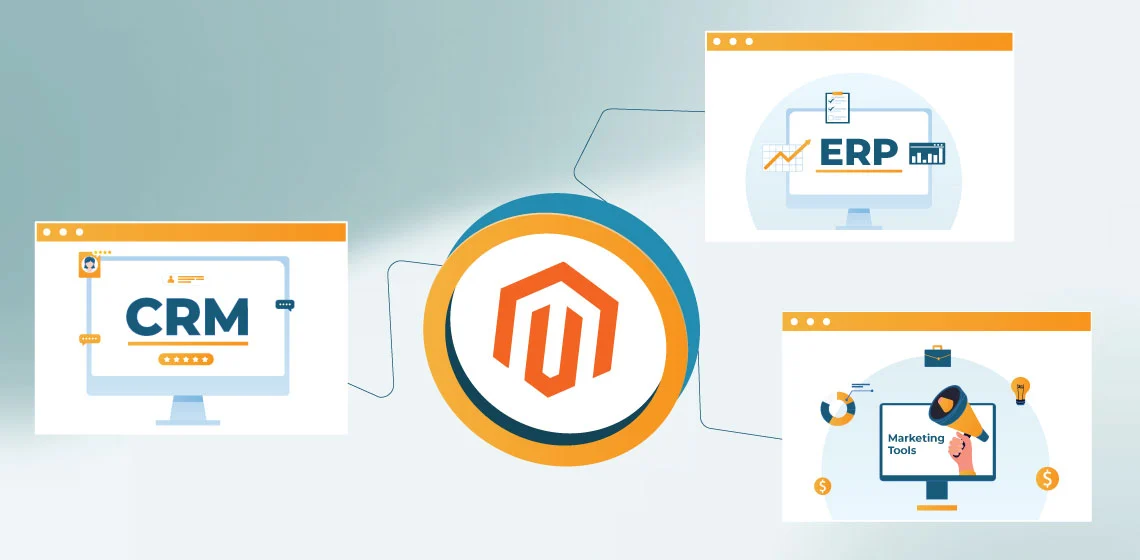
Imagine you run a big online store. Magento is the part people see. It shows products, takes orders, and lets customers pay. That is its main job.
But here is the thing. A real business has way more going on behind the scenes. Someone needs to track inventory. Someone needs to remember customers. Someone needs to send emails and ads at the right time.
That is why Magento talks to other systems. ERP systems handle stock and orders. CRM systems remember customers. Marketing tools send messages. APIs and automation help all of them talk without humans copying things all day.
When these systems work together, the store feels smooth. When they do not, everything feels messy fast.
Understanding the Magento Integration Ecosystem
Think of Magento like the front desk at a hotel. It greets guests, books rooms, and takes payments. But it does not clean rooms, manage staff schedules, or run accounting. Other systems handle those jobs.
Magento works the same way.
ERP systems run the business engine. They track inventory, warehouses, shipping, and money. CRM systems act like a smart notebook. They remember who the customer is, what they bought, and how often they come back. Marketing tools act like megaphones. They send emails, ads, and messages to the right people.
APIs are the messengers. They carry information from one system to another. Automation is the rulebook. It decides what happens next without a person pushing buttons.
So when someone buys a product:
- Magento takes the order
- ERP updates inventory
- CRM updates the customer record
- Marketing tools know what message to send
None of this should feel slow or confusing. Good integration makes it feel automatic and calm.
ERP Integration with Magento
Think of Magento as the shop floor where customers walk around and buy things. Now think of ERP as the warehouse, the office, and the money room all combined. If Magento is the face of the store, ERP is the backbone that keeps the business standing.
When Magento talks to ERP properly, the store knows what is in stock, what was sold, what needs shipping, and what money came in. When they do not talk well, chaos shows up very fast.
What ERP Systems Control in a Magento Stack
ERP systems control the serious stuff. They watch inventory, manage fulfillment, track money, and handle purchasing from suppliers.
Inventory means knowing how many products are actually available to sell. No guesses. Real numbers. ERP keeps track of what is sitting in warehouses and what is already promised to customers.
Fulfillment means packing orders, shipping boxes, and updating delivery status. ERP tells Magento when an order ships so customers can see tracking details.
Accounting means money math. ERP records sales, taxes, refunds, and payments so the business knows if it is making or losing money.
Procurement means buying more products from suppliers when stock runs low. Magento does not do this. ERP does.
ERP is usually the system of record because it is built to be strict. It cares about accuracy, not looks. Magento focuses on selling. ERP focuses on truth.
Core ERP–Magento Data Flows
The first big flow is inventory and product availability sync. When ERP says ten items are left, Magento must show ten. If ERP updates inventory, Magento needs to know fast.
The second flow is order export and financial accuracy. When someone buys something, Magento sends the order details to ERP. ERP checks totals, taxes, discounts, and payment status. This keeps books clean and reporting honest.
The third flow is shipment, invoice, and return updates. ERP tells Magento when orders ship, when invoices are created, and when returns happen. Customers see updates. Support teams stay informed.
These flows keep everyone looking at the same truth.
Common ERP Integration Failure Points
One common problem is inventory overselling. Magento thinks products are available, but ERP knows they are gone. Customers buy items that do not exist. Everyone gets upset.
Another problem is duplicate orders. Bad integrations resend the same order twice. ERP creates two records. Fulfillment ships twice. Money reports break.
Financial mismatches also happen. Totals in Magento do not match totals in ERP. Taxes look wrong. Refunds go missing. Accounting loses trust in the system.
All of these problems come from poor data accuracy between Magento and ERP.
Why This Matters
Magento sells. ERP confirms reality. ERP integration makes sure Magento never lies by accident. When both systems stay in sync, the business feels calm, predictable, and ready to grow.
CRM Integration for Customer Intelligence
If ERP is the backbone of the business, then CRM is the memory. It remembers people. Magento can sell to someone once, but CRM helps the business remember that person the next time they come back.
Magento knows what someone buys. CRM knows who that person is, what they like, and how the business should talk to them. When Magento and CRM work together, customers feel recognized instead of forgotten.
Why CRM Integration Is Not Just Contact Sync
A lot of people think CRM integration just means copying email addresses. That is not enough.
A CRM needs to understand the whole customer story. That includes what they bought, how often they shop, and if they had any problems before. Magento creates these events. CRM connects them into a timeline.
Without integration, Magento has orders and CRM has names. With integration, CRM knows which customer placed which order and when.
That is the difference between a list of contacts and real customer intelligence.
Magento to CRM Data That Actually Matters
The first important data point is account creation. When someone signs up in Magento, CRM should know right away.
The second is order history. CRM needs to see what was bought, how much was spent, and how often purchases happen. This helps teams understand customer value.
The third is behavior signals. Things like repeat purchases or long gaps between orders help CRM decide who needs attention.
This data turns customers from strangers into familiar faces.
CRM as the System of Context
CRM becomes the place where teams go to understand customers.
Sales teams can see past purchases before talking to someone. Support teams can see order history without asking too many questions. Marketing teams can group customers based on real behavior instead of guesses.
Magento sends facts. CRM adds meaning.
When CRM integration works well, customers feel like the business remembers them every time.
Marketing Tools and Automation
Now we take everything CRM knows about customers and actually do something with it. This is where marketing tools and automation step in. Think of this part like a smart helper that sends the right message at the right time, without someone sitting there all day clicking buttons.
Magento creates actions. CRM understands people. Marketing tools turn both into messages that help sell more.
Event-Based Marketing from Magento
Magento creates events whenever something important happens. An event is just a moment worth reacting to.
Examples of key commerce events include viewing a product, adding items to a cart, starting checkout, completing a purchase, or returning an order. These moments tell a story about what a customer is doing right now.
Events beat static data because static data gets old fast. A list that updates once a day cannot react in real time. Events let marketing tools respond while the moment still matters.
That is how messages feel helpful instead of random.
Automation Workflows Enabled by Integration
One common workflow is abandoned cart recovery. Someone adds items but leaves. Magento sends the event. Marketing tools send a reminder. The customer comes back and finishes the order.
Post-purchase journeys are another big win. After a purchase, customers might get tips, product guides, or follow-up offers. These messages feel natural because they match what was just bought.
Win-back and retention flows help bring customers back after long breaks. Automation watches behavior and knows when to reach out, without guessing.
Integration turns these workflows on. Automation keeps them running.
Risks of Poor Marketing Integration
When marketing integration is sloppy, things go wrong quickly.
Misfired campaigns happen when messages are sent at the wrong time. Customers get reminders after they have already bought something. That feels annoying.
Broken attribution is another issue. Marketing teams cannot tell what actually worked. Money gets spent blindly.
Worst of all, customer trust erodes. Messages feel spammy instead of helpful. Customers stop paying attention.
Good integration protects trust. Bad integration burns it.
APIs as the Technical Foundation
So far, we talked about ERP, CRM, and marketing tools. Now let’s talk about how they actually talk to Magento. That job belongs to APIs.
Think of APIs like messengers. They carry notes between systems so humans do not have to copy and paste information all day. Without APIs, none of the integration we talked about would work.
Marketing tools create actions. APIs carry those actions safely between systems. Reliability starts here.
How Magento Uses APIs
Magento uses something called REST APIs. That sounds fancy, but it just means a clear set of rules for asking questions and sending answers.
Some API calls are read operations. These are like asking, “What is the order status?” or “How much inventory is left?” Magento shares information without changing anything.
Other API calls are write operations. These actually change data. Examples include creating an order, updating inventory, or adding a customer record. These calls need extra care because mistakes here cause real problems.
Magento exposes data through APIs so other systems can stay updated without guessing.
API Design Considerations in Integration
APIs need rules to stay safe and stable.
Authentication and access control decide who is allowed to talk to Magento. Only trusted systems should get in. This protects customer data and business logic.
Rate limits matter too. They stop systems from sending too many requests at once. Without limits, systems can overload each other and slow everything down.
Retries are also important. Sometimes messages fail because of temporary issues. Good integrations try again instead of giving up.
Versioning and payload stability keep things from breaking. When APIs change suddenly, integrations fall apart. Stable versions keep data flowing smoothly.
APIs work best when they are boring and predictable.
Why APIs Alone Are Not Enough
APIs move messages, but they do not manage the whole conversation.
Orchestration is needed to decide what happens next. For example, when an order is placed, ERP updates inventory, CRM updates the customer, and marketing tools trigger messages. APIs alone do not manage this order of steps.
Failure handling and recovery matter just as much. If ERP is down for a moment, orders should wait, not disappear. Systems need queues, retries, and alerts to stay reliable.
APIs are the roads. Orchestration is the traffic control. Reliability depends on both.
Data Ownership, Mapping, and Governance
This is the quiet part of integration that causes the biggest headaches when ignored. Everything might look connected on the surface, but underneath, data still needs rules. Someone has to be in charge of the truth.
Data ownership, mapping, and governance are about deciding who is right when systems disagree. Without these rules, even the best integrations slowly fall apart.
Defining the System of Record
A system of record is the boss for a specific type of data. When questions come up, that system has the final answer.
For products, one system must decide names, SKUs, and base details. That is often ERP or a product system, not Magento.
For inventory, ERP usually owns the truth. Magento should never guess stock numbers. It should listen.
For customers, CRM often becomes the main source. Magento creates accounts, but CRM manages the long-term profile.
For orders, Magento usually owns order creation. ERP owns fulfillment and accounting details afterward.
Clear ownership prevents arguments between systems. Everyone knows who decides what.
Canonical Data Models
When many systems talk to each other, things get messy fast. This is where canonical data models help.
A canonical model is a shared language. Instead of every system translating data differently, everything maps to one common format first.
This reduces integration complexity. Changes happen in one place instead of everywhere.
Canonical models also prepare the business for future migrations. If one system changes later, the rest do not panic. They already understand the shared language.
This makes growth safer and less scary.
Edge Cases That Break Integrations
Edge cases are the weird situations nobody plans for, but customers hit all the time.
Bundles and configurable products are common troublemakers. One product on the screen might actually be many items in the warehouse.
Partial shipments and refunds cause problems too. Some items ship now. Some later. Some come back. Systems must agree on what really happened.
Multi-currency and tax models add another layer. Prices look different across regions. Taxes behave differently too. If systems calculate these differently, reports stop matching.
Strong data rules help handle edge cases calmly instead of scrambling later.
Security, Compliance, and Risk Management
Now let’s talk about keeping everything safe. When Magento talks to ERP, CRM, and marketing tools, a lot of important data moves around. That includes customer info, orders, and money details. If this part is sloppy, trust breaks fast.
Good security is not about fear. It is about being careful and prepared.
API Credential Governance
APIs need keys, kind of like secret passwords. These keys decide who is allowed to talk to Magento and other systems.
Good governance means only the right systems get access. No sharing keys everywhere. No leaving old keys active forever. Keys should be protected, rotated, and removed when no longer needed.
This keeps bad actors out and keeps mistakes from spreading.
Data Privacy Considerations
Customer data is personal. Names, emails, addresses, and order history need protection.
Systems should only share what is necessary. Marketing tools do not need full payment details. ERP does not need marketing preferences.
Privacy rules help businesses respect customers and avoid legal trouble. Clean data sharing builds long-term trust.
Log Retention and Masking
Logs are records of what systems do. They help teams debug problems and understand failures.
But logs should never expose sensitive data. Things like passwords, full credit card numbers, or personal details must be hidden or masked.
Logs should also have limits. Keeping them forever increases risk. Keeping them just long enough keeps systems safe and useful.
Integration as Part of the Security Surface
Every integration adds a new door into the business. That means integration is part of the security surface, not separate from it.
If one system is weak, it can affect everything else. Strong integration security protects the whole ecosystem, not just Magento.
When security is built into integration from day one, the business feels stable, professional, and trustworthy.
When to Use Extensions vs Custom Integration?
This is where a lot of businesses pause and think. Should you install an extension and move fast, or build something custom and plan long-term? There is no single right answer. It depends on how big the store is now and how big it plans to grow.
The key is knowing the trade-offs before choosing.
Limits of Off-the-Shelf Extensions
Extensions are like ready-made tools. You install them, configure a few settings, and things start working.
They are great for getting started. They save time and money early on. For small or simple setups, they can be enough.
But extensions have limits. They usually follow fixed rules. If your business process changes, the extension might not keep up. Updates can break things. Two extensions might clash and cause bugs.
Extensions work best when needs are common and stable.
Scalability and Maintainability Trade-Offs
Custom integration takes more effort upfront. It needs planning, testing, and ongoing care.
The upside is control. Custom integrations match how the business actually works. They scale better as order volume grows. They are easier to adjust when systems change.
Maintainability matters too. Custom setups, when done cleanly, are easier to understand and fix over time than a pile of extensions glued together.
Fast now versus flexible later is the real choice here.
Long-Term Total Cost of Ownership
The cheapest option today is not always the cheapest over time.
Extensions may have license fees, upgrade costs, and hidden maintenance work. Custom integrations cost more at first but often save money as complexity grows.
The real question is not price. It is how much pain a setup creates over the years.
Choosing wisely here keeps growth smooth instead of stressful.
Integration as a Growth and Scalability Strategy
At this point, everything should feel connected. Magento sells. ERP keeps things accurate. CRM remembers customers. Marketing tools talk at the right moments. APIs move data. Automation keeps it all running.
This is where integration stops being a tech project and starts becoming a growth strategy.
Why Integration Makes Growth Feel Easier
When systems are connected properly, growth does not feel chaotic.
More orders do not mean more manual work. Inventory stays accurate even during busy times. Customer data stays clean as the list grows. Marketing messages still feel personal, not spammy.
The business can grow without constantly fixing broken processes. That is a huge win.
Scaling Without Breaking Trust
Customers notice when things go wrong. Late updates, wrong stock numbers, confusing emails. These issues damage trust fast.
Strong integration protects that trust. Customers see accurate order status. Messages match real actions. Support teams have answers right away.
Trust scales only when systems stay aligned.
Future-Proofing the Business
One day, systems will change. New tools will replace old ones. New markets will open. New sales channels will appear.
When integration is built on clear data ownership, APIs, and automation, change becomes manageable. One system can evolve without breaking everything else.
That is how businesses stay flexible instead of stuck.
The Big Picture
Integration is not about connecting tools just to say they are connected. It is about building a calm, reliable foundation that supports growth.
When Magento, ERP, CRM, and marketing tools work as one system, the business runs smoother, customers feel understood, and teams focus on moving forward instead of fixing problems.
That is what real scalability looks like.
Frequently Asked Questions
People often have a few common questions about how Magento works with ERP, CRM, and marketing tools. The answers below explain the basics in a clear, easy way. This should help everything click without getting technical or confusing.
ERP integration helps Magento know what is really in stock, what shipped, and how money is tracked. Magento sells the product, but ERP keeps the numbers honest behind the scenes.
Magento knows orders. CRM knows people. CRM remembers customers over time, connects purchases together, and helps teams treat returning customers better.
APIs are messengers. They carry information between Magento and other systems so people do not have to move data by hand.
Automation means rules that run on their own. When something happens, like an order or abandoned cart, the next steps happen automatically without waiting for a person.
No. Magento is great at selling online, but ERP and CRM are built for different jobs. They work best when each system does what it is good at.
If integrations break, inventory gets messy, orders duplicate, emails sent at the wrong time, and teams lose trust in the data. That is why monitoring and error handling matter.
Small stores can start simple. As a business grows, integration becomes more important. Good planning early makes growth much easier later.
Conclusion
Magento works best when it is not working alone. ERP keeps inventory, orders, and money accurate. CRM remembers customers and their history. Marketing tools turn actions into helpful messages.
APIs connect everything, and automation keeps it running smoothly in the background. When these systems work together, the business feels calm instead of chaotic. Growth becomes easier, mistakes become rarer, and customers feel taken care of.
Good integration is not about fancy tech. It is about building a store that works reliably today and still works tomorrow.


