
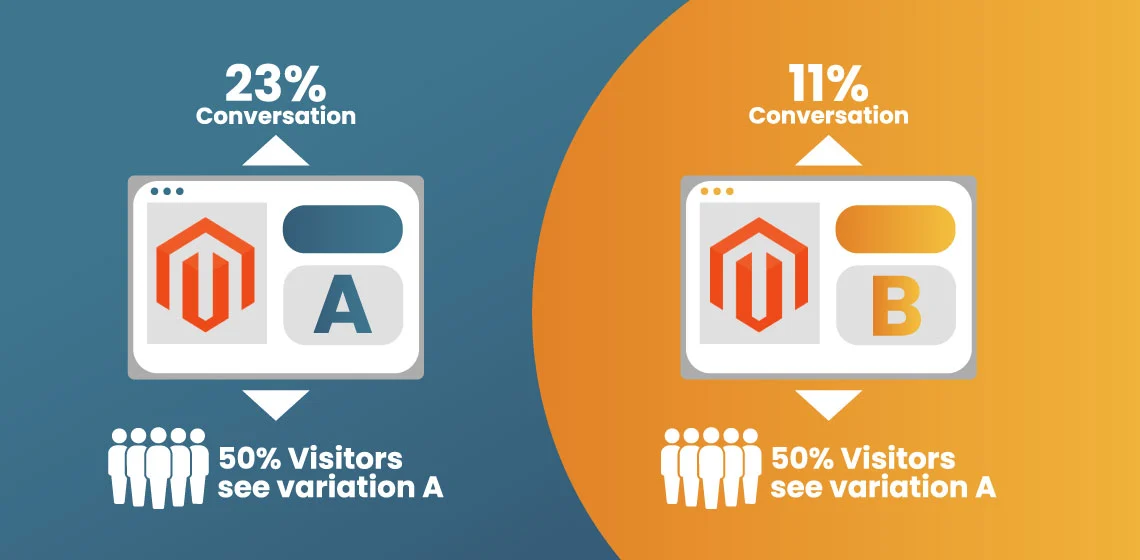
A/B testing is like a friendly competition between two versions of your website to see which one works best. You test things like colors, buttons, or page layouts to find out which one gets more clicks, sales, or engagement. By comparing these different versions, you can make smarter decisions about what will help your store grow.
Magento makes A/B testing simple! If you’re using the Enterprise edition, you already have built-in tools to test new ideas. If you’re on the Community edition, there are plenty of helpful extensions to add testing features.
Why does testing matter? It helps you figure out which changes will actually work. Testing shows you what’s driving conversions and what’s holding customers back.
When you use A/B testing, you can improve your site, boost sales, and create a better shopping experience for your customers. It’s all about making the right choices to grow your business.
Why A/B (Split) Testing Matters in Magento
A/B testing is a simple way to compare two versions of your website to see which one works best. You try different things, like button colors or page layouts, and check which version gets more clicks or sales. This helps you understand what your customers like.
Magento makes A/B testing easy. If you use the Enterprise edition, you have built-in tools to run tests. If you’re on the Community edition, you can use extensions to get the same features. Either way, Magento makes it simple to start testing.
Why does A/B testing matter? It helps you find out what works and what doesn’t. By testing different elements, you can reduce the risk of making changes that hurt your site.
This leads to better user experiences, higher conversion rates, and more sales. Proper testing helps you make smarter decisions and grow your business.
Key Metrics to Monitor Before & During Testing
Before you start any A/B test, you need to know what numbers tell the real story. These metrics act like “health checks” for your website. They show what’s working, what’s failing, and where users get stuck.
When you watch these numbers closely, it becomes easier to spot patterns, compare versions, and choose the winning design with confidence.
- Conversion rate tells you how many visitors complete an important action. It could be buying a product, signing up, or clicking a button. Higher conversions mean your changes are working.
- Bounce rate and exit rate show when visitors leave too early. If people leave after just one page, something isn’t grabbing their attention or guiding them forward.
- Average Order Value (AOV) helps you see if design changes make shoppers spend more. Even small tweaks can increase how much customers add to their carts.
- Cart abandonment tells you when shoppers leave during checkout. Testing different layouts or instructions can help reduce this and bring back lost sales.
- Time on site and pages per session show how engaged people are. If users explore more pages or stay longer, your site is doing a good job.
- Device segments matter too. Mobile users behave differently than desktop users. Testing both helps you build the best experience for everyone.
Key Areas to Test in Magento for Maximum ROI
Before you make big changes to your store, it helps to know which parts of your website matter the most. These areas have the biggest impact on how people shop, click, and buy.
Testing these sections lets you fine-tune tiny details that can turn a curious visitor into a paying customer. Small updates here often lead to big gains.
Homepage & Entry Page Elements
Your homepage is your store’s “first impression,” and testing it can lead to huge improvements.
Hero images are one of the first things visitors see. Try testing a simple static image vs a lively animated one. You can also compare short punchy text vs a longer value message to see which keeps people interested.
Your navigation and menus matter, too. A simple menu might help users find what they want faster, while a detailed menu may give power-shoppers more control. Testing both helps you discover which style your audience prefers.
CTA buttons like “Shop Now” or “Get Started” seem small, but they guide visitors forward. Changing the color, size, or message can lead to more clicks and purchases.
Finally, personalized homepages can make returning customers feel recognized. You can show them recommended products or a welcome message based on where they came from or what they looked at before.
Product Listing & Product Detail Pages
Product pages heavily influence buying decisions. Product images make a huge difference-some shoppers respond better to clean, simple images, while others connect more with lifestyle or video demos. Testing all three helps you see what drives the most clicks and buys.
Description styles also matter. Some shoppers want quick benefit-focused text, while others prefer detailed feature lists. Testing both can show which makes people feel confident enough to add to cart.
Price presentation is another big factor. Showing a discount badge, displaying savings, or using different price layouts can change how shoppers react. Testing these details helps you find the most motivating format.
Adding reviews and social proof can boost trust. Testing the placement-top of the page, near the Add to Cart button, or lower down-can show which spot encourages shoppers to continue.
You can also use personalization to display “Recommended for You” items based on browsing history. Testing personalized vs non-personalized recommendations reveals what leads to higher engagement and purchases.
Checkout Flow & Cart Page
The checkout is where many sales are won-or lost. Testing a simple one-page checkout vs a multi-step checkout can show which one reduces friction and helps customers finish their orders faster.
Form fields can make or break a sale. Too many fields can frustrate shoppers. Testing fewer fields, or offering guest checkout, can significantly lower drop-offs.
Your CTA button design and text at checkout also matters. Small changes in wording like “Complete Purchase” vs “Checkout Now” can give shoppers the extra push to finish.
Payment options are crucial too. Some customers prefer credit cards, while others love wallets like Apple Pay or Google Pay. Testing the placement or visibility of payment options helps you see which one increases completed orders.
And for returning customers, personalized checkout-like pre-filled address fields or saved shipping preferences-can make the process feel faster and easier. Testing these options helps you build a smooth, stress-free checkout experience that boosts conversions.
Leveraging User Behavior to Inform Your Hypotheses
Before you run any A/B test, you need to understand how people actually behave on your site. User behavior is like a secret map that shows where shoppers get excited, confused, or stuck.
When you study their actions, you can make smarter guesses, called hypotheses, about what changes will make your store perform better. This turns random guesses into confident decisions.
Analytics Tools
Heatmaps, scroll maps, and session recordings are powerful tools that help you “see” what users do.
Heatmaps show where people click the most, like hot spots on a screen. Scroll maps reveal how far users scroll before losing interest.
Session recordings let you watch real user journeys-like watching a replay of a game-to spot confusing areas or broken elements. These tools help you understand exactly where shoppers struggle or succeed.
Behavioral Segmentation
Not all visitors act the same, so grouping them helps you understand patterns. New visitors might explore slowly, while returning users head straight to a product page. Mobile shoppers tap differently than desktop shoppers.
When you split users into groups-called segments-you can see how each one behaves. This helps you choose the right tests for the right audience, instead of treating everyone the same.
Hypothesis Creation
Once you understand user behavior, it’s time to make smart, testable guesses. For example: if mobile users drop off during checkout step 2, you might guess that the form is too long or confusing.
So your hypothesis becomes: “Simplifying step 2 will help more mobile users finish checkout.” These clear, behavior-based hypotheses make your tests stronger and easier to measure.
Linking User Behavior to Personalization
Behavior data also helps you personalize the shopping experience.
If a visitor is a VIP customer, you can show them exclusive discounts. If someone keeps checking the same product, you can highlight it on their next visit. If a returning user clicks certain categories, you can customize their homepage to match their interests.
Personalization makes shoppers feel understood-and that often leads to higher engagement and more sales.
Incorporating Personalization into Your A/B Program
Personalization makes your Magento store feel like it knows your shoppers. It’s the difference between showing everyone the same thing… and showing each person exactly what they’re most likely to love.
When you mix personalization with A/B testing, you’re not just guessing you’re learning what works for different types of users and improving results with every test.
Personalization, Explained Simply
Think of your store talking to each visitor differently:
- A new visitor gets a warm welcome.
- A returning visitor gets product suggestions based on what they viewed last time.
- A repeat buyer sees VIP perks or exclusive offers.
This boosts engagement because it feels more helpful and more human.
A/B Testing + Personalization = Smarter Experiments
Instead of running one generic test for everyone, you can test personalized vs. non-personalized experiences.
Example experiments:
- Generic banner vs. banner based on past browsing
- Standard product list vs. “Recommended for You” section
- Same homepage for everyone vs. different versions for different segments
You compare the results, and the winning experience becomes the new “normal.” Simple, powerful, and data-driven.
Tools That Make It Easy
Magento supports personalization through extensions such as:
- Dynamic Yield – real-time product recommendations
- Kameleoon – behavior-based personalization
- Magento Personalization Extensions – built into the ecosystem
These tools quietly track patterns – what people click, what they buy, what they ignore – and adjust the shopping experience automatically.
A Few Challenges
- Personalization can take careful setup.
- You need enough website traffic for reliable test results.
- Different user segments must see the right version at the right time.
But once things are running smoothly, the payoff is huge.
Real Example in Action
Imagine showing shoppers products they looked at before, plus new items they might love. Now compare that to showing everyone random items. Almost every time, the personalized list gets more clicks, more adds to cart, and more purchases-because it feels relevant.
Best Practices & Pitfalls for Maximum ROI
A/B testing works best when you treat it like a science experiment. You make one change, watch what happens, and learn from the results. When you follow the right steps, even tiny adjustments can lead to big wins.
But if you rush, guess, or mix too many changes at once, your results get messy and hard to trust. These best practices keep your tests clean, reliable, and super effective.
Test one element at a time so you know exactly what caused the change. If you switch the button color, the headline, and the image all at once, you won’t know which one actually worked. One clear change = one clear result.
Statistical significance is your proof that the result is real and not just luck. This means waiting until enough people have seen each version-usually aiming for a strong confidence level. When the sample size is big enough, you can trust the winner.
Prioritize high-impact areas like checkout pages, product pages, or the homepage hero banner. These are the places where your decisions can boost conversions the fastest. A tiny improvement here can lead to a big jump in sales.
Multivariate testing is helpful when you have high traffic and want to test combinations of things at once-for example, button text and product image style.
This helps you see how different parts work together, but it only works well with lots of visitors.
Monitor your secondary metrics during every test. Even if conversions go up, things like bounce rate, time on site, or cart value should stay healthy. A winning test isn’t a real win if it hurts something important.
Always iterate based on results. A/B testing isn’t “run once and done.” After you find a winner, apply it, then test the next idea. Over time, all these small wins stack up, making your Magento store faster, smoother, and far more profitable.
Example Test Ideas with Expected ROI Impact
These test ideas are some of the easiest ways to get big results fast. They focus on areas shoppers see the most and interact with the most.
Each idea can reveal what your customers truly prefer and help you make smarter choices that boost sales, lower drop-offs, and create a smoother shopping experience.
Hero Image Test
Your homepage’s first impression can make or break a sale. Trying different hero images can teach you what type of visual pulls people in.
- Test a high-quality product photo vs a lifestyle image that shows the product being used.
- Product photos are crisp and clear, while lifestyle images tell a story.
- Expected ROI boost: 5–10%, because the right image can increase attention and clicks.
Simplified Mobile Checkout Form
Mobile users want fast and easy checkouts. Removing friction here creates a huge impact because this is where many shoppers quit.
- Test a shorter checkout form with fewer fields vs the regular full form.
- Mobile users often get frustrated by long forms, so trimming them helps.
- Expected reduction in cart abandonment: 20–40%.
Personalized Recommendations
Shoppers love seeing products that match their interests. Personal recommendations make the store feel custom-made for each person.
- Test products based on browsing history vs a generic recommendation list.
- Personalized suggestions feel smarter and more helpful.
- Expected increase in average order value (AOV): 10–15%.
Free Shipping Threshold Test
Free shipping is one of the strongest motivators online shoppers respond to. Sometimes offering a clear “goal” makes customers add more to their carts.
- Test showing a free shipping message (“Spend $50 to get free shipping!”) vs showing nothing.
- This often encourages shoppers to buy one extra item.
- Expected conversion lift: 8–12%.
Discount Messaging
How you show a deal can be just as important as the deal itself. Messaging changes how shoppers feel about the offer.
- Test bold discount messaging (“20% off today!”) vs a normal price display.
- This catches attention fast and encourages quick clicks.
- Expected click-through boost: 15–20%.
Putting It All Together - A Roadmap for Testing in Magento
A/B testing works best when you follow a clear, simple plan. Each step builds on the one before it, helping you understand your users and make smart decisions based on real data-not guesses.
When you move through this roadmap, you create a system that gets better and more powerful every time you test. This is how Magento stores grow steadily and reliably.
Step 1: Audit & Baseline Metrics
Start by learning where your store stands right now. Check your conversion rate, bounce rate, cart abandonment, time on site, and other key numbers. These baseline metrics help you measure improvements later. Without them, you won’t know if your changes truly worked.
Step 2: Research & Segmentation
Not all shoppers behave the same way, so break them into groups. New visitors explore differently than returning ones, and mobile users act differently than desktop users. When you understand these patterns, you can design tests that match each segment’s needs.
Step 3: Hypothesis Generation
Now turn your research into smart, testable ideas.
For example: “Mobile users drop off at checkout-maybe the form is too long.”
Your hypothesis becomes: “If we simplify the checkout on mobile, more users will finish their purchase.”
Clear hypotheses make tests easier to track and measure.
Step 4: Test Variant Setup
Create the versions you want to test. Maybe you change the CTA button, redesign the product page, or shorten the checkout form.
Your variants should be different enough to measure, but simple enough to understand.
Step 5: Run the Test
Launch your test and let real shoppers interact with it. Give the test enough time and traffic to gather meaningful data. Don’t stop early-reliable results need a strong sample size.
Step 6: Analyze Results
Check which version performed better. Did conversions go up? Did bounce rates drop? Also examine secondary metrics to make sure nothing else broke. A winning test should improve the whole experience-not just one number.
Step 7: Implement the Winning Variant
Once you find the winner, roll it out to everyone. This becomes your new “default” version because it’s proven to work better than before.
Step 8: Personalize Further
Use everything you’ve learned to upgrade the experience even more. Add personalized banners, recommended products, or special offers. Make each shopper feel like the store was built just for them.
Step 9: Repeat & Iterate
Testing never stops. After one improvement, move to the next idea. Over time, all these small wins stack up into huge growth-more sales, happier customers, and a much stronger store.
Frequently Asked Questions (FAQs)
It’s normal to have lots of questions – everyone does! These FAQs are here to make things clearer, simpler, and easier to understand so you can start testing with confidence.
Start with high-traffic pages like the homepage, product detail pages, and checkout flow. These areas impact the most visitors and bring the fastest ROI.
Use a sample size calculator to estimate how many visitors you need. Try to reach a 95% confidence level so you know your results are reliable.
Personalization lets you test experiences based on user groups, like new vs returning shoppers. This makes your tests more relevant and usually boosts engagement and conversions.
Most tests should run at least 1–2 weeks to capture a full range of user behavior. Ending too early can lead to incorrect or misleading results.
If there’s no clear winner, move on to your next idea. Neutral results still teach you what doesn’t matter, which saves time in future tests.
Yes – as long as the tests don’t affect the same page or user action. Overlapping tests can confuse the results and make it hard to know which change worked.
Test continuously! Run one test after another. Regular testing helps your store grow steadily and keeps improving your customer experience.
Conclusion
Great A/B testing in Magento isn’t about guessing – it’s about learning what your users actually do and improving one smart step at a time.
When you understand their behavior, test the most important parts of your store, and personalize their experience, everything feels smoother and more enjoyable for shoppers. That’s how you turn small changes into big wins.
Start with high-impact areas like your homepage and checkout. Watch the results closely, keep what works, and continue testing new ideas. Every improvement adds up. With consistency and curiosity, your ROI will grow, your customers will be happier, and your store will perform better than ever.


