

Global expansion sounds simple until you actually try to do it. One new country turns into questions about language, currency, taxes, URLs, and suddenly everyone’s unsure what should change – and what absolutely shouldn’t.
That’s where Magento multistore comes in. Not as a growth hack or a feature you “turn on,” but as a structure designed to stop things from getting messy as soon as you add regions.
This guide isn’t about clicking through setup screens. It’s about understanding how Magento separates language, money, and regional rules – and why getting that structure right early saves you from painful rework later.
Why Magento Multistore Exists (Architectural Reason)
Here’s the part that gets missed a lot: Magento 2 didn’t add multistore to be fancy. It exists because running multiple countries from separate installs gets painful fast.
Inventory drifts. Reporting stops lining up. SEO turns into a guessing game. And every small change suddenly needs to be done five times.
Multistore fixes that by separating what must be shared from what must be different. You get one backend, one source of truth, and clear boundaries for things like currency, catalog structure, and language. That way, global growth doesn’t mean global chaos.
This isn’t about flexibility for its own sake. It’s about control. Magento multistore gives you guardrails so expansion stays structured instead of slowly turning into technical debt.
If you want, next we can do “Understanding Website, Store, and Store View” – that’s where everything usually clicks.
Understanding Magento’s Website, Store, and Store View Hierarchy

This is the part where most confusion comes from, so let’s slow it down and be very literal. In Magento, website, store, and store view are not different words for the same thing. They are hard boundaries. Mixing them up is how global setups go sideways.
Website - where money rules live
A website is a business boundary. This is where Magento decides things like currency, payment methods, taxes, and checkout rules. If two regions don’t share the same financial reality, they should not live on the same website. This is why currency settings exist here – money problems are expensive to fix later.
Store - how your catalog is organized
A store controls the catalog structure. Categories, product groupings, what’s visible where. You usually don’t need many of these unless different regions sell fundamentally different assortments. This layer is about what you sell, not how it looks.
Store View - what the customer actually sees
A store view is pure presentation. Language, locale, translated content, sometimes URLs. Same products, same prices, same checkout – just shown in a way that makes sense to the user. This is where multi-language belongs, and nowhere else.
Once you see this hierarchy clearly, a lot of “should we create a new store?” debates just disappear.
We worked with the BrandsBro team on a Magento Multistore Setup project where the client struggled with poor structure, weak presentation, and low engagement.
Our team improved the layout, shopping flow, and store experience. Facing similar Magento issues? Book a free meeting with BrandsBro.
Multi-Language Is a Presentation Problem, Not a Business One
Multi-language functionality is often one of the most misunderstood parts of a Magento multi store setup. It is not primarily about pricing, checkout settings, payment methods, or how the business operates. It is about making sure customers can understand the content displayed on the website.
When learning how to setup Magento store configurations for different audiences, it is important to understand that language is managed at the store view level. A new store view allows you to translate product descriptions, menu labels, navigation, CMS pages, transactional emails, and other text-based content without creating an entirely separate business operation.
A Magento multi language store setup should not automatically be tied to currency or country. For example, a business may serve customers in the United States, the United Kingdom, and Australia using English while displaying different currencies. In another case, a single country may require multiple languages while using the same currency. Magento separates language from broader store settings because these requirements do not always match.
Treating language as a presentation layer makes Magento multi store setup much easier to manage. Instead of duplicating websites only to translate content, you can create separate store views under the same website or store structure. This reduces unnecessary configuration work, prevents duplicated data, and keeps products, inventory, and business rules consistent.
A properly planned Magento multi language store setup gives customers a localized browsing experience without forcing you to rebuild features that do not need to change. The key is to use store views for language and reserve separate websites or stores for genuine operational differences such as pricing, inventory, tax rules, checkout processes, or regional business requirements.
Currency Settings Define Hard Business Boundaries
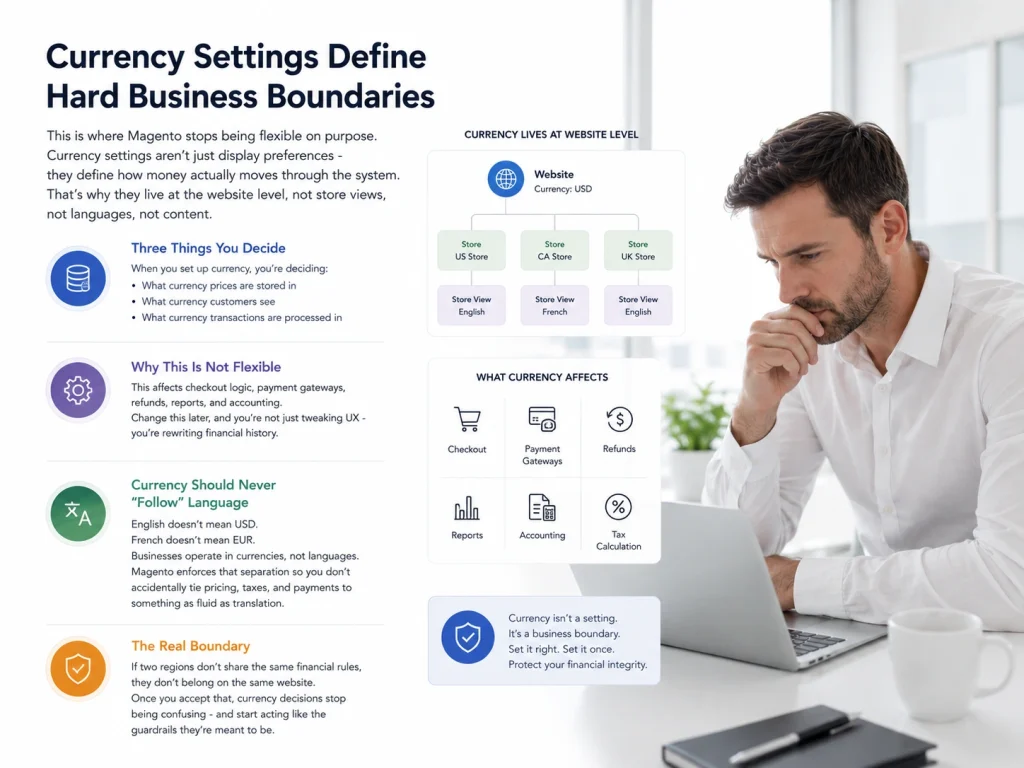
This is where Magento stops being flexible on purpose. Currency settings aren’t just display preferences – they define how money actually moves through the system. That’s why they live at the website level, not store views, not languages, not content.
When you set up currency, you’re deciding three very real things: what currency prices are stored in, what currency customers see, and what currency transactions are processed in. That affects checkout logic, payment gateways, refunds, reports, and accounting. Change this later, and you’re not just tweaking UX – you’re rewriting financial history.
This is also why currency should never “follow” language. English doesn’t mean USD. French doesn’t mean EUR. Businesses operate in currencies, not languages. Magento enforces that separation so you don’t accidentally tie pricing, taxes, and payments to something as fluid as translation.
If two regions don’t share the same financial rules, they don’t belong on the same website. Once you accept that, currency decisions stop being confusing – and start acting like the guardrails they’re meant to be.
Localization Is Where Global Stores Usually Break
This is the part teams underestimate – and then quietly pay for later. Localization isn’t a single setting you flip on. It’s a collection of small details that decide whether a store feels native or just translated.
What localization actually covers (and why it matters)
- Date and time formats: Something as simple as 03/07/2025 can mean different things in different regions. Get this wrong and users hesitate – even if they don’t know why.
- Addresses and phone numbers: Required fields, field order, validation rules. A checkout that “works” technically can still feel broken if it doesn’t match local expectations.
- Legal and policy content: Returns, privacy, tax notes, compliance text. This content often changes by region, not language – and reusing it blindly kills trust.
- Tax display norms: Some regions expect tax included. Others expect it added later. Showing the “wrong” total feels deceptive, even if it’s accurate.
Where localization lives in Magento (important distinction)
Short version:
- Language → store view
- Currency → website
- Localization → spans both
Localization sits on top of language and currency. It doesn’t replace them – it connects them into something that feels correct for a specific region.
Why this breaks conversions quietly
Nothing crashes. No errors show up. Sales just feel… softer. Users hesitate. Checkout abandonment creeps up. Support tickets increase with vague complaints. This is usually a localization issue, not a pricing or traffic problem.
If multi-language helps users understand you, localization helps them trust you. And without trust, global expansion never really sticks – no matter how clean the setup looks on paper.
Common Multistore Mistakes That Cause Rework
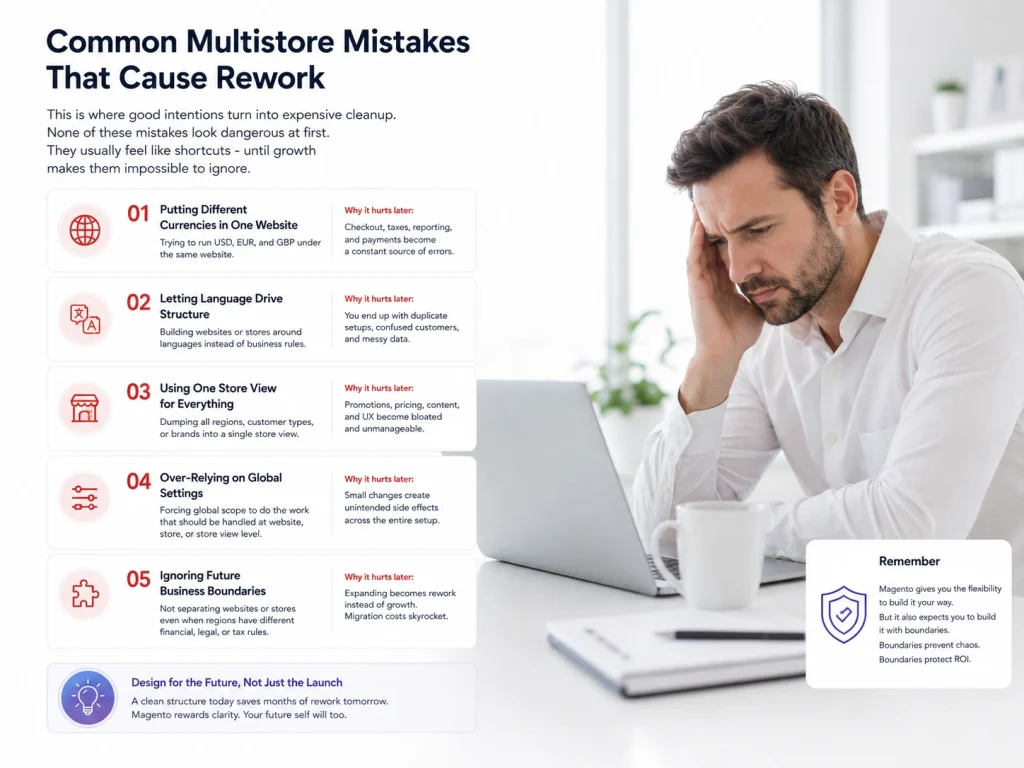
This is where good intentions turn into expensive cleanup. None of these mistakes look dangerous at first. They usually feel like shortcuts – until growth makes them impossible to ignore.
Mistake 1 - One website, multiple currencies
Why it happens: “It’s the same store, just different countries.”
What actually breaks: Reporting, refunds, payment logic, accounting consistency. Currency is a financial boundary. Mixing it inside one website guarantees pain later.
Mistake 2 - Treating language as a pricing decision
Why it happens: “French store means different prices, right?”
What actually breaks: You lock pricing logic to translations. Later, when the same language needs multiple currencies, you’re forced to restructure everything.
Mistake 3 - Creating separate Magento installs per region
Why it happens: Feels clean. Feels isolated. Feels safe.
What actually breaks: Inventory sync, customer data, reporting, SEO authority, and operational speed. You trade short-term clarity for long-term fragmentation.
Mistake 4 - Ignoring localization until after launch
Why it happens: “Translation first, we’ll fix the rest later.”
What actually breaks: Trust. Conversion. Support load. Nothing crashes – performance just quietly underdelivers.
The pattern behind all of this
Most Magento multistore mistakes happen when businesses combine boundaries that Magento is designed to keep separate. During a Magento 2 multi store setup, presentation, pricing, currency, customer experience, and regional rules must be planned independently. When these areas overlap without a clear structure, expensive rework becomes almost unavoidable.
Magento multistore is not difficult simply because it has many settings. The real challenge is that early architectural decisions can be difficult to reverse. Whether you are building a large international store or following a niche how to sell stickers on Magento store setup guide, the same rule applies: define websites, stores, store views, catalogs, and pricing requirements before development begins.
Pricing also needs careful planning, especially when deciding how to setup price for store views in Magento 2. Magento does not normally manage product prices directly at the store-view level, so businesses must understand the available website-level pricing scope, currency options, catalog rules, and customization requirements.
Next, we will examine how to choose the right multistore structure before building anything—the planning stage that can save the most time, money, and technical effort.
How to Decide Your Multistore Structure (Before You Build Anything)
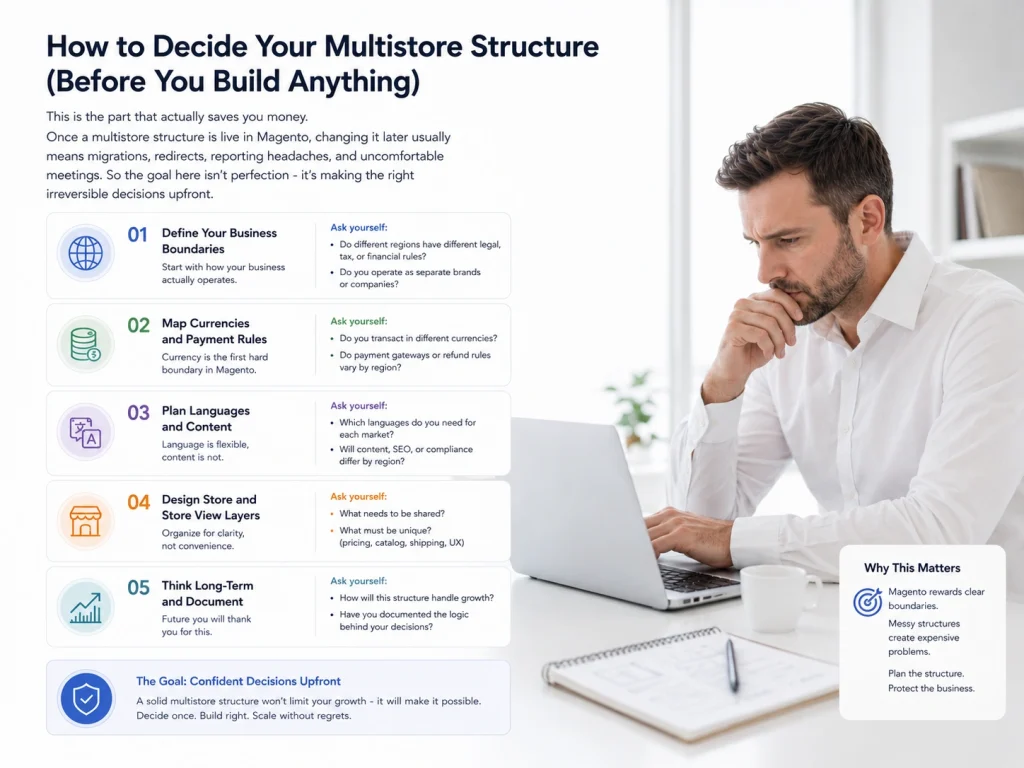
This is the part that actually saves you money. Once a multistore structure is live in Magento, changing it later usually means migrations, redirects, reporting headaches, and uncomfortable meetings. So the goal here isn’t perfection – it’s making the right irreversible decisions upfront.
Start with the one question that matters most
Do these regions share the same financial reality? If the answer is no, they don’t belong on the same website. Currency, taxes, and payment rules are hard boundaries. Everything else is secondary.
When you need a new website
Use a new website when at least one of these is true:
- Different base currency
- Different tax or legal requirements
- Different payment methods or checkout rules
- Separate accounting or business entity
Why: A website defines how money works. If money works differently, force separation early.
When a store view is enough
A store view is usually all you need when:
- Currency stays the same
- Checkout and taxes are identical
- Only language, content, or locale changes
Why: This keeps operations centralized while letting users experience the store in their own language.
When a store (catalog layer) makes sense
Create a separate store only if:
- Product assortments differ meaningfully
- Category structures don’t translate well across regions
Why: Stores control what’s sold, not how it’s sold.
A simple rule to sanity-check decisions
If a change affects money, think website.
If it affects words, think store view.
If it affects what’s for sale, think store.
If you can answer those three cleanly, your multistore structure will scale without forcing painful rewrites later.
Magento Multistore Setup Prerequisites
Magento multistore setup requires a properly configured Magento installation, separate domains or subdomains, SSL certificates, and sufficient hosting resources to support multiple storefronts. Preparing these elements ensures a smooth setup process.
Before creating multiple stores, verify your server meets Magento requirements, configure DNS settings, and plan your store hierarchy, including websites, stores, and store views.
Choosing the Right Magento Multistore URL Structure
The best Magento multistore URL structure depends on your SEO and business goals, with separate domains, subdomains, and subdirectories being the most common options. Each structure affects management and search visibility differently.
Separate domains are ideal for country-specific brands, subdomains offer flexibility, and subdirectories are often easier to manage while consolidating SEO authority.
Magento Multistore Performance Considerations
Magento multistore performance depends on server resources, caching, database optimization, and content delivery networks (CDNs). Proper optimization ensures all storefronts load quickly and operate efficiently.
Enable full-page caching, optimize images, use a CDN, and monitor database performance regularly to maintain a fast and reliable shopping experience.
Magento Multistore Security and User Permissions
Magento multistore security relies on strong user permissions, secure authentication, and regular software updates. Proper access control helps protect sensitive store data and administrative functions.
Create role-based permissions for team members, enable two-factor authentication, and keep Magento, themes, and extensions updated to reduce security risks.
Frequently Asked Questions
Multistore questions usually come up after someone has already made a few structural decisions – and starts wondering if they picked the right ones. These FAQs focus on the practical, real-world doubts that show up when planning or expanding a global Magento setup.
Do I need Magento multistore for international expansion?
If you’re expanding into regions with different currencies, taxes, or checkout rules, yes. Magento multistore is designed specifically to handle those differences without running separate installs or duplicating data.
Can I handle multiple languages without multistore?
You still use multistore - just at the store view level. Multi-language in Magento is a presentation concern, not a business one, so it doesn’t require separate websites or stores by default.
Does each country need its own website?
Only if the financial rules change. Different currencies, tax structures, or payment methods usually mean a new website. Same money rules but different language or locale usually don’t.
Can one website use multiple currencies?
Technically, display currencies can vary, but the base currency is fixed per website. Mixing true multi-currency business logic inside one website almost always causes reporting and accounting issues later.
What’s the difference between localization and translation?
Translation changes words. Localization changes expectations - things like date formats, address fields, legal content, and tax display. You can translate a store and still feel “foreign” if localization is ignored.
Is it better to create separate Magento installs for each region?
Almost never. Separate installs create data silos, inventory sync issues, fragmented reporting, and SEO problems. Multistore exists to avoid exactly that kind of long-term operational debt.
Structure First, Settings Second
Global expansion usually fails long before traffic or demand become the problem. It fails when structure is rushed. Language gets tied to pricing. Currency gets treated like a display option. Localization gets postponed. And suddenly a store that “worked fine” becomes expensive to untangle.
The reason Magento multistore works at scale is simple: it forces separation where separation matters. Money lives at the website level. Catalog logic lives at the store level. Language and presentation live at the store view level. Localization ties it all together without breaking those boundaries.
If you get that structure right early, configuration becomes straightforward. If you don’t, no amount of extensions or optimization will save you later. Multistore isn’t about flexibility – it’s about guardrails. And the earlier you respect them, the easier global growth becomes.
