
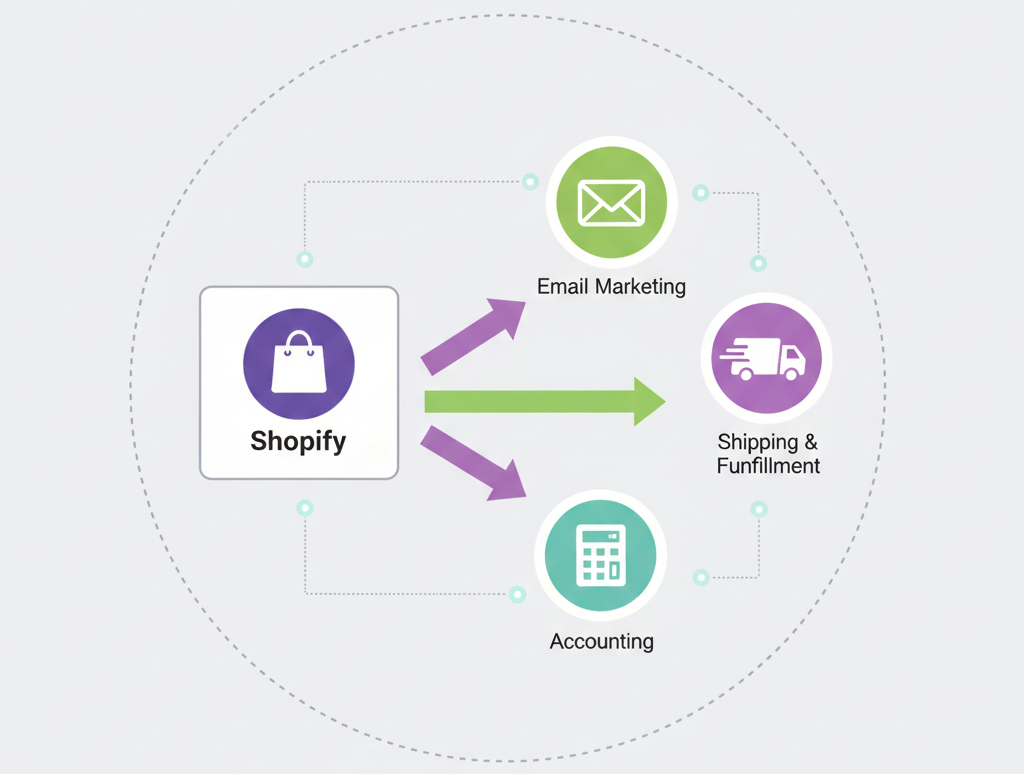
Shopify app integration is no longer just about installing tools from the App Store. In 2026, a growing Shopify store needs connected systems that work together smoothly, inventory, payments, email marketing, reviews, upsells, shipping, analytics, CRM, loyalty programs, and custom workflows. If these apps are not integrated properly, they can slow down your store, break tracking, confuse customers, and create serious operational problems.
At Brand’s Bro, we have spent over 11 years helping Shopify and ecommerce brands build, connect, and scale smarter store systems. Our team has worked with 350+ Shopify businesses across the USA, Canada, the UK, and Australia, including brands in fashion, beauty, home goods, electronics, lifestyle products, and health-focused ecommerce.
We have seen many Shopify stores struggle because their app setup was messy. Too many apps were installed without a clear strategy, causing slow page speed, duplicate features, poor data flow, broken discount logic, and weak reporting. In one Shopify lifestyle project, we rebuilt the store’s app ecosystem by connecting email automation, reviews, upsells, inventory sync, and analytics properly. Within 95 days, checkout efficiency improved by 44%, repeat purchase revenue increased by 68%, and monthly sales grew by 126%.
For a home essentials Shopify brand, we replaced unnecessary apps, connected key tools, and built a cleaner automation flow for orders, customer communication, and post-purchase offers. As a result, store speed improved, manual workload decreased by 39%, and revenue became easier to track across campaigns.
A strong Shopify app integration strategy is not about using the most apps. It is about using the right apps, connecting them correctly, and making sure every tool supports sales, speed, customer experience, and business growth.
In this guide, we’ll explain how to build, connect, and scale Shopify app integrations in 2026, including custom app setup, third-party integrations, automation workflows, analytics tracking, performance optimization, and growth-focused app strategy.
If your Shopify store is slowed down by messy apps or disconnected systems, Brand’s Bro can help you clean, connect, and scale your Shopify app setup properly. You can book a meeting with us today.
What Is Shopify App Integration & How It Evolved In 2026
Shopify app integration connects external software with the Shopify platform. It helps merchants automate tasks and run stores better.
It works as a bridge between business goals and technical execution. APIs, webhooks, and embedded apps turn merchant needs into actions.
In the early days, integrations focused on sharing data like products and orders. By 2026, they became smarter, more flexible, and more secure.
The shift from REST APIs to GraphQL lets apps request only the data they need. This improves performance. Permission-based access tokens limit what apps can do. Plus, merchants get more control.
Shopify also introduced AI-powered integrations like Sidekick and auto-generated product content. Web Pixel Extensions replaced older analytics methods. Checkout extensibility replaced checkout.liquid to make checkout customization safer and more scalable.
Shopify Platform And App Architecture
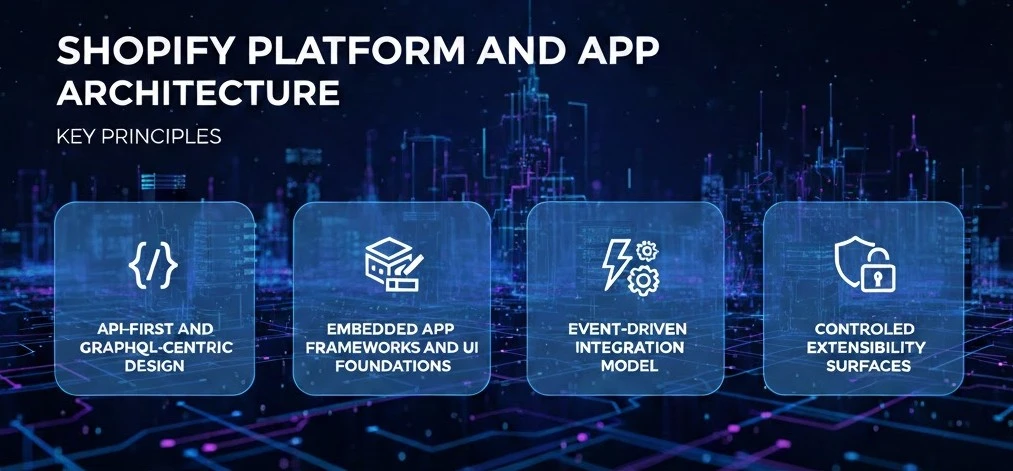
In 2026, the Shopify platform runs on Shopify’s Multi-Tenant SaaS Model. Millions of stores share the same infrastructure. Still, each store stays fully isolated at the data and permission level.
Because of this, apps follow a stateless architecture. Apps do not assume store context. Instead, they derive it from OAuth sessions, access tokens, and request metadata.
Api-First And GraphQL-Centric Design
Shopify follows an API-First and GraphQL-Centric Design. The GraphQL Admin API is the primary way apps access products, orders, customers, inventory, metafields, and billing.
Apps request only the data they need. You get improved performance and keep usage limits predictable.
REST APIs still exist. However, most complex or large-scale integrations rely on GraphQL.
For very large data tasks, the Bulk Operations API runs async jobs and returns results through JSON files and webhooks.
Embedded App Frameworks And Ui Foundations
Merchant-facing apps use Embedded App Frameworks and UI Foundations. Apps run inside the Shopify Admin. Shopify App Bridge handles navigation and context. Polaris provides consistent UI components.
This makes apps feel native while following Shopify’s embedded UX rules.
Layered App Architecture: Shopify apps are built in layers, each with a clear role.
Presentation Layer: Runs inside the Shopify Admin using App Bridge and Polaris. This is where merchants interact with the app.
API Access Layer: Handles communication with Shopify APIs, including versions, permissions, and limits.
Data Synchronization Layer: Keeps data in sync using webhooks and incremental updates. It prevents duplicates and ensures reliability.
Security Layer: Manages OAuth 2.0, HMAC validation, sessions, and secure token storage.
Event-Driven Integration Model
Shopify apps respond to events instead of polling. Webhooks notify apps when orders, products, or app states change.
Apps must handle retries and delays while keeping data accurate.
Controlled Extensibility Surfaces
Apps do not modify Shopify directly. They extend it through defined surfaces. Such as Admin UI extensions, theme app extensions, checkout UI extensions, and Shopify Flow.
Each surface has clear limits and rules.
Rule of thumb: Use APIs correctly, separate concerns into layers, respond to events, and stay within Shopify’s extension model.
Types Of Shopify App Installation & Configuration And When To Use Them

Shopify apps connect to the platform in a few main ways. Each type exists for a different purpose. Picking the right one depends on who the app is for, how many stores will use it, and how closely it needs to work with Shopify.
Most Shopify apps use more than one integration type. A public app may also be embedded. A custom app may rely on events and background jobs.
Let’s talk about the types:
1. Public Apps For The Shopify App Store
Public apps are built for many merchants and are installed from the Shopify App Store. They follow Shopify’s rules for security, design, and billing. Here is a table for integration characteristics of public apps for Shopify:
When to Use Public Apps
- The same feature is useful for many stores
- You want to sell the app as a product
- You need Shopify-managed billing and updates
Common Use Cases
- Marketing and email tools
- Analytics and reporting apps
- Inventory and order management tools
2. Custom And Unlisted Apps
Custom and unlisted apps are built for one store or one business. They are installed directly and are not shown in the App Store. Let’s look at some integration characteristics of the custom and unlisted apps:
When to Use Custom and Unlisted Apps
- The store has special or internal needs
- The app connects Shopify to other business systems
- You do not need public distribution
Common Use Cases
- ERP or accounting integrations
- Internal dashboards
- Custom automation for one merchant
3. Sales Channels And Embedded Integrations
Sales channels and embedded integrations connect directly to Shopify’s admin, storefront, or checkout. These apps feel built-in and are used often. Here is a table for a better overview:
When to Use Sales Channels and Embedded Integrations
- The app must feel native to Shopify
- Merchants use it every day
- The app affects customer experience or checkout
Common Use Cases
- Marketplace and sales channel apps
- Checkout extensions
- Storefront features and widgets
How Shopify Apps Are Built: Integration Architecture Patterns
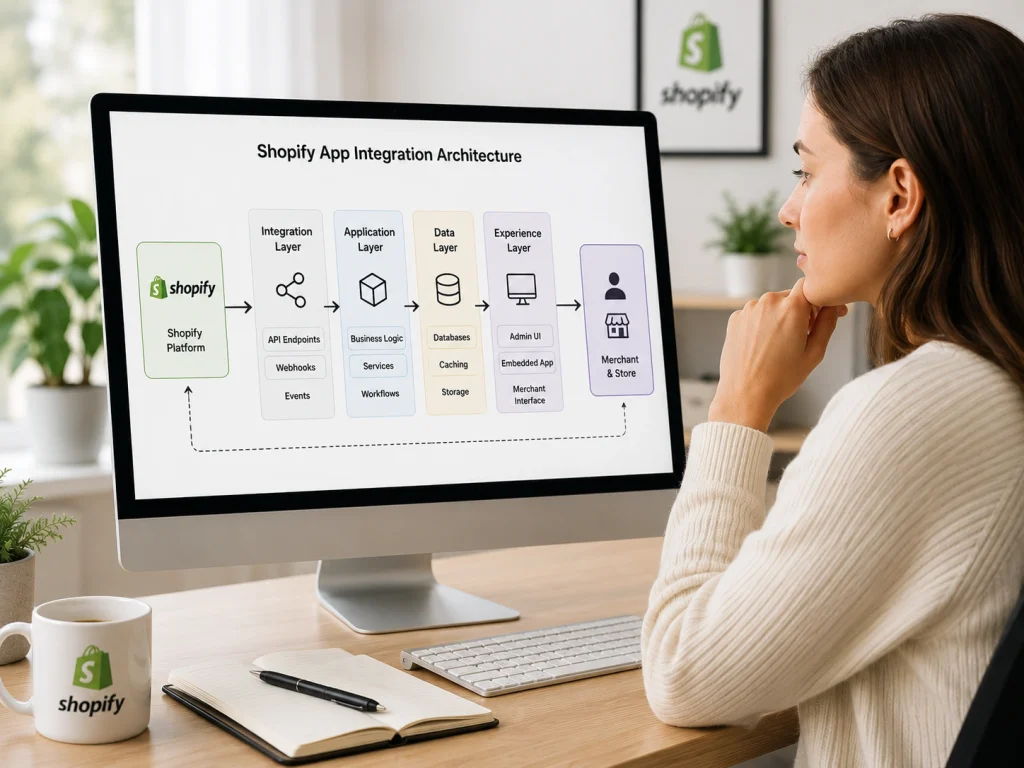
Shopify apps are built as integration-native systems instead of traditional monolithic applications. They primarily focus on understanding platform signals, interpreting merchant contexts, and performing actions.
The architecture emphasizes clarity, scalability, and fits well within Shopify’s API-first approach. Turns out, it consists of layers that each handle specific transformations of data and context.
Frontend Experience In Shopify Apps
The frontend layer acts as a user interface within Shopify environments. It doesn’t maintain a global state but reacts to platform-provided context.
Embedded Admin Interfaces
These interfaces operate within the Shopify Admin using App Bridge. They receive context information like shop identity, user sessions, and permissions. That is, through tokens and messaging.
This layer functions as a reactive presentation surface:
- UI state is temporary and session-based
- Authorization is built-in, not negotiated
- Navigation follows Shopify’s rules
The Polaris design system ensures a consistent user experience across apps.
Storefront and Headless Experiences
When apps connect to storefronts or headless setups, they move towards decoupled integration. Storefront APIs are accessed as read-focused interfaces, often using a Backend-for-Frontend (BFF) layer. Here’s what the BFF does:
- Normalizes schemas
- Manages data field aggregation
- Handles latency and caching
In headless setups, Shopify serves as a data source while the app functions as a flexible service.
Backend Architecture For Shopify Apps
The backend layer deals with reconstructing context, maintaining state, and ensuring resilience, where integration patterns are created.
Scalable Services
Shopify app backends are mainly stateless, which allows for horizontal scaling and fault isolation. Each request rebuilds context using:
- JWT session tokens
- Shop domain identifiers
- Permission scopes
This setup avoids tight coupling with infrastructure. GraphQL APIs help by ensuring efficient data access.
Data Sync and Background Jobs
Data synchronization is a continuous process rather than a one-time task. Apps typically use:
- Bulk operations for initial setup
- Webhook updates for ongoing changes
- Periodic checks to maintain accuracy
Background workers manage webhook events, applying logic and refreshing data. Queueing systems and retry strategies help maintain balance under changing conditions.
Event-Driven Integration Pattern
All layers of Shopify apps follow an event-driven integration pattern. Events reflect changes, not fixed outcomes. Apps interpret these events and produce effects like data updates or notifications.
Apps can now adapt easily as Shopify updates its APIs and requirements.
We helped a client improve their Shopify app integration with cleaner setup, better product presentation, and a smoother shopping experience.
After the update, their storefront looked more professional, trustworthy, and conversion-focused. Facing similar Shopify issues? Book a free BrandsBro meeting.
Shopify Apis And Data Access
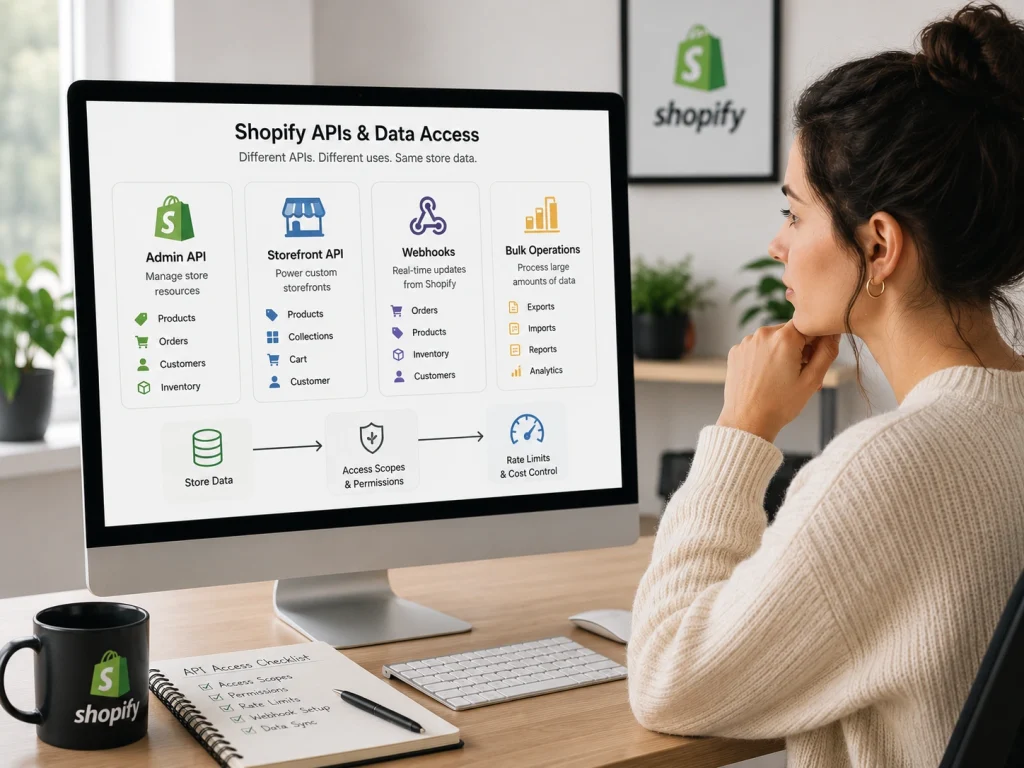
Shopify APIs are how apps read and work with store data. In 2026, data access is structured, permission-based, and cost-aware.
Each API surface exposes the same store information in a different way, depending on whether the goal is management, storefront display, or large-scale processing.
Admin Apis And Core Store Data
The Admin APIs provide access to a store’s main operational data. This includes products, orders, customers, inventory, and settings. These resources are structured as fixed data models with clear relationships.
The GraphQL Admin API lets apps ask only for the data they need. Instead of multiple requests, a single query can retrieve connected information in one response.
Key characteristics include:
- Exact field selection to avoid unnecessary data
- Linked resources accessed in a single query
- Typed responses that follow a defined schema
Shopify controls usage through query cost limits, encouraging efficient requests.
Access is managed with permission scopes, and tokens define what an app can read or change.
Storefront Apis And Headless Commerce
The Storefront APIs are designed for customer-facing experiences. They focus on fast, read-only access to product and collection data.
In headless builds, these APIs power custom frontends that are separate from Shopify’s themes.
Common traits include:
- Restricted access tokens
- Market-aware data such as language and currency
- Responses shaped for UI rendering
Bulk Operations For Large Data Sets
The Bulk Operations APIs are used when an app needs a lot of data at once. These APIs run tasks in the background instead of returning data immediately.
They are commonly used for:
- Full catalog exports
- Historical data processing
- Reporting and analytics
Authentication, Security, And Trust For Shopify Apps
Authentication and security define how much Shopify and merchants can trust an app. In 2026, every Shopify app operates inside a controlled access system where identity is verified, permissions are limited, and data handling is closely governed.
Nothing connects by default. Everything is allowed on purpose.
Oauth And App Permissions
Shopify apps use the OAuth 2.0 authorization code flow during installation. For merchants concerned about site performance when adding apps, proper integration architecture. Who doesn’t want to ensure minimal impact, right?
This process confirms merchant consent before any store data is accessed.
Permissions are granted through OAuth scopes. Each scope allows a specific action on Shopify resources such as products, orders, customers, or metafields. Shopify follows a least-privilege approach, meaning apps should request only the scopes they truly need.
Scopes cannot change silently. If an app needs more access later, the merchant must approve a new authorization request. This keeps permissions visible and controlled.
By 2026, Shopify treats scopes based on data sensitivity. Access to customer or financial data is reviewed more strictly than access to catalog data.
Tokens, Sessions, And Identity
After authorization, Shopify issues access tokens that identify the app when it calls Shopify APIs. These tokens act as credentials and must be protected.
Offline tokens are long-lived and used for background tasks, webhooks, and scheduled jobs. Online tokens are short-lived and tied to a user session in the Shopify Admin.
Embedded apps use session tokens provided by Shopify App Bridge. These are time-limited JWTs that allow secure, stateless verification between the frontend and backend.
Shopify signs incoming requests, such as webhooks, using HMAC signatures. Apps must verify these signatures to confirm the request truly came from Shopify.
Tokens must be stored securely, rotated when necessary, and revoked if compromised. Token misuse is considered a critical security issue.
Protecting Store And Merchant Data
Shopify apps act as processors of merchant data, not owners. Data protection applies at every stage.
Sensitive data must be encrypted at rest and protected during transfer using TLS. Secrets should never be hardcoded and must be managed through secure environments.
Apps should store only necessary data and avoid long-term retention when data can be retrieved again from Shopify.
When an app is uninstalled, merchant data must be deleted or anonymized within required retention periods.
Webhook payloads and bulk data exports may contain personal or regulated information. Apps must enforce strict access controls and isolate data between stores.
By 2026, security is not just technical. Apps are expected to support data access requests, deletion workflows, and compliance with global privacy regulations.
Strong authentication, controlled permissions, and careful data handling together create the trust that allows Shopify apps to scale safely.
Shopify Data Models And Customization Options
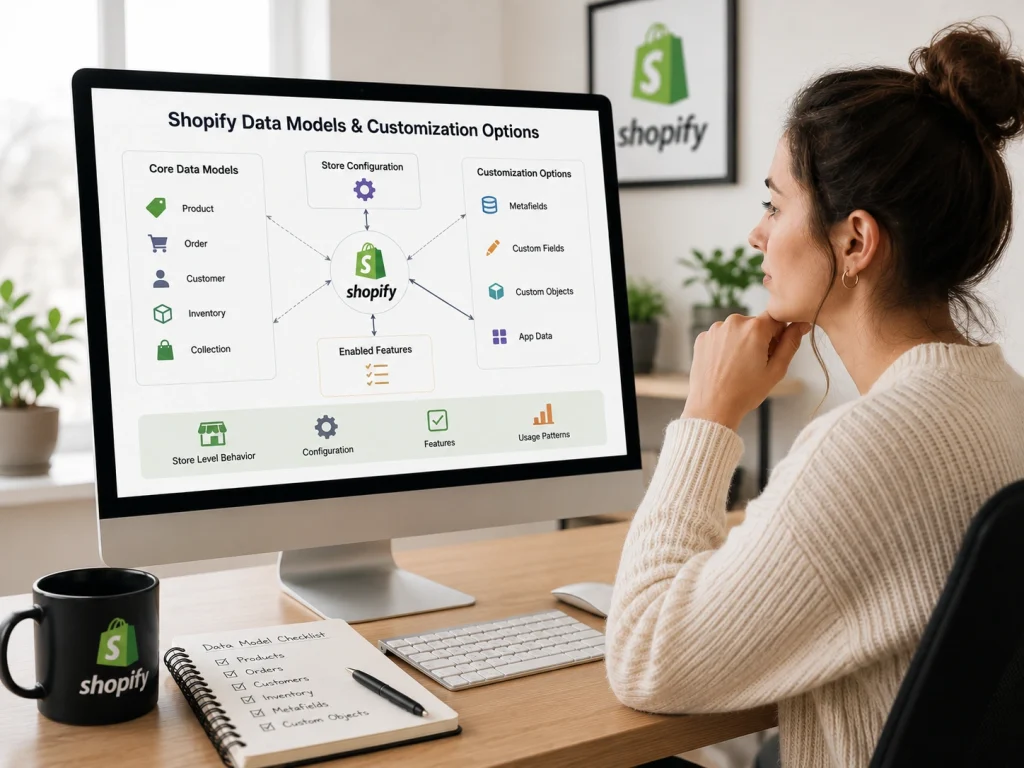
Shopify data models are designed to stay consistent at the platform level while behaving differently at the store level.
Here, app integrations treat these models as stable in shape but flexible in behavior, adapting to store configuration, enabled features, and real usage patterns.
Products, Orders, And Customers
Shopify’s core resources follow a shared structure, but their meaning emerges through relationships rather than single records.
Products
Products define structure, while variants carry selling logic. Inventory, pricing, and availability are split across related resources. This allows Shopify to support multiple locations, markets, and channels. The key points include:
- Products group variants
- Variants represent sellable units
- Inventory is managed separately
- Availability depends on channels and markets
Orders
Orders act as permanent transaction records. Instead of changing core data, Shopify records changes through related objects, keeping a full history. Order behavior are:
- Line items capturing purchase-time data
- Separate payment and fulfillment states
- Transactions for payment events
- Refunds recorded as additions
Customer Options
Customers store long-term merchant relationships rather than login sessions. Their value increases over time as more data is attached. Customer data usually includes:
- Identifiers and contact details
- Order history
- Tags for segmentation
- Consent and privacy states
Metafields And Metaobjects
Shopify supports customization without altering core schemas by using structured extension mechanisms.
Metafields
Metafields allow apps to attach typed data to existing resources. They are controlled, validated, and scoped to prevent conflicts. Here are the basics:
- Namespace and key pairing
- Strong data types
- App-scoped ownership
- Accessible across APIs and UI
Common uses of Metafields include App settings, Extra product attributes, Feature flags, Lightweight structured data and more.
Metaobjects
Metaobjects provide custom data models with defined schemas. They are reusable and managed directly from the admin. Metaobjects support:
- Custom structured records
- Reusable data across resources
- References between objects
- Centralized content management
Typical use cases include Product specifications, Size guides, Reusable content blocks, Domain-specific data.
Handling Differences Between Stores
Every Shopify store behaves slightly differently. Apps must expect variation and handle it safely. Differences often come from:
- Enabled features and plans
- Installed apps and custom logic
- Market and currency setup
- Data age and API versions
To manage this, well-built apps use feature detection instead of assumptions, nullable and defensive queries, store-level configuration, safe defaults and fallbacks, and sometimes idempotent data processing.
Integrate apps with Shopify succeed by assuming variation, handling it gracefully, and relying on stable data contracts rather than rigid expectations.
Event-Driven Shopify App Setup & Integration Using Webhooks
Shopify apps rely on events instead of constant checking. This is where Webhooks kick in.
When something changes in a store, Shopify sends a message to the app right away. The app listens, receives the signal, and reacts. No polling. No guessing.
This event-driven model keeps apps lightweight and efficient. Shopify stays in control of the data, and apps respond only when something meaningful happens. The result is faster updates, lower API usage, and cleaner integration logic that works well at scale.
Webhooks turn store activity into signals that apps can act on, one event at a time.
Reacting To Store Events
Every webhook represents a specific store action. An order is created. A product is updated. Inventory changes. A customer record is edited. Each action triggers a webhook tied to a clear topic.
When Shopify sends a webhook, it includes the current state of the resource. Apps use this data to start workflows such as syncing data, updating dashboards, triggering automations, or sending information to external systems. Common uses include:
- Processing new orders
- Syncing inventory changes
- Updating customer data
- Handling refunds and fulfillments
- Responding to app install or uninstall events
A good webhook handler stays simple. It checks the request, accepts it quickly, and passes the real work to background jobs. This keeps the system responsive and avoids delivery problems.
Reliable Event Handling
Webhooks are not guaranteed to arrive only once. Shopify may send the same event again if delivery fails. Because of this, apps must be built to handle repeats safely.
The first step is verification. Each webhook must be checked using HMAC validation to confirm it truly came from Shopify.
Next is idempotency. If the same event arrives twice, the app should not perform the action twice. This is usually handled by tracking event IDs or resource states. To stay reliable:
- Respond to webhooks quickly
- Process work asynchronously
- Handle duplicate events safely
- Retry failed jobs internally
- Monitor webhook success and failure
Reliable webhook handling is not about perfect delivery. It is about predictable behavior, even when events arrive late, early, or more than once.
Where Shopify Apps Integrate Across The Platform
In 2026, Shopify apps will not plug in everywhere the same way. Each part of the platform allows extensions in specific, controlled places. Knowing these places helps apps stay fast, secure, and compatible with future platform changes.
Admin Interface Extensions
Admin Interface Extensions live inside the Shopify Admin, where merchants manage their stores.
These integrations are embedded directly into the admin experience and follow Shopify’s rules for layout, navigation, and permissions.
Apps use Shopify App Bridge to stay aware of store and user context, and Polaris to match Shopify’s UI standards. Key characteristics are:
- Shown inside product, order, or customer pages
- Powered mainly by the GraphQL Admin API
- Scoped by merchant-approved permissions
- Store app settings using metafields or metaobjects
Themes, Storefronts, And Headless Builds
Storefront integrations affect what customers see. Its surface prioritizes performance, stability, and merchant control.
For standard themes, apps integrate through theme app extensions. These use app blocks and predefined sections, allowing merchants to place features without breaking their theme.
In headless setups, apps do not render UI directly. Instead, they provide data and logic through APIs that custom frontends consume. Typical uses include:
- Display components added through theme blocks
- Data delivery to headless storefronts
- Support for Hydrogen or custom frontend frameworks
Checkout And Post-Purchase Extensions
Checkout is a highly restricted integration area. Apps extend it using Checkout UI Extensions. These allow small and safe changes without exposing payment data. The extensions run in Shopify-managed environments and follow strict rules.
Post-purchase extensions run after checkout is complete. They support limited upsells, onboarding steps, or order updates.
These integrations are used when security, compliance, and reliability matter more than deep customization.
Automation With Shopify Flow
Shopify Flow allows apps to integrate without a user interface. Apps provide triggers, conditions, and actions. Merchants combine these to create automated workflows.
These workflows run in the background and respond to store events. Common uses include automating fulfillment, updating inventory, syncing data with external systems, and enforcing business rules.
Performance, Scalability, And Reliability In App Integration
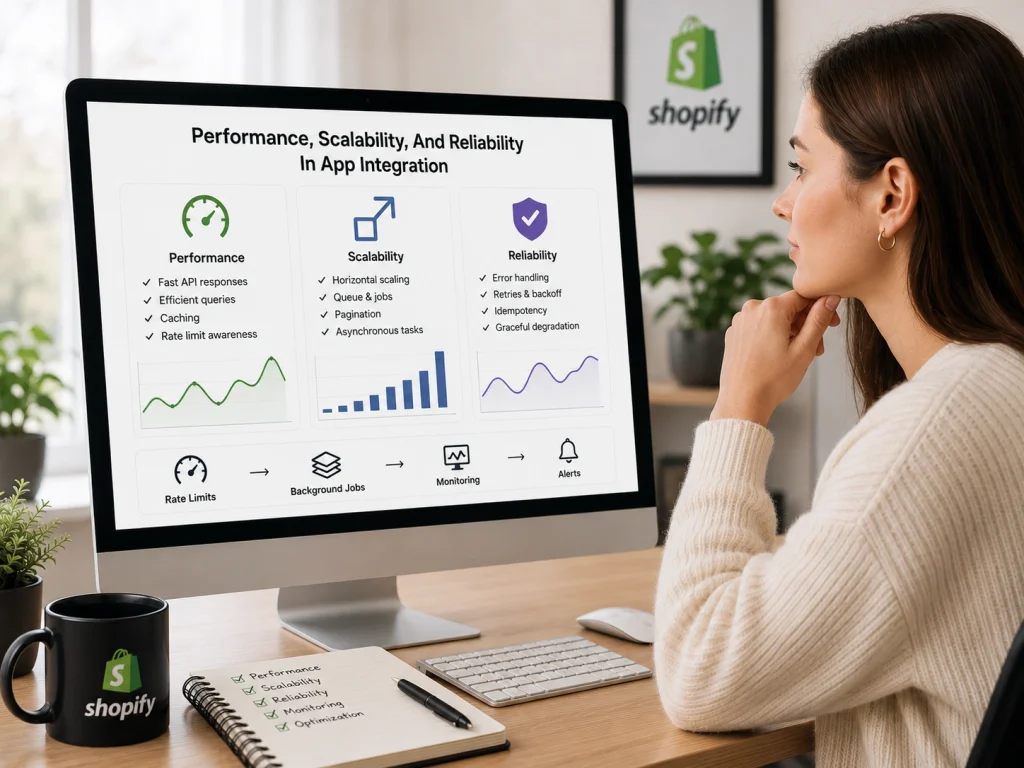
In 2026, Shopify app performance is about staying efficient inside clear limits. Apps run on shared infrastructure, so speed, scale, and stability depend on how carefully integrations are designed.
The goal is simple: respond fast, grow safely, and fail without breaking everything.
Api Limits And Optimization
Shopify APIs enforce strict usage limits. REST APIs use call limits, while GraphQL APIs use a cost-based system where complex queries consume more budget.
To stay within limits, apps should:
- Request only the data they actually need
- Keep GraphQL queries small and focused
- Batch operations where possible
- Use the Bulk Operations API for large data sets
- Respect throttle signals and apply controlled retries
Good optimization reduces wasted requests and keeps apps responsive even under load.
Caching And Speed
Caching helps apps avoid repeated API calls and reduce response time. Common approaches include:
- Caching shop settings and app configuration
- Separating user session data from store-level data
- Using short-lived caches for frequently accessed resources
- Relying on webhooks to know when cached data should be refreshed
For storefront and headless setups, edge caching and server-side rendering further improve speed. Caching works best when it is selective and easy to invalidate.
Scaling App Infrastructure
Shopify apps must handle growth without assuming steady traffic. Installs, sales events, and webhooks can all create sudden spikes.
Scalable apps usually rely on:
- Stateless services that scale horizontally
- Background jobs for data sync and webhook handling
- Queues to manage burst traffic
- Monitoring to detect slowdowns and failures early
Reliability comes from planning for retries, duplicate events, and temporary failures. When systems recover quickly, growth becomes manageable instead of risky.
Advanced Shopify App Integration Use Cases
As merchants grow, Shopify app integrations shift from basic feature add-ons to systems. This coordinates data, automation, and operations across the business.
In the year 2026, advanced integrations mainly focus on running multiple stores, separating frontend and backend systems, and even connecting Shopify with external platforms.
Shopify Plus And Multi-Store Setups
Shopify Plus is built for businesses managing multiple stores under one organization. A Plus plan includes a main store and several expansion stores. This allows region-specific pricing, currencies, languages, and catalogs.
Each store still keeps its own products, customers, and orders. Nothing syncs automatically.
Advanced integrations solve this by using a central system, usually a “PIM” or “ERP” to act as the source of truth. Data flows from this system to each store through Shopify APIs, while allowing local differences.
Automation adds another layer of complexity. Shopify Flow and Launchpad work per store, so cross-store campaigns and updates often require middleware or API-based orchestration. This keeps inventory, pricing, and launches aligned.
For B2B merchants, integrations must also handle company accounts, catalogs, payment terms, and locations. These structures need to stay consistent between Shopify, CRM systems, and ERP platforms.
Headless And Composable Commerce
Headless commerce separates Shopify’s backend from the storefront experience. Shopify manages products, orders, and checkout, while custom frontends control how customers interact with the brand.
In this model, integrations rely on the Storefront API and Customer Account API. Frontends are built with frameworks like React, Next.js, or Hydrogen and often run on edge infrastructure for better performance.
Composable commerce extends this approach. Shopify becomes one service among many, alongside CMS platforms, search tools, marketing systems, and custom services.
Each part communicates through APIs and can be replaced without rebuilding the entire stack.
To manage this complexity, teams use aggregation layers such as Backend-for-Frontend services and caching strategies to keep data fast and reliable for the frontend.
External System Integrations
Advanced Shopify apps often exist to connect Shopify with other business systems. These integrations keep commerce data aligned across the organization. Common approaches are:
- Direct integrations using certified connectors for ERP and accounting systems
- iPaaS platforms that manage data flows, transformations, and error handling
- Custom API integrations built for unique workflows or legacy systems
Key patterns include webhook-based updates, bulk data sync for large datasets, and safeguards to prevent duplicate or inconsistent records.
Long-Term Strategy For Sustainable Shopify App Setup & Integration
A sustainable Shopify app in 2026 is built to stay steady while everything around it shifts. The platform changes, merchant behavior evolves, and technical assumptions slowly fade.
Long-term success comes from designing apps that remain useful. Even when conditions are uneven and unpredictable.
The focus is simple: reduce friction, preserve trust, and adapt quietly over time.
Adapting To Shopify Platform Changes
Shopify does not change all at once. Updates arrive in waves, some small, some structural. Apps that last treat change as ongoing, not exceptional. Here’s what you should do:
Design For Ongoing Change
Durable apps are built with the expectation that Shopify will continue to evolve. Instead of reacting to every update, they use API version pinning, compatibility layers, and internal abstractions. These patterns allow apps to adapt over time without breaking core functionality.
Isolate What Changes Most
Shopify APIs, permissions, and extension surfaces shift more often than business logic. Separating these concerns keeps internal systems stable while external connections evolve.
Introduce Change Gradually
Merchants respond better when changes feel optional. Feature flags, staged rollouts, and opt-in upgrades reduce disruption. Approaches like this lowers learning costs and helps merchants adopt updates with confidence.
Keep Expectations Clear
Predictable release cycles and early communication reduce uncertainty. When merchants know what to expect, updates feel safer—even when they are significant.
Align Early With Platform Direction
Apps that adopt Shopify’s preferred patterns early, API-first design, extension-based UI, minimal scopes, avoid rushed migrations later and stay aligned with the ecosystem.
Building Apps That Last
Apps endure when they feel reliable day after day, even under stress or scale. So, once you stand up, you will most likely go only up. Remember to:
Favor Stability Over Perfection
Systems designed with retries, background jobs, and graceful failures continue working when traffic spikes or APIs slow down. Reliability matters more than speed at the edge.
Preserve Familiar Experiences
Merchants build habits quickly. Stable layouts, consistent language, and predictable workflows reduce effort and keep the app easy to return to.
Use Asynchronous Workflows
Large data operations and integrations should not block user actions. Deferred processing and clear progress signals make the app feel responsive without rushing results.
Design Data for the Long Term
Metafields and metaobjects should evolve without breaking older assumptions. Additive changes and backward compatibility protect merchant data over time.
See the System Clearly
Logging, monitoring, and usage tracking reduce guesswork. Clear signals lead to better decisions and calmer maintenance.
Improve Quietly
The best apps change without drama. Updates happen in the background. Compatibility is maintained without disruption. Stability becomes part of the product’s identity.
Monetization And App Store Strategy In Shopify App Development & Integration
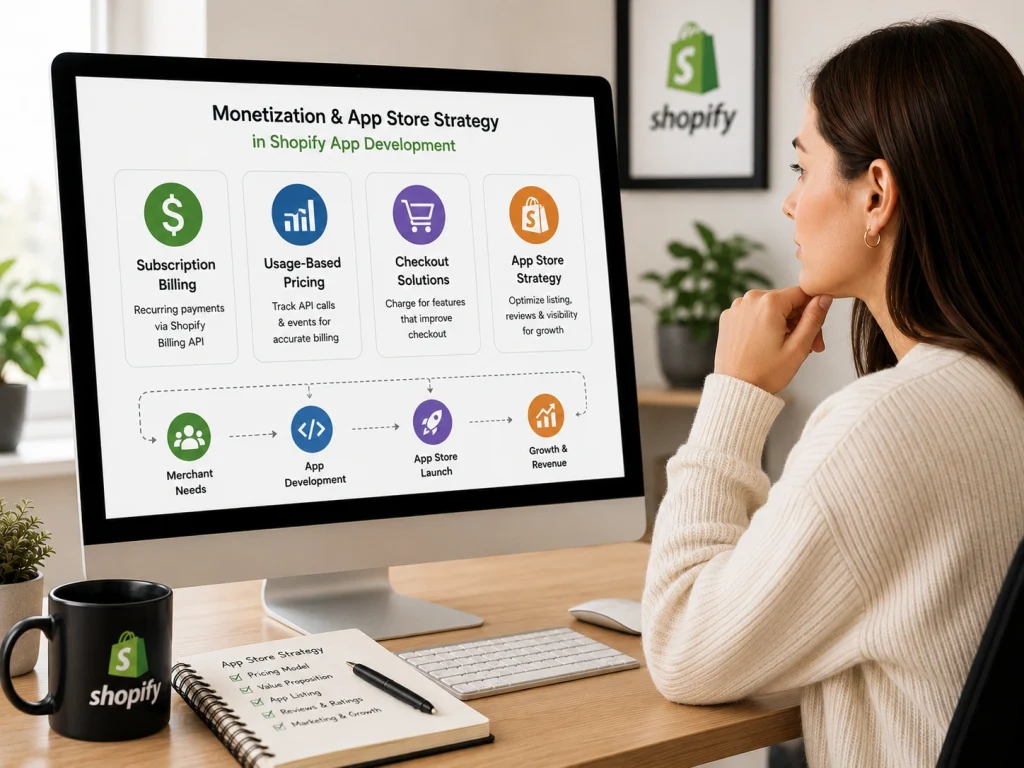
Monetization in Shopify apps depends on choosing the right pricing model.
Many apps use subscription billing through Shopify’s Billing API. This lets merchants pay directly inside the Shopify admin.
Some apps use usage-based pricing. In this case, API calls and events must be tracked accurately so billing stays correct.
Apps that use Shopify Functions or checkout extensions can charge for features that improve checkout and reduce cart abandonment.
App Store Visibility
App Store visibility depends heavily on integration quality. Apps that use Polaris components, efficient GraphQL queries, and reliable webhooks usually perform better in search results.
Shopify Partner programs also reward apps that add value while keeping system load low.
Technical Excellence
Good integrations lead to better reviews and higher visibility. Apps should be fast, secure, and easy to use inside merchant workflows. When everything works smoothly, merchants stay satisfied.
Shopify App Integration Checklist Before You Start
Before starting any Shopify app integration, define the exact business goal. Do you need better email marketing, inventory control, order tracking, reviews, upsells, or analytics? A clear goal prevents you from installing random apps that slow down your store without improving revenue.
Next, check whether the app is compatible with your Shopify theme, checkout setup, payment methods, and existing apps. Some apps can conflict with discount tools, page builders, product option apps, or tracking scripts. Testing compatibility early saves time and avoids broken customer experiences.
Review the app’s data permissions before installation. A Shopify app may request access to customer data, orders, products, inventory, discounts, or checkout information. Only approve permissions that are necessary for the app’s purpose. Unnecessary access increases privacy and security risks.
Finally, create a backup and test the integration before using it on the live store. Check page speed, mobile layout, cart behavior, checkout flow, tracking events, and order sync. A good Shopify app integration should improve store operations without damaging performance or customer trust.
Shopify Third-Party App Integration Vs Custom App Development
A third-party Shopify app is best when you need a fast, affordable, and already-tested solution. These apps are available in the Shopify App Store and usually cover common needs like email marketing, reviews, shipping, SEO, subscriptions, loyalty, and product upsells.
Custom Shopify app development is better when your store has unique workflows that existing apps cannot handle. For example, you may need a custom inventory system, special order routing, advanced product rules, private supplier sync, or a unique customer dashboard.
The biggest advantage of third-party apps is speed. You can install and configure many apps within hours. The downside is limited control. You depend on the app developer’s features, pricing, support quality, and future updates.
The biggest advantage of custom apps is flexibility. You can build exactly what your business needs. The downside is higher cost, longer development time, and ongoing maintenance. In simple terms, use third-party apps for common problems and custom apps for business-specific systems.
How To Choose The Right Shopify Apps For Your Store
Start by checking whether the app solves one clear problem. Do not install an app just because it looks popular. Every app should support a specific goal, such as increasing conversions, reducing manual work, improving customer retention, or making order management easier.
Look at the app’s reviews, support history, pricing model, and update frequency. A cheap app with poor support can cost more in the long run if it breaks your store or creates tracking problems. Strong documentation and responsive support are important.
Check how the app affects store speed. Some Shopify apps add extra scripts, popups, widgets, or theme code that can slow down product pages and collection pages. A slow store can hurt conversions, SEO performance, and customer experience.
Choose apps that can grow with your business. The right Shopify app should be easy to configure, compatible with your current setup, secure with customer data, and useful as your order volume increases. If an app creates more complexity than value, it is not the right choice.
How to Integrate an App With Shopify Step by Step
To integrate an app with Shopify, log in to your Shopify admin and visit the Shopify App Store. Search for the required app, review its pricing, features, permissions, and customer ratings, then click Install.
After installation, approve the requested permissions and complete the app’s setup process. This may include connecting an external account, adding API credentials, selecting products, or configuring automation rules.
Test the integration before using it fully. Confirm that data such as orders, inventory, customers, and payments sync correctly. Regularly review app permissions and remove integrations that are no longer needed.
Essential Shopify App Integrations for Different Business Functions
The most useful Shopify app integrations depend on the business function they support. For marketing, businesses commonly use email marketing, SMS, affiliate, social media, and advertising integrations.
For operations, inventory management, shipping, accounting, customer service, and order-tracking apps can reduce manual work. Popular integration categories include CRM systems, live chat tools, review apps, subscription platforms, and payment gateways.
Stores should avoid installing unnecessary apps. Choose integrations that solve a specific problem, connect smoothly with existing tools, and provide measurable improvements in sales, efficiency, or customer experience.
Common Shopify App Integration Problems and How to Fix Them
Common Shopify app integration problems include data-sync errors, conflicting apps, incorrect permissions, slow store speed, API limits, and failed webhooks. These issues may cause missing orders, inaccurate inventory, or delayed customer updates.
Start by checking the app settings, connection status, permissions, and error logs. Reconnect the app, refresh API credentials, and confirm that both platforms use compatible data formats.
If problems continue, disable recently installed apps one at a time to identify conflicts. Update outdated themes or integrations, contact the app developer, and back up important store data before making major changes.
Frequently Asked Questions (FAQs)
Even though we covered most things about Shopify app integration, readers still ask a few common questions. Here are clear answers.
What is Shopify app integration?
Shopify app integration means connecting third-party or custom apps with a Shopify store to improve functions like marketing, inventory, shipping, reviews, analytics, payment, or customer support. The goal is to make the store more automated, efficient, and easier to manage.
Why is Shopify app integration important?
Shopify app integration is important because it helps store owners add features without building everything from scratch. The right apps can improve conversion rates, reduce manual work, track customer behavior, manage orders, and create a better shopping experience.
Should I use a third-party Shopify app or build a custom app?
Use a third-party Shopify app when you need a common feature quickly, such as reviews, email marketing, SEO, or upsells. Choose custom Shopify app development when your store has unique workflows, special data requirements, or business logic that existing apps cannot support.
Can too many Shopify apps slow down my store?
Yes, too many Shopify apps can slow down your store, especially if they add extra scripts, popups, widgets, or theme code. A slow store can hurt user experience, SEO performance, and sales. Only keep apps that provide clear value.
How do I choose the right Shopify app?
Choose a Shopify app by checking its purpose, reviews, pricing, support quality, update history, permissions, and theme compatibility. A good app should solve one clear problem, work smoothly with your store, and not create unnecessary performance or security risks.
Is Shopify app integration safe?
Shopify app integration is safe when you use trusted apps, review permissions carefully, and avoid giving unnecessary access to customer, order, or payment-related data. Store owners should also check the app’s privacy policy, support reputation, and security practices before installation.
How much does Shopify app integration cost?
Shopify app integration cost depends on the app type and complexity. Some third-party apps offer free plans, while paid apps may charge monthly fees. Custom Shopify app development usually costs more because it requires planning, coding, testing, and ongoing maintenance.
Ready To Transform Your Store With Seamless Shopify App Integration?
Build connections that really boost your business. You may start your first embedded app or expand multiple Plus stores, but you do need some that influence your future success.
The foundation you lay now determines your competitive edge tomorrow.
Make smart choices, grow steadily, and let your technology work hard for you. Your next great integration is just around the corner.
