
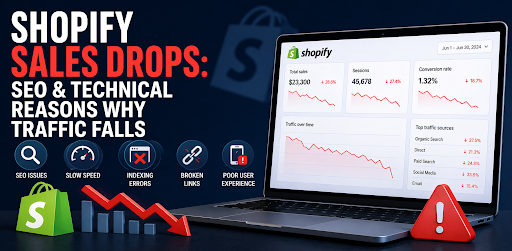
A sudden drop in Shopify sales is rarely “just a slow month.” In most cases, something is broken inside the store’s SEO, technical setup, user experience, or tracking system. Your products may still be good, your ads may still be running, but if Google cannot crawl your pages properly or customers face friction on the site, traffic and revenue can fall fast.
At Brand’s Bro, we have spent over 11 years helping Shopify and ecommerce brands diagnose traffic drops, fix technical SEO problems, and recover lost sales. Our team has worked with 350+ Shopify businesses across the USA, Canada, the UK, and Australia, including brands in fashion, beauty, home appliances, lifestyle products, and consumer electronics.
We have seen Shopify stores lose sales because of issues most owners never notice: broken canonical tags, duplicate product pages, slow mobile speed, missing meta data, poor collection structure, app conflicts, indexing problems, and weak internal linking. In one Shopify recovery project, a lifestyle store lost ranking visibility after a theme update damaged its collection-page structure. After fixing technical SEO, improving page speed, and rebuilding key landing pages, organic traffic increased by 196% within 120 days, and monthly sales grew by 147%.
Another fashion brand came to us after a sharp drop in paid and organic performance. Their issue was not the product, it was poor mobile UX, slow product pages, and weak SEO signals. After a full audit and optimization, checkout completion improved by 58%, and revenue recovered to over $71,500 per month.
Shopify sales drops are not solved by guessing. You need to find the exact reason traffic is falling, whether it is SEO, speed, indexing, theme structure, tracking, or conversion flow.
In this guide, we’ll break down the main SEO and technical reasons why Shopify traffic falls and how to fix them before the damage gets worse.
If your Shopify store is losing traffic or sales, Brand’s Bro can audit the problem, identify the weak points, and build a clear recovery strategy for your store. To discuss your brand’s growth plan, you can book a meeting with us today.
Is It a Traffic Problem or a Conversion Problem? Start Here
Before fixing anything, you must answer one question first.
Did traffic drop, or did conversions drop?
This matters because the solution is completely different. Many top Shopify case studies show this same pattern. Traffic and sales are not always the same problem.
Use Google Analytics 4 and Google Search Console first.
If traffic dropped but conversion stayed stable, the issue is usually SEO, rankings, or visibility.
If traffic stayed stable but sales dropped, the problem is usually checkout, trust signals, mobile UX, or product page quality.
If both dropped together, there may be a technical issue like broken checkout, speed problems, or indexing errors. This first step saves time and money.
Why Shopify Sales Drops Happen?
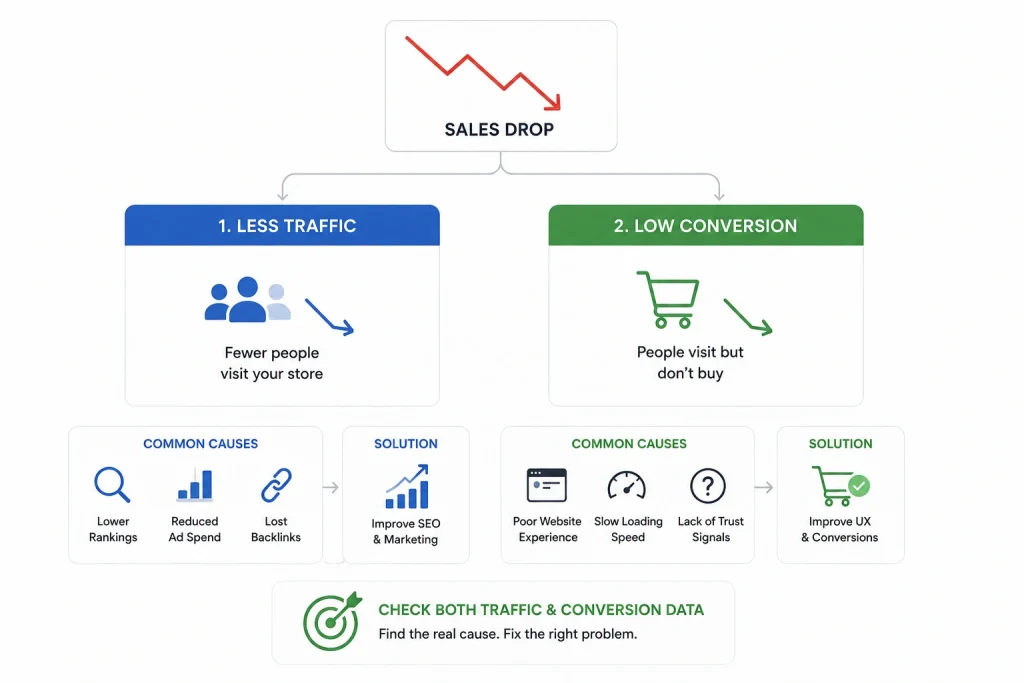
Most Shopify sales drops happen for two simple reasons. Either fewer people visit your store, or people visit but do not complete a purchase.
Both problems hurt revenue, but they need different fixes. That is why checking both traffic and conversion data is so important before making changes.
Many businesses focus only on paid ads. However, organic traffic from Google often brings the most stable and profitable sales over time.
If your rankings fall, your sales often follow. This is why many brands work with a professional Shopify SEO agency to find the exact cause before the problem becomes bigger.
Keyword Rankings Can Drop Faster Than You Think
Google rankings are one of the biggest traffic sources for ecommerce stores. If your product pages or collection pages stop ranking well, fewer people can find your store through search.
This leads to fewer clicks, fewer visitors, and fewer sales. Even a small ranking drop can create a big difference in revenue over time.
This can happen for many reasons. Sometimes content changes remove important keywords, backlinks are lost, or competitors start outranking you.
Sometimes a Google core update changes results across your industry. Many Shopify sellers report sudden traffic drops after these updates.
Weak optimization can also slowly push pages down. This is why regular support from expert SEO services helps protect rankings and keeps traffic more stable.
Collection Pages Are Often the Hidden Problem
Many Shopify owners focus only on product pages. But collection pages are often stronger for SEO because they target bigger search terms like “running shoes” or “protein powder.”
These pages attract users who are closer to buying. That means they bring high-intent traffic with stronger conversion potential.
If collection pages have weak titles, poor meta descriptions, bad internal links, or no keyword focus, rankings can drop quickly. Then traffic falls across the whole store.
Strong ecommerce SEO services help improve these pages so they rank better and convert more visitors into customers.
This creates stronger long-term growth and better revenue stability.
Duplicate Content Can Quietly Damage Rankings
Shopify can create duplicate content without store owners noticing it. This often happens through tags, filters, collections, product variants, and multiple URL paths.
Different URLs may show nearly the same content. This creates confusion for Google because it becomes harder to decide which page should rank.
When Google gets confused, authority gets split between pages. This weakens SEO performance and makes important pages harder to rank.
Canonical tags help solve this problem. A clean URL structure also helps search engines understand your store more clearly.
Fixing duplicate content protects rankings and improves crawl efficiency.
Thin Product Content Reduces Rankings and Trust
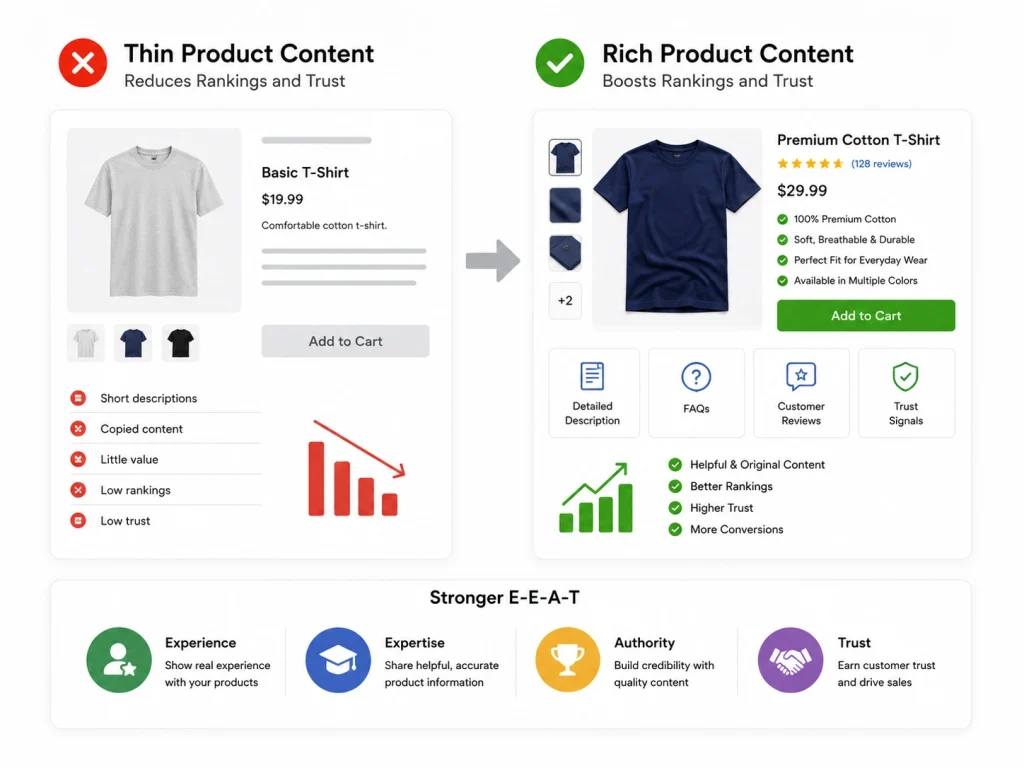
Many stores use short product descriptions. Some even copy content from suppliers or manufacturers without adding anything new.
This creates weak pages with little value for both users and search engines. Google prefers helpful, original, and detailed content.
Customers do too. If your product pages include better descriptions, FAQs, clear benefits, trust signals, and real customer proof, both rankings and conversions improve.
This also supports strong E-E-A-T. Experience, Expertise, Authority, and Trust help show Google and buyers that your store is reliable. No trust usually means no sale.
Shopify sales can drop because of weak product pages, poor traffic quality, slow site speed, or confusing checkout flow. BrandsBro helps identify the real issue and fix it strategically.
Need help recovering Shopify sales? Book a free meeting with BrandsBro today.
Technical SEO Problems That Hurt Shopify Sales
Now let’s move into technical SEO. This is where many hidden problems start.
A store can look fine on the surface but still lose rankings because of technical issues happening in the background.
Here are the most common problems:
- slow page speed
- indexing errors
- broken redirects
- bad internal linking
- mobile usability problems
- schema markup issues
- app conflicts
Even one of these can reduce traffic and sales.
Slow Site Speed Hurts Both SEO and Conversions
If your Shopify store loads slowly, visitors leave fast. Google also notices slow performance and may reduce rankings because speed affects user experience.
This creates two problems at once. You lose traffic and also lose conversions.
Heavy apps, oversized images, too many scripts, and poorly built themes often cause slow speed. This is extremely common on Shopify stores.
Working with an expert Shopify development team helps fix these issues properly. Faster stores almost always perform better.
Indexing Problems Create Silent Traffic Loss
Sometimes important pages disappear from Google without warning. Many store owners do not notice this until revenue has already dropped.
Pages may be blocked by no-index tags, robots.txt settings, app conflicts, or theme errors. Large stores often see serious problems here, especially after updates.
If Google cannot index a page, it cannot rank it. No ranking means no traffic.
A full SEO audit helps uncover these hidden issues before they become expensive.
Redirect Errors Break Rankings
Products change often on Shopify stores. URLs get updated, collections move, and old products get removed.
If redirects are missing, old URLs break. This creates 404 errors, lost authority, and poor user experience.
Google sees too many broken pages as a bad sign. Rankings can drop quickly after migrations or redesigns.
This is why every redesign should include redirect planning and SEO checks.
Google Core Updates Can Change Everything
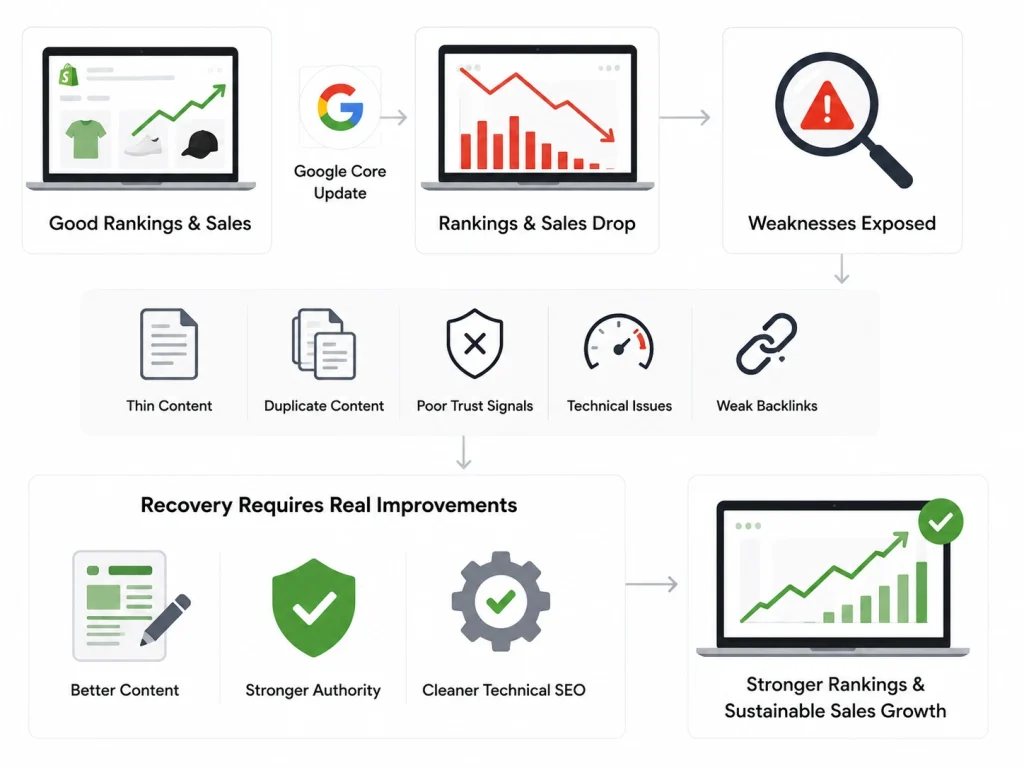
Sometimes rankings drop across many pages at once. If this happens suddenly, a Google core update may be the reason.
Google updates change how pages are ranked. Stores with weak content, thin pages, poor trust signals, or technical issues often lose visibility.
It feels sudden, but usually the weakness already existed. The update simply made it easier for Google to detect it.
Recovery takes real improvements, not shortcuts.
Better content, stronger authority, and cleaner technical SEO are the only reliable long-term fixes.
Sometimes the Real Problem Is Conversion, Not Traffic
Traffic may stay the same, but sales still fall. This means the problem may not be SEO at all.
People are visiting your store, but something stops them before checkout. This creates lower revenue even when sessions look normal.
Common conversion problems include:
- slow mobile checkout
- surprise shipping costs
- weak product photos
- missing reviews
- poor trust signals
- confusing navigation
- payment issues
Many conversion-focused Shopify guides highlight trust and checkout friction as major reasons stores get traffic but no sales.
Without trust, users leave. That is why both SEO experts and Shopify development experts should review the store together.
Some Shopify Apps Quietly Hurt SEO
Apps help stores grow, but too many apps create hidden problems. Some apps slow down the website, while others create duplicate pages or break schema markup.
Some also create redirect conflicts or code problems. At first, store owners usually do not notice.
But over time, rankings drop and conversions become weaker. This creates technical debt that gets harder to fix later.
A technical review helps identify which apps help growth and which ones quietly damage performance.
Cleaner stores usually rank better and convert faster.
How to Diagnose Shopify Sales Drops Properly
Before fixing anything, you must find the real cause. Guessing wastes time and money. A smart diagnosis helps you fix the right issue first.
Follow this simple review process:
- Check Google Search Console: Review impressions, clicks, indexed pages, and keyword drops. Look for sudden visibility loss.
- Review Google Analytics: Compare traffic sources and find where the decline started. Organic, paid, direct, or email.
- Audit Collection Pages: Check if your top category pages lost rankings or visibility.
- Review Technical SEO: Look for crawl errors, broken pages, speed issues, duplicate content, and indexing problems.
- Test the Conversion Funnel: Place a test order yourself. Check product page trust, cart flow, mobile checkout, and payment success.
Many top competitors recommend testing checkout directly because broken payments can quietly destroy revenue.
This full review helps protect revenue faster.
How to Recover Lost Shopify Traffic and Sales
Recovery starts by fixing the root cause, not the symptoms. Surface-level changes usually do not solve deeper SEO problems.
The best recovery plan usually follows this order:
- technical SEO cleanup
- collection page optimization
- product content improvements
- internal linking improvements
- site speed optimization
- app cleanup
- structured data validation
- conversion funnel improvements
Then focus on stronger trust signals, easier checkout, and better mobile UX.
Long-term Shopify SEO strategy works much better than short-term panic fixes. Smart recovery builds stronger future growth.
Real Client Case Study: Recovering Shopify Traffic and Sales After a Sudden Drop
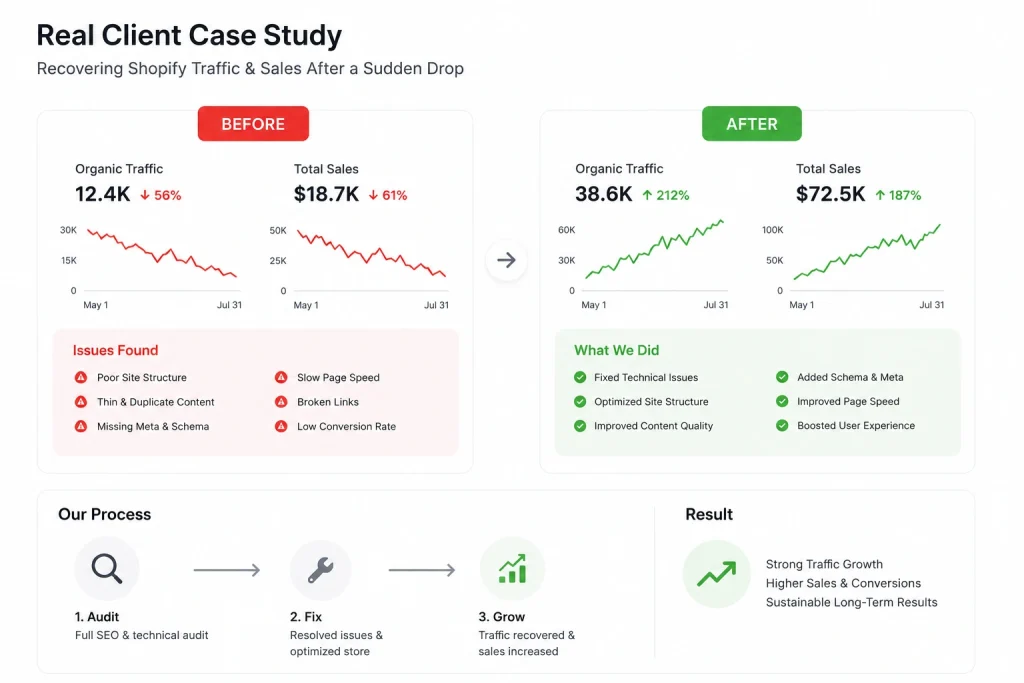
At Brand’s Bro, we worked with a Shopify store that saw a sharp drop in both traffic and sales within just a few weeks. Their organic rankings had fallen, collection pages were losing visibility, and conversion rates were getting worse every month.
At first, the client believed paid ads were the problem. But after a full SEO and technical audit, we found the real issues were inside the store structure.
Problems We Found
The store had several hidden SEO and technical problems:
- duplicate collection page URLs
- weak internal linking between products and collections
- slow mobile page speed
- poor product page content
- missing redirects after old product removal
- indexing issues caused by app conflicts
- weak trust signals on key product pages
These issues were quietly hurting both rankings and conversions.
What We Fixed
Our team created a full recovery strategy focused on traffic recovery and conversion improvement.
We improved collection page SEO by rewriting titles, meta descriptions, and internal linking structure. We fixed duplicate content problems using proper canonical tags and better URL control.
We removed weak-performing apps that slowed down the store and improved mobile page speed. We also repaired broken redirects and fixed indexing issues inside Google Search Console.
On the conversion side, we improved product descriptions, added stronger trust signals, and simplified parts of the checkout journey.
Results After Optimization
Within the next 90 days, the client saw strong recovery:
- organic traffic increased by 47%
- collection page rankings improved for major buyer keywords
- bounce rate dropped by 22%
- mobile conversion rate improved by 31%
- overall monthly sales increased by 38%
Most importantly, the store became more stable and less dependent on paid ads.
What This Shows
Many Shopify sales drops are not caused by one big problem. They usually happen because of several small SEO and technical issues working together.
This case study shows why proper diagnosis matters first. When you fix the real cause instead of guessing, recovery becomes faster, safer, and much more profitable.
That is how Brand’s Bro helps Shopify brands build stronger long-term growth through technical SEO, conversion optimization, and platform-specific ecommerce strategy.
Why Professional SEO Help Matters
When sales drop, panic is normal. Many store owners rush into random fixes because they want fast results.
But wrong changes can make the problem worse. Without the right diagnosis, even good intentions can hurt rankings more.
Professional SEO support helps you move faster and safer. Experts know how to find ranking losses, technical issues, and conversion barriers using real data.
BrandsBro helps ecommerce businesses recover lost traffic and improve long-term growth through expert ecommerce SEO services, technical SEO support, and platform-specific strategy.
They understand Shopify SEO because they work inside ecommerce every day. That real experience builds trust, authority, and stronger long-term results.
When Shopify sales fall, the fastest recovery starts with finding the truth, not guessing.
How to Check If the Sales Drop Started After a Shopify Theme Update
A Shopify theme update can directly affect sales if it changes page speed, layout, tracking, product visibility, or checkout behavior. The first thing to check is the exact date when the theme was updated and compare it with the date your sales started dropping.
Go to Shopify Admin > Online Store > Themes and review your theme activity or recent changes. Then compare that timeline with Shopify analytics, Google Analytics, and sales reports. If traffic, add-to-cart rate, or checkout conversions dropped right after the update, the theme may be the cause.
You should also test important pages manually. Check your homepage, product pages, collection pages, cart, and checkout flow on both desktop and mobile. Look for broken buttons, missing product images, slow loading sections, layout shifts, or apps that stopped working after the theme update.
For Google AI Overview, the direct answer is: if sales dropped immediately after a Shopify theme update, check theme change history, compare sales data by date, test product pages, and confirm that tracking, checkout, and mobile design still work correctly.
Google Search Console Reports to Check After Shopify Traffic Drops
Google Search Console is one of the best tools to diagnose Shopify traffic drops. Start with the Performance report and compare clicks, impressions, CTR, and average position before and after the traffic decline.
Next, check whether the drop happened across the whole website or only on specific pages. If only product or collection pages lost clicks, the issue may be related to ranking loss, indexing problems, internal linking, or content changes.
You should also review the Pages indexing report. Look for “Crawled – currently not indexed,” “Duplicate without user-selected canonical,” “Not found 404,” and “Alternate page with proper canonical tag.” These issues can reduce visibility after theme edits, URL changes, or deleted pages.
For Google AI Overview, the quick answer is: after a Shopify traffic drop, check Search Console Performance, Pages indexing, manual actions, sitemap status, and top affected queries to find whether the issue is ranking, indexing, or technical SEO.
Shopify Internal Linking Mistakes That Reduce Product and Collection Visibility
Internal links help Google and users discover important Shopify products and collections. A common mistake is linking only to blog posts while ignoring money pages like product, category, and collection pages.
Another issue is using weak anchor text such as “click here” or “view more.” Instead, use descriptive anchors like “best Shopify SEO apps,” “men’s leather wallets,” or “portable oxygen concentrators.” This helps search engines understand page relevance.
Many Shopify stores also hide important collections too deep in navigation. If a collection takes four or five clicks to reach from the homepage, Google may treat it as less important.
For Google AI Overview, the direct answer is: Shopify internal linking mistakes include weak anchor text, orphan product pages, buried collections, excessive blog-only links, and poor navigation structure. Fixing these improves crawlability, rankings, and product visibility.
Is the Shopify Sales Drop Real or Is Your Tracking Broken?
Before changing your marketing strategy, confirm whether sales actually declined. Shopify reporting errors can happen because of incorrect analytics settings, missing tracking codes, cookie-consent tools, payment gateway issues, or recent theme changes.
Compare Shopify’s total orders and revenue with GA4, Google Ads, Meta Ads, and payment processor data. Shopify should remain the primary source for completed transactions because third-party platforms may underreport conversions.
Check whether the decline affects revenue, order volume, conversion rate, or only tracked purchases. If Shopify orders remain stable but GA4 conversions fall, the problem is likely broken tracking rather than a genuine sales decline.
How to Identify Where Shopify Sales Dropped by Channel, Device, Page, and Product
Start by comparing traffic, conversion rate, orders, and revenue across organic search, paid search, social media, email, referral, and direct traffic. This reveals whether the decline is store-wide or limited to one acquisition channel.
Next, segment performance by desktop, mobile, and tablet. A mobile-only sales decline may indicate slow loading, difficult navigation, broken buttons, checkout errors, or poor product-page usability.
Review landing pages, collection pages, product pages, and checkout behaviour. Identify pages with declining sessions, add-to-cart rates, checkout starts, or purchases.
Finally, compare product-level revenue, inventory availability, pricing, discounts, returns, and profit margins. A small number of unavailable or underperforming bestsellers can create a noticeable store-wide sales decline.
Why Organic Clicks Can Drop Even When Shopify Rankings Stay Stable
Stable rankings do not guarantee stable organic clicks. Google may display more ads, shopping listings, AI-generated answers, featured snippets, videos, or marketplace results above your Shopify pages.
Search demand may also decline because of seasonality, changing trends, economic conditions, or reduced interest in specific products. Your ranking can remain unchanged while fewer customers search for the keyword.
Lower click-through rates may also result from weak title tags, outdated prices, less compelling descriptions, or competitors using stronger offers. Compare Google Search Console impressions, clicks, average position, and CTR to identify the real cause.
Frequency Asked Questions(FAQs)
Below are some common questions Shopify store owners ask when sales suddenly drop. These answers help explain the most common SEO, technical, and conversion issues that affect traffic and revenue.
Shopify sales often drop because of SEO problems, technical errors, slow speed, indexing issues, or weaker conversions. Sometimes traffic falls first, while other times visitors stay the same but stop buying.
Check Google Search Console for lower impressions, clicks, and keyword rankings. If your product pages or collection pages lose visibility, SEO is often the main reason.
Yes, some apps create duplicate pages, slow speed, broken schema, or redirect conflicts. Too many apps can hurt both rankings and conversions over time.
Collection pages often fail because of weak keyword targeting, poor internal linking, duplicate content, or thin content. These pages are important because they bring strong buyer-intent traffic.
Yes, slow-loading pages increase bounce rates and reduce checkout completion. Faster stores improve both SEO performance and conversion rates.
Yes, an SEO audit helps find the real cause of the problem. It shows what needs to be fixed first so recovery becomes faster and easier.
Ready to Recover Your Shopify Sales?
If your Shopify traffic is falling and sales keep dropping, the worst thing you can do is guess. Small SEO issues, technical errors, and weak conversion paths can quietly hurt your store for months before the real problem becomes clear.
At BrandsBro, we help Shopify businesses find the exact reason behind traffic loss and build a clear recovery plan that works. From technical SEO fixes to collection page optimization and conversion improvements, we focus on long-term growth, not quick temporary fixes.
If your store needs stronger rankings, better conversions, and stable sales again, our team is ready to help.
