

Starting an Amazon Storefront sounds simple, but the real cost is not always clear. Amazon lets eligible brand owners create a storefront at no additional cost, but sellers still need to think about account fees, branding, product content, ads, design, and ongoing optimization. Amazon’s own guidance says brands usually need a Professional selling account, Brand Registry, and an Amazon Ads account to build a storefront.
At Brand’s Bro, we have worked with Amazon sellers and ecommerce brands across the USA, Canada, the UK, and Australia. We have helped clients build better Amazon storefronts, improve product presentation, fix weak brand pages, and turn traffic into more sales.
One client came to us with an Amazon store that had products listed, but no clear brand structure. After improving the storefront layout, product navigation, and content flow, their store engagement increased by 42%, and monthly revenue improved by 31% within 90 days.
Another client was spending on Amazon ads but sending buyers to weak product pages instead of a strong storefront experience. After rebuilding their Amazon brand store and aligning it with their ad strategy, revenue increased by 27%, and wasted ad spend dropped.
So, how much does an Amazon Storefront really cost? The answer depends on more than Amazon’s basic setup. It depends on how serious you are about branding, traffic, conversion, and long-term growth.
If you want to build an Amazon Storefront that looks professional and actually supports sales, Brand’s Bro can help you plan, design, and optimize it the right way. You can book a meeting with us today.
What Is an Amazon Storefront?
Your Amazon Storefront is your brand’s dedicated space on Amazon. It works like a small website where businesses showcase their products in a unique way.
It’s more than a product list. A Storefront includes images, videos, and custom content. This makes shopping more engaging and helps build trust with customers.
It’s available for brands registered under Amazon Brand Registry. The best part? Setting up a basic Storefront doesn’t cost anything.
Setting Up Your Storefront
Sellers must meet the official Amazon Storefront requirements before gaining access to these features.
Brand registration confirms your authenticity and unlocks professional tools. Use high-quality images to showcase your products properly.
Add detailed descriptions that highlight key features. Arrange products into clear categories and themed collections. Think of it like setting up a physical store.
Why Does an Amazon Storefront Matter?
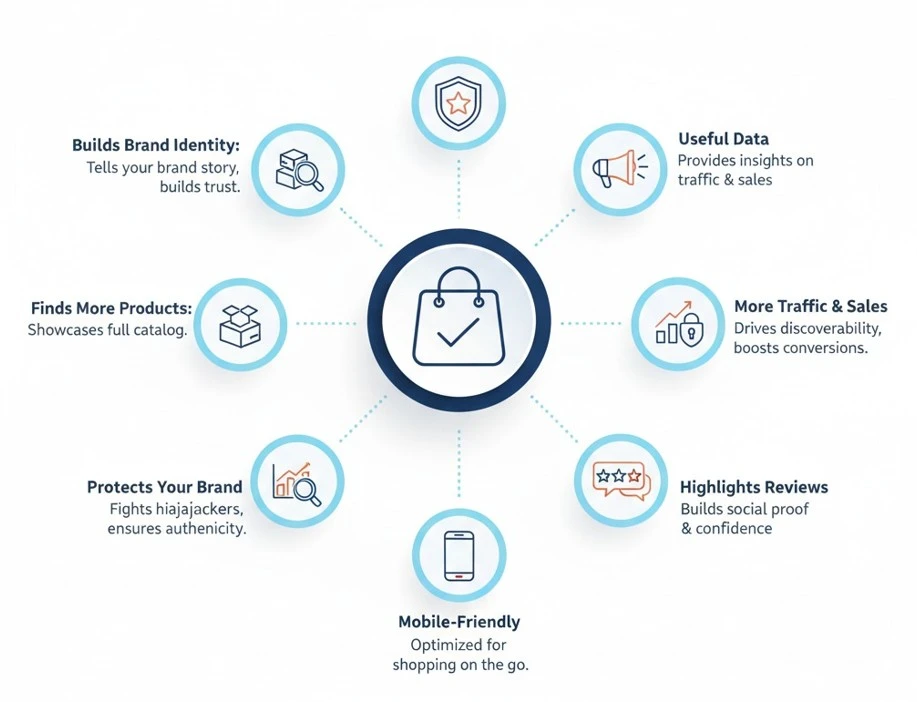
First impressions matter, especially in online shopping. An unorganized product list won’t grab attention, but a well-designed storefront will. It gives your brand personality by helping customers connect and trust your business.
- Builds Brand Identity: It lets you share your story. Show how your products are made and what makes them special. This not only builds trust but also connects customers to your brand on a personal level.
- Helps Customers Find More Products: A well-organized storefront makes it easy for shoppers to browse. Group products by category or theme. Highlight best-sellers and new arrivals in a way that grabs attention.
- Brings More Traffic and Sales: A great storefront makes you more visible on Amazon. More people will see your products, which can lead to more sales. You can also use Amazon’s ad tools to run promotions and show off new items.
- Gives You Useful Data: Amazon provides insights into your storefront’s performance. You can track what’s working and tweak your strategy accordingly.
- Protects Your Brand: A dedicated storefront keeps unauthorized sellers away. It gives your brand an official presence on Amazon.
- Works Well on Mobile: A properly designed storefront adjusts for mobile users. Since many people shop on their phones, this is crucial.
- Highlights Customer Reviews: Showcasing testimonials builds trust. Positive reviews push more shoppers to make a purchase.
This points shows what you’ll need to get started with the Amazon Brand Registry. Trademark Registration costs around $250 to $350 and can take up to a year.
You’ll also need UPC or GTIN barcodes, which cost $30 to $250 and are available right away. The Brand Registry application is free and usually gets approved within a few months.
Amazon Storefront Cost depends on design, branding, product pages, and setup complexity. At BrandsBro, we help build professional Amazon Storefronts that look clean, trustworthy, and sales-focused.
Need help with your Amazon Storefront? Book a free discussion with us, and we’ll guide you with the right cost and strategy.
How Much Does It Cost to Have an Amazon Storefront?
While it’s free to create a Storefront, maintaining one involves real costs. You’ll need to budget for seller account fees, referral commissions, shipping, and marketing expenses to stay competitive.
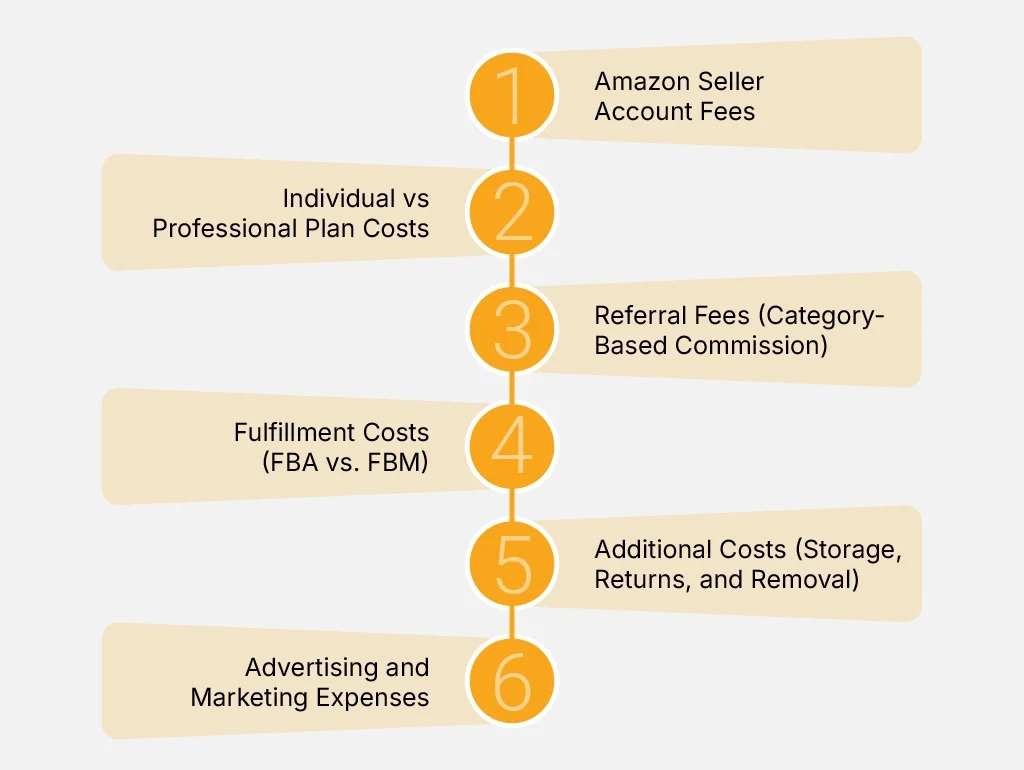
Below is a breakdown of all the expenses involved in running an Amazon Storefront.
1. Amazon Seller Account Fees
To start selling on Amazon, you’ll need to choose between an Individual plan or a Professional one. Each has different costs and features.
- Individual Plan: No monthly fee, but Amazon charges $0.99 per item sold. This option is best for small-scale sellers who sell less than 40 items per month.
- Professional Plan: Costs $39.99 per month but allows unlimited sales. It comes with benefits like bulk listing, detailed analytics, and access to Amazon advertising.
Beyond these fees, sellers may also pay additional charges based on their business needs:
- High-Volume Listing Fees: If a seller lists more than 100,000 products, Amazon charges $0.005 per SKU per month.
- Refund Administration Fee: If a seller issues a refund, Amazon keeps 20% of the referral fee up to $5.
Sellers should carefully choose the right account type to avoid unnecessary costs.
2. Individual vs. Professional Plan Costs
Before learning how to make an Amazon storefront, sellers need to understand which Amazon selling plan fits their monthly sales volume. The right plan affects your overall storefront cost and helps you avoid unnecessary fees as your business grows.
For small sellers, the Individual plan may look attractive because it has no fixed monthly subscription fee. However, Amazon charges $0.99 for every item sold under this plan. That cost can increase quickly once sales start growing.
For example, if a seller sells 50 products in one month, the Individual plan would cost $49.50 in per-item fees. That is already higher than the Professional plan, which has a fixed monthly fee of $39.99.
This is why sellers researching how to create an Amazon storefront should think beyond the setup process. They also need to calculate how many products they expect to sell each month. If a seller sells 100 products monthly, the Individual plan would cost $99 in per-item fees, while the Professional plan would still cost only $39.99. That saves nearly $60 per month.
For anyone building an e commerce storefront on Amazon with plans to scale, the Professional plan is usually the smarter choice. It includes bulk listing tools, advanced sales reports, and better selling features that support growth. It also gives sellers access to important tools that can improve visibility and sales potential.
So, if you are serious about learning how to make an Amazon storefront for long-term business growth, the Professional plan is usually the better investment. The Individual plan works for very low-volume sellers, but once sales increase, the Professional plan quickly becomes more cost-effective.
3. Referral Fees (Category-Based Commission)
Every sale on Amazon includes a referral fee set by the platform. For most products, Amazon’s referral fees land in the 8% to 15% range, but some categories can be higher.
Common Referral Fee Percentages:
- Electronics and Appliances: 8%
- Beauty and Personal Care: 8% (if the item is under $10), 15% (if over $10)
- Clothing and Accessories: 17%
- Furniture: 15% (capped at $200 per item)
- Jewelry and Watches: 20%
Some categories have minimum referral fees. For example, watches have a $2 minimum fee per item sold, even if the percentage is lower.
Knowing these fees helps sellers calculate profit margins more accurately.
4. Fulfillment Costs (FBA vs. FBM)
Sellers must decide between Fulfillment by Amazon (FBA) or Fulfillment by Merchant (FBM). Each method has its own costs.
FBA Costs (Amazon Handles Shipping and Storage):
With FBA, Amazon handles storage, packing, and shipping. It’s a convenient option for scaling your business, but it comes with specific fees that sellers should understand before choosing this route.
- Pick and Pack Fees: Small standard items (under 16 oz) cost $3.22 per unit. Large items start at $4.75.
- Storage Fees: Charged per cubic foot, ranging from $0.87 (January-September) to $2.40 (October-December).
- Long-Term Storage Fees: If inventory sits in Amazon’s warehouse for over 365 days, additional fees apply ($6.90 per cubic foot or $0.15 per unit, whichever is greater).
FBM Costs (Seller Ships Products Themselves):
FBM gives sellers full control over the fulfillment process. However, it also means taking responsibility for packaging, shipping, and storing inventory, which can affect both time and budget.
- Shipping Fees: Sellers must handle their own carrier costs (USPS, UPS, FedEx, etc.).
- Packaging Costs: Boxes, labels, and protective materials must be purchased separately.
- Storage and Warehousing: Sellers may rent storage space or use a fulfillment center.
FBA is easier for scaling a business but comes with more fees. FBM gives sellers more control but requires handling logistics.
5. Additional Costs (Storage, Returns, and Removal Fees)
Amazon charges extra for storing inventory, handling returns, and removing unsold stock. These fees can cut into profits if not managed properly.
Storage Fees:
Amazon charges sellers for storing inventory based on size and season. These fees increase during peak months and can rise sharply if items sit too long. Planning ahead and managing inventory flow can help you reduce costs and avoid storage penalties.
- Standard-Size Items: $0.87 per cubic foot from January to September. This jumps to $2.40 per cubic foot from October to December.
- Oversized Items: $0.56 per cubic foot from January to September and $1.40 per cubic foot in peak months.
If inventory sits in Amazon’s warehouse for too long, long-term storage fees apply. Items stored for over 365 days incur an extra charge of $6.90 per cubic foot or $0.15 per unit, whichever is higher.
Sellers should track inventory levels and remove slow-moving products to avoid unnecessary fees.
Return Processing Fees:
While Amazon makes returns easy for customers, it often comes at a cost to sellers. On top of that, clearing out unsold or outdated inventory carries removal and disposal fees.
Tracking the inventory performance and preventing returns through clear product details can reduce these costs.
- Clothing, Shoes, and Accessories: If Amazon offers free returns, the seller covers the processing fee.
- Electronics: Items may require inspection and repackaging, adding extra costs for sellers.
Too many returns can hurt profits. Providing accurate product descriptions, clear images, and sizing charts can help reduce return rates.
Removal and Disposal Fees:
If products aren’t selling or need to be cleared out, Amazon offers removal and disposal services. However, these come with added costs per item.
Actively reviewing stock levels and removing underperforming items at the right time helps control fees and free up valuable storage space.
- Removal Fee: Retrieving inventory from Amazon costs $0.50 to $0.60 per item.
- Disposal Fee: Destroying unsold products costs $0.15 to $0.50 per unit.
To minimize these costs, sellers should monitor stock levels and run promotions to clear out slow-moving inventory.
6. Advertising and Marketing Expenses
To stand out on Amazon, sellers need to invest in advertising. Amazon’s pay-per-click (PPC) ads are designed to help your brand get noticed and bring more visitors to your Storefront.
Here are the three main types of Amazon ads and how they work:
| Ad Type | Where It Appears | Cost Estimate | Purpose |
|---|---|---|---|
|
Sponsored Products |
Search results, product detail pages |
$0.75–$1.50 per click |
Promotes individual listings directly in search results |
|
Sponsored Brands |
Top of search results, banner-style ads |
Min. $1/day |
Highlights your brand logo and sends traffic to your Storefront |
|
Sponsored Display Ads |
On and off Amazon, retargeting shoppers |
Around $1 per click |
Brings back shoppers who viewed your product but didn’t buy |
These ad types serve different roles in your marketing funnel. Sponsored Products are great for visibility, Sponsored Brands help build awareness, and Display Ads are ideal for retargeting.
External Marketing Costs:
Many sellers also promote their Amazon Storefront using external platforms such as social media, search ads, and influencer collaborations.
| Platform | Cost Estimate | Use Case |
|---|---|---|
|
Facebook and Instagram Ads |
$0.50–$2.00 per click
|
Useful for targeting specific shopper interests |
|
Google Shopping Ads |
$1.00–$2.50 per click |
Great for driving high-intent traffic to listings |
While external ads can bring strong returns, it’s important to track your return on investment (ROI). Use smart audience targeting, set clear goals, and manage your budget carefully to get the best results.
Free vs. Paid Storefront Features
Amazon Storefronts give sellers a dedicated space to showcase their brand. There are differences between the free and paid versions.
Sometimes, it can be challenging for sellers to understand the feature differences. If you are one of them, check the differences below:
| Feature | Free Storefront | Paid Storefront |
|---|---|---|
|
Custom URLs |
Standard Amazon URL |
Custom URL specific to brand |
|
Design Templates |
Limited selection
|
Wide range of premium templates |
|
Branding Tools |
Basic logos and color schemes |
Advanced branding with full customization |
|
Content Features |
Standard product listings
|
Rich content options like videos and slideshows |
|
Analytics |
Basic traffic data |
Comprehensive analytics with deeper insights |
|
Promotional Tools |
Basic promotions
|
Advanced promotions and advertising tools |
|
Customer Engagement |
Standard contact options
|
Enhanced interaction features like live chat
|
|
Mobile Optimization |
Basic mobile site |
Fully optimized for all mobile devices |
|
Support |
Community forums and basic support
|
24/7 dedicated support and account manager |
This table outlines what you get with free versus paid Amazon Storefronts. The free version provides basic features, including standard URLs and limited design templates. In contrast, the paid version offers custom URLs designed for your brand and a broader selection of design templates.
It also gives you more useful insights with detailed analytics and improves customer interactions with better engagement tools. Additionally, the paid storefront includes prioritized support to help sellers optimize their presence and grow their business on Amazon.
What You Get for Free
Amazon offers a free Storefront to sellers who are Brand Registered. This provides a customized shopping space on Amazon without extra charges.
- You get a custom Storefront URL to use for direct marketing and brand awareness.
- Basic branding tools let you upload a logo, header image, and feature product collections.
- You can add product listings with images, descriptions, and categories.
The free version works well for sellers who only need a branded presence without extra marketing tools.
Paid Features and Upgrades
For better branding and higher sales, Amazon offers paid upgrades like A+ Content and Storefront design services, as well as advertising tools.
- A+ Content: Allows detailed descriptions, comparison charts, and lifestyle images on product pages. It helps customers better understand your product and how it fits into their lives. Also, it builds trust and can lead to higher conversion rates by answering common questions visually.
- Video Integration: Let sellers add product demo videos to improve customer engagement. Videos give shoppers a closer look at your product’s features, benefits, and real-world use. They’re especially powerful on mobile, where buyers prefer watching over reading.
- Sponsored Ads and Promotions: Paid plans allow advertising integration within the Storefront. It helps drive traffic to your products through targeted campaigns. With flexible budgeting and audience controls, sellers can promote new launches or push best-sellers more effectively.
- Advanced Analytics: Provides deeper insights into traffic, conversions, and customer behavior. You’ll know which pages perform best, where traffic is coming from, and what shoppers respond to. These insights help you refine your marketing, pricing, and content strategies.
Is an Amazon Storefront Worth It?
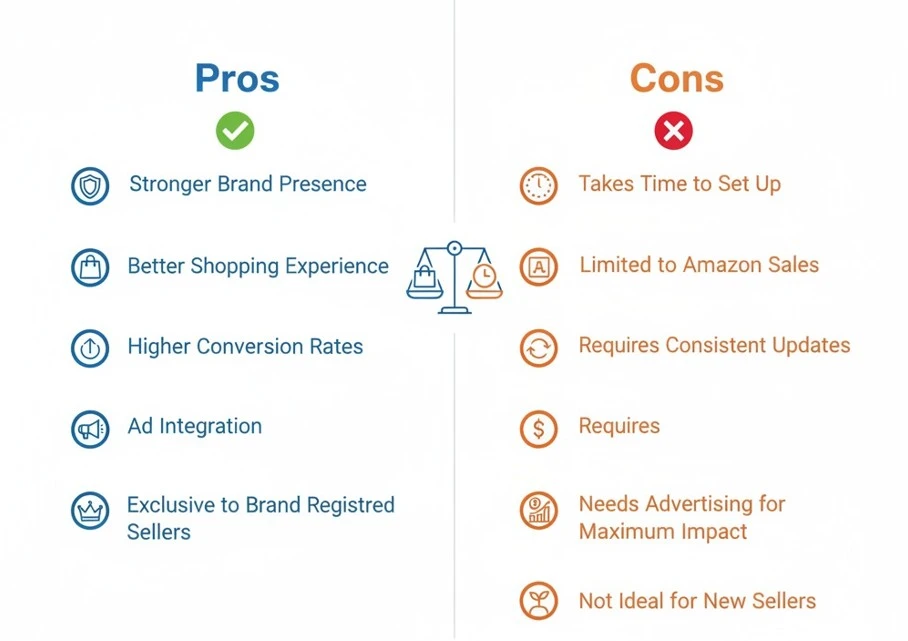
Amazon has millions of products, so it’s hard for sellers to get noticed. A branded Storefront helps your business stand out and look more professional. It also improves the shopping experience, builds trust, and increases conversions. But is it worth the effort and cost?
While the benefits are significant for most businesses, this approach isn’t ideal for every situation. Let’s break it down.
Pros and Cons of an Amazon Storefront:
An Amazon Storefront comes with advantages, but it also has challenges. Below is a simple comparison:
| Pros | Cons |
|---|---|
|
Stronger Brand Presence |
Take Time to Set Up
|
|
Better Shopping Experience |
Limited to Amazon Sales |
|
Higher Conversion Rates |
Requires Consistent Updates |
|
Ad Integration |
Needs Advertising for Maximum Impact |
|
Exclusive to Brand Registered Sellers
|
Not Ideal for New Sellers |
In the table, we can see the pros and cons of the Amazon storefront. Let’s talk about the pros first. An Amazon Storefront helps businesses create a strong brand presence by offering a dedicated space for their products. It makes shopping easier by organizing items clearly, helping customers find what they need.
A well-designed Storefront builds trust and credibility, leading to higher conversions. Features like ad integration and exclusive access for brand registered sellers make it a useful tool for growing brands.
However, setting up a Storefront takes time and effort. It requires high-quality images, branding work, and regular updates to stay relevant. Since it’s limited to Amazon’s platform, sellers cannot use it outside of Amazon.
Advertising is often necessary to get the most out of it. While larger brands see clear benefits, new sellers with only a few products may not need it right away.
Who Benefits Most from an Amazon Storefront?
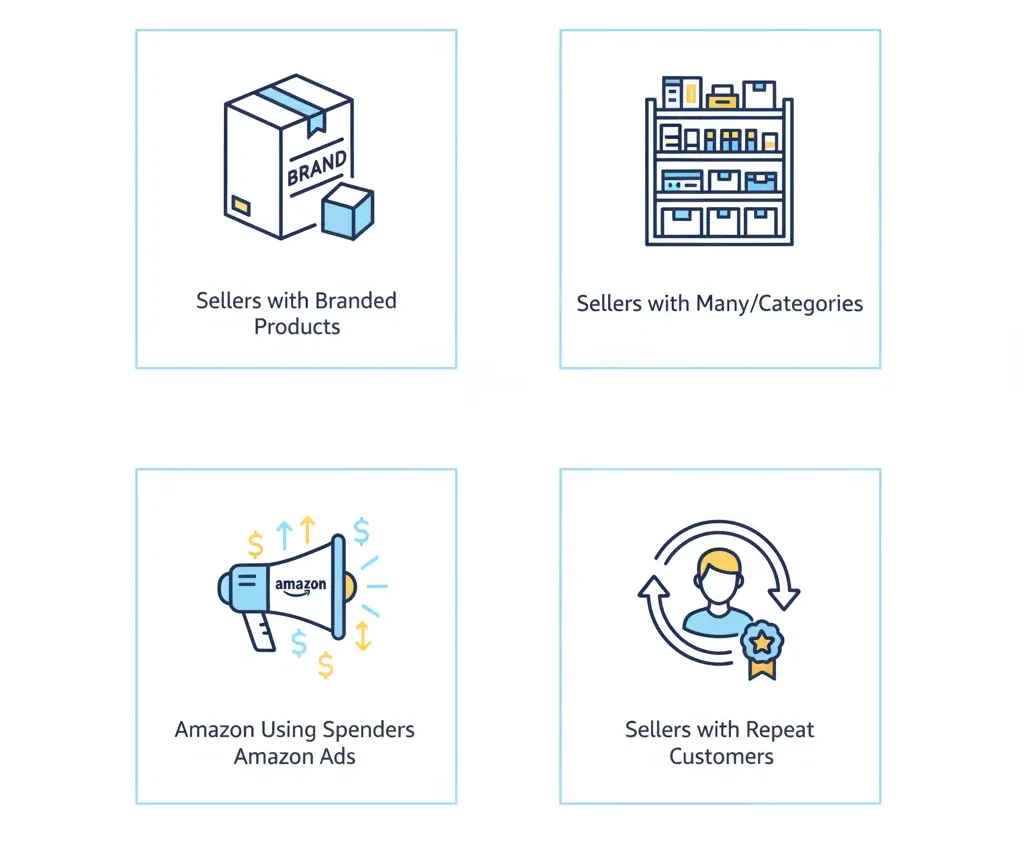
An Amazon Storefront is not useful for every seller, but some businesses get more value from it than others. Sellers who have their own branded products see the biggest benefits.
A Storefront helps them create a unique identity and build trust with customers. It also works well for businesses that sell many products because it allows them to organize different categories, making shopping easier.
Sellers who spend money on Amazon Ads also get good results with a Storefront. A well-designed Storefront gives customers a better shopping experience, which increases sales. Businesses with repeat customers also benefit.
When buyers see a branded Storefront, they are more likely to return and make future purchases. New sellers with only a few products may not need a Storefront right away, but as their business grows, it becomes a useful tool.
ROI Considerations
A Storefront takes time and planning, so make sure it fits your goals before getting started. It often leads to more sales, as shoppers feel more confident buying from a clean and professional-looking page.
Advertising also performs better when connected to a Storefront, as customers are more likely to trust a branded space.
Over time, a well-maintained Storefront helps build brand recognition and customer loyalty. With time, it becomes a worthwhile strategy for sellers focused on building their brand.
Is an Amazon Storefront Really Free? Free Setup vs Hidden Business Costs

Yes, an Amazon Storefront is free to create and maintain if your brand is eligible. Amazon states that Brand Stores are free, and sellers do not need to run ads to create one. However, “free” only applies to the storefront builder itself, not the full business cost behind launching a professional Amazon presence.
To create a Storefront, sellers usually need a Professional selling account, Brand Registry enrollment, product listings, images, brand content, and a clear store structure. Brand Registry is also free, but it requires a registered or pending trademark, which can create outside costs depending on how your business handles trademark filing.
The hidden costs come from preparation and growth. You may need product photography, listing optimization, A+ Content, keyword research, logo design, copywriting, video assets, Amazon PPC campaigns, inventory, FBA fees, referral fees, and agency support. So, the Storefront tool is free, but building a Storefront that actually converts is not free.
A weak DIY Storefront can look unfinished, confuse shoppers, and fail to move buyers toward your best products. Amazon gives you the space, but your strategy decides whether that space becomes a sales asset or just another ignored brand page.
Amazon Storefront Cost Breakdown: DIY vs Hiring an Agency
A DIY Amazon Storefront costs less upfront because you build it yourself using Amazon’s self-service Store builder. Amazon says sellers can create and edit Stores without design expertise, using templates and widgets built for mobile, desktop, and app users.
DIY is best for sellers with simple catalogs, strong product images, basic copywriting skills, and enough time to test layouts. The main cost is your time. You still need quality product listings, keyword planning, lifestyle images, and a logical navigation structure. If those are weak, saving money upfront can cost you more later through poor conversion.
Hiring an agency costs more, but it can save time and reduce mistakes. An agency may handle storefront design, brand messaging, category layout, keyword mapping, competitor research, image direction, A+ Content alignment, and PPC traffic planning. This is useful if you have multiple products, a premium brand, or poor current Amazon performance.
The honest answer: DIY is fine for beginners with limited budgets. But if your catalog is serious and you are already spending on ads, hiring experts usually makes more sense. Sending paid traffic to a badly designed Storefront is like pouring water into a broken bucket.
How to Measure Amazon Storefront ROI After Launch
Amazon Storefront ROI is measured by comparing the revenue, conversion improvements, and customer engagement generated after launch against the cost of creating and promoting the Storefront.
The most important metrics are Storefront visits, sales, units sold, conversion rate, average order value, traffic sources, and product page clicks. Sellers should also track whether Sponsored Brands ads perform better when sending shoppers to the Storefront instead of a single product listing.
A simple ROI formula is: Storefront ROI = revenue gained from Storefront traffic minus setup and marketing costs, divided by total costs. For example, if your Storefront brings $10,000 in sales and costs $2,000 to build and promote, your ROI is 400%.
But do not judge ROI only by immediate sales. A strong Amazon Storefront can also improve brand trust, increase cross-selling, educate shoppers, and help buyers compare products faster. These benefits may improve long-term performance even if the first-month sales are modest.
To measure properly, compare performance before and after launch. Look at sales trends, ad efficiency, product discovery, repeat purchase behavior, and branded search growth. If traffic is increasing but sales are flat, the problem may be weak product listings, pricing, reviews, or Storefront layout—not the Storefront idea itself.
Frequently Asked Questions (FAQs)
Selling on Amazon is competitive, and a Storefront gives brands a unique space to showcase their products. It helps build trust, improves sales, and creates a professional shopping experience.
Many sellers have questions about costs, setup, and requirements before starting. Here are the answers to some of the most common questions.
No, only sellers enrolled in the Amazon Brand Registry can create a Storefront. To qualify, you need a registered trademark and an active Professional Seller account. Without these, you cannot build a branded Storefront on Amazon.
Yes, a registered trademark is required to join the Amazon Brand Registry, which is needed to create a Storefront. Amazon uses this to verify brand ownership and protect against counterfeit products. Without a trademark, you cannot access Storefront features.
Setting up a Storefront can take a few hours to several days, depending on how much content you add. Amazon reviews all Storefronts before approval, which can take up to 72 hours. Changes or updates also require Amazon’s approval.
Yes, you can switch anytime. Go to Seller Central > Settings > Account Info, then upgrade to the Professional Plan. This removes the $0.99 per item fee and unlocks advertising, bulk listing, and Storefront features.
To lower costs, choose the right fulfillment method (FBA or FBM), manage inventory wisely, and use free branding tools. Running targeted ads instead of broad campaigns also helps reduce unnecessary spending while increasing Storefront visibility.
No, creating a Storefront is free for Brand Registered sellers. However, you need a Professional Seller account ($39.99/month). Optional upgrades like advertising, A+ Content, and advanced analytics may add extra costs.
Conclusion
Amazon Storefronts offer more than just a place to sell. They help brands grow and connect with customers. From setup to costs, we’ve covered everything. While creating a Storefront is free, sellers must maintain a Professional Seller account, which costs $39.99/month.
However, investing in high-quality content, strategic advertising, and efficient operations can make a significant difference. A well-designed storefront doesn’t just attract buyers. It builds trust and loyalty. If you’re still wondering how much an Amazon Storefront costs, it depends on your branding goals.
So, don’t let expenses hold you back. Think of it as building for the future. A great shopping experience creates loyal customers. Build your storefront. Make it unique. Let your brand’s story reach the right people.
