
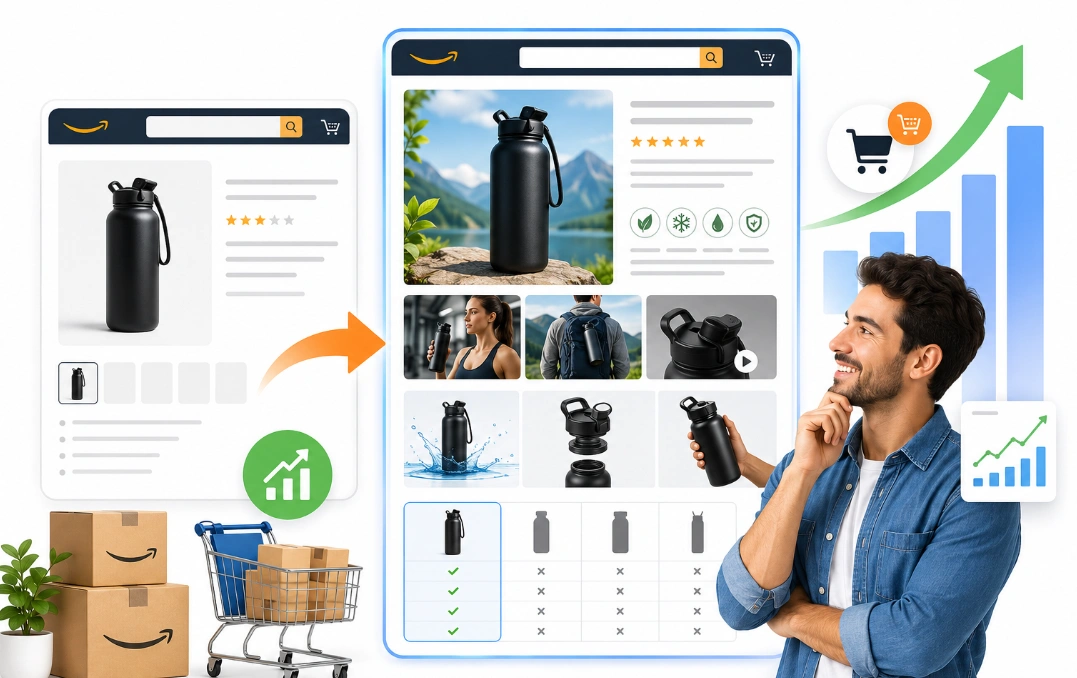
Your first product goes live on Amazon. You refresh the page just to see it sitting there. Everything looks fine until you scroll past the buy box.
Below your bullet points sits a plain gray block of text. No images. Nothing that explains why your product beats the one ranked above you.
Then you open a competitor listing at the same price. Theirs shows lifestyle photos, a comparison table, and a short brand story. You already know which page a shopper trusts more.
That missing section is called A+ Content. Our team at Brand’s Bro has built it for USA and Canada brands. We handle copy, module design, and brand story images.
One home goods client saw unit session percentage climb four points in six weeks. Another cut returns by fixing a sizing chart inside one module. Those results come from the same seven principles below.
So do new Amazon sellers need A+ Content to increase sales? Yes. This guide covers why, for brand owners across the USA. You get seven reasons, a build process, and a way to measure results.
What Is A Plus Content on Amazon?
A+ Content is a visual section on your Amazon product detail page. It sits under the Product Description heading on most listings. Some sellers call that area From the Manufacturer instead.
Both names point to the same block below your bullets. You fill it with images, tables, and formatted headers. Amazon once called it Enhanced Brand Content, or EBC.
Sellers still call it Amazon Enhanced Brand Content out of habit. A+ Content Manager gives you three content types to pick from.
Is A Plus Content Worth It for a New Seller? The Quick Answer

Yes, new Amazon sellers need A+ Content to increase sales. Amazon reports a sales lift near 10 percent on listings that add it. Basic A+ tends to land between 5 and 8 percent.
Premium A+ Content pushes higher on some products. Amazon cites lifts near 20 percent for that tier. Your category and your current listing quality both shift the number.
The tool costs you nothing once you hold Brand Registry. Sellers who want to increase Amazon sales start here for that reason. Amazon plus content fills the empty space under your bullets.
One caution matters before you open the design tool. A weak listing with strong A+ still converts poorly. Knowing what the feature actually is helps you avoid that trap.
The Three A+ Content Types Explained
Basic A+ is the standard product-level build every brand starts with. Brand Story is a separate carousel that runs across your whole catalog. Premium A+ adds larger images, video, and interactive blocks.
You choose the type from a dropdown when you start a project. Brand Story does not count against your five-module limit. It sits above your Basic A+ on the same page.
Which Type to Build First
Most new sellers build Basic first and Brand Story second. Premium comes later once you meet the volume rule. The table below compares all three side by side.
Feature | Basic A+ | Brand Story | Premium A+ |
Cost | Free | Free | Free |
Requirement | Brand Registry | Brand Registry | Brand Story plus 5 approved projects |
Scope | One ASIN | Whole catalog | One ASIN |
Blocks | 5 modules | 1 banner plus 4 cards | 7 modules |
Max image width | 970 pixels | 463 pixels per card | 1464 pixels |
Video support | No | No | Yes |
Reported sales lift | 5 to 8 percent | Supports brand recall | Up to 20 percent |
Basic A+ Content and Premium both cost you nothing. The gap sits in module count, image size, and video support. Most new sellers spend their first year on Basic and do fine.
A Plus Content and Your Product Description Field

Keep your product description field filled even after you publish. Amazon uses it as a fallback on some devices and feeds. Every brand on the Amazon marketplace gets this space free. Where the section appears decides how you should build it.
Use this field for details missing from titles and bullets. Add materials, dimensions, compatibility, care steps, and package contents. Mention key limits that could affect a buyer’s decision. Avoid repeating the same claims already shown elsewhere.
A Plus Content adds images, comparison modules, and richer brand details. Still, the description should remain accurate and complete. Review both sections after every listing update. Check desktop and mobile views for missing or outdated information.
Where A+ Content Sits on Your Detail Page
Your A+ Content sits below the bullet points on the desktop. Mobile shoppers reach it after the Buy Box and the reviews snippet. Both spots catch buyers still weighing a shopping decision.
Mobile buyers scroll a column about 400 pixels wide. Text inside your images shrinks below readable size there. Your Amazon product page design has to survive that squeeze.
Roughly seven in ten Amazon sessions now happen on a phone. A layout that only works on desktop wastes most of your traffic. Eligibility decides whether you get to build any of it.
Who Can Use A Plus Content on Amazon?
Only brand-registered sellers can use A+ Content on Amazon. Amazon Brand Registry is the gate, and no workaround exists. Enrollment requires an active registered trademark.
You also need a Professional selling plan. Individual accounts cannot open A+ Content Manager. Your seller role has to map to your brand inside Brand Registry.
Brand Registry itself costs you nothing to join. The trademark behind it does. A US filing runs several hundred dollars and takes months to clear.
Amazon IP Accelerator can shorten that wait for you. The program connects you to vetted law firms. Seller eligibility rules split cleanly into two groups.
Brand Registry and Trademark Requirements
A pending trademark alone will not open the door for you. Amazon wants a registered mark or an IP Accelerator referral. USPTO registration takes six to twelve months on a standard filing.
Your trademark has to cover the marketplace where you sell. A US mark unlocks Amazon.com and not the EU stores. Each region needs its own filing.
Brand Registry brings you more than A+ Content. Sponsored Brands ads, Brand Analytics, and A/B testing all unlock together. That bundle is worth the trademark cost on its own.
Sellers Who Cannot Use A Plus Content
Resellers cannot build A+ Content for brands they do not own. Arbitrage and wholesale accounts fall outside the feature. Brand owner status is the deciding factor here.
Sellers on the Individual plan also stay locked out. Upgrading to Professional costs about forty dollars per month. That fee makes sense once you clear a few dozen units.
A trademark filing in progress leaves you waiting. Many new sellers use that window well. They spend it fixing the listing basics.
Where A+ Content Fits in Your Listing Workflow
A+ Content is the last step in building your product listing. Product images, title, and bullets all come first. The design work assumes those pieces already convert.
You should audit your listing before opening A+ Manager. Compare your main product image against the category leaders. Read your bullets next to the top three results.
Product reviews sit outside your direct control at launch. Amazon Vine and follow-up emails help seed the first batch. Customer trust builds from reviews and content together.
Amazon Seller Central holds every tool you need for this. Listing edits live under Catalog, and A+ Manager lives under Advertising. Working through them in order saves you rework later.
What to Fix on Your Listing Before A Plus Content

Your A+ Content works on top of a solid listing. It never works in place of one. Buyers judge your main image before they scroll.
Retail readiness comes first for that reason. The term covers your images, title, bullets, price, and reviews. Weak basics waste every dollar you put into design.
Your detail page works like a funnel with stages. The main image earns the click from search results. Bullets and price earn the scroll.
A+ Content closes the buyers who reach the bottom. Three areas deserve your attention before the design tool opens.
Main Image and Photo Set
Your main product image drives click-through from search results. Amazon requires a pure white background on that first photo. The item should fill about 85 percent of the frame.
Six to seven product images cover the rest of the job. Lifestyle shots, scale references, and detail crops all pull weight. Buyers zoom on these more than most sellers expect.
A+ Content cannot rescue a listing with two blurry photos. Fix your gallery before you spend on design. Your copy comes next in the same order.
Title and Bullet Points
Your title carries the heaviest keyword load on the page. Amazon listing optimization runs on title, bullets, and backend terms. A+ Content text never joins that index.
Your bullet points answer the first five buyer questions. Each one should lead with a benefit and back it with a spec. Five strong bullets beat ten vague ones.
Good Amazon a plus content writing builds on those bullets rather than repeating them. Duplicate copy wastes the space you fought to unlock. Trust factors round out the checklist.
Price and Review Count
Your price sets the frame for everything a buyer reads. A product priced 30 percent above the category median needs a reason. Your content has to carry that justification.
Review count and star rating shape trust before any content loads. New listings with zero reviews face real friction. Amazon Vine can seed your first thirty reviews.
Pricing strategy and social proof work alongside your content, not under it. Sort those out, and the seven reasons below start to pay you back.
7 Reasons A Plus Content Increases Sales for New Sellers

Do new Amazon sellers need A+ Content to increase sales? Seven forces explain the lift you see on new listings. Each one solves a specific buyer problem.
Answering Product Questions Before They Become Doubts
Product education is the first job your A+ Content does. Bullets hold about 200 characters each. Complex products need far more room than that.
A supplement brand can show dosage, timing, and sourcing. Tool brands can show what fits in the box. Buyers who find the answer stop shopping around.
Good Amazon a plus content examples in electronics lead with a spec table. Feature explanation belongs in a module, not a bullet. Trust follows once the facts land.
Building Trust When Your Brand Is Unknown
Your new brand carries no name recognition on Amazon. Buyers see an unfamiliar seller and hesitate. Visual polish closes part of that gap for you.
Certifications, warranty terms, and factory details all fit inside a module. These trust signals cost you nothing to include. Buyer confidence rises when your brand looks established.
A gray text block signals a listing nobody maintains. Amazon enhanced brand content reads as effort by contrast. Comparison shopping comes next in the buyer path.
Keeping Comparison Shoppers on Your Page
The comparison chart module holds shoppers who would otherwise leave. It shows your products side by side in one table. Buyers pick a variant instead of opening a competitor tab.
Amazon rules block direct competitor comparisons inside that module. You compare your own sizes, models, or bundles. Cross-sell inside your catalog raises average order value.
Most agencies rate this module the highest converter available. Product comparison shortens the decision for your buyer. Screen size shapes how any of it lands.
Winning the Mobile Shopper
Mobile shoppers scroll a narrow column on a small screen. Small text inside an image turns unreadable there. Modules built for desktop fail that test.
Every one of the Amazon a plus modules stacks vertically on a phone. Your three-column layout becomes three stacked blocks. Long paragraphs get skipped at that width.
Short headers with one clear image per block survive the shrink. Mobile shopping habits reward brevity. Clarity also cuts a cost most sellers ignore.
Cutting Returns With Clearer Expectations
Returns eat your margin on every unit that comes back. Most returns trace to a mismatch between expectation and product. Buyers expected a different size, material, or function.
A sizing chart or a scale reference kills that mismatch. Clear specs set the right expectation before checkout. Fewer returns lift your net margin without one extra sale.
Amazon also tracks return rate against listing health. Clear Amazon a plus content design lowers that risk in some categories. Your paid traffic feels the same content effect.
Getting More From Your Ad Spend
Sponsored Products traffic lands on the same detail page. Every click costs you money whether it converts or not. Weak content burns that spend.
A jump from 8 percent to 12 percent changes your ACOS math. Amazon PPC gets cheaper per sale without any bid change. Ad conversion and content quality move together.
New sellers lean on ads to seed early velocity. That makes your content quality more urgent, not less. One more effect compounds over time.
Turning One Sale Into a Repeat Buyer
Amazon brand story sits above your A+ Content on every brand ASIN. It carries your brand identity across the whole catalog. One build covers every listing you own.
The module includes a carousel that links to your other products. Buyers who like one item find the next. Brand building starts with that link.
Catalog growth gets easier once shoppers recognize your name. Your Amazon brand story does that work in the background. Seeing it done on a real account makes the process clearer.
How Brand's Bro Helps New Sellers With A Plus Content

Do new Amazon sellers need A+ Content to increase sales? Clients ask us that before every project. Our team builds it for brands of every size across the USA and Canada.
A recent home goods client came to us with four rejected submissions. We rebuilt the layout around five modules and fixed the image specs. The listing cleared approval on the first try after that.
Another client sold a mid-priced kitchen tool with no comparison chart. Adding one lifted unit session percentage by roughly four points in six weeks. Buyers stopped leaving to compare variants elsewhere.
Every build starts with your listing basics and ends with a measurement plan. Need help with your Amazon A+ Content? Reach out to our team, and we will audit your listing first.
How A+ Content Helps Buyers Decide
Shoppers arrive at your page with objections, not questions. Content that clears those objections converts.
The top four objections repeat across most categories. Buyers ask if your product fits their situation. They ask whether the quality justifies your price.
They also ask what happens if it fails. Your warranty and return terms answer that one. Module choice decides which objection you can address.
Mapping Objections to Modules
Amazon conversion content works by mapping each objection to a block. One module per doubt keeps your layout tight. The module library gives you the tools.
What Buyer Objections Look Like on a Product Page
Buyer objections are the silent reasons a shopper leaves you. Nobody types them into a question box. They show up as a bounce instead.
Fit is the most common objection across categories. Buyers wonder if your size or model suits their situation. A scale image and a sizing table answer it.
Value ranks second in most shopping decision paths. Buyers weigh your price against the reviews they see. Product benefits stated as specs settle that doubt.
Risk closes the list of common objections. Warranty terms and return windows reduce it. Customer buying decision speed rises once all three are clear.
Amazon A Plus Content Modules Explained
New Amazon sellers need A+ Content to increase sales. Modules are how you build it.
Standard A+ gives you a library of about seventeen. Premium adds a video module and interactive blocks. You fill each block with your own assets.
Each module has fixed image dimensions and character limits. Amazon rejects assets that miss those specs. The table below covers the ones new sellers use most.
Module | Image Size | Best Use |
Standard image with dark text overlay | 970 x 600 | Opening banner |
Three images and text | 300 x 300 each | Three key benefits |
Standard single image sidebar | 300 x 400 | Long explanation, specs |
Comparison chart | 150 x 300 thumbnails | Variant comparison |
Four image highlights | 220 x 220 each | Feature grid |
Image header with text | 970 x 300 | Section divider |
Your module choice shapes the whole layout. Our breakdown of Amazon A+ content modules covers the specs for each block. Picking five that each do a different job beats picking five pretty ones.
Which Modules Carry the Most Weight
Image module and text module options carry most of the load. Comparison and brand blocks handle the rest. Each one deserves a short look.
Image and Text Modules
The standard image and dark text overlay module opens most layouts. It works as a banner with a short headline. Buyers read that first block more than any other.
Three-image and text modules break your features into scannable thirds. Each cell holds one benefit with a supporting photo. Strong Amazon a plus content design lives or dies on that clarity.
The single image and sidebar module handles longer explanations. Technical products lean on it. Comparison work needs a different block entirely.
Comparison Chart Module
The comparison chart module holds up to six products in one table. You set the rows to match features that matter. Checkmarks and short values read fastest.
Your rows should cover the specs buyers weigh most. Size, material, and use case beat vague quality claims. Among the Amazon a plus modules, this one converts hardest.
Linking a child ASIN inside the chart lets buyers switch variants. That keeps the sale inside your catalog. Brand-level content works a little differently.
Brand Story Module
Brand Story is a separate carousel that sits above your A+ Content. You build it once, and it appears on every brand ASIN. A+ Content stays specific to one ASIN.
The carousel holds a brand banner and up to four cards. One card should link to your Amazon Storefront. Another can carry your founding story.
Premium A+ eligibility requires a published Brand Story module. Building it early opens that door for you later. The build process follows a fixed order.
How to Create A+ Content on Amazon Step by Step

You create A+ Content through A+ Content Manager in Seller Central. The process runs from asset prep through approval. Most projects take an afternoon once your images are ready.
Asset prep matters more than the tool itself. Amazon rejects images that miss the size specs. Gather every file before you open the manager.
- Gather every image at the required pixel size.
- Open A+ Content Manager inside Amazon Seller Central.
- Start a new project and name it clearly.
- Pick your modules and drag them into order.
- Upload images and write headers for each block.
- Apply the project to your parent ASIN and child ASIN.
- Preview on desktop and mobile before you submit.
- Submit for review and wait for content approval.
Our guide on how to create A+ Content on Amazon walks through each screen. Approval usually takes about seven business days. Q4 submissions can stretch to fourteen.
Rejections happen often on first submissions. The reasons repeat across most accounts.
Content Approval and Rejection Reasons
Amazon reviews every project before it goes live. A+ Content approval runs on a set of style rules. Most rejections trace back to four issues.
Claims about being a best seller or number one get rejected. Pricing and promotional language also fail review. Contact details and external links break the rules.
Poor image quality triggers the fourth common rejection. You can edit and resubmit right away. Image specs prevent most of these problems.
Image Specs That Pass Amazon Review
Amazon rejects A+ images that miss the required dimensions. Each module lists its exact pixel size inside the manager. Your files have to stay under two megabytes.
Standard image with dark text overlay needs 970 by 600 pixels. Three-image modules need 300 by 300 per cell. The comparison chart uses 150 by 300 thumbnails.
JPEG and PNG both work for uploads. Text inside your images should sit above 16 pixels. An image-first listing fails when nobody can read it.
Keep a master file at double the required size. Downscaling preserves sharpness better than upscaling. Sharp files make your Amazon product page design look deliberate.
Best A Plus Content Structure for New Sellers
The best A+ Content structure uses five modules in a fixed order. Start broad, move to detail, and close with comparison. That sequence matches how buyers actually scroll.
A five-module set covers most new listings without extra work. Each slot carries one job. Skipping a slot leaves a question unanswered.
Module one carries a lifestyle banner with your main promise. Three key benefits split into thirds in the second block. Specs or a how-to sequence fill the third.
Your comparison chart belongs in the fourth slot. Brand credibility or warranty terms close the fifth. Each block answers one question and moves on.
Why Module Variety Beats Repetition
Your Amazon listing design fails when every module repeats one message. Variety inside a fixed order beats repetition. Five banners saying premium quality teach a buyer nothing.
Each block should answer a different question. One handles fit and another handles durability. A third covers what sits in the box.
Buyers scroll until a question gets answered or boredom wins. Repeated messaging speeds up the second outcome. Mix your module types the same way you mix your bullets.
Photo style deserves the same variety. A lifestyle shot, a spec diagram, and a scale reference all read differently. Some errors show up again and again.
A Plus Content Mistakes New Sellers Make
New Amazon sellers need A+ Content to increase sales, but execution decides the result. Plenty of sellers build it and still see flat conversion.
Six mistakes account for most weak projects. Each one is easy to avoid once you name it.
- Copying bullet points straight into your modules.
- Keyword stuffing text that never gets indexed.
- Using small text that vanishes on mobile screens.
- Filling all five modules with the same message.
- Skipping the comparison chart module entirely.
- Publishing without recording a baseline first.
Copying your bullet points into module tops the list. Buyers already read that text above. Repetition gives them no reason to keep scrolling.
Keyword stuffing ranks second and helps nothing at all. A+ text stays outside the search index. Search impact deserves a clearer explanation.
Does A Plus Content Help Amazon SEO and Search Traffic?
A+ Content does not directly improve your Amazon SEO rank. Text inside the modules stays outside the search index. Your title and bullets carry all the keyword weight.
The indirect effect still matters for your search traffic. Better content lifts your Amazon conversion rate on the same sessions. Rising conversion feeds sales velocity within weeks.
Content that helps improve conversion rate feeds sales velocity. A listing that converts better tends to climb. Amazon listing design and listing optimization work together this way.
Treat detail page optimization as two separate jobs. Keywords live above the fold, and content lives below. Both feed the same growth curve.
How A Plus Content Supports Your PPC and Ad Spend

PPC traffic lands on the same detail page as organic traffic. Sponsored Products clicks cost you money on every visit. Weak content burns that budget without a sale.
Do new Amazon sellers need A+ Content to increase sales through ads? Yes, and the math is simple. A stronger page raises seller conversion rate across every source.
Amazon sales growth stalls when ads run before the content is ready. That order wastes spend during your most expensive weeks. Build the page first and then scale the ads.
Private label seller accounts feel this most during launch. Ad spend runs high while review count sits low. Content carries the trust your reviews cannot yet supply.
Does A Plus Content Increase Sales on a Brand New Listing?
Yes, new Amazon sellers need A+ Content to increase sales on fresh listings. Your new ASIN carries no review history. Content fills that trust gap.
An established listing with 2000 reviews already has social proof. A new listing with four reviews has none. Visual proof does the work reviews cannot yet do.
Product launch timing favors building early. Every session before you publish converts at your weaker rate. Waiting three months wastes that traffic.
Amazon conversion content pays back fastest during launch. The math holds at any catalog size. Price point shifts the picture slightly.
Is A Plus Content Worth It for a Low Price Product?
Yes, A+ Content still pays on low-price items, though payback takes longer. Products at 15 dollars earn you less per converted unit. Volume has to carry the return.
Run the math before you commit a design budget. Take a 5 percent lift on 200 monthly units at 15 dollars. That adds 150 dollars, so a 400-dollar build pays back in three months.
Higher-priced products clear that bar much faster. Considered purchases in home and beauty see the largest lifts. Commodity categories with price wars see smaller deltas.
Ecommerce conversion always tracks back to your margin per unit. Weigh the design cost against monthly volume. Copy quality shifts the result as much as design.
What Good A Plus Content Writing Looks Like
Strong A+ copy leads with a benefit and backs it with a spec. Buyers skim your headers before they read body text. Each header should carry one clear claim.
Vague claims waste the space entirely. Premium quality tells a buyer nothing at all. Strong Amazon a plus content examples name the material instead.
Character limits force that discipline on you. Most text modules cap around 200 characters per block. Short blocks read better on a phone anyway.
Amazon A Plus content writing works best when each module targets one objection. Visual storytelling carries the rest. Results only count once you measure them.
How to Measure If Your A Plus Content Worked
Unit session percentage is the metric that answers this. Take units ordered and divide by sessions on your page. Seller Central reports it under Business Reports.
Pick a clean before-and-after window to keep the read honest. Thirty days on each side works well. Shorter windows pick up noise from ads and seasonality.
Record your baseline before you publish anything. Sales, sessions, and conversion rate all matter. Without that baseline, session data proves nothing.
Metric | Where to Find It | What It Shows |
Unit session percentage | Business Reports | Conversion rate per session |
Sessions | Business Reports | Search traffic volume |
Units ordered | Business Reports | Sales volume |
Return rate | Voice of the Customer | Expectation mismatch |
Those four numbers tell you the whole story. Watch for a rise in unit session percentage with flat sessions. A drop in return rate means your specs did their job.
Manage Your Experiments and Split Testing
Manage Your Experiments runs true A/B tests on your content. Amazon splits traffic between two versions of your A+ project. The tool needs Brand Registry and enough sessions.
Conversion testing removes the guesswork from your layout choices. You test A+ Content one variable at a time. Two different headline banners make a clean test.
Tests usually need four to six weeks for a clear result. Low-traffic ASINs may never reach significance. Split testing answers what opinion cannot.
Frequently Asked Questions
New sellers ask us the same questions before their first build. The answers below cover eligibility, cost, timing, and results. Each one reflects what Amazon documents today.
How soon should a new seller add A+ Content?
Build it before you drive any paid traffic to the listing. Every session before you publish converts at your weaker rate. Most sellers add it within the first month of launch.
Can I use A+ Content without Brand Registry?
No, Brand Registry enrollment is the only path to A+ Content. Registry itself requires an active registered trademark. IP Accelerator can speed that process up.
Does A+ Content replace my bullet points?
No, A+ Content replaces the plain text product description instead. Your bullets and title still carry the keyword load. Both sections do different jobs on the page.
What does A+ Content actually cost to produce?
Amazon charges nothing for either tier once you qualify. Your only real cost is design and copywriting time. Agency builds usually run between 300 and 800 dollars.
How long does A+ Content take to get approved?
Amazon reviews most submissions within seven business days. Q4 volume can push that to fourteen days. Rejected projects can be edited and resubmitted right away.
What happens if I never publish any A+ Content?
Your detail page keeps showing plain text where competitors show visuals. Conversion stays flat while your ad costs stay the same. Sellers who skip it lose the easiest lift available.
Start With Basic A Plus and Measure the Lift
So do new Amazon sellers need A+ Content to increase sales? Yes, and the lift usually lands between 5 and 10 percent. Premium reaches higher on considered purchases.
The order of work decides your return. Fix your images, title, bullets, and price first. Build five modules that each answer a different objection.
Record your unit session percentage before you publish. Compare thirty days on each side. That number tells you what the work was worth.
