
Your page is live, and stock appears ready for sale. Yet each seller report still shows few or no orders.
An Amazon product listing not getting sales has one broken sales step. Shoppers may miss the page or reject its offer.
Some pages need better search reach before any design work. Others get visits but fail to earn buyer trust.
This guide shows where sales stop and what comes first. The first task separates weak traffic from poor page sales.
What Is an Amazon Product Listing?
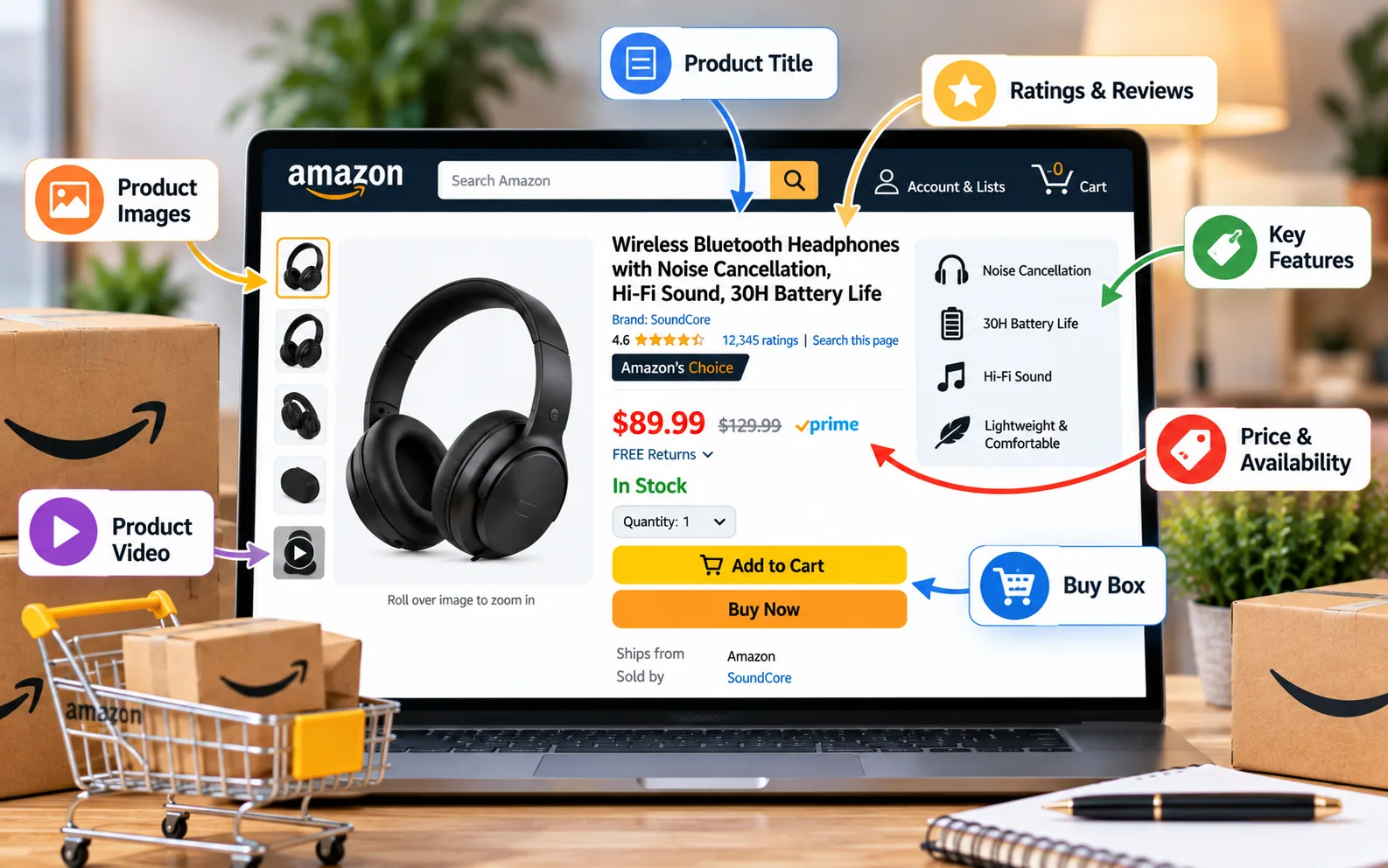
An Amazon listing joins product facts with a seller offer. The shared product detail page holds the main product content. That content includes the product title and all product images.
The same page holds bullet points and the product copy. Each seller offer adds price and current inventory availability. It shows all shipping terms and the shipping method.
Amazon may place one offer inside the Featured Offer area. Many sellers still call this area the Buy Box.
Page content explains the product while the offer helps the sale. The next section shows which side blocks the order.
Why Is Your Amazon Product Listing Not Getting Sales?
The page gets no sales when traffic or buyer trust breaks. Low sessions mean too few shoppers reached the page. Strong sessions with weak orders show poor Amazon listing conversion.
The table below gives each pattern one starting point. It keeps sellers from changing unrelated product page parts.
Report pattern | Main cause | First repair |
Few sessions and few sales | Weak search reach | Keywords and index status |
Many sessions and few sales | Weak page conversion | Images and offer |
Paid clicks without sales | Poor ad traffic | Search term report |
Sudden sales loss | Offer or stock change | Featured Offer review |
Sales with weak profit | Price or ad cost | Margin review |
A low conversion rate reveals the first conversion bottleneck before edits. Nine common sales barriers now follow that same order.
9 Sales Barriers Inside Amazon Product Listings
Most weak pages fail through reach or buyer trust. Each barrier below has one clear sign and fix path.
Good Amazon product listing optimization starts with the first broken sales step. Strong Amazon listing optimization protects data and stops mixed page tests.
Search Visibility Stays Too Low
Few sessions often show weak product discoverability in Amazon search. The page may miss search terms that buyers use.
A page with poor search visibility cannot build steady sales. Search suppression can block normal product reach across Amazon.
The product title may miss the main product phrase. Hidden backend search terms may lack clear buyer wording.
When an Amazon listing is not showing in search, sellers should inspect index status. Search reach comes before any product page sales test.
Keywords Bring The Wrong Shoppers
High sessions do not prove the traffic fits your product. Broad terms can attract shoppers with another product need.
Shopper intent describes the goal behind a buyer search. Strong keyword relevance connects that goal with the listed item.
The search term report shows queries that produced paid clicks. Sellers can compare each query with product use and size.
A search-to-offer mismatch creates weak ad traffic quality after clicks. This problem can leave an Amazon listing not selling after launch.
The Main Image Loses Search Clicks
The main image forms the first product view for shoppers. Buyers compare it with nearby results within a few seconds.
Poor crops can make the product look small or unclear. Hidden parts can create false buyer expectations before the sale.
Strong product photography shows the true item and included parts. Good mobile thumbnail clarity keeps the shape clear on phones.
An Amazon image optimization review should test crop and scale. The next images must answer questions after that first click.
Secondary Images Leave Questions Open
Strong secondary images explain product size and package contents. They can show real product use and product limits.
Useful visual proof supports claims with close views or diagrams. Each frame should answer one clear buyer question before purchase.
Weak image stacks repeat the same product angle across frames. They leave key buyer concerns open before the final checkout.
This part of Amazon product page optimization reduces doubt after clicks. The title and bullets must back the same facts.
The Title And Bullets Hide Product Value
The title should name the product before extra details. Buyers need fast clarity during search and page review.
Strong Amazon product title optimization places product type near the front. Size or count should follow when they affect purchase.
Good Amazon bullet points link buyer benefits with product facts. Each bullet should answer one common buyer concern before purchase.
An Amazon bullet points optimization pass removes repeats and vague claims. Clear copy can reduce buyer hesitation after good traffic arrives.
The Description And A+ Content Repeat Claims
The copy should explain use and care in plain words. It should add facts that the bullets cannot hold.
Good Amazon product description optimization adds needed product context. Repeated sales claims add no new value for buyers.
A+ Content can add images and useful product charts. A Brand Story can explain the brand behind the item.
Weak Amazon A+ Content repeats bullets with larger pictures. Strong modules add proof that supports the value proposition.
The Price Misses Buyer Expectations
Shoppers compare your price with close products shown nearby. A higher price needs clear value on the page.
Price competitiveness compares your deal with close product choices. It does not mean choosing the lowest market price.
Short price testing periods can show how buyers respond. A visible coupon badge may improve the price view.
The seller still needs enough margin after fees and ads. That limit supports profit protection during each price test.
Reviews Reduce Buyer Trust
Amazon product reviews show how past buyers judged the item. A low star rating can raise doubt before the sale.
Small review counts can hurt sales against known product rivals. Recent complaints may expose weak copy or product faults.
Strong buyer trust signals include honest social proof after valid sales. Sellers should never seek reviews through banned reward methods.
A review-led listing repair can improve Amazon listing conversion after good traffic. The final sales barrier sits inside the active seller offer.
The Offer Blocks A Simple Purchase
The Featured Offer sits near the main purchase buttons. Stock and price changes can affect the active offer.
Slow shipping speed can weaken the shown seller choice. FBA means Amazon stores and ships the seller stock.
FBM means the seller handles each sale and shipment. Both methods need clear stock status details and ship dates.
A Featured Offer missing issue can weaken offer quality and sale access. This offer access failure deserves review before page edits.
Sessions Show Whether Your Listing Gets Enough Traffic

Sessions count visits to one product page during a period. Low sessions mean the page lacks enough traffic for testing. Sellers can compare sessions across seven or fourteen days.
The dates should exclude stockouts or major sale events. A session-to-order gap appears when visits rise without sales. Sellers may call this Amazon listing getting traffic but no sales.
That pattern shows an ecommerce conversion problem after page arrival. Keyword work comes first when product sessions remain low. Traffic data shows whether term work or page work comes first.
Better Amazon search term research tools can reveal clear buyer wording before title edits. Search volume alone cannot prove strong buyer purchase intent. Those search terms should still match the exact listed product.
Keyword Research Should Match Product Use
Good search term research starts with the item and buyer need. Terms should describe product type and common buyer use. Competitor listings can reveal common words for close products.
Customer reviews can reveal use cases and missing details. A keyword list should group terms by clear buyer meaning. One group may cover product type or key compatibility.
This work supports an Amazon SEO listing without term stuffing. Clean search terms should guide titles and hidden fields. Hidden search terms need the same clear product match.
A focused Amazon SEO service can join index work with title research. That shared work helps search reach and buyer clarity. Clear buyer meaning should guide every final term choice.
Backend Search Terms Need Clean Coverage
Backend terms help Amazon read added product search language. Amazon shoppers do not see this hidden search field. These backend keywords can hold alternate word forms and phrases.
They should not repeat every title word without reason. A strong Amazon SEO listing uses clean, visible, and hidden terms. Product fit matters more than broad, unrelated high-volume keywords.
Rival brand names can create policy and relevance risks. Common buyer spelling forms may help when demand supports them. This hidden field supports Amazon SEO without hurting title clarity.
The visible title still needs the strongest buyer phrase. Title structure now becomes the next clear buyer-facing repair. That product title must still read well for shoppers.
Product Titles Need Clarity Before Keyword Density
A title should name the item in plain words. The main keyword should match buyer meaning within that title. Repeated nouns can make the title harder to scan.
A second Amazon product title optimization pass should remove those repeats. It should keep product size near the main product type. Mobile search can cut long titles from buyer view.
The first words should still identify the exact product. Strong titles support listing quality and buyer search clicks. Weak titles can hurt both reach and page trust.
A guide on ranking higher in Amazon search can help with this wider review. Search work should still match real buyer product demand. The title brings the click while images support the choice.
Images Need One Clear Job Per Frame
The main product image should show the exact sale unit. It should set correct product expectations before the shopper clicks. Secondary frames should explain product size and package contents.
Another frame can show the item during normal use. One image can compare close models or product sizes. Each claim must remain fair and easy to prove.
A second Amazon image optimization test should compare valid main images. The winning product image should improve clicks and orders. Strong Amazon product page optimization gives each image one question.
Amazon recommends clear product images that allow full zoom. The image stack shows details while copy explains product limits. Clear image frames can reduce buyer confusion after delivery.
Bullet Points Need Benefits With Proof
A product bullet should start with one buyer result. The next words should show proof from the listed item. Strong product bullets avoid empty claims like premium quality.
Buyers need materials or tested limits behind each claim. A second Amazon bullet point optimization pass should remove repeated facts. It should move key compatibility details near the front.
The bullet set should cover benefits and product limits. Clear product limits can cut returns and poor reviews. Good product bullets should match every shown product image.
Amazon advises sellers to add focused bullets with clear product facts. Its ad guide recommends at least three clear bullet points. The copy can then explain product use and care.
Product Descriptions Should Add Missing Facts
The copy gives sellers room for more product detail. It can explain setup and care in simple words. Each product paragraph should add one new buyer fact.
A second Amazon product description optimization review should remove copied bullets. Product limits belong near the linked product use steps.
Clear fact placement can reduce buyer surprise after delivery. The copy should match each image and package claim. That close match supports stronger product-page trust before the sale.
A clear page then gives A+ modules a useful role.
A+ Content Should Add Buyer Proof
A+ Content gives eligible brands more product page modules. These page modules can include images and product charts. Sellers enrolled in Brand Registry may gain these tools.
Basic and Premium options offer different product page modules. Each module should answer a buyer question still left open. Repeating the product title adds little value for shoppers.
A chart can help buyers select the right model. Clear product care details can reduce common product misuse. Strong modules can support brand credibility with clear facts.
Brand owners can use Amazon A+ Content to build richer page sections. The page can look strong while price still blocks purchase. Product price tests should follow one clear testing plan.
Price And Offer Tests Need One Change
Offer tests work best when one item changes at once. The first test should confirm the active Featured Offer. Later tests can cover price or a short coupon period.
The table below gives each test one clear signal. Each table row gives the first clear stop point.
Test item | Main signal | Stop point |
Featured Offer | Offer access | Restore lost access |
Product price | Orders and margin | Margin falls too far |
Coupon | Order lift and profit | Loss exceeds added sales |
Main image | Click-through rate | No clear lift appears |
Reviews | Rating and complaint themes | Product fault needs work |
A+ Content | Unit session percentage | No useful change appears |
One test should run long enough for enough traffic data. The next section explains how sellers can split page versions.
Manage Your Experiments Tests Listing Content
Eligible brand sellers can test titles and product images. They can test product bullets and the product copy. Sellers can test A+ Content and Brand Story too.
Manage Your Experiments splits shoppers between two page versions. The final report then compares both page sales results. Tool eligibility depends on seller and brand account requirements.
Each page test should answer one product page question. Mixed edits can hide the change that helped sales. Testing needs a clear fix order before each version.
Sellers asking “how to improve Amazon product listing conversion” need controlled page tests. Eligible sellers can use Manage Your Experiments for those tests. Amazon suggests running tests until the results become useful.
The First Listing Repairs Should Follow Report Data
Report signals should set the first page fix step. Low product sessions need index and term work first. When a product page gets views without orders, it needs offer review.
Weak paid sales need search term review before bid changes. Sudden sales drops need stock and Featured Offer review. Weak search clicks need a new main image test.
Rising product returns need product claim and image review. This fix order keeps each result easy to read. That fix order creates a simple seven-day work plan.
Sellers searching “how to fix a low converting Amazon listing” need report context. Searches for “fix Amazon listing” need the same clear data. A full Amazon listing audit should name one first fix.
A Seven-Day Amazon Listing Audit Plan
Day one records product sessions and unit session percentage. The seller records price and all current stock levels. Day two reviews product index status and search rank.
Day three compares the main image with close rivals. Day four reviews product titles and all bullet points. Day five compares product price and current shipping terms.
Day six groups recent product review complaints by topic. Day seven starts a one-page test with baseline data. The final review compares the result against the baseline.
This Amazon product listing optimization plan avoids mixed page changes. It creates one repeatable full Amazon listing audit process. Each new action should follow the last test result.
Metrics Show Whether Listing Changes Worked
Sessions show how many shoppers reached the product page. Search rank shows where key terms place the page. Click-through rate shows paid product clicks against ad views.
That rate can help judge main image and term fit. An Amazon listing not converting will show weak Amazon listing conversion after visits. Order growth still needs profit review before success claims.
Returns and review themes should remain part of the result. A strong test should not create new buyer problems. These metrics can separate page weakness from weak product demand.
A conversion rate guide can help with deeper page tests. The seller should still track one change at once. Clean report data should guide every next listing fix.
Product Demand Can Limit Every Listing Repair
Some products face weak demand despite strong page content. Search volume may stay too low for steady sales. A crowded product category can limit new sales velocity.
Sales velocity means sales pace during a set period. Strong rivals may hold lower prices and deeper reviews. New products need a clear reason for buyer choice.
Weak product-market fit appears when right-fit shoppers reject the offer. No page copy edit can create missing buyer demand. The final audit should join traffic and page results.
A sound Amazon product sourcing plan can cut weak demand and margin risks. Product choice often shapes all later Amazon sales results. Better product sourcing can protect future seller profit too.
Traffic Sources Need Separate Conversion Reviews

Organic shoppers may enter through broad Amazon search phrases. Paid shoppers may arrive through narrow Amazon ad terms. A traffic source conversion split shows both result groups.
This traffic split can expose weak Amazon PPC traffic. Broad ad targets may send shoppers with poor product fit. Those poor clicks can lower the paid sales rate.
Strong Sponsored Products ads bring matched shoppers to the page. They cannot repair poor images or a weak offer. This traffic split supports the full Amazon sales funnel.
It shows whether listing readiness and retail readiness help each traffic source. The final section turns these findings into one audit request. That request should cover both traffic and page quality.
Frequently Asked Questions (FAQs)
Many new Amazon sellers ask these questions after a page launch stalls. Each answer starts with the first useful diagnosis.
Why Does My Amazon Listing Get No Sales?
An Amazon listing not selling needs traffic and sales checks. Session counts show which page issue deserves review first.
How Can I Tell Whether My Listing Gets Traffic?
Amazon business reports show sessions for each listed ASIN. Amazon listing has sessions but no sales signals weak page conversion.
Can Weak Images Stop Amazon Sales?
Weak product images can reduce clicks and buyer trust. The main image and image stack need separate tests.
Is My Amazon Product Price Too High?
Your price is high when visible value cannot support it. Close product offers give shoppers the fairest buyer comparison.
Do Reviews Affect Amazon Listing Conversion?
Product reviews affect trust and can change buying choices. Recent buyer complaints can reveal product or page faults.
Can Wrong Keywords Bring Traffic Without Sales?
Wrong search terms can attract shoppers seeking another product. Search term reports show the queries behind paid visits.
What Should I Repair First On My Listing?
Low product sessions need search work before page design. Product page views without orders need product page repairs.
How Long Should A Listing Test Run?
A test needs enough traffic for a fair result. Amazon experiments can run until the data shows a winner.
Start With A Full Listing And Offer Audit
A seller with an Amazon product listing not getting sales needs clear data. Traffic reports show whether Amazon shoppers reach the page. Page content shows whether buyers understand the exact product.
The offer shows whether price and shipping time support the sale. A full audit should cover titles and all product images.
Price and Featured Offer status complete the sales review. A focused audit can create one clear fix order. That plan protects budget and helps sellers make better listing choices.
