
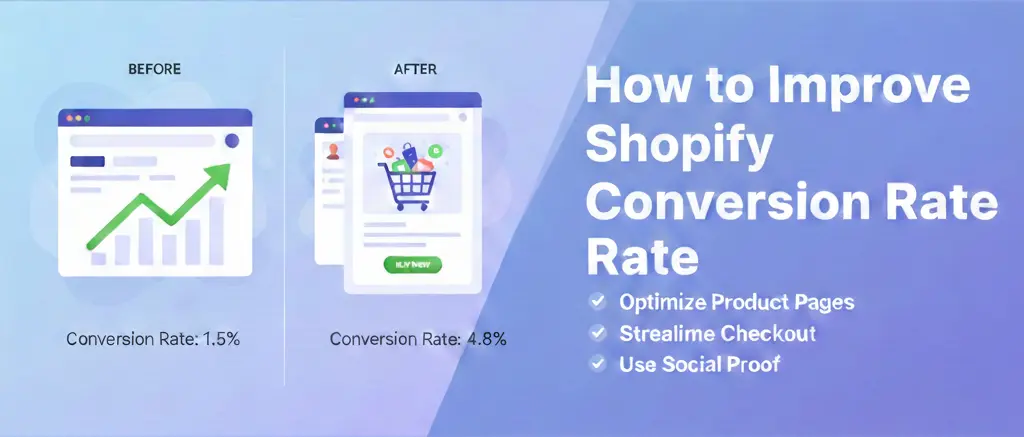
Getting traffic to your Shopify store is not enough. If visitors are landing on your website but leaving without buying, the real problem is conversion. Slow pages, weak product presentation, poor trust signals, confusing navigation, and a difficult checkout process can quietly kill your sales every day.
At Brand’s Bro, we have spent over 11 years helping Shopify and ecommerce brands improve store performance, customer experience, and revenue growth. Our team has worked with 350+ Shopify businesses across the USA, Canada, the UK, and Australia. From fashion and beauty brands to home appliance and lifestyle stores, we have helped businesses turn weak storefronts into stronger sales machines.
We have seen how small conversion problems create big revenue losses. In one Shopify project, a home appliance brand had traffic but poor mobile performance and low checkout completion. After improving page speed, product layout, trust sections, and conversion flow, their organic traffic increased by 214% within 90 days, and monthly revenue crossed $89,983. For a fashion brand, better product-page structure and paid ad optimization helped increase conversions by 291%.
Improving Shopify conversion rate is not about changing colors randomly or adding more apps. It is about understanding where customers drop off and fixing the exact barriers stopping them from buying.
In this guide, we’ll explain how to improve your Shopify conversion rate with practical strategies that make your store faster, clearer, more trustworthy, and easier to buy from.
If your Shopify store is getting traffic but not enough sales, Brand’s Bro can help you identify the problem and fix it with a data-driven conversion strategy. To discuss your brand’s growth plan, you can book a meeting with us today.
What Shopify Conversion Rate Is & How It Is Calculated
Before you fix anything, you need to know your numbers. Shopify conversion rate measures the percentage of visitors who complete a purchase.
Simple math: divide your total orders by total sessions, then multiply by 100.
Orders ÷ Sessions × 100
Calculate Your Shopify Conversion Rate & Revenue Potential
If 1,000 people visit your store and 20 buy, your conversion rate is 2%.
The average Shopify conversion rate is between 1.5% and 3%. Top performers hit 4% or higher. But averages lie, Shopify sales statistics vary wildly by industry, price point, and traffic source.
A $10 impulse item converts differently than a $500 leather bag. Your niche, traffic source, and price point all shift the benchmark.
Here is what matters: your rate against your own history. A 1% store that climbs to 2% just doubled revenue without spending more on ads.
That is the leverage conversion rate optimization gives you.
Track this metric weekly. Watch it during sales, after redesigns, when you launch new products. It is your store’s pulse.
If you ignore it, you are flying blind. Watch it, and you know exactly which changes earn their keep.
Shopify Conversion Funnel and Drop-Off Points
Buyers do not appear out of thin air. They travel a path. At each step, some leave. Your job is to find where they leave, and why.
Think of your Shopify conversion funnel as a series of doors. Each door asks for more commitment. Your job is to make every doorway irresistible to walk through.
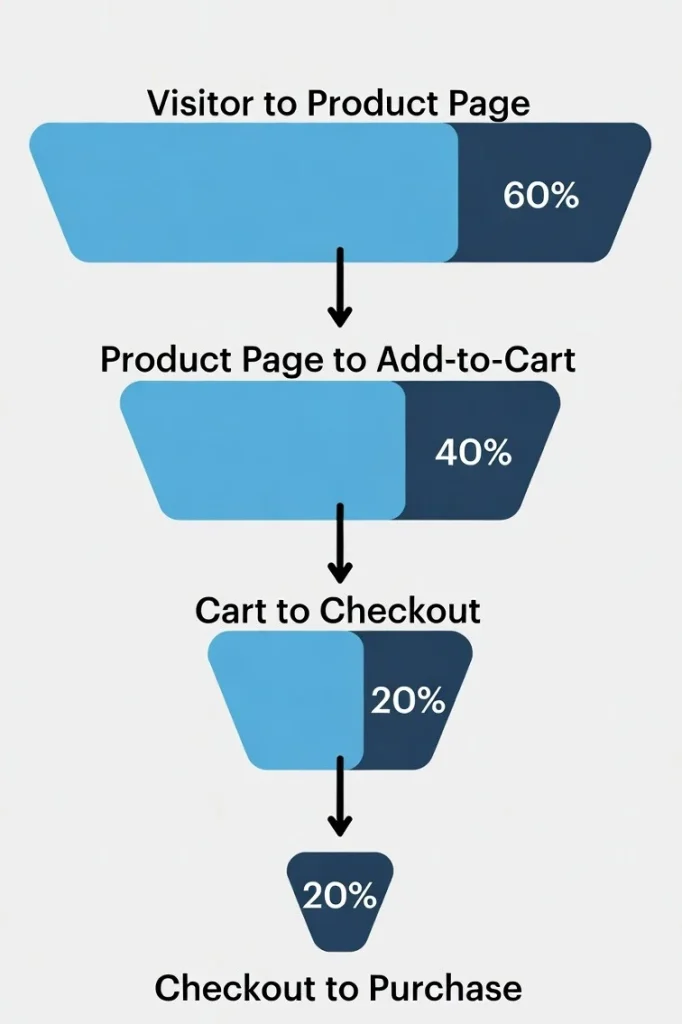
1. Visitor to Product Page
Most visitors land on your homepage or a collection page. They browse. They hesitate. Then they either click a product or bounce.
The drop-off here is brutal. Industry data shows 70-80% of visitors never reach a product page. They came from an ad promising something specific. Your homepage confused them. Or your collections felt overwhelming.
Fix this by matching intent. If your ad shows blue running shoes, land visitors on that exact product. Not your shoe category. Not your homepage. That specific shoe. Reduce clicks. Reduce thinking.
2. Product Page to Add-to-Cart
This is where interest turns to intent. Or it dies.
Visitors scrutinize everything here. Price. Photos. Descriptions. Reviews. Shipping time. One doubt, and they are gone.
Average add-to-cart rates sit around 8-10%. That means 90% of your product page visitors leave without adding anything.
The fix? You need to answer every question before they ask it. Show the product in use.
List dimensions in both inches and centimeters. Display reviews that mention fit, quality, and shipping speed. Remove the need to guess.
3. Cart to Checkout
Cart abandonment here hits 60-70%. Shoppers get distracted. They see the total with shipping added. And realize, they need to create an account.
After that, they start comparing prices elsewhere.
Your cart page messaging and value reinforcement matters enormously here. Show them what they are getting.
Remind them of free shipping thresholds. You display trust badges. Make the “Checkout” button impossible to miss.
4. Checkout to Purchase
Checkout flow, forms, and error handling kill more sales than most store owners realize. Every extra field. Every confusing error message. Every surprise fee.
These are conversion killers.
Shopify’s one-page checkout helps. But you must still optimize.
Do use pre-fill fields when possible. Use clear error messages that say exactly what went wrong.
Offer payment options they actually use, Shop Pay, Apple Pay, PayPal. The easier you make this final step, the more people cross it.
BrandsBro helps improve Shopify conversion rates by fixing weak layouts, unclear product pages, slow buying flow, and missing trust signals.
We optimize your store experience, product presentation, and checkout journey so more visitors turn into paying customers.
How to Improve Shopify Conversion Rate through Page Optimization
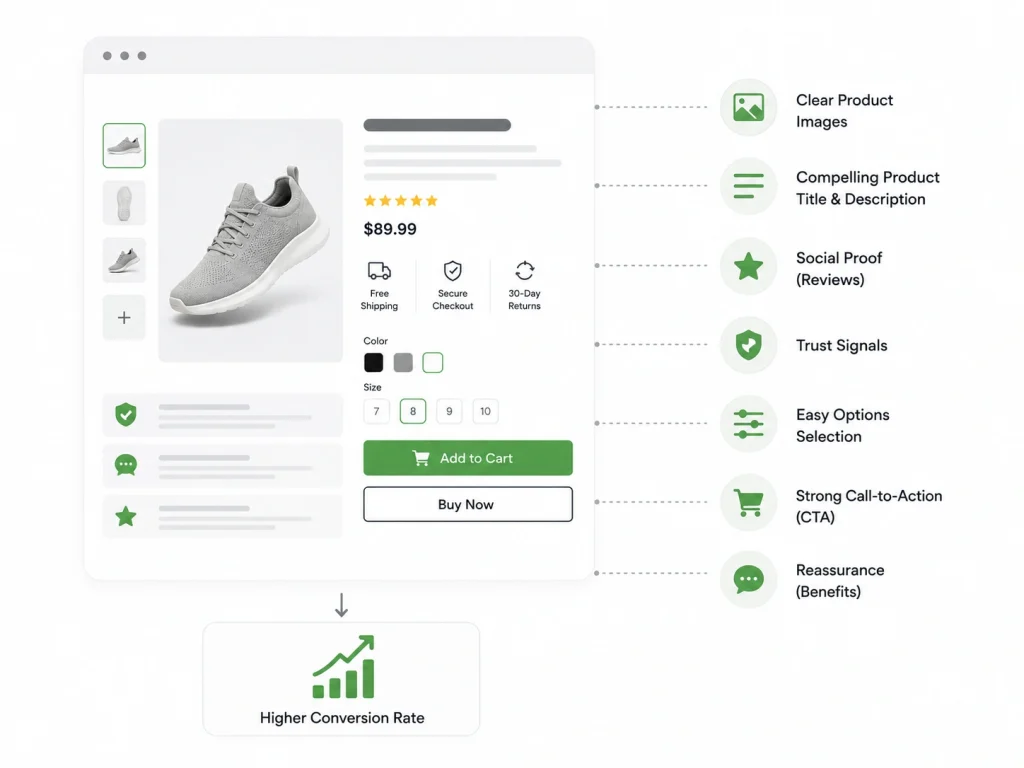
Your product page is your salesperson. It works 24/7. It never calls in sick. But if it is confusing, pushy, or vague, it is costing you sales.
Product Titles and Descriptions
Your product titles and descriptions do heavy lifting. They must grab attention, explain value, and drive action, all in seconds.
Features vs Benefits
Features are facts. “Made from 100% organic cotton.” Benefits are outcomes. “Stays soft wash after wash, so you reach for it every morning.”
You need to remember this, buyers buy benefits. They want to know how their life improves.
Just lead with the transformation. Support with the feature. Not the other way around.
Clear and Simple Copy
Hemingway knew. Simple words hit harder. Cut jargon. Cut cleverness. Cut every word that does not earn its place.
Instead of: “Utilizing our proprietary moisture-wicking technology to ensure optimal thermal regulation.”
Write: “Keeps you cool when it is hot. Warm when it is cold.”
Read your copy out loud. If you stumble, rewrite. If you need a breath mid-sentence, break it in two.
Your reader is scanning on their phone, half-watching TV, drinking coffee. Respect their attention. Get to the point.
Images, Media, and Pricing Presentation
Turns out, just one photo is not enough. Neither is five if they all look the same.
Show the product alone on white. Show it in context, on a body, in a room, in use. Show the detail shots: stitching, texture, scale.
Add video if possible. A 15-second clip of someone using your product beats a paragraph of description.
Pricing presentation tricks the eye, but use this power for clarity, not deception. Show the original price struck through next to the sale price.
Display “per month” costs for expensive items. Bundle related products with clear savings. Make the value obvious at a glance.
Trust and Credibility Optimization on Shopify
Online shopping requires a leap of faith. Visitors hand money to a stranger. They wait days hoping the product matches the photo. Your job is to make that leap feel small and safe.
Reviews, Ratings, and Social Proof
Reviews, ratings, and social proof are your most powerful trust tools. They provide what you cannot: unbiased voices confirming your claims.
Display star ratings prominently. Show the number of reviews. Feature photos customers took, user-generated content converts better than professional shots because it feels real.
Respond to negative reviews professionally. A thoughtful response to a one-star review builds more trust than a page of five-star silence. It shows you stand behind your product.
Trust Badges, Security, and Guarantees
Trust badges, security, and guarantees reduce perceived risk. Norton Secured. SSL certificates. Money-back promises. These small icons signal safety.
But do not overdo it. A wall of badges looks desperate. Choose three that matter most to your audience.
Place them near the “Add to Cart” button and in the footer. Make them visible but not overwhelming.
Guarantees work when specific. “100% satisfaction guaranteed” is vague. “60-day money-back guarantee, no questions asked, we even pay return shipping” is a promise that sells.
Shipping and Return Policy Clarity
Surprises kill conversions. Unexpected shipping costs are the number one reason for cart abandonment.
State shipping costs upfront. Better yet, offer free shipping above a threshold and display progress toward it. “Add $12 more for free shipping” turns a cost into a game.
Your return policy belongs on every product page, not buried in the footer. “Free 30-day returns” removes the fear of commitment. Make the process sound easy. “Print a label, drop it off, get refunded in 2 days.” Specificity builds confidence.
User Experience and Navigation Optimization
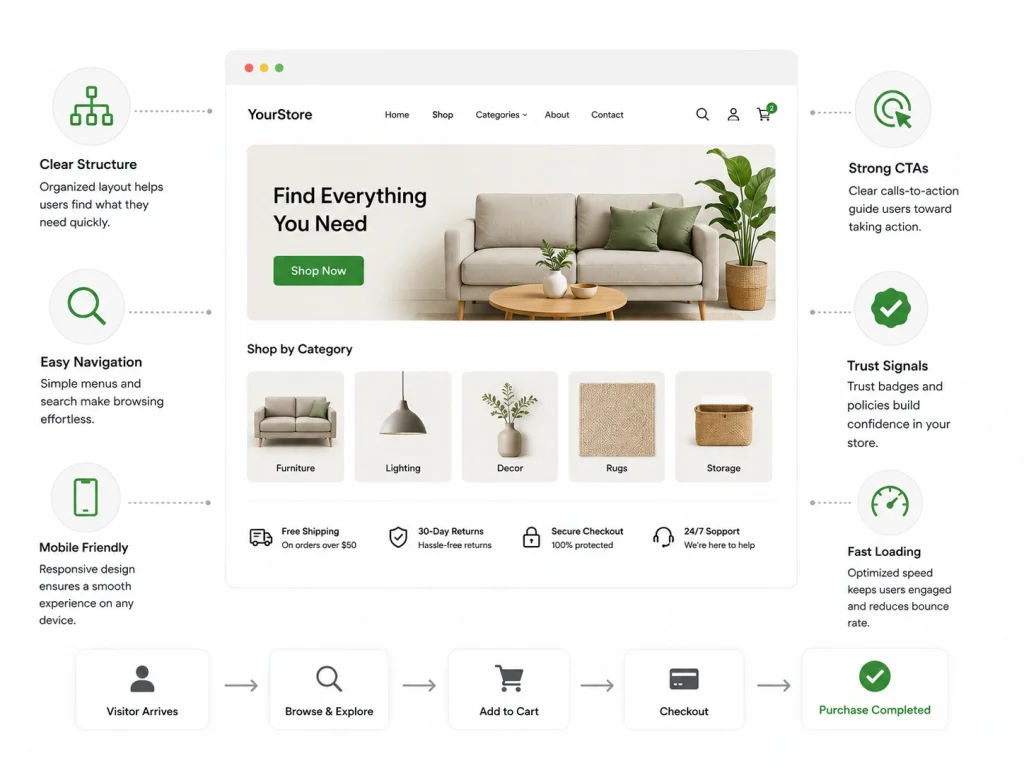
Confused visitors do not buy. They leave. Your site structure and navigation must guide them effortlessly from arrival to purchase.
Site Structure and Navigation
Organize collections logically. Use names your customers use, not industry terms. “Sofas” not “Seating Solutions.” “Phone Cases” not “Mobile Device Protection.”
Limit top-level navigation to five or six items. Too many choices paralyze. Use dropdowns for subcategories. Add a search bar that actually works, more on that later.
Breadcrumbs help users know where they are. “Home > Women > Dresses > Maxi Dresses” lets them backtrack without starting over. Small detail, big impact on browsing behavior.
Reducing Friction and Confusion
Every click, every scroll, every moment of “wait, what?” costs you sales. Reducing friction and confusion means removing speed bumps from the buying journey.
Button Text and Microcopy
Your buttons tell users what happens next. “Submit” is vague. “Complete Purchase” is clear. “Get My [Product]” is exciting.
Button text and microcopy guide action. Use verbs that promise progress. “Add to Cart” not “Submit.” “Continue to Checkout” not “Next.” Test different phrases. Sometimes “Buy Now” outperforms “Add to Cart” for low-consideration items. Sometimes the opposite is true.
Microcopy, those tiny lines of text near buttons, reduces anxiety. “Free shipping applied” below the checkout button. “No credit card required” below an email signup. “Ships within 24 hours” near the add-to-cart button. These small assurances add up.
Shopify Search, Cart, and Checkout Optimization
The final stretch of the buyer journey is where revenue is won or lost. Optimize these pages with surgical precision.
On-Site Search and Product Discovery
30% of e-commerce visitors use on-site search and product discovery. These users convert 2-3x higher than browsers.
They always know what they want. Your job is to help them find it fast.
Make your search bar prominent. Top center or top right. Use autocomplete that suggests products, not just categories. Handle typos gracefully, “running shoes” should still find results.
Filter and sort options matter. Let users narrow by size, color, price, rating. Every filter applied brings them closer to purchase. But do not overwhelm. Five smart filters beat twenty useless ones.
Cart Page Messaging and Value Reinforcement
The cart page is not just a holding area. It is a conversion opportunity.
Display product images, not just text lists. Show savings clearly. “You saved $23.50” triggers satisfaction. Reinforce guarantees here. “Free returns on everything” or “Price match guarantee.”
Upsell carefully. “Complete the look” with complementary items. But keep the focus on completing this purchase, not starting a new shopping session.
Checkout Flow, Forms, and Error Handling
Always be simple with checkout flow, forms, and error handling.
Ask for only essential information. Every field you add drops conversions. Use smart defaults. Detect card type from the number. Auto-format phone numbers.
Error messages must be helpful, not just red. Instead of “Invalid input,” say “Please enter a valid email address like name@example.com.” Instead of “Payment failed,” say “Your card was declined. Try a different payment method or call your bank.”
Offer guest checkout. Forcing account creation kills 35% of potential sales. You can ask them to create an account after purchase, when they are already happy.
Cart Abandonment and Mobile Conversion Optimization
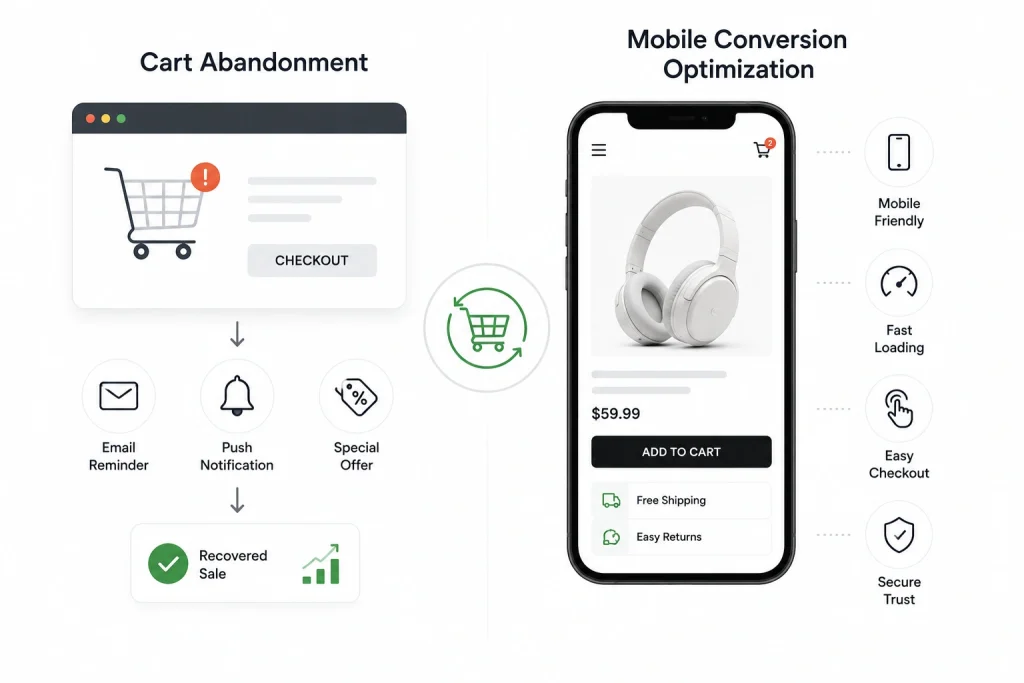
You don’t have to think of abandoned carts as lost causes. They are warm leads who get distracted or spooked.
And mobile? It is where most of your traffic lives, even if desktop drives more sales.
Common Abandonment Causes and Recovery
Common abandonment causes and recovery strategies start with understanding why people leave.
Top reasons: unexpected costs (shipping, taxes), forced account creation, complicated checkout, security concerns, limited payment options, better price found elsewhere.
Address these upfront. Show all-in pricing early. Offer guest checkout. Simplify forms. Display trust badges. Price match guarantees. Then, when abandonment happens anyway, fight back.
Email recovery sequences work. First email: sent within an hour, friendly reminder, maybe offer help. Second email: 24 hours later, address objections, add urgency. Third email: 48-72 hours, small discount if needed. Keep the tone helpful, not desperate.
SMS recovery works even better for younger audiences. Shorter, more immediate, higher open rates.
Mobile Product Pages and Mobile Checkout
Over 70% of Shopify traffic comes from mobile. Yet mobile conversion rates lag desktop by 30-50%. This gap is opportunity.
Mobile product pages and mobile checkout need different design than desktop. Thumb-friendly buttons. Sticky “Add to Cart” bars that stay visible while scrolling. Swipeable image galleries. Collapsible descriptions that do not overwhelm small screens.
Speed matters more on mobile. Compress images. Minimize scripts. Test on actual devices, not just browser emulators. A page that loads in 2 seconds on wifi might take 8 seconds on 4G. That delay costs sales.
Simplify mobile checkout. Use digital wallets, Apple Pay, Google Pay, Shop Pay, so users never type card details. Enable one-tap purchasing for returning customers. The less typing on a phone, the better.
Personalization, Testing, and Analytics for Conversion Growth
You cannot optimize what you do not measure. And you cannot grow if you only guess what works.
Product Recommendations and Behavioral Messaging
Product recommendations and behavioral messaging turn generic stores into personal shopping experiences.
“Customers also bought” suggestions increase average order value. “Recently viewed” brings browsers back to considered items. Dynamic content based on location, weather, or browsing history feels magical when done right, and creepy when overdone.
Start simple. Recommend complementary products on cart and checkout pages. Show “Back in Stock” alerts for viewed items. Send browse abandonment emails for high-intent product views.
A/B Testing for Conversion Improvement
A/B testing for conversion improvement removes the guesswork. So, test one element at a time. Headlines. Button colors. Image order. Pricing displays.
Run tests until you reach statistical significance, usually at least 100 conversions per variation.
Small wins compound. A 5% improvement here, an 8% lift there, and suddenly your store converts twice as well as last year. Document everything.
What you learn about your audience in one test informs the next.
Conversion Tracking and Funnel Analysis
Conversion tracking and funnel analysis show you exactly where money leaks from your store.
Set up Google Analytics 4 or Shopify’s built-in analytics. Track events: product views, add to carts, checkouts initiated, purchases completed. Build funnel reports that show drop-off at each stage.
If 1000 people view products but only 50 add to cart, your product pages need work. If 500 add to cart but only 50 checkout, your cart experience is broken. Data points you to the problem. Your creativity solves it.
Shopify Conversion Rate Optimization Mistakes and Checklist
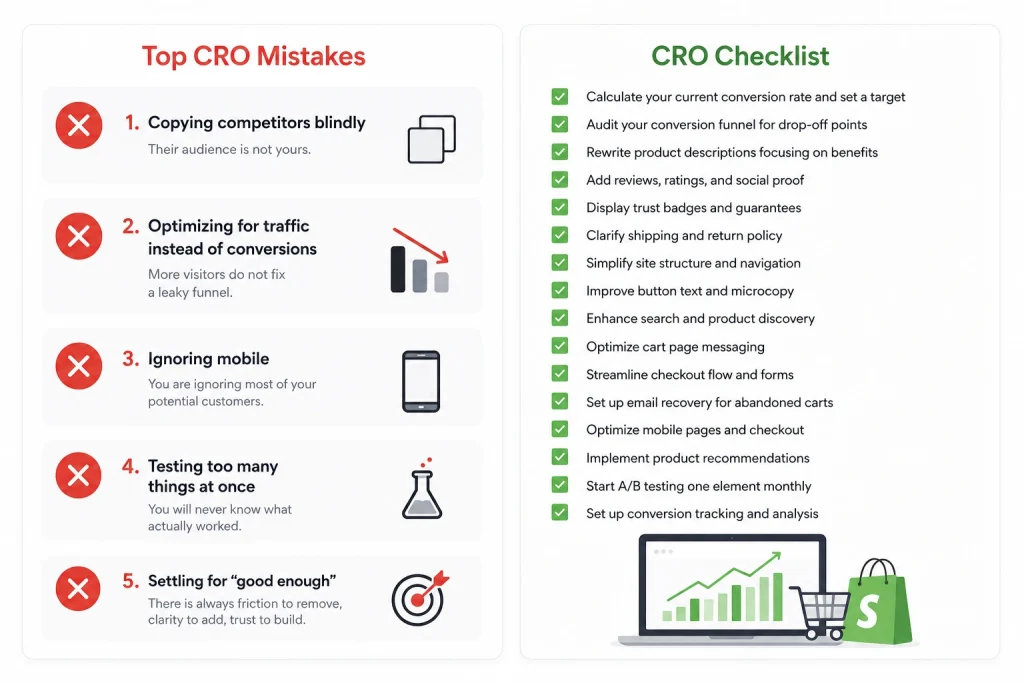
Even well-meaning store owners sabotage their own success. Here are the traps to avoid, and a simple checklist to keep you on track.
- Mistake 1: Copying competitors blindly. Their audience is not yours. Their winning tactic might fail for your store. Test everything.
- Mistake 2: Optimizing for traffic instead of conversions. More visitors do not fix a leaky funnel. Plug the holes first, then pour in traffic.
- Mistake 3: Ignoring mobile. If your mobile experience is an afterthought, you are ignoring most of your potential customers.
- Mistake 4: Testing too many things at once. You will never know what actually worked. Patience beats chaos.
- Mistake 5: Settling for “good enough.” The best stores never stop optimizing. There is always friction to remove, clarity to add, trust to build.
Here is a checklist you can follow:
- [ ] Calculate your current Shopify conversion rate and set a target
- [ ] Audit your Shopify conversion funnel for major drop-off points
- [ ] Rewrite product descriptions focusing on benefits over features
- [ ] Add genuine reviews, ratings, and social proof to every product page
- [ ] Display trust badges, security, and guarantees near add-to-cart buttons
- [ ] Clarify shipping and return policy clarity on product pages
- [ ] Simplify site structure and navigation to five top-level categories
- [ ] Improve button text and microcopy for clarity and action
- [ ] Enhance on-site search and product discovery with autocomplete and filters
- [ ] Optimize cart page messaging and value reinforcement
- [ ] Streamline checkout flow, forms, and error handling
- [ ] Set up email recovery for common abandonment causes and recovery
- [ ] Optimize mobile product pages and mobile checkout for thumb-friendly use
- [ ] Implement product recommendations and behavioral messaging
- [ ] Start A/B testing for conversion improvement with one element monthly
- [ ] Set up conversion tracking and funnel analysis to measure progress
Pick three items from this list. Tackle them this week. Measure the results. Then pick three more.
Check out our Shopify SEO checklist to get the foundation right. Then optimize everything else.
How to Prioritize Shopify CRO Fixes for the Biggest Revenue Impact
Start with the pages closest to revenue: product pages, cart pages, checkout, and high-traffic collection pages. These areas usually create the fastest conversion lift because shoppers are already near the buying decision.
Use analytics before making changes. Check where users drop off, which products get traffic but low sales, and which pages have high bounce rates. Do not guess—bad CRO decisions waste time.
Prioritize fixes based on impact and effort. For example, improving product images, shipping clarity, trust badges, reviews, and call-to-action buttons often gives faster results than redesigning the full store.
The best Shopify CRO strategy is simple: fix the biggest friction points first. A small improvement on a high-traffic page can generate more revenue than a major change on a page few people visit.
How Traffic Quality Affects Shopify Conversion Rate
Shopify conversion rate depends heavily on traffic quality. If the wrong people visit your store, even a beautiful website will not convert well.
High-quality traffic comes from users who already want your product, understand the offer, and match your target customer. These visitors are more likely to add products to cart and complete checkout.
Low-quality traffic often creates misleading data. You may see many visitors but very few sales. This usually means your ads, keywords, targeting, or content are attracting the wrong audience.
To improve conversion rate, review traffic sources separately. Compare Google Ads, SEO, social media, email, and referral traffic to see which channels bring buyers, not just visitors.
Live Chat and Customer Support for Conversion Rate
Live chat can improve Shopify conversion rate by answering buyer questions before they leave the store. It works best when shoppers need help with sizing, shipping, returns, product details, or compatibility.
Fast support builds trust. If customers cannot get answers quickly, they may delay the purchase or buy from a competitor with clearer information.
Live chat should not feel robotic or annoying. Use it to support purchase decisions, not to spam visitors with popups. Helpful timing matters.
For best results, add live chat on product pages, cart pages, and checkout-related pages. Also use FAQs, contact options, and clear policies so customers feel safe before buying.
How to Diagnose Why Your Shopify Store Is Not Converting
To diagnose a low Shopify conversion rate, review your traffic quality, product pages, pricing, checkout process, and customer trust signals. High traffic with few sales usually means visitors are not finding enough value, confidence, or urgency to complete a purchase.
Use Shopify Analytics and Google Analytics 4 to identify where customers leave. Check bounce rate, product-page exits, add-to-cart rate, checkout abandonment, and conversion rate by device, traffic source, and landing page.
Also review your store as a customer. Look for unclear product descriptions, weak images, hidden shipping costs, confusing navigation, limited reviews, and technical errors. Fix the largest drop-off point first instead of changing the entire website without evidence.
How Shopify Store Speed and Core Web Vitals Affect Conversion Rate
Shopify store speed directly affects conversion rate because slow pages create friction and increase abandonment. Customers are more likely to leave when product images, buttons, or checkout elements take too long to load.
Core Web Vitals measure loading speed, visual stability, and responsiveness. The main metrics are Largest Contentful Paint, Interaction to Next Paint, and Cumulative Layout Shift. Poor scores can damage user experience and may also affect organic search performance.
Improve speed by compressing images, removing unnecessary Shopify apps, reducing third-party scripts, using lightweight themes, and limiting autoplay videos. Test important pages with PageSpeed Insights, but prioritize real customer experience over chasing a perfect score.
How to Optimize Shopify Homepage and Collection Pages for Conversions
A high-converting Shopify homepage should quickly explain what the store sells, who it serves, and why customers should buy. Use a clear value proposition, strong product imagery, visible calls to action, reviews, guarantees, and featured collections.
Collection pages should help shoppers compare products without confusion. Add useful filters, sorting options, clear pricing, ratings, product benefits, availability, and consistent images.
Place best-selling or high-margin products near the top. Avoid overcrowding pages with banners and pop-ups. Every section should guide visitors toward finding a product, understanding its value, and purchasing it.
Frequently Asked Questions(FAQs)
A good Shopify conversion rate is usually between 1.5% and 3%. Top stores can reach 4% or higher. What’s considered “good” depends on what you sell, how much it costs, and where your traffic comes from. A low-priced item converts differently than an expensive one.
This is cart abandonment, and it happens to most stores. Common reasons include high shipping costs, forced account creation, long checkout forms, errors during checkout, or trust concerns. Using abandoned cart emails, better cart page messaging and value reinforcement, and guest checkout options can help recover 10–15% of lost sales.
Focus on benefits, not just features, in your product titles and descriptions. Use clear images, media, and pricing presentation so shoppers understand the product quickly. Show reviews, ratings, and social proof clearly. Explain shipping and return policy clarity early so buyers don’t hesitate.
Slow pages, small buttons, too much scrolling, and lots of typing hurt mobile product pages and mobile checkout. Improve this by speeding up your site, adding sticky add-to-cart buttons, enabling Apple Pay and Shop Pay, and testing your store on real phones.
Best practices are a starting point. A/B testing for conversion improvement shows what works for your audience. Test one change at a time, like headlines, button text and microcopy, or images. Data will guide better decisions than copying other stores.
Set up conversion tracking and funnel analysis using Google Analytics 4 or Shopify reports. Track product views, add-to-carts, checkout starts, and purchases. Funnel reports show where people leave. Fix the stage with the biggest drop first.
Wanna Stop Losing Sales You Already Earned
Conversion rate optimization is not a one-time project. It is a habit. The stores that win are the ones that never stop asking: “How can we make this easier for our customers?”
Now that you know all about how to Improve Shopify Conversion Rate, your next sale is already on your site.
Help them find it. Help them trust it. Help them buy it.
That is how you improve your Shopify conversion rate, one clear, confident step at a time.
